There is no one verified VRAM or RAM minimum for Bonsai 2.5 27B. Its smallest published base GGUF is 5.99 GB, but that is a file-size record, not the memory used by a running model. Context, the KV cache, runtime buffers, MTP, vision, concurrent requests and the operating system all belong in the budget.
The practical answer is to plan by configuration. Start with the exact GGUF, add the optional components you will actually use, establish a short-context baseline, and measure peak memory on your hardware. PrismML documents a 262,144-token context, but the supplied material does not include an exact KV-cache byte table or a hardware-by-hardware context limit. The often-quoted 5.9 GB footprint therefore cannot answer whether a particular GPU or RAM-only machine will run your intended workload.
This guide separates published file sizes from unknown runtime allocations. It covers the six model GGUFs, two vision projectors, MTP’s file-size delta and prefill tradeoff, context growth, CPU and unified-memory considerations, and a worksheet you can fill in before committing to a configuration. The PrismML launch announcement supplies the footprint positioning, while the Ternary Bonsai 2.5 27B GGUF repository supplies the exact filenames, sizes and commands.
Why is weight size different from runtime memory?
A GGUF file is an artifact on disk. Runtime memory is the working set of a live process. The file contains model data, but loading it also creates a cache for attention state, computation buffers, tokenizer and request state, backend allocations and whatever optional features you enable. Some working memory may reside in VRAM, some in system RAM, and some may be shared on a unified-memory machine.
This distinction changes the buying question. A 5.99 GB download does not prove that a 6 GB GPU is sufficient, and it does not prove that a 16 GB system has enough spare capacity for an agent. Compare your available memory with a measured peak under the same context, request count and feature set you intend to use. Do not compare it with the marketing footprint alone.
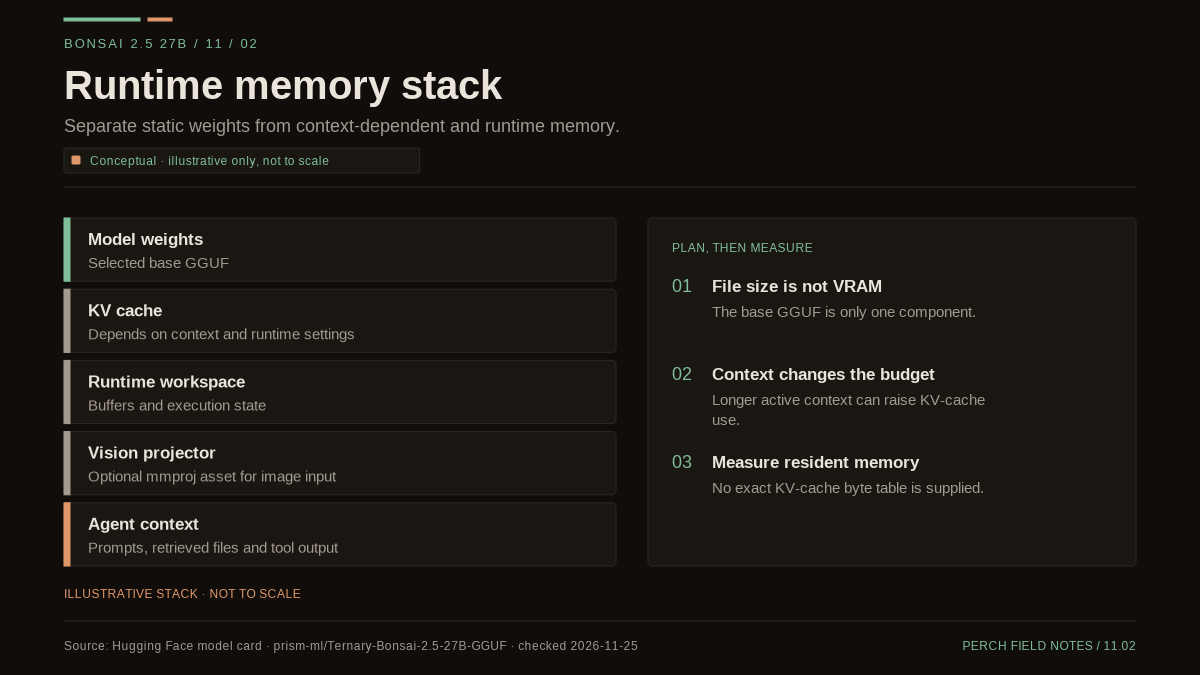
Use the following inventory before doing arithmetic. It is a checklist of memory categories, not a promise that every category appears as a separate, fixed block in every runtime.
| Memory component | What the supplied evidence establishes | How to budget or measure it |
|---|---|---|
| Language-model weights | Base GGUFs range from 5.99 GB for PTQ1_0 to 7.67 GB for Q2_0 |
Start with the exact selected file, then measure loaded resident memory |
| KV cache and attention state | Context is documented as 262,144 tokens; exact cache bytes are not supplied | Compare short and longer contexts in the same runtime and record the peak |
| Runtime and computation buffers | CUDA, Metal, CPU and SYCL backends are documented; allocation sizes are not | Measure the chosen runtime and backend rather than borrowing another runtime’s figure |
| MTP model data | Each MTP file is about 0.24 GB larger than its base counterpart; extra runtime overhead is unknown | Compare base and MTP runs with identical context and request settings |
| Vision projector | Optional BF16 and Q8_0 projector files are 0.93 GB and 0.63 GB | Add only for image input, then measure the vision workload separately |
| Request history and concurrency | Agent history consumes context; no fixed per-request memory table is supplied | Test one request first, then the concurrency you actually need |
| Offloaded weights and transfers | Partial offload is a configuration choice, not a published memory minimum | Record both VRAM and RAM, and treat speed as a separate measurement |
| OS, display and other applications | No source allocates a fixed reserve for a user’s desktop or server | Record baseline use and leave room for observed variation and other work |
A useful planning equation is: peak working set equals weights plus cache plus runtime and request allocations plus enabled optional components, with an operating reserve. It is a conceptual equation, not an exact calculator. The runtime decides where those components live, and the supplied sources do not disclose enough allocation detail to turn it into a guaranteed byte total.
The model card provides one concrete memory observation. On a 10 GB RTX 3080, PrismML reports roughly 9.5 GB VRAM before -np 1, dropping to about 7.8 GB afterward. That is a vendor-reported configuration, not a universal minimum. It shows that runtime state can exceed the weight file and that configuration matters. It does not establish that every 8 GB-class card, every context length or every MTP and vision setup will fit.
For a server, keep the GPU budget separate from the host budget. A process can fit in VRAM while the host still needs memory for the runtime, request handling, model loading and other services. The vLLM OpenAI-compatible Bonsai server setup covers serving and concurrency; this article supplies the memory questions to ask before treating a server configuration as stable.
Which GGUF file sizes should you plan around?
The repository publishes three base quantizations and three MTP alternatives. The sizes below are rounded decimal GB derived from repository byte counts. They describe files, not resident allocations. Choose either a base file or its MTP alternative; do not add both file sizes together as though both models must be loaded.
| Exact filename | Published size | Difference from base | Documented llama.cpp route |
|---|---|---|---|
Ternary-Bonsai-2.5-27B-PTQ1_0.gguf |
5.99 GB | Base | PrismML llama.cpp fork |
Ternary-Bonsai-2.5-27B-PTQ1_0-mtp.gguf |
6.23 GB | +0.24 GB | PrismML llama.cpp fork |
Ternary-Bonsai-2.5-27B-PQ2_0.gguf |
7.25 GB | Base | PrismML llama.cpp fork |
Ternary-Bonsai-2.5-27B-PQ2_0-mtp.gguf |
7.49 GB | +0.24 GB | PrismML llama.cpp fork |
Ternary-Bonsai-2.5-27B-Q2_0.gguf |
7.67 GB | Base | Stock llama.cpp b11556+ |
Ternary-Bonsai-2.5-27B-Q2_0-mtp.gguf |
7.91 GB | +0.24 GB | Stock llama.cpp b11556+ |
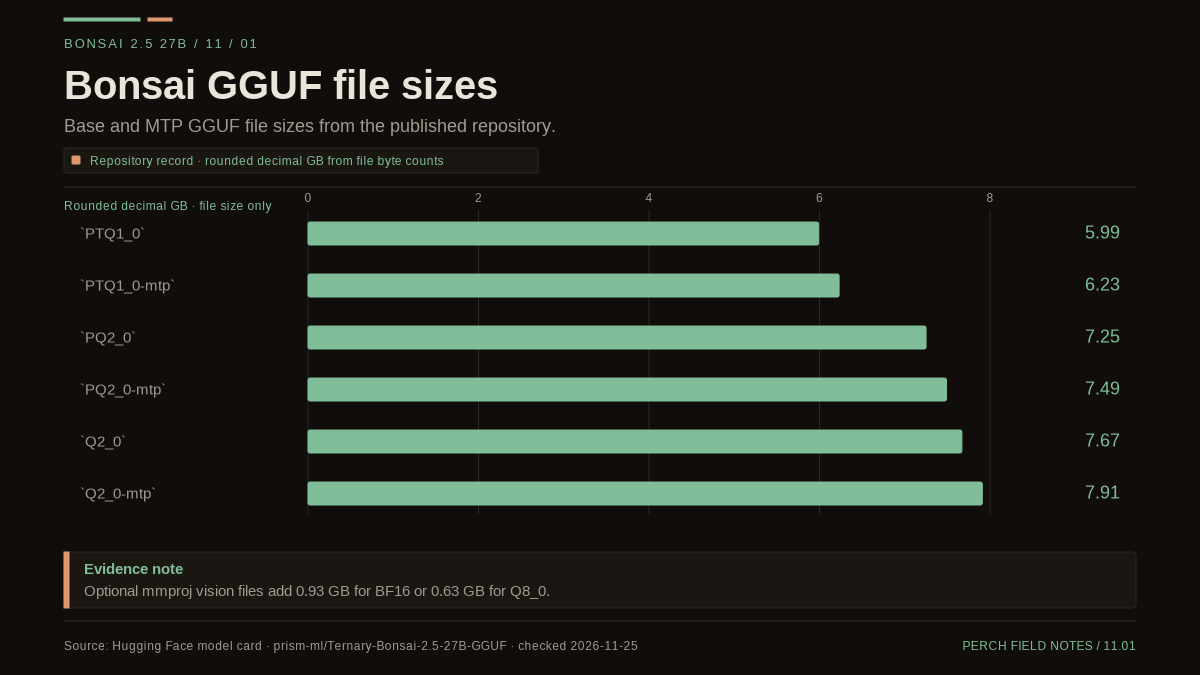
PTQ1_0 is the smallest published base file and the closest match to the 5.9 GB-class claim. PQ2_0 and Q2_0 are larger. The supplied material does not provide quantization quality scores, so a larger file must not be described as automatically better. Select by runtime compatibility, measured fit and your own output checks, not by the number in the filename alone.
Runtime compatibility is part of the memory decision because it determines which binary and backend you can actually test. PTQ1_0 and PQ2_0 require PrismML’s llama.cpp fork. Q2_0 requires stock llama.cpp b11556 or newer; the vendor warns that older builds may load the file but produce garbage. A successful load is therefore a compatibility check, not merely a memory check.
The published compatibility material also uses the shorthand TQ1_0 in places and contains pairings that do not cleanly match the actual PTQ1_0 base and MTP filenames. Use the exact repository names above in your worksheet. The PTQ1_0 versus PQ2_0 versus Q2_0 quantization guide provides the file-level comparison, while the PTQ1_0 and Q2_0 local installation walkthrough covers the build paths.
For a memory-constrained first test, the smallest file is a reasonable starting candidate, not a certified solution. For a stock-runtime requirement, Q2_0 is the documented route, but its 7.67 GB file still leaves the cache, buffers and reserve to measure. Disk space also needs its own line in the worksheet. Keep room for the selected file, any projector, runtime artifacts and temporary download data rather than treating the visible GGUF size as the entire storage requirement.
How does the KV cache change with context length?
The documented context for Bonsai 2.5 27B is 262,144 tokens, a model specification rather than a guarantee that the full window fits on a given GPU or RAM configuration. A context setting defines how much token history the runtime may need to represent. The memory cost depends on the architecture, attention implementation, cache representation, runtime and request pattern.
PrismML describes a hybrid attention design with about 75 percent linear attention and 25 percent full attention. This is a reason not to apply a generic dense-transformer KV formula and present the result as a Bonsai measurement. The supplied sources contain no exact KV-cache byte table, no per-layer cache breakdown and no verified context ceiling for each hardware class. Any single number for “KV bytes per token” would be invented here.
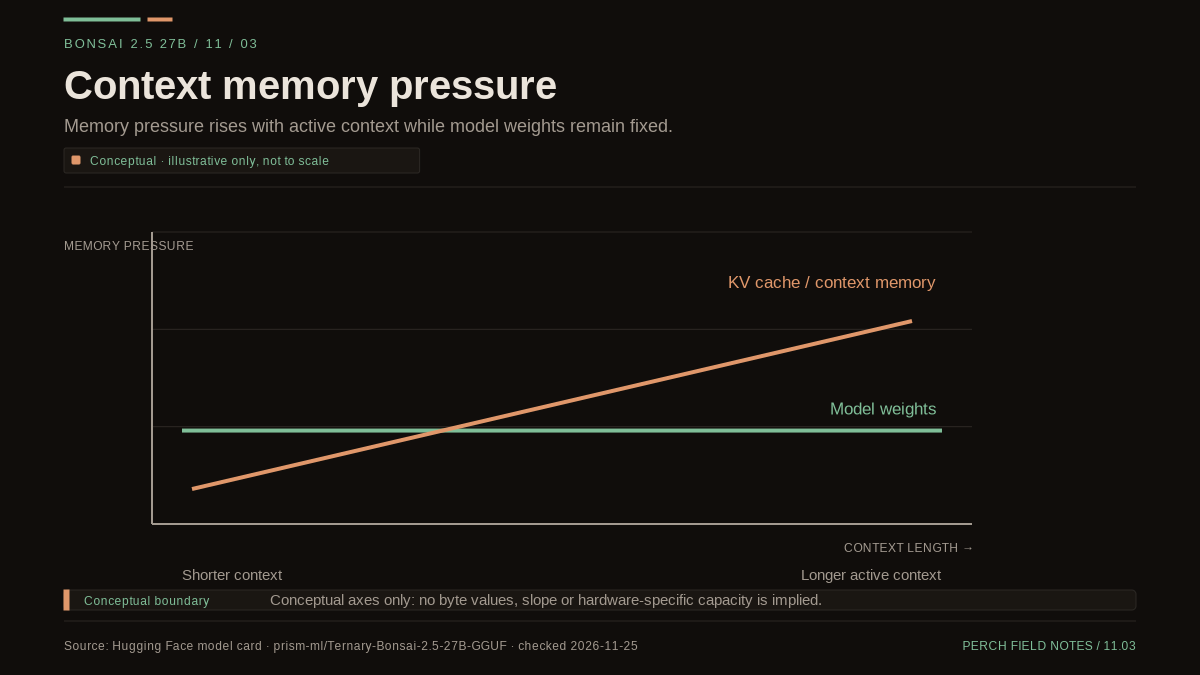
The safe method is an incremental measurement. Load the model with a short context, record the baseline, then increase context in steps while keeping the GGUF, backend, MTP state, vision state and request count fixed. Write down both the configured context and the actual prompt length. A runtime may reserve capacity up front or grow allocations with use, so observe loading, prompt processing and decoding rather than checking memory only after the answer finishes.
The model card’s PTQ1_0 smoke test uses -c 32768, which means a 32,768-token context in that published command, and allows up to 16,384 output tokens. It is a useful documented baseline, not a recommended universal ceiling:
./bin/llama-cli -m Ternary-Bonsai-2.5-27B-PTQ1_0.gguf -ngl 99 -fa on -c 32768 --temp 1.0 --top-p 0.95 --top-k 20 --min-p 0 -p "Explain quantum computing in simple terms." -n 16384The command includes -fa on, but the supplied material does not attach a memory-saving byte figure to that flag. Treat it as part of the documented example, not as permission to calculate an exact cache reduction. Sampling values are usage examples, not disclosed benchmark settings.
Agent history deserves special attention. Repository files, tool schemas, prior commands, test output and earlier model responses all consume context tokens. Increasing the context setting does not improve a workflow if the harness keeps appending unbounded logs. Retrieve relevant files, cap verbose output and discard stale tool results before raising the context allocation. The 180-tool-call Bonsai coding-agent workflow covers the agent loop, and the 262K Bonsai context-window memory guide covers retrieval and history policy in more detail.
Reasoning also affects the shape of a test. Bonsai defaults to xhigh; medium is available, while low is unsupported and behaves like xhigh. Thinking is on by default, and a short output cap can truncate reasoning before the final answer. Include reasoning mode and output allowance in the measurement record, since otherwise a higher memory peak or slower run may be mistaken for a context problem when the workload simply produced a longer trace.
Do not set 262K as the first experiment on a memory-constrained machine. A documented maximum is useful for architecture planning, but a practical working limit must come from your runtime and workload. If memory pressure appears, reduce context or improve retrieval before assuming that a larger GPU is the only answer.
What memory overhead does MTP add?
The published MTP variants add about 0.24 GB of file data over each matching base file. PTQ1_0 rises from 5.99 GB to 6.23 GB, PQ2_0 from 7.25 GB to 7.49 GB, and Q2_0 from 7.67 GB to 7.91 GB. Those are exact rounded file-size deltas. They are not a published measurement of total extra VRAM or RAM after loading.
MTP is a speed tradeoff as well as a memory choice. The launch page claims 291 generated tokens per second on an H100 and 204 on an RTX 4090. The model card’s plain-decode PTQ1_0 table reports 186 on an H100 and 112 on an RTX 4090. ExplainX’s Bonsai overview attributes the 291 H100 launch figure to MTP and emphasizes that the published benchmark results are vendor-run rather than independently reproduced. The figures are not a controlled head-to-head test, so do not treat their difference as a guaranteed gain on your machine.
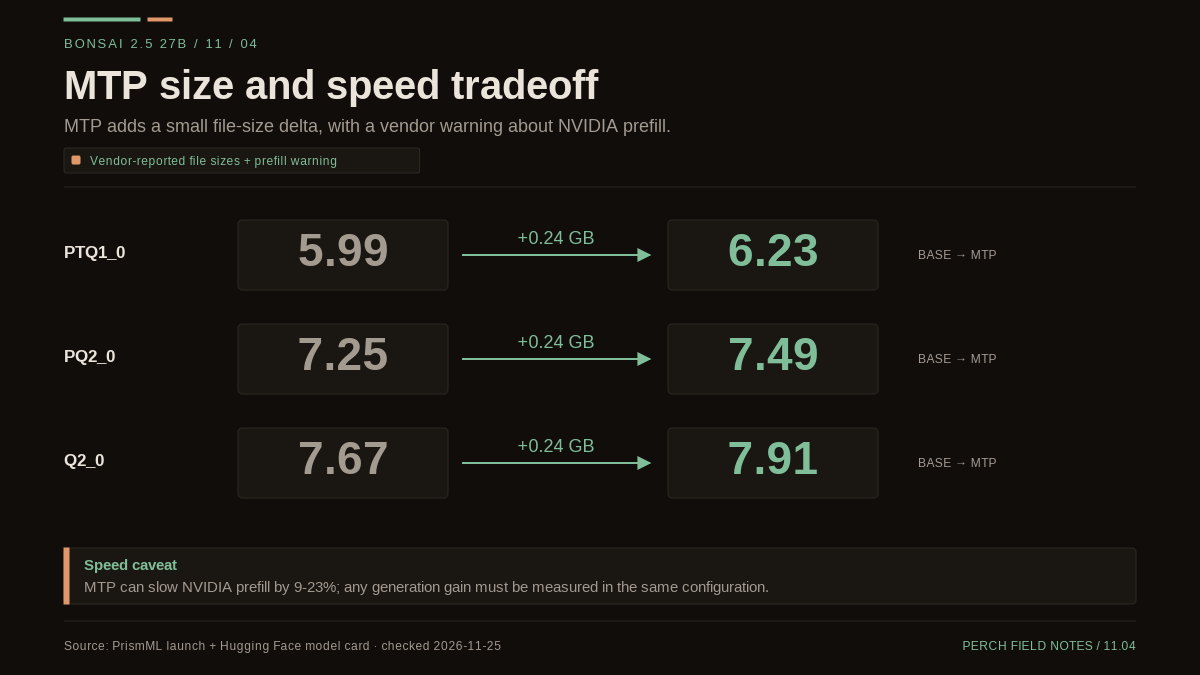
The model card also warns that MTP can slow NVIDIA prefill by 9 to 23 percent. This matters for repository agents, where a large prompt may need processing before generation begins. A configuration can improve decode while making the prompt-processing phase worse. Capture prompt speed and generation speed separately, and include the MTP file name in every result.
To measure MTP overhead, run the base file first, then the matching MTP file with the same context, prompt, output allowance, backend and request count. Note peak memory during loading, prefill and decode. If the MTP run is faster but no longer leaves a stable reserve, it is not an automatic upgrade. If it fits but prefill becomes the dominant delay, the workload may favor the base file.
No supplied source gives a separate byte value for MTP runtime buffers, draft state or backend-specific allocations. The worksheet should therefore have one field for the recorded file delta and another for measured peak-memory delta. Do not collapse them into a single assumed number. The cross-hardware Bonsai tokens-per-second comparison provides the broader test method, and the RTX 4090 Bonsai configuration and speed claims applies these tradeoffs to one GPU class.
How much memory does the vision projector add?
Bonsai 2.5 27B is documented as a vision-language model with image input. The GGUF repository provides two optional projector files: ...-mmproj-BF16.gguf at 0.93 GB and ...-mmproj-Q8_0.gguf at 0.63 GB. The projector is a separate file, so a text-only base-GGUF download is not the complete file payload for image use.
Simple addition can describe the published files, but not the runtime peak. For example, base PTQ1_0 plus the Q8_0 projector totals 6.62 GB of files. The Q2_0 MTP file plus the BF16 projector totals 8.84 GB. Both sums exclude KV cache, runtime buffers, image preprocessing, generated tokens and the operating reserve. Neither is a VRAM requirement.
Choose the projector deliberately. Q8_0 has the smaller published file, but the supplied material does not include projector-quality comparisons, so this guide does not claim that it preserves BF16 image quality. Test the document, screenshot or diagram types you actually need. The Bonsai vision mmproj setup and benchmark limits covers the image workflow and evidence boundaries.
Runtime support is equally important. PrismML’s getting-started documentation documents image support and the local llama.cpp path, but the Apple Silicon MLX export at prism-ml/Ternary-Bonsai-2.5-27B-mlx-2bit is text-only. Adding an mmproj filename to that MLX directory does not create a supported vision loader. If images are required, choose and verify a documented GGUF vision route instead.
Measure vision as its own workload. A short text prompt can hide the cost of loading a projector, processing image tokens and retaining the resulting context. Run a text baseline, enable the selected projector, and then repeat with representative images. Note peak VRAM or RAM at each stage. Keep image dimensions and image count in the test record even though this guide does not prescribe an unsupported universal image-size limit.
For a coding agent, distinguish native image input from text extracted by another tool. OCR output pasted into a prompt still consumes context, but it is not the same memory path as sending the original image to Bonsai’s vision tower. This distinction helps explain why two apparently similar document workflows can produce different memory peaks.
Can Bonsai 2.5 27B run on RAM-only systems?
CPU inference is a documented backend, so running without a discrete GPU is a supported path to test. It is not a speed promise. No reliable CPU-only tokens-per-second figure is supplied. A machine that loads the model successfully may still be too slow for an interactive coding agent, and memory fit alone cannot establish usefulness.
On a CPU-only system, system RAM must accommodate the weights, cache, runtime and request state while also serving the operating system and other applications. Start with available RAM before loading, not the advertised total. A nominal 16 GB configuration does not provide 16 GB of uncommitted model space after the OS, desktop, browser and background services take their share. Note the baseline and the process peak rather than assuming the difference belongs to Bonsai.
The smallest base file reduces one part of the pressure, but it does not remove the unknown cache and runtime components. Use a short context and one request for the first test. If the process causes heavy paging or swapping, treat that as a failed practical baseline even if the operating system keeps it alive. Swap can prevent an immediate allocation failure; it does not demonstrate comfortable fit or predictable latency.
Partial GPU offload is another configuration, not a separate model size. Moving only some computation to a GPU changes where memory is used and may add transfer work between host and device. Track VRAM and RAM together. Do not report the GPU figure alone and call the whole system memory-safe. The CPU-only Bonsai setup and memory tuning guide covers thread and context testing without inventing a CPU speed estimate.
Integrated graphics also need careful accounting. An iGPU may use system memory rather than a dedicated VRAM pool, so its working set competes with the same host budget. Verify what the selected backend reports instead of assuming that “integrated” means a separate allocation is free. This is a measurement question, not a reason to add an invented amount to the GGUF file size.
Apple Silicon uses unified memory, which is shared rather than added to a separate RAM allowance. The documented MLX path is text-only, and the supplied evidence does not establish a universal unified-memory minimum. A Hacker News discussion contains an anecdotal 22.3 tokens-per-second Mac Mini M5 Pro report, but its configuration is incomplete and it is not a memory certification. The Apple Silicon MLX setup for Bonsai 2.5 27B and Mac Mini M5 Pro Bonsai setup and 22.3 tok/s audit keep that boundary visible.
For any RAM-only plan, decide whether the goal is an occasional short prompt, a long document or an interactive repository agent. Those are different workloads. Test the slowest phase you can tolerate, including prompt processing and reasoning, and stop if memory pressure or latency makes the workflow impractical. A smaller weight file can be valuable without making CPU agentic coding fast.
How do you build a memory configuration worksheet?
A useful worksheet turns a vague question such as “will Bonsai fit?” into a record that another person can reproduce. Fill in the hardware, file, runtime, features and measurements before drawing a conclusion. Leave unknown allocations blank until you measure them; do not replace them with estimates from a different model or runtime.
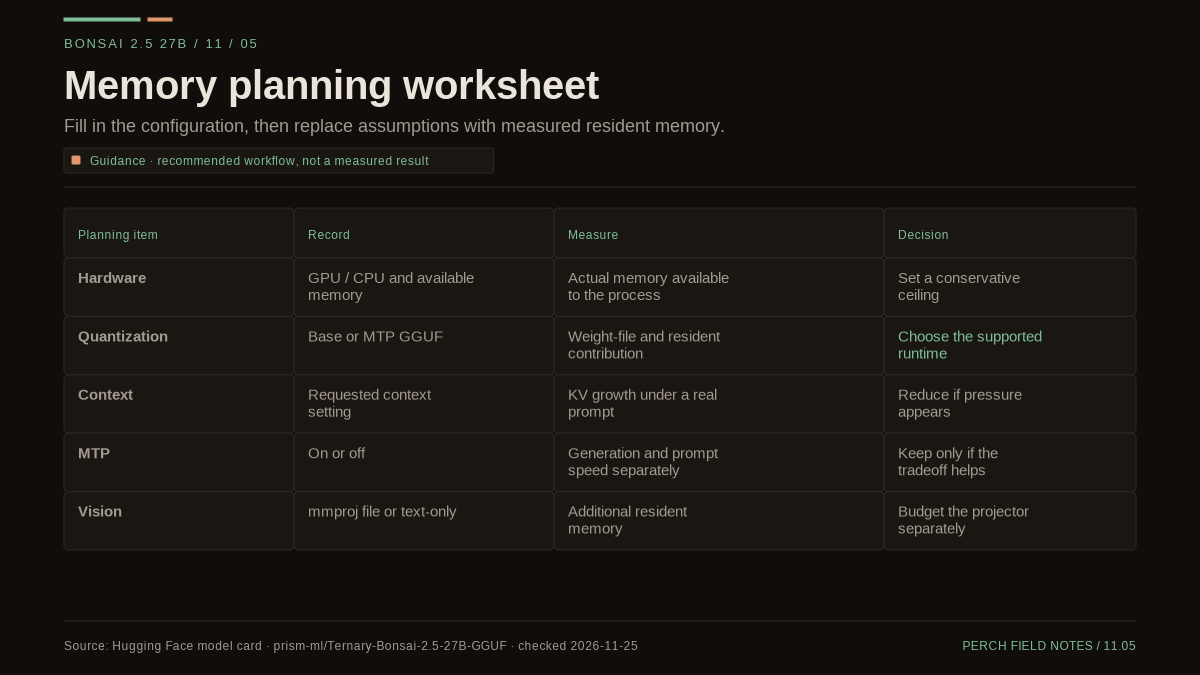
Use this sequence:
- Record the hardware pool. Write down GPU name and total VRAM, or total and currently available system RAM. For unified memory, record the shared capacity and baseline use. Note whether other applications or services will remain active.
- Name one exact model file. Copy the full GGUF filename and published size. Record the runtime version, backend and build route. For
Q2_0, confirm stock llama.cppb11556+; forPTQ1_0orPQ2_0, confirm the PrismML fork. - Declare optional features. Write MTP on or off, the exact projector file or none, and the intended image workload. Do not enable every option merely because it exists.
- Fix the request shape. Record context setting, actual prompt length, output allowance, reasoning mode, request count and whether an agent appends history. Use a stable prompt identifier so later tests can be compared.
- Measure a baseline. Record memory before load, after model initialization, after prompt processing and during decoding. Capture the highest observed value, not only a post-run snapshot. On a GPU, watch device memory; on a host, watch both process use and system availability.
- Change one variable. Test a longer context, then MTP, then vision, then concurrency as separate runs. Reverting to the previous configuration should restore a comparable baseline.
- Set an operating reserve. Decide how much room the workload needs for variation and other work based on repeated observations. Do not spend every reported byte on a single successful run.
- Write a conditional verdict. State the exact configuration that passed, the workload it passed, and the conditions that would invalidate the result.
The table below is the copyable worksheet. The final column gives a decision rule rather than a fabricated threshold.
| Worksheet field | What to record | Decision or stop rule |
|---|---|---|
| Hardware pool | GPU and VRAM, or RAM capacity and available memory; unified memory if applicable | Use the pool actually available to the process, not a separate nominal number |
| Baseline use | Memory used before model load, with normal applications running | If baseline use fluctuates heavily, close or account for other workloads first |
| Exact GGUF | Full filename, published file size and local path | Reject shorthand names and unverified file substitutions |
| Runtime | Version, backend, build route and offload policy | Keep these fixed when comparing memory configurations |
| Context | Configured tokens, actual prompt tokens and output allowance | Increase only after the previous setting has a stable measured peak |
| MTP | Base or exact -mtp.gguf; file delta and measured peak delta |
Keep MTP only if the measured speed benefit justifies fit and prefill cost |
| Vision | None, BF16 projector or Q8_0 projector; representative image workload | Measure image loading and processing separately from text-only use |
| Concurrency | Number of simultaneous requests and agent-history policy | Test one request before adding concurrency or unbounded history |
| Peak VRAM | Highest observed device memory during load, prefill and decode | Require room for observed variation and other GPU work |
| Peak RAM | Highest process use plus system availability during the same run | A GPU-only record is insufficient for partial offload or CPU use |
| Swap or paging | Whether it rises during the test and how the workload responds | Stop treating the run as comfortable if paging dominates |
| Verdict | Configuration, workload, date, pass condition and remaining risk | Describe a tested configuration, never a universal minimum |
A measurement log can be plain text. For example, record one line per stage with the exact file, runtime, context, prompt length, MTP state, projector state, request count and peak memory. If the runtime exposes prompt and generation timers, keep those values too, but do not substitute speed for fit. Both matter to the final decision.
Repeat the passing configuration more than once. Cold loading, warm caches and background activity can produce different peaks. Keep the best result as an observation, but base the reserve on the higher repeated values. When you publish or share a requirement, include the runtime and feature set beside it. A statement such as “Bonsai needs 5.9 GB” discards the information that makes the number meaningful.
The RTX 3060 12GB Bonsai feasibility and context tuning post applies a constraint-first version of this method. ExplainX relays an unsourced claim of about 74 tokens per second at 262K context with MTP on a 12 GB RTX 3060. That claim is unverified and lacks enough configuration detail to prove either memory fit or speed. Do not use it as a worksheet default.
What is the practical verdict, and what remains unknown?
Choose Bonsai 2.5 27B by configuration, not by a single minimum. If memory is tight, test the 5.99 GB PTQ1_0 base file first with short context and no optional features, using PrismML’s fork. If a stock llama.cpp route is required, test the 7.67 GB Q2_0 file on b11556+. Add MTP only after measuring its benefit and prefill cost. Add a projector only for a real image workload. Raise context only after the previous step has a stable peak and an operating reserve.
The honest loss is that compact weights do not remove runtime uncertainty. The 5.9 GB-class footprint is not total VRAM, the MTP file delta is not total MTP overhead, and 262K is not a practical context promise for every device. The vendor’s RTX 3080 observation demonstrates configuration sensitivity rather than establishing a portable minimum. No supplied source gives exact KV-cache bytes, a vision peak-memory table, a reliable CPU speed or an independently reproduced hardware-fit matrix.
Several gaps should remain explicit: exact cache allocation by runtime, MTP working-memory overhead, projector peak memory, practical context ceilings, quantization quality differences and CPU throughput. This article should be updated when PrismML publishes allocation details or reproducible independent tests supply those values. Until then, the worksheet is the evidence you can generate yourself. The LocalLLaMA Hugging Face thread is an inconsistently accessible community pointer, not evidence for a memory requirement.
Bonsai 2.5 27B is not currently a hosted One AI API Key model. If local runtime maintenance is not acceptable, you can compare hosted models currently available through One AI API Key. For local use, the defensible verdict is conditional: select the exact file and features, measure peak memory under a representative workload, and keep the result attached to that configuration.
Complete Bonsai 2.5 27B guide
- Bonsai 2.5 27B launch verdict and setup router
- row-by-row Bonsai 2.5 27B benchmark teardown
- 180-tool-call Bonsai coding-agent workflow
- Tau, BFCL and AppWorld tool-calling analysis
- SWE-bench Verified 75.6 repository-repair analysis
- Terminal-Bench 2.1 long-horizon terminal analysis
- PTQ1_0 and Q2_0 local installation walkthrough
- Ollama Q2_0 commands and coding-agent connection
- vLLM OpenAI-compatible Bonsai server setup
- Apple Silicon MLX setup for Bonsai 2.5 27B
- cross-hardware Bonsai tokens-per-second comparison
- RTX 4090 Bonsai configuration and speed claims
- RTX 3060 12GB Bonsai feasibility and context tuning
- Mac Mini M5 Pro Bonsai setup and 22.3 tok/s audit
- CPU-only Bonsai setup and memory tuning
- 262K Bonsai context-window memory guide
- PTQ1_0 versus PQ2_0 versus Q2_0 quantization guide
- Bonsai vision mmproj setup and benchmark limits
- Bonsai 2.5 27B versus Qwen3.8 27B decision matrix
Sources
- PrismML’s Bonsai 2.5 27B announcement supports the footprint positioning, documented context, launch throughput claims and MTP context.
- The Ternary Bonsai 2.5 27B GGUF model card supports exact file sizes, optional projector sizes, runtime requirements, commands, the RTX 3080 memory observation and the NVIDIA prefill warning.
- PrismML’s getting-started documentation supports the vision-language description, image input, local runtime paths and the text-only MLX boundary.
- ExplainX’s Bonsai 2.5 27B overview supports the third-party MTP interpretation, the vendor-run evidence caveat and the clearly labeled unverified RTX 3060 claim.
- The Hacker News Bonsai discussion contains community commentary and the incomplete Mac Mini M5 Pro speed anecdote. It is not independent memory verification.
- The LocalLLaMA Bonsai thread is an inconsistently accessible community pointer. It supports no factual memory claim in this article.