For multi-turn tool use, Bonsai 2.5 27B looks promising, but its published tool-calling average is 77.2, not a clean win over Qwen3.8 FP16 at 77.7. PrismML reports that it beats Qwen on Tau2-Bench and Tau3-Bench, comes close on BFCL v3 native, and trails on BFCL v4 and AppWorld. Against Bonsai 2 27B, however, the tool-calling average rises by 10.2 points. The practical conclusion is a meaningful upgrade inside the Bonsai line, with benchmark parity that still needs validation in your own harness.
A tool-calling score measures a system, not just a model. The system includes the tool definitions, the server’s chat template and parser, argument validation, execution permissions, error messages, conversation history and the policy that decides whether to retry. A model can choose the right function and still fail a task because its arguments are rejected, a response is too large, or a duplicate call changes application state twice, which is why the benchmark meaning and the schema design belong in the same article.
This guide explains the five published rows without turning vendor results into independent findings, then turns them into a practical contract for JSON schemas, multi-turn observations, bounded recovery and harness testing. The model is a local GGUF release with documented native tool calling; it is not currently a hosted One AI API Key model. For the broader release decision, start with the Bonsai 2.5 27B launch verdict and setup router.
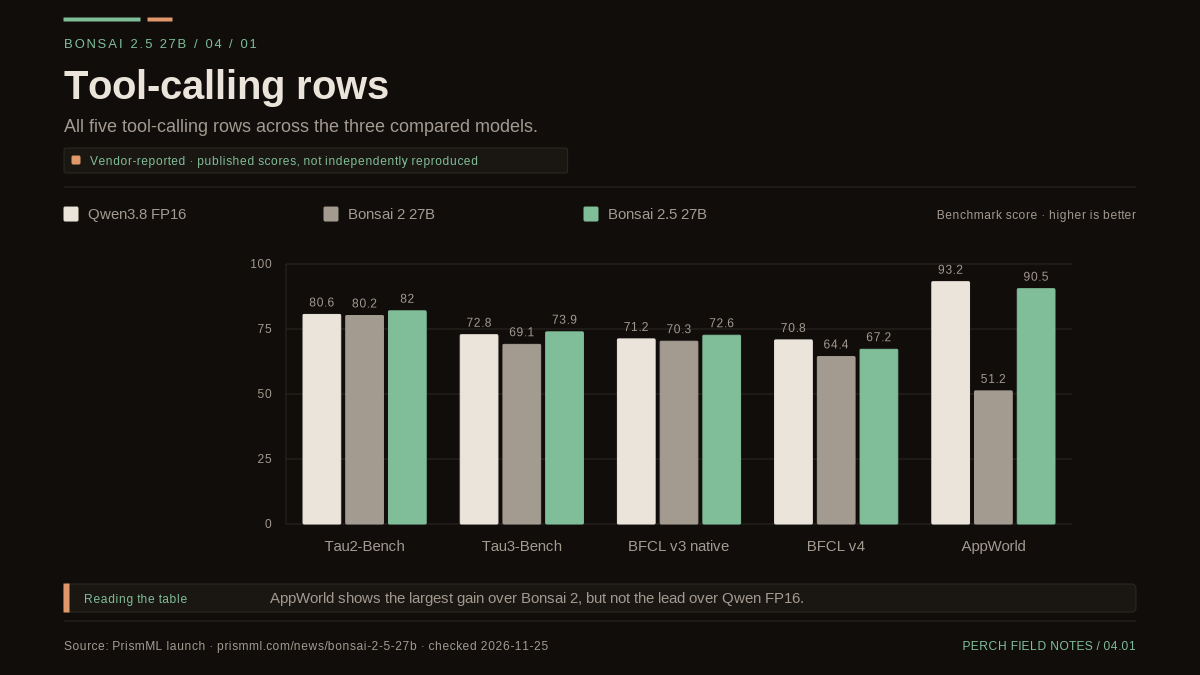
What does the tool-calling scorecard show?
Read the scorecard row by row before reading the average. PrismML compares Qwen3.8 FP16, Bonsai 2 27B and Bonsai 2.5 27B on the same five named benchmarks. The values are useful for shortlisting a model and identifying regressions. They do not disclose a complete, independently replayable evaluation.
| Benchmark | Qwen3.8 FP16 | Bonsai 2 27B | Bonsai 2.5 27B | What the row tells you |
|---|---|---|---|---|
| Tau2-Bench | 80.6 | 80.2 | 82.0 | Bonsai 2.5 leads this row by 1.4 points over Qwen. |
| Tau3-Bench | 72.8 | 69.1 | 73.9 | Bonsai 2.5 leads by 1.1 points over Qwen. |
| BFCL v3 native | 71.2 | 70.3 | 72.6 | Bonsai 2.5 is 0.6 points behind Qwen. |
| BFCL v4 | 70.8 | 64.4 | 67.2 | Bonsai 2.5 trails Qwen by 3.6 points. |
| AppWorld | 93.2 | 51.2 | 90.5 | Large gain over Bonsai 2, but 2.7 points behind Qwen. |
| Average, five rows | 77.7 | 67.0 | 77.2 | Bonsai 2.5 remains 0.5 points behind Qwen. |
The average is the published five-row average, not a new sixth test. On every listed row, Bonsai 2.5 27B improves over Bonsai 2 27B. The gains are 1.8 points on Tau2-Bench, 4.8 on Tau3-Bench, 2.3 on BFCL v3 native, 2.8 on BFCL v4 and 39.3 on AppWorld. AppWorld contributes most of the visible movement in the predecessor average. Without that row, the improvement would look much smaller.
The comparison with Qwen is mixed: the two Tau rows go to Bonsai 2.5, while BFCL v3 native is lost by 0.6, BFCL v4 by 3.6 and AppWorld by 2.7. Those margins are small enough that they should not be treated as stable rankings without repeated runs, but they are also large enough to reject a blanket claim of superiority. The row-by-row Bonsai 2.5 27B benchmark teardown places these tool results beside the coding and broad-capability tables.
The PrismML launch benchmark table is the primary source for these numbers. ExplainX’s overview of the Bonsai 2.5 27B results explicitly describes the evaluations as vendor-run and not independently reproduced. Both points matter: there is a concrete table to inspect, but there is no supplied independent replication that settles how the models behave in a different agent framework.
For a buying or architecture decision, translate each row into a workload question. Does your agent need long conversations with tool observations? Put more weight on the Tau rows and test multi-turn continuity. Does it mostly choose among narrowly defined functions? Test the BFCL-style path with exact argument checks. Does success mean changing the state of an application and verifying the result? AppWorld is the closer reminder to test the completed task, not only the emitted call. None of those mappings is a claim that the unpublished benchmark harness matches yours.
What do the Tau2 and Tau3 benchmarks mean for an agent?
The useful reading of the Tau rows is that Bonsai 2.5 27B is reported to perform well in benchmark settings built around tool-using agents that must continue a conversation after observations arrive, which differs from a one-shot classification task. A multi-turn agent has to preserve the user’s goal, connect an observation to the next action, avoid repeating completed work and recognize when it has enough evidence to answer.
Tau2-Bench rises from 80.2 for Bonsai 2 27B to 82.0 for Bonsai 2.5 27B, while Qwen3.8 FP16 is 80.6. Tau3-Bench rises from 69.1 to 73.9, compared with 72.8 for Qwen. Both comparisons favor Bonsai 2.5, and the Tau3 gain over the predecessor is larger than the Tau2 gain. As with every other row, though, this evidence is vendor-published without an independent reproduction in the supplied material.
The supplied sources do not document the exact domains, user simulator, tool inventory, prompt template or retry policy used for these runs. In particular, the version number alone does not establish what changed between Tau2 and Tau3, so this article does not claim that a specific new task category caused the gain. What you can say is narrower and more useful: PrismML reports better results on both named Tau rows, with the larger absolute improvement on Tau3.
For your own harness, turn that signal into three tests. First, give the agent a goal that cannot be completed with one tool call. Second, make one observation change the correct next action. Third, include a completed action that the model must remember rather than repeat. Record whether the final answer is correct, whether every call was necessary, and whether the agent stayed within its retry and context limits. A fluent final answer does not excuse an unauthorized or duplicate action along the way.
History design is part of the test. Make the user goal, tool definitions, call identifiers, normalized observations and a compact task state visible. Do not rely on an ever-growing raw transcript as the only memory. Long tool outputs can bury the constraint that determines the next step. The 262K Bonsai context-window memory guide explains the hardware and KV-cache limits behind the documented context length; a large context window is not a reason to avoid disciplined state management.
Reasoning defaults also belong in the experiment record. PrismML documents xhigh as the default, makes medium available and says low is unsupported and behaves like xhigh. Thinking is on by default, and a short output cap can truncate reasoning before the final answer or tool call. When testing a multi-turn workflow, allow enough output room, log the actual configuration and judge task completion separately from reasoning length. The 180-tool-call Bonsai coding-agent workflow is a related vendor example of long-horizon tool use, not an independent Tau evaluation.
How should you compare BFCL v3 versus v4?
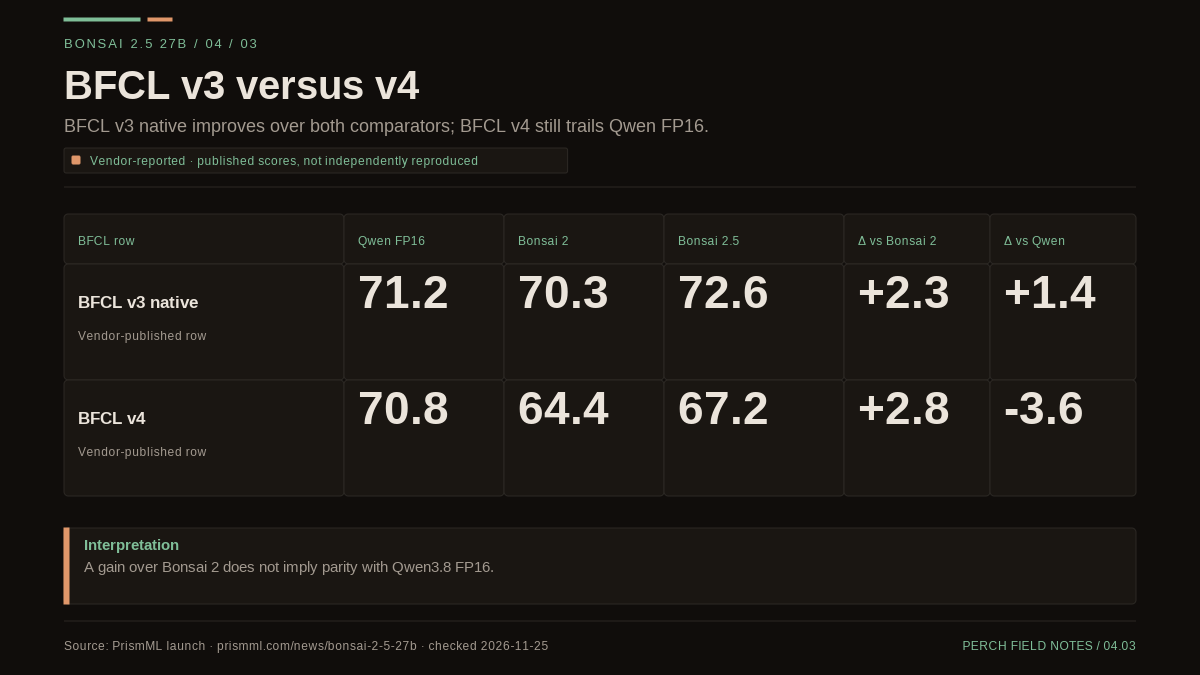
Keep the labels exact: PrismML reports BFCL v3 native at 72.6 and BFCL v4 at 67.2 for Bonsai 2.5 27B, and these are separate rows with separate scores. Do not replace one with the other, average them together or compare a local v3-style test with a published v4 number as though the conditions were identical.
The predecessor comparison is positive but modest: BFCL v3 native moves from 70.3 to 72.6, a 2.3-point gain, and BFCL v4 moves from 64.4 to 67.2, a 2.8-point gain. The Qwen comparison is weaker. Against Qwen3.8 FP16, Bonsai 2.5 trails by 0.6 on v3 native and by 3.6 on v4. The v4 gap is the clearest tool-calling regression relative to Qwen in the published table, even though Bonsai 2.5 improves over Bonsai 2.
The supplied evidence does not enumerate the categories, task mix or harness used for BFCL v4, which limits causal explanations. It is not sound to assert that one particular feature of v4 caused the lower score. It is sound to say that the published v4 result is a reason to test your function-calling path carefully before assuming that Tau gains will transfer.
Use a local BFCL-inspired suite as a stress test, not as an official reproduction. Include a single call with all required arguments, a call with a missing required field, an invalid enum value, an unknown argument, two independent calls that could be issued together, two calls where the second depends on the first, and a correction after a validation error. Test the complete route from generated output to parser to validator to executor. If your suite includes parallel calls, decide explicitly whether they are truly independent and whether the executor preserves a safe order.
Runtime choice matters here too. The Hugging Face model card for Ternary Bonsai 2.5 27B documents native tool calls and an OpenAI-compatible serving path, but that does not prove every client, parser or agent framework implements the same tool-call format. A working curl request is not yet a working agent loop. The vLLM OpenAI-compatible Bonsai server setup and Ollama Q2_0 coding-agent connection cover two local integration routes; test tool calls on the route you intend to use.
A fair comparison freezes the model file, runtime version, context allocation, reasoning setting, sampling configuration, tool list and retry policy. Change one factor at a time. If the harness repairs invalid JSON before execution, log that repair as a model failure even if the task eventually succeeds. Otherwise, a strong wrapper can hide weak raw function-calling behavior and make comparisons misleading.
What does the AppWorld score tell you?
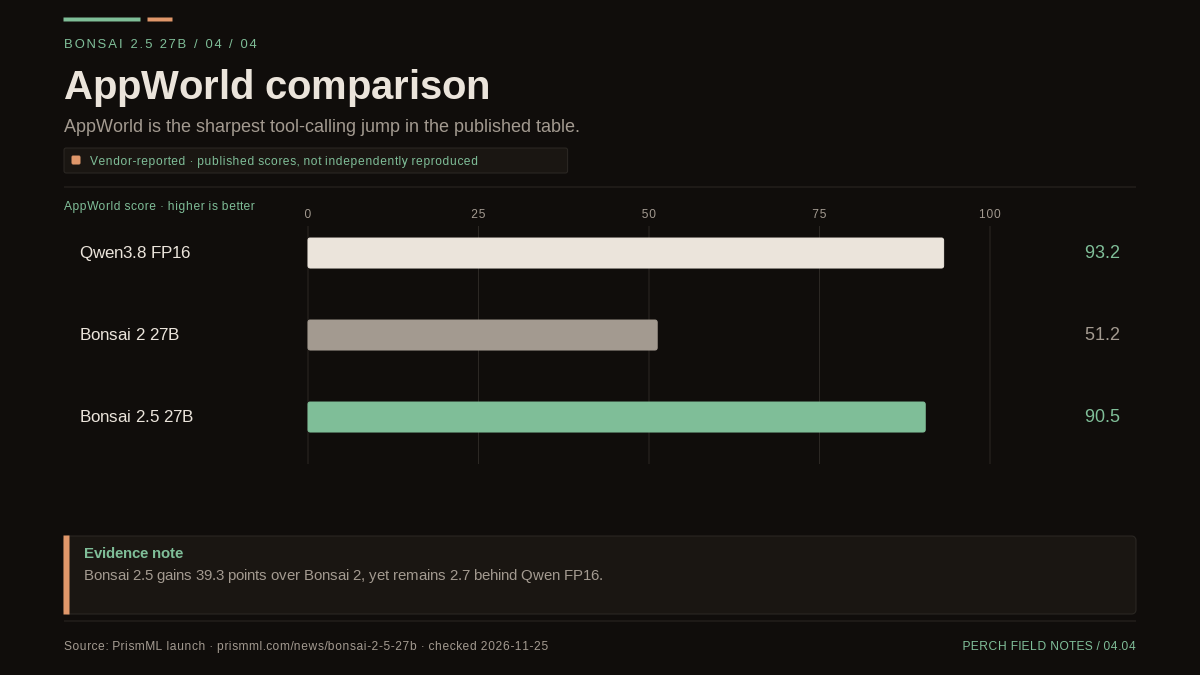
AppWorld is the most dramatic row in the predecessor comparison. Bonsai 2 27B scores 51.2, Bonsai 2.5 27B scores 90.5 and Qwen3.8 FP16 scores 93.2. The update gains 39.3 points over Bonsai 2, narrowing the gap to Qwen from 42.0 points to 2.7, which is a substantial reported improvement in an application-task benchmark rather than proof that Bonsai 2.5 now wins the row.
For planning purposes, treat AppWorld as a prompt to evaluate complete application tasks. An agent may need to inspect state, choose an operation, execute it, read the result and decide whether another operation is required. A syntactically valid call is only an intermediate step. The meaningful outcome is the expected application state, confirmed by a separate check rather than by the model’s own assertion.
Build a local analogue with a disposable fixture. Define a starting state, a user goal and an expected final state. Give the agent a small set of tools with clear permissions. After the run, compare the fixture with the expected state, inspect the call log and check for unrelated changes. This tests the same practical failure boundary: the model can sound successful while leaving the task unfinished or making an extra change.
Do not use the 90.5 score to predict success on your product’s API without testing. Your tools may have different names, descriptions, pagination, authentication, state transitions and error semantics. Your harness may expose more functions at once or truncate observations differently. The published table does not supply those details. A close AppWorld result is evidence that the model deserves an application-task trial, not a substitute for that trial.
The score also needs to stay beside BFCL v4. A narrative that mentions only the 39.3-point AppWorld gain would hide the 3.6-point BFCL v4 deficit to Qwen. Different rows answer different questions. The balanced reading is that Bonsai 2.5 has a strong reported application-task result and a weaker published v4 function-calling result, with both requiring local validation.
How should you design reliable tool schemas?
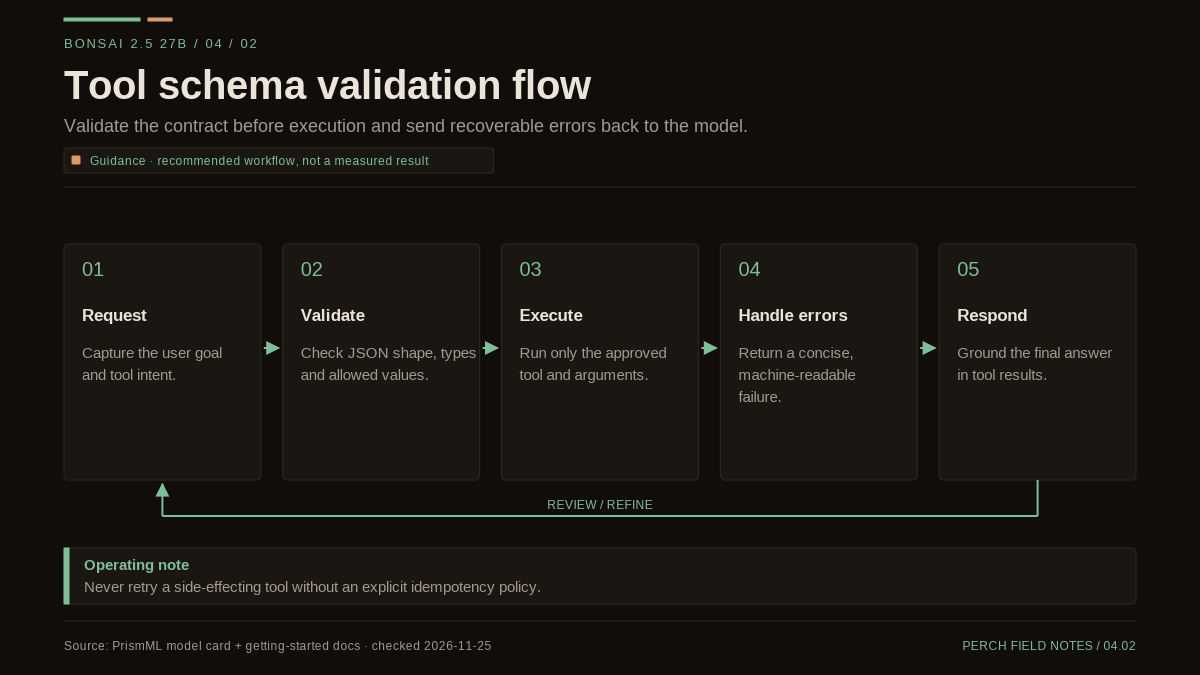
A tool schema is an executable contract. It tells the model what action exists, which inputs are accepted and what a successful result means. It also gives your harness a place to reject invalid calls before they reach application code. The goal is not to make descriptions long. The goal is to remove ambiguity that the model would otherwise have to guess.
Start with a small tool surface. Expose actions that map to clear user intent and safe backend operations. Avoid a generic update_record tool with dozens of optional fields when the product really needs cancel_order, change_shipping_address and add_order_note. Specific tools make the choice explicit and allow narrower permissions. They also make evaluation easier because the expected tool is known before the run.
Give every parameter a type, a purpose and the constraints that your backend actually enforces. Use required fields for information without which the operation cannot proceed. Constrain categorical values with an enum. Use patterns for identifiers only when the format is stable. Put units in the field name or description, such as timeout_seconds, rather than leaving the model to infer whether a number means seconds or milliseconds. If a field has a default, document it and make sure the executor applies the same default.
Reject unknown properties at the validation boundary, or normalize them deliberately and log that choice. A schema that silently ignores a misspelled field can make the model believe it supplied information that never reached the backend. If your server or client cannot enforce a strict schema keyword, keep the application-side validator authoritative. Do not assume that a schema accepted by one runtime will be interpreted identically by another.
Here is an illustrative OpenAI-style function definition for a read-only order lookup. It is an engineering example, not a verbatim PrismML schema or a claim about a benchmark harness.
{
"type": "function",
"function": {
  "name": "lookup_order",
  "description": "Fetch the current status of one order. Use this for status questions; do not use it to change an order.",
  "parameters": {
    "type": "object",
    "properties": {
      "order_id": {
        "type": "string",
        "pattern": "^ord_[A-Za-z0-9]+$",
        "description": "Exact order identifier supplied by the user or returned by an earlier tool."
      },
      "include_history": {
        "type": "boolean",
        "default": false,
        "description": "Include a compact list of prior status changes when true."
      }
    },
    "required": ["order_id"],
    "additionalProperties": false
  }
}
}
The description separates reading from writing. The identifier has one documented shape. The optional history flag has a stated default. Those choices reduce several common ambiguities: which tool to use, what counts as an identifier and whether an omitted flag should return a large history. Your real schema should reflect your backend’s validation rules rather than copying this example unchanged.
Use this schema checklist before exposing a tool to the agent.
| Schema design check | Recommended contract | Failure it helps prevent |
|---|---|---|
| Tool purpose | State one action and when not to use it. | Wrong function selection. |
| Input shape | Use a typed object with a stable property list. | Arrays, strings and objects being confused. |
| Required inputs | Require only fields essential to execute. | Calls that cannot run without follow-up. |
| Unknown fields | Reject or explicitly normalize extras. | Silent loss of intended information. |
| Value constraints | Use enums, ranges and stable identifier formats. | Valid JSON with invalid business values. |
| Units and formats | Put units in names or descriptions. | Milliseconds interpreted as seconds. |
| Defaults | Document defaults and apply them server-side too. | Model and executor disagreeing. |
| Side effects | Mark read, create, update and delete behavior clearly. | A lookup accidentally changing state. |
| Idempotency | Define duplicate-call behavior and support a key where needed. | Repeated writes after timeout or retry. |
| Pagination | Define page size, cursor and terminal conditions. | Partial results treated as complete. |
| Authorization | Bind permissions to the caller, not model prose. | Model text bypassing access controls. |
| Result contract | Return stable fields, status and actionable errors. | Observations that invite guessing. |
Tool descriptions and schemas also consume context. The exposed set should stay relevant to the current task, but do not change identifiers or semantics mid-conversation without telling the agent. If tools are grouped into stages, make the transition explicit. A model cannot reliably call a function that has been removed from the available list because its raw transcript still mentions it. Test the transition between tool sets as deliberately as a single call.
The PrismML getting-started documentation confirms native tool calling, image input and an OpenAI-compatible server. It does not supply a canonical schema for your application. Treat compatibility as something to verify at the request, parser and execution layers. A useful smoke test sends one harmless schema, checks the raw response structure, validates the arguments and returns a result that the model can reference on the following turn.
Finally, design the result schema as carefully as the input schema. Return the fields needed for the next decision, with stable names and concise errors. Do not dump an entire database record when the agent needs a status and a timestamp. Do not hide failure inside a successful response envelope. The observation is part of the model’s evidence, so its shape directly affects multi-turn reliability.
How should a Bonsai agent recover from tool errors?
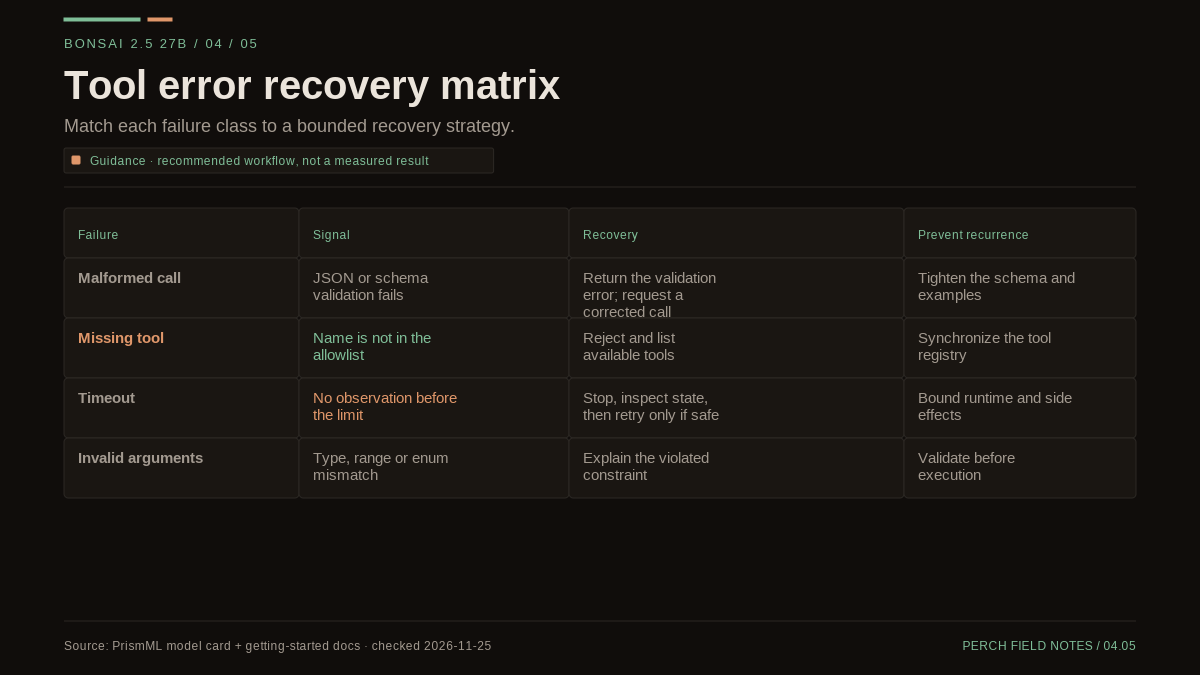
Error recovery works best when the model receives a structured observation and the harness enforces a bounded policy. Free-form text such as “something went wrong” leaves the next action ambiguous. A useful error says what failed, whether another attempt could help and what the model may change. It should not expose credentials, internal stack traces or unrestricted backend details.
Separate argument errors from execution errors. If a required field is missing, return the field name and the expected type. If an enum is invalid, return the allowed values. If a permission check fails, do not invite the model to retry with different wording; the identity and permissions need to change. If a read times out, a bounded retry may be reasonable. If a write times out, the harness must first determine whether the operation completed before issuing another write.
Here is an illustrative validation response. The field names are a recommended contract, not a Bonsai-specific format.
{
"error": {
  "code": "invalid_argument",
  "message": "end_date must be on or after start_date.",
  "field": "end_date",
  "retryable": true,
  "allowed_action": "correct_arguments"
}
}
Return the error as a tool result tied to the original call identifier. Preserve the failed call in the transcript so the next turn can correct it rather than inventing a new context. Limit automatic correction attempts in the harness. After the limit, stop or escalate to a human with the goal, recent calls and the unresolved error. A model should not receive an unlimited opportunity to mutate arguments until something passes.
Use idempotency for operations that may be retried. A create request can carry a client-generated key so the backend returns the original result instead of creating a second record. For updates, define whether repeating the same values is harmless. For deletes, decide whether a second call should return success, a not-found response or a conflict. These are API design decisions; the model cannot make a write safe merely by promising to be careful.
Make permission failures terminal for the current credentials. If the agent lacks access to a resource, retrying the same call with a reworded argument is not recovery. The right action is to explain the limitation, use an authorized alternative or request approval through a separate trusted channel. Never let generated text serve as authorization.
Handle parser failures before execution. Malformed JSON, an unknown tool name, a missing call identifier or arguments encoded as prose should produce a controlled harness response. Log the raw output for debugging, but do not pass it to application code. If your framework repairs JSON automatically, count the repair as a failure in the raw-call metric and as a recovery in the end-to-end task metric.
Large outputs need their own recovery path. Truncate with an explicit marker and, where possible, provide a narrower query or pagination cursor. Do not silently cut a result in a way that makes a partial list look complete. If context pressure rises, summarize prior observations while retaining the goal, unresolved errors, call identifiers and current application state. The related Terminal-Bench 2.1 long-horizon terminal analysis discusses timeouts, retries and sandboxing in a shell-agent setting.
How do you test the whole tool harness?
Test a golden path and the failures around it. The golden path proves that a valid request can become a valid call, execute and produce a correct final state. Failure tests prove that invalid or unsafe behavior is caught before it causes damage. A demo with only successful calls cannot tell you whether the harness is reliable.
Use the PTQ1_0 and Q2_0 local installation walkthrough to establish a known runtime, then record the exact GGUF, server version, context setting, reasoning mode, sampling configuration and tool list, keeping those values with every result. Reasoning defaults to xhigh and does not support low; thinking is enabled, so give the run sufficient output space. Do not compare a short-output run with a long-output run and attribute the difference only to the model.
Start with deterministic fixtures. Each case should define the user request, initial application state, available tools, expected call or acceptable alternatives, expected final state and prohibited side effects. Reset the fixture before every attempt. If one case leaves state behind, the next case may pass for the wrong reason. Reserve human evaluation for ambiguous outcomes, but use machine checks for JSON validity, schema validity, permissions and final state wherever possible.
This harness failure table is a practical test plan, not a list of benchmark categories.
| Harness failure mode | How to detect it | Harness response | Pass condition |
|---|---|---|---|
| Malformed JSON | Parser rejects the raw tool output. | Return a controlled parse error; log raw output. | Model corrects within the attempt limit. |
| Missing required argument | Schema validation names an absent field. | Ask for the exact field without executing. | Corrected call validates and runs. |
| Invalid enum or range | Value falls outside the declared contract. | Return allowed values or bounds. | Next call uses a valid value. |
| Unknown tool | Name is absent from the active tool registry. | Return available tool names and purposes. | Model selects an available tool. |
| Unknown extra field | Additional property is not permitted. | Reject or normalize according to policy. | No intended input is silently lost. |
| Duplicate side effect | Idempotency key or state check finds a repeat. | Return the original result or a conflict. | State changes exactly once. |
| Stale call identifier | Result cannot be matched to an active call. | Do not execute; request a fresh valid call. | Call and result correlation stays intact. |
| Read timeout | Deadline expires before a result. | Retry only within the read retry budget. | Result arrives or failure is reported. |
| Uncertain write timeout | Write may have committed without a reply. | Check operation status before any retry. | No duplicate write occurs. |
| Oversized observation | Result exceeds the configured output budget. | Return a marked summary or paginated subset. | Model does not treat partial data as complete. |
| Context truncation | Goal, error or call identifier disappears from history. | Compact history and restore task state. | Agent resumes without repeating work. |
| Prose instead of a call | Expected tool output is ordinary answer text. | Return a format reminder without executing prose. | A valid structured call follows. |
| Unauthorized operation | Permission policy denies the requested action. | Stop that path; do not suggest a bypass. | Protected state remains unchanged. |
| Repeated repair loop | Correction attempts exceed the configured limit. | Stop and escalate with the recorded evidence. | No unbounded retry or side effect occurs. |
Measure more than task success. Record raw parse failures, schema failures, unnecessary calls, corrected calls, retries, permission denials, duplicate attempts, output truncations and final-state correctness. Separate model behavior from harness repairs. If the wrapper fixes every malformed call, report both the repaired task outcome and the raw failure rate. That distinction prevents a polished demo from hiding a weak integration.
Run each case more than once when you need evidence about stability, and report the number of attempts beside the number of successes. Do not invent a pass rate definition after seeing the outcomes. Decide in advance whether a run with one repaired schema error counts as success, partial success or failure for your purposes. Keep the raw logs so another person can replay the case with the same model and harness.
Compare models only under the same conditions. Bonsai 2.5 27B, Bonsai 2 27B and Qwen3.8 FP16 should receive the same tool definitions, fixtures, retry policy and scoring rules. The published table does not provide enough detail to recreate the vendor evaluation exactly, so label your suite as a local comparison. Its value is in predicting your workload, not in claiming to reproduce Tau, BFCL or AppWorld.
After the basic matrix passes, add harder cases: a tool result that changes the plan, a stale record, a partially successful batch, two calls whose safe order matters and an error that requires user clarification. These cases expose whether the harness preserves state and whether the model can use an observation instead of merely emitting another plausible call. If you change a schema, rerun the affected fixtures because a wording change can alter tool selection even when the backend is unchanged.
What evidence is still missing?
The largest gap is independent reproduction. The supplied sources do not provide a complete benchmark package with hardware, prompts, scaffolds, seeds, attempt counts and scoring implementation. The Hacker News discussion of Bonsai 2.5 27B contains community questions and anecdotes, not a controlled tool-calling evaluation. It should not be used to upgrade the vendor scores into verified results.
The supplied LocalLLaMA Hugging Face discussion is an inconsistently accessible community pointer, not evidence. It supports no factual claim here. The useful next contribution would be a replayable local harness with published fixtures, raw outputs, validation logs and final-state checks.
There are also model-specific unknowns. The material does not establish how each GGUF behaves on your parser, how often a particular schema wording causes invalid calls, or how performance changes with a large tool catalog and long observations. The documented 262K context is not a measured guarantee of reliable retrieval or multi-turn memory at that length. The PTQ1_0 versus PQ2_0 versus Q2_0 quantization guide helps identify the file and runtime, but it does not supply quantization-specific tool-calling quality scores.
Until those gaps close, treat the published rows as a reason to test, not a deployment guarantee. Update this assessment if an independent reproduction or a replayable vendor harness appears. A future result that fixes the runtime, schema set and retry policy would be more informative than another isolated average.
What is the final verdict for tool calling?
Bonsai 2.5 27B earns a serious local tool-calling trial. It improves every published tool-calling row over Bonsai 2 27B, leads the two Tau rows in PrismML’s table and posts a large AppWorld gain. Its five-row average of 77.2 is close to Qwen3.8 FP16 at 77.7. That is a credible result for a compact local model with documented native tool calling.
The honest loss is equally clear: Bonsai 2.5 trails Qwen on BFCL v4 by 3.6 points, on AppWorld by 2.7 and on the five-row average by 0.5. Benchmark parity on selected rows does not imply parity in every agent framework. Schema compatibility, parser behavior, error recovery and execution safety still have to be demonstrated in the system you plan to run.
The practical recommendation is to start with a small, strict tool set, validate every call before execution, return structured errors and test final application state. Use the published benchmarks to choose what to test, then let a frozen local harness decide whether the model fits your workload. If you need a hosted route instead, you can compare hosted models currently available through One AI API Key; Bonsai 2.5 27B itself is not currently listed there.
Complete Bonsai 2.5 27B guide
- Bonsai 2.5 27B launch verdict and setup router
- row-by-row Bonsai 2.5 27B benchmark teardown
- 180-tool-call Bonsai coding-agent workflow
- SWE-bench Verified 75.6 repository-repair analysis
- Terminal-Bench 2.1 long-horizon terminal analysis
- PTQ1_0 and Q2_0 local installation walkthrough
- Ollama Q2_0 commands and coding-agent connection
- vLLM OpenAI-compatible Bonsai server setup
- Apple Silicon MLX setup for Bonsai 2.5 27B
- Bonsai VRAM and RAM worksheet by quantization
- cross-hardware Bonsai tokens-per-second comparison
- RTX 4090 Bonsai configuration and speed claims
- RTX 3060 12GB Bonsai feasibility and context tuning
- Mac Mini M5 Pro Bonsai setup and 22.3 tok/s audit
- CPU-only Bonsai setup and memory tuning
- 262K Bonsai context-window memory guide
- PTQ1_0 versus PQ2_0 versus Q2_0 quantization guide
- Bonsai vision mmproj setup and benchmark limits
- Bonsai 2.5 27B versus Qwen3.8 27B decision matrix
Sources
- PrismML launch announcement supports the release identity, exact benchmark rows and vendor positioning.
- Ternary Bonsai 2.5 27B GGUF repository supports the model-card specifications, runtime requirements and documented tool-calling capability.
- PrismML getting-started documentation supports native tool calling, image input, Apache-2.0 availability and OpenAI-compatible serving.
- ExplainX Bonsai 2.5 27B overview provides a third-party interpretation and explicitly labels the scores as vendor-run rather than independently reproduced.
- Hacker News discussion provides community questions and anecdotes, not independent benchmark verification.
- LocalLLaMA discussion is an inconsistently accessible community pointer, not evidence for any claim in this article.