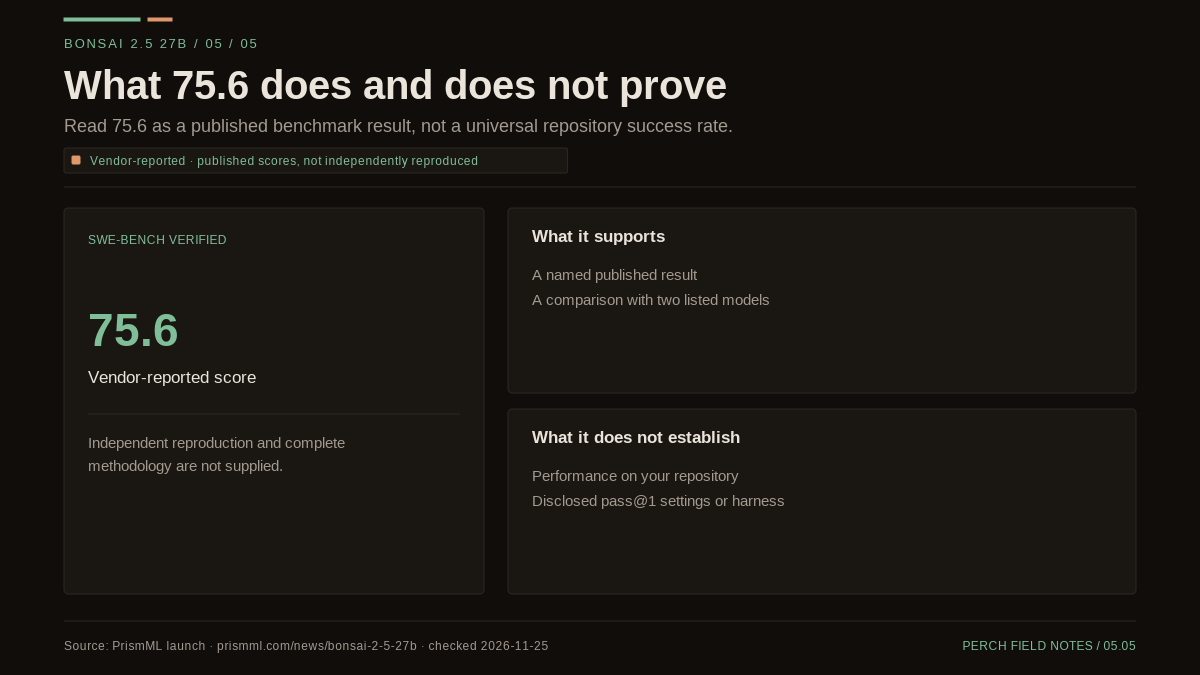
Bonsai 2.5 27B scores 75.6 on SWE-bench Verified, up 14.8 points from Bonsai 2 27B’s 60.8. That is a substantial published gain for a compact local model, but it is not an independent reproduction and it does not mean Bonsai will repair 75.6% of your backlog. Qwen3.8 FP16 still leads this row at 80.6, a 5.0-point advantage.
The useful conclusion is narrower: Bonsai 2.5 deserves a place in a supervised repository-repair evaluation, especially when local weights and a small footprint matter. Treat 75.6 as a reason to test carefully, not as permission to merge generated patches automatically. The missing harness details, the possibility of test-specific fixes and the gap to FP16 all matter.
This guide explains what the benchmark asks a model to do, compares the three published scores, and turns the result into a patch-review and local-test workflow you can apply to your own repositories.
What does SWE-bench Verified measure?
SWE-bench Verified is a repository-repair benchmark. Its central task is not writing a function from a blank file. It is changing an existing codebase in response to an issue, with tests used to decide whether the reported problem has been resolved. That distinction changes what a good model must do.
A repair agent has to locate relevant code, understand existing behavior, identify a plausible cause, edit the right files and check the result. A fluent explanation is not enough. A patch can sound correct while changing the wrong layer, missing an edge case or making unrelated tests fail.
For practical evaluation, separate three things that are easy to blur together:
- Issue understanding: Can the agent turn a report into a testable reproduction and a bounded change?
- Patch correctness: Does the change address the cause rather than only the visible symptom?
- Verification quality: Do focused tests, broader tests and an independent review support accepting the patch?
The word “Verified” is part of the benchmark name. It does not make PrismML’s Bonsai run independently verified. The supplied evidence is a vendor-published score. PrismML’s Bonsai 2.5 27B announcement provides the result, while ExplainX’s agentic coding overview explicitly notes that the scores were vendor-run and not independently reproduced.
That evidence boundary is important when interpreting “resolved.” A benchmark result summarizes performance under a particular evaluation setup. It is not a promise that every accepted patch has the naming, error handling, documentation or architectural fit your maintainers require. Your local acceptance gate should therefore judge both behavior and patch quality.
How do the SWE-bench scores compare?
The published SWE-bench Verified row is straightforward. Bonsai 2.5 sits between its predecessor and the FP16 reference.
SWE-bench comparison
| Model | Published score | Difference from Bonsai 2 | Difference from Bonsai 2.5 |
|---|---|---|---|
| Qwen3.8 FP16 | 80.6 | +19.8 | +5.0 |
| Bonsai 2 27B | 60.8 | Baseline | -14.8 |
| Bonsai 2.5 27B | 75.6 | +14.8 | Baseline |
All three values are vendor-published, not independently reproduced. The arithmetic describes the published rows; it does not supply confidence intervals or establish statistical significance.
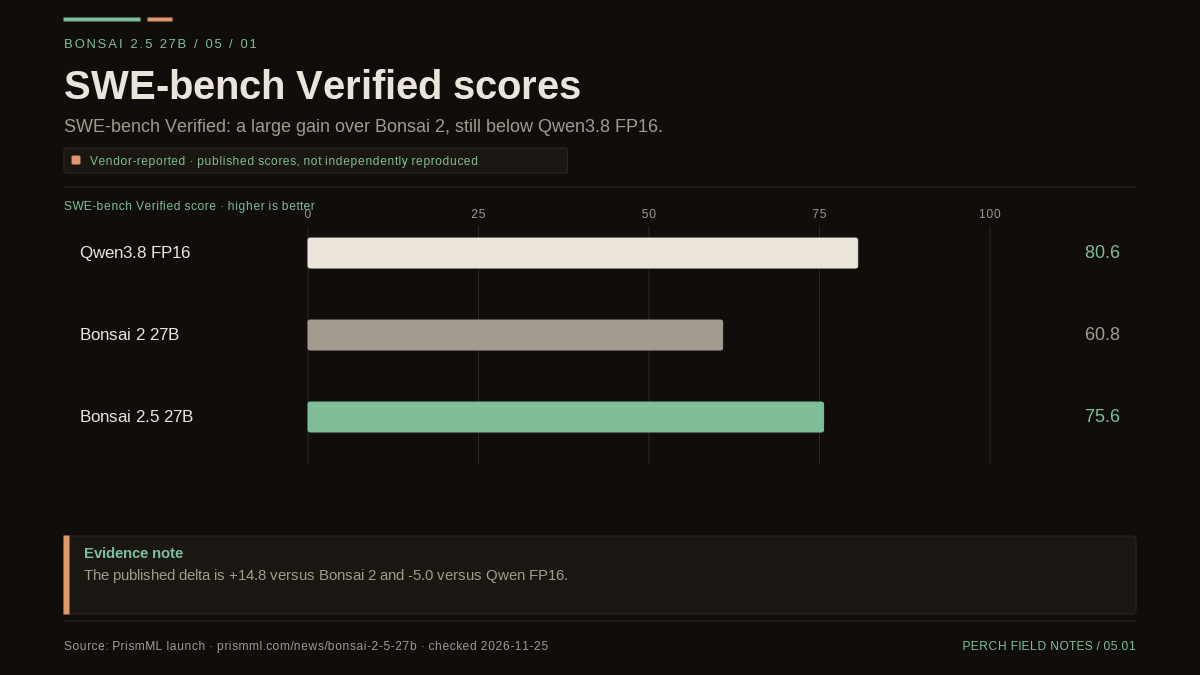
The 14.8-point gain is the headline, but the 5.0-point gap is the constraint. Bonsai 2.5 recovers much of the predecessor’s deficit on this row without reaching the FP16 reference. It would be misleading to describe the result as parity with Qwen.
The surrounding coding rows also prevent an overly broad victory claim. Bonsai 2.5 scores 60.1 on Terminal-Bench 2.1 versus Qwen FP16’s 70.8, and 27.0 on DeepSWE versus 30.1. Its three-row coding average rises from 37.9 for Bonsai 2 to 54.2, but remains below Qwen FP16’s 60.5. The row-by-row Bonsai benchmark teardown covers the full table, and the Terminal-Bench 2.1 analysis examines the separate demands of long-horizon terminal work.
Do not translate 75.6 into “three quarters of our issues are easy now.” The supplied material does not disclose the prompts, scaffold, seeds, hardware, sampling policy or a pass@1 setting. It also does not break the score down by repository size, language or bug type. Those omissions make your own task mix more important, not less.
Why does the 14.8-point jump matter?
A move from 60.8 to 75.6 is large enough to change how you would approach an evaluation. It suggests that Bonsai 2.5 is not merely incrementally different from Bonsai 2 on the published repository-repair row. It is worth testing whether that improvement appears in the kinds of issues your team already has.
For a local workflow, the gain could matter in several practical ways. A model that reproduces failures more reliably may produce fewer patches based on guesswork. A model that follows repository evidence may need less manual context preparation. A stronger repair candidate may reduce review cycles. None of those outcomes is established by the score alone, but each is a reasonable hypothesis to test.
There is also a useful contrast with PrismML’s offline pytest demonstration. The vendor reports 180 tool calls while investigating a pytest 9.1 regression that passed alone but failed alongside other tests. The reported sequence includes repository inspection, a minimal reproduction, tracing, a patch and a previously unseen maintainer test. The 180-tool-call Bonsai coding-agent workflow examines that pattern in more detail.
That demo is relevant because order-dependent failures reward investigation rather than immediate editing. However, it is not an independent benchmark. No dataset, full transcript or harness is supplied, and the prominent “65” in the interface has no reliably legible metric label. Use the demo as an illustration of the intended workflow, not as another score.
The jump also raises the value of good tooling. Repository repair depends on search, file access, shell execution and test feedback. If a harness hides useful output, truncates errors or gives the agent excessive permissions, the evaluation measures the harness as much as the model. The Tau, BFCL and AppWorld tool-calling analysis is useful background for designing those interfaces, even though tool-calling scores do not predict patch correctness by themselves.
Finally, the improvement makes controlled comparison worthwhile. Run Bonsai 2 and Bonsai 2.5 on the same frozen tasks if you have both. Keep the repository revision, environment, prompt, tool access and test commands fixed. Record review effort as well as test outcomes. A score gain is more useful when you can see whether it produces smaller diffs, fewer retries or less maintainer intervention.
What does a reliable patch workflow look like?
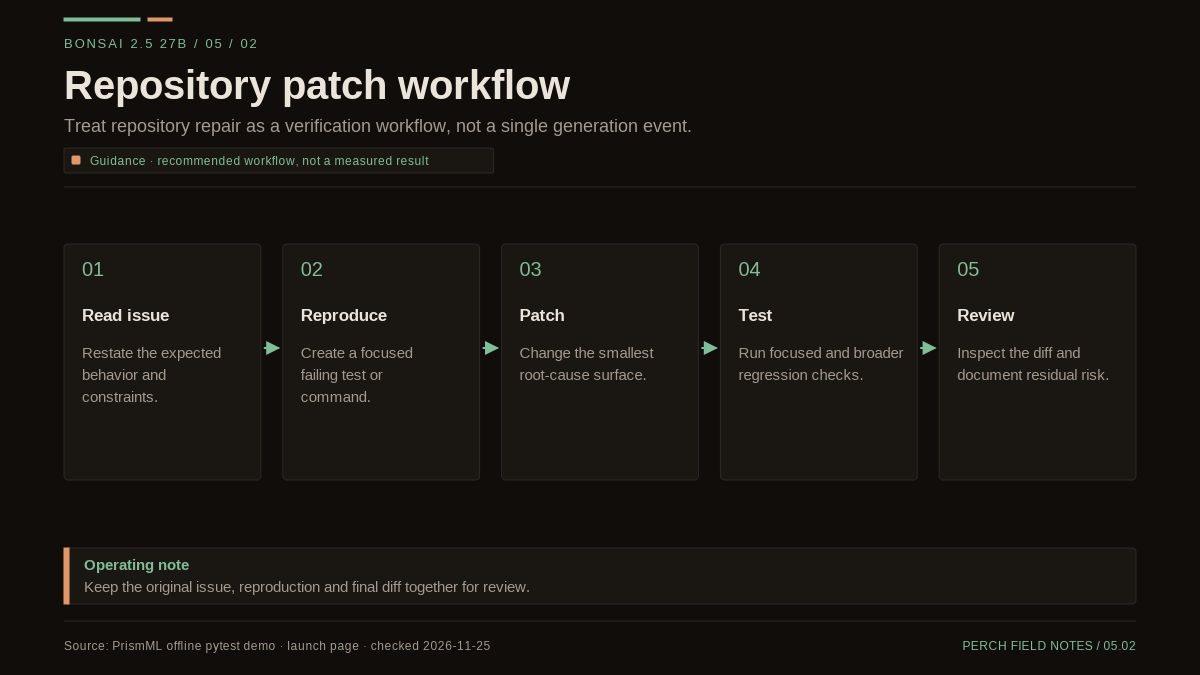
A reliable workflow begins before the model edits anything. Its purpose is to make the starting failure, the proposed change and the acceptance evidence visible. Without that structure, a green test can be ambiguous.
1. Freeze the task and starting state
Freeze the issue text, repository commit and dependency state before anything else. Use a clean checkout or an isolated environment so old build artifacts cannot affect the result. Confirm that the reported failure occurs before asking the model for a patch. If the baseline does not fail, stop and repair the evaluation setup first.
A known-good reference patch or expected behavior, where one exists, gives you a way to validate the tests themselves. A test suite that passes both the broken baseline and every proposed patch may not exercise the reported bug.
Define the allowed change surface. Some tasks need code only. Others may legitimately require documentation or fixtures. State whether tests may be edited. For a strict repair evaluation, the safer default is to reject test weakening and require new behavior to pass tests the agent did not author.
2. Give the agent bounded evidence
Provide the issue, relevant repository paths and a reproducible command rather than an entire repository dump. Let the agent search, but require it to cite the files and observations behind its diagnosis. Useful evidence includes the failing assertion, the relevant call path and the smallest reproduction it can construct.
The documented 262,144-token context does not mean every repository fits usefully in one prompt. Tool output and agent history compete with source files for attention and memory. The 262K Bonsai context-window memory guide explains the hardware boundary; the evaluation lesson is to retrieve deliberately and preserve decisive evidence.
Ask for a short root-cause statement before implementation. This is not proof of correctness, but it exposes whether the agent is targeting a symptom, a test fixture or a plausible code path. If the diagnosis changes after a test run, retain both versions in the record.
3. Limit tools and keep changes reviewable
Start with read-only discovery, then allow writes inside the task workspace. Test execution should be explicit and bounded. Network access, package installation and changes outside the checkout need separate approval because they can alter the environment that determines success.
Require a focused diff. Large rewrites are not automatically wrong, but they increase the evidence a reviewer must check. A useful patch explains why each changed file is necessary and avoids unrelated formatting. Keep generated artifacts out of the change set.
The Ternary Bonsai 2.5 27B GGUF model card and PrismML’s getting-started documentation document local inference and compatible serving paths. Whichever runtime you choose, keep it fixed for the comparison. PTQ1_0 and PQ2_0 require PrismML’s llama.cpp fork; Q2_0 requires stock llama.cpp b11556 or newer. The PTQ1_0 and Q2_0 installation walkthrough covers that setup boundary.
4. Verify in layers
Run the narrowest test that demonstrates the reported behavior first. Then run related tests, followed by the broader project suite where practical. A focused pass is useful diagnosis, not final acceptance. A broad pass can still hide a poorly designed fix, so review the diff after testing rather than treating green output as the whole verdict.
Where possible, add a held-out test that the agent cannot see or modify. This checks whether the change generalizes beyond the visible failure. Preserve the exact test command, exit status and relevant output. If a test fails because of environment setup rather than the patch, classify that separately instead of silently retrying until something passes.
5. Review and record the decision
Inspect the final diff for scope, error handling, compatibility and unintended behavior changes. Check that the patch does not merely make the failing assertion disappear. Record whether a maintainer would accept the change with minor edits, substantial edits or not at all.
Use safe diff checks as part of the review:
git status --short
git diff --check
git diff
These commands do not establish correctness. They help expose unexpected files, whitespace errors and the actual change under review. Keep test evidence and the final diff together so another person can reproduce the decision.
Patch evaluation checklist
Use the same checklist for a candidate patch regardless of which model produced it. A “no” in the acceptance column means the patch needs another pass or explicit maintainer judgment.
| Check | Question to answer | Evidence to inspect | Accept only when |
|---|---|---|---|
| Reproduction | Did the unmodified repository fail for the reported reason? | Baseline command, exit status and relevant output | The task setup demonstrates the target failure |
| Root cause | Does the change address the cause rather than suppress a symptom? | Diagnosis, call path and reproduction after editing | The explanation matches the code change |
| Scope | Is every edited file necessary for this repair? | Final diff and starting revision | Unrelated edits are removed or justified |
| Test integrity | Were assertions weakened, skipped or deleted? | Test-file diff and new test behavior | Existing checks retain their strength |
| Generalization | Does the fix work beyond the exact visible input? | Held-out or added boundary tests | Relevant adjacent behavior also passes |
| Regression safety | Did related project behavior remain intact? | Focused, related and broader suite results | No unexplained failures remain |
| Review quality | Would a maintainer accept the implementation and conventions? | Reviewer notes and required revisions | The patch is approved before merge |
This checklist is a recommended local gate, not a description of PrismML’s undisclosed benchmark harness. It makes the review criteria explicit so a green test run cannot stand in for the whole decision.
How can a patch pass tests and still be wrong?
Passing tests are necessary evidence, not a complete definition of a good patch. Local evaluation needs explicit checks for false positives, especially when the model can influence tests or the surrounding environment.
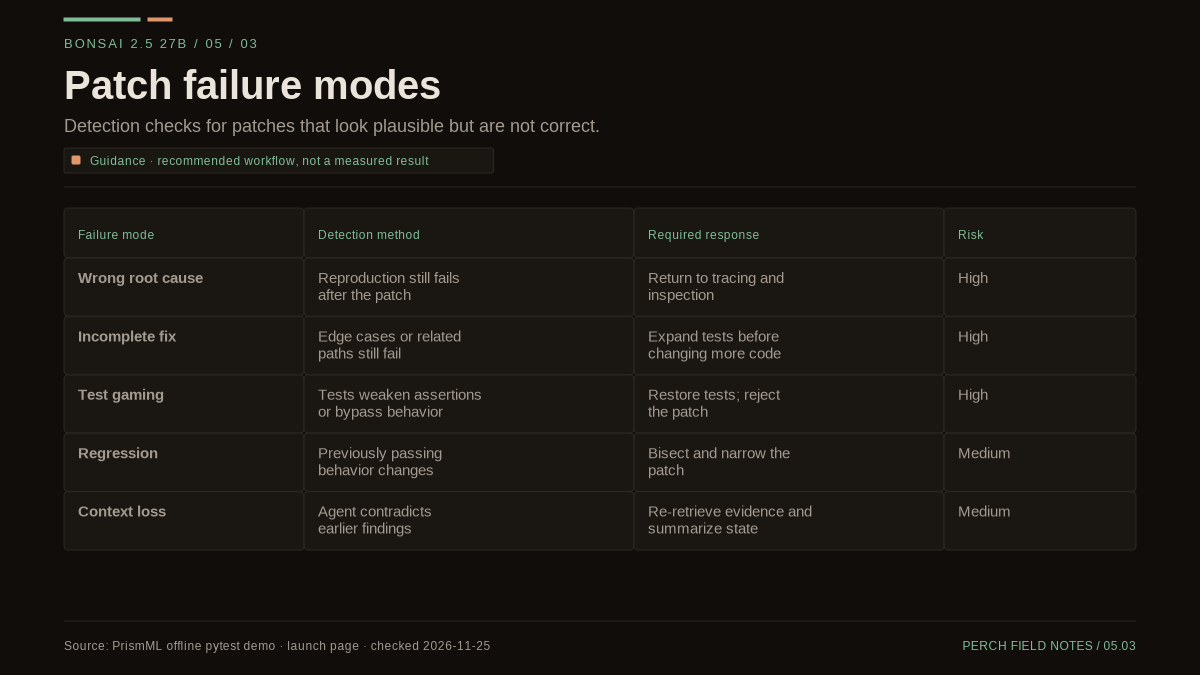
One failure is fixing the symptom instead of the cause. A guard can suppress the visible exception while leaving the underlying state incorrect. Review the surrounding call path and ask what happens with adjacent inputs. A patch that only special-cases the exact reported input deserves scrutiny.
Another is incomplete repair. The original assertion may pass while a related boundary still fails. Add cases for empty values, repeated operations, ordering or error paths when they are relevant to the issue. Do not invent requirements unrelated to the report, but do test the behavior the change claims to preserve.
Test gaming is a more direct false positive. Warning signs include deleted assertions, new skip conditions, broader exception handling, relaxed tolerances and fixture changes that remove the failure. Compare test files against the starting revision. If the task permits test edits, require a clear explanation and independent validation of the new assertions.
Environment drift can also create a misleading pass. A different dependency version, cached artifact or locally installed package may make a patch appear to work without addressing the repository. Re-run from a clean environment and preserve dependency information. If installation changes are necessary, treat them as part of the patch and review them explicitly.
Regressions elsewhere are why focused tests cannot be the only gate. Run neighboring tests and the project suite where feasible. If the full suite is too costly for every attempt, use it for finalists and record what was omitted. “Not run” is more honest than implying complete verification.
Context loss can undermine otherwise sensible work. A long agent session may forget an earlier constraint, repeat an abandoned approach or overwrite a useful change. Keep a concise task record and inspect the final diff against the original requirements. Summarization should preserve the reproduction, constraints and unresolved failures, not merely the recent conversation.
A maintainer review catches failures that execution cannot. Ask whether the patch follows local conventions, introduces avoidable complexity and handles resources correctly. Also check security-sensitive behavior and public API compatibility where relevant. These are review questions, not claims that the published score measures those dimensions.
How should you evaluate Bonsai locally?
A local evaluation should answer a practical question: does Bonsai 2.5 produce acceptable patches on your repositories with an acceptable amount of review? It should not be presented as a reproduction of SWE-bench Verified unless you have the actual dataset, harness and disclosed configuration. The supplied Bonsai material does not provide those details.
Build a small, frozen task set from historical issues with known behavior. Keep the issue description, starting commit, environment and expected checks stable. Separate tasks used for prompt development from tasks held back for final assessment. Otherwise, repeated tuning can make the result look better without improving general repair ability.
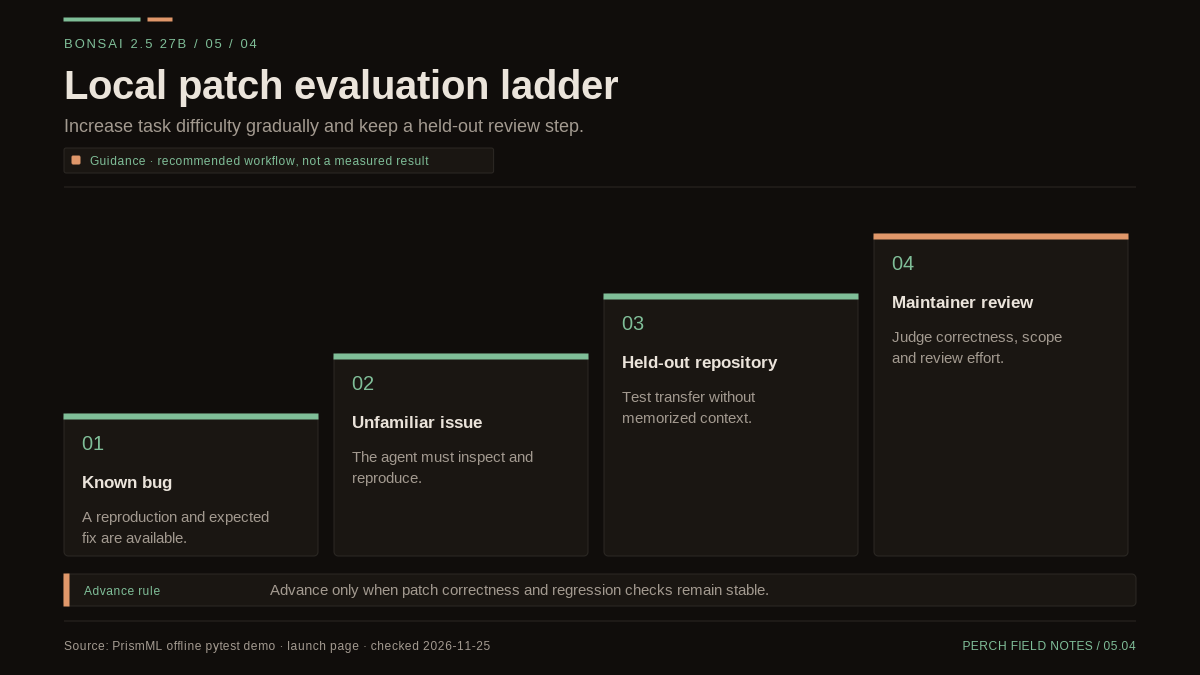
Local test matrix
| Stage | Task selection | What to hold fixed | Evidence to record | Advancement rule |
|---|---|---|---|---|
| Known bug | A historical issue with a clear reproduction | Commit, environment, issue text and visible tests | Baseline failure, patch diff, focused and related test results | Correct behavior with no test weakening |
| Unfamiliar issue | A bug outside prompt-development examples | Runtime, tools, context policy and retry budget | Root-cause statement, attempts, test output and final diff | Generalizes beyond the visible assertion |
| Held-out repository | A separate codebase with comparable maintenance tasks | Model configuration and review rubric | Cross-repository failures, review time and edit burden | Acceptable quality without task-specific hints |
| Maintainer review | Finalist patches from the held-out set | Acceptance criteria and reviewer | Correctness, scope, conventions and required revisions | Human approval before merge |
This ladder is a local evaluation design, not a claim about the official benchmark’s internal stages. Its purpose is to expose different failure modes before you trust a headline score.
Start with a baseline check. The unmodified repository should fail the target test. If you have a known-good patch, confirm that it passes the intended checks. This validates the task and prevents a broken fixture from consuming evaluation time.
Next, choose one runtime and one GGUF. Record the exact filename, runtime version, context setting, sampling values, output cap, MTP state and tool configuration. The model card’s CLI sampling values are usage examples, not disclosed SWE-bench settings. Do not label your run pass@1 or directly comparable to 75.6 unless the actual evaluation protocol supports that claim.
Give each model the same information and permissions. If you compare Bonsai 2.5 with Qwen FP16, remember that the published reference is FP16, not an unspecified quantized Qwen file. The Bonsai 2.5 versus Qwen3.8 decision matrix explains why quality, memory and runtime differences must be evaluated together.
Keep retries bounded and visible. Record every attempted patch, not only the final success. A model that eventually produces a good diff after extensive hidden retries has a different operational cost from one that succeeds within a small budget. Tool calls, elapsed time, context pressure and reviewer edits are useful local measurements, but none is supplied by the benchmark table.
Finally, review failures by category. Distinguish wrong diagnosis, incomplete implementation, test gaming, environment problems and harness errors. This turns a collection of red and green results into a decision about fit. If failures cluster in one repository or bug type, narrow the recommendation instead of averaging them away.
What are the limits of the 75.6 score?
The largest limitation is evidence quality. The score is published by the model vendor, and the supplied sources do not disclose enough methodology for an independent reproduction. Hardware, prompts, scaffolds, seeds, category weighting and confidence intervals are absent. There is no established pass@1 setting in the packet. Those gaps do not prove the score is wrong; they limit what can be concluded from it.
The result also does not establish uniform strength. Qwen3.8 FP16 leads SWE-bench Verified by 5.0 points and the published coding average by 6.3 points. Bonsai 2.5 improves sharply over Bonsai 2 on several agentic rows, but BFCL v4 and AppWorld still trail the FP16 reference. In broad capabilities, Qwen leads every category, and Bonsai 2.5’s instruction-following category falls 1.65 points below Bonsai 2. Repository repair depends on following constraints as well as producing code, so that regression deserves local testing.
Compact weights do not remove runtime constraints. The 5.9 GB claim is a weight footprint, not total VRAM. Context, KV cache, MTP, vision and agent history add memory cost. No exact KV-cache byte table or reliable CPU-only tokens-per-second figure is supplied. A small model that fits your hardware may still be too slow for an interactive repair loop, so measure your own configuration rather than borrowing a speed claim from a different setup.
Access is local. The model card says no inference provider currently deploys Bonsai 2.5 27B, and it is not hosted on One AI API Key. That makes a local harness part of the evaluation, not an optional convenience. Serving quality, tool integration and test-environment isolation become your responsibility.
Community discussion does not close these gaps. The Hacker News discussion of Bonsai 2.5 27B contains anecdotal reports and disputed interpretations, not a controlled patch evaluation. The supplied LocalLLaMA Hugging Face thread is an inconsistently accessible community pointer, not evidence. Neither should be used to upgrade the published score into an independent result.
This analysis will need an update if PrismML releases the benchmark harness, full configuration or an independent reproduction. Until then, the honest description is “vendor-reported 75.6 with material methodology gaps.” That phrasing preserves the useful signal without claiming more than the record supports.
Is Bonsai 2.5 27B ready for repository repair?
For supervised local repair, it is a credible candidate worth evaluating. The 14.8-point published improvement over Bonsai 2 is meaningful, and the score places Bonsai 2.5 much closer to the FP16 reference on SWE-bench Verified. For users who need local weights and can operate a compatible runtime, that is a strong reason to put it on a shortlist.
It is not ready for unattended merging based on this evidence. Qwen FP16 remains 5.0 points ahead on this row, the evaluation methodology is incomplete and no independent reproduction is supplied. A patch that passes tests can still be narrow, regress another behavior or violate maintainer expectations.
Use a staged decision. Reproduce known failures, test unfamiliar issues, move to a held-out repository and require maintainer review. Judge the final diff as well as the test result. If Bonsai produces correct, focused patches with manageable review effort on your task set, the benchmark gain has practical relevance. If it needs repeated hints or weakens tests, the published score does not rescue the workflow.
If you need a hosted route instead of operating local weights, you can compare hosted models currently available through One AI API Key. Bonsai 2.5 27B itself is not available there. The decision is therefore both a model choice and an operating-model choice: local control and evaluation work versus a hosted integration path.
Complete Bonsai 2.5 27B guide
Use these cluster posts for setup, benchmark context, hardware planning and model selection:
- Bonsai 2.5 27B launch verdict and setup router
- row-by-row Bonsai 2.5 27B benchmark teardown
- 180-tool-call Bonsai coding-agent workflow
- Tau, BFCL and AppWorld tool-calling analysis
- Terminal-Bench 2.1 long-horizon terminal analysis
- PTQ1_0 and Q2_0 local installation walkthrough
- Ollama Q2_0 commands and coding-agent connection
- vLLM OpenAI-compatible Bonsai server setup
- Apple Silicon MLX setup for Bonsai 2.5 27B
- Bonsai VRAM and RAM worksheet by quantization
- cross-hardware Bonsai tokens-per-second comparison
- RTX 4090 Bonsai configuration and speed claims
- RTX 3060 12GB Bonsai feasibility and context tuning
- Mac Mini M5 Pro Bonsai setup and 22.3 tok/s audit
- CPU-only Bonsai setup and memory tuning
- 262K Bonsai context-window memory guide
- PTQ1_0 versus PQ2_0 versus Q2_0 quantization guide
- Bonsai vision mmproj setup and benchmark limits
- Bonsai 2.5 27B versus Qwen3.8 27B decision matrix
Sources
- PrismML: Bonsai 2.5 27B announcement supports the published benchmark rows, comparison arithmetic and offline pytest demonstration. These are vendor claims.
- Hugging Face: Ternary Bonsai 2.5 27B GGUF supports model identity, exact GGUF filenames, runtime requirements and provider status.
- PrismML: getting started supports the documented local inference paths, tool and image support, and compatible serving overview.
- ExplainX: Bonsai 2.5 27B agentic coding overview supports the third-party caveat that scores were vendor-run and not independently reproduced.
- Hacker News discussion is a community discussion containing anecdotal reports and skepticism. It is not benchmark evidence.
- LocalLLaMA discussion is an inconsistently accessible community pointer only. No factual claim here depends on it.