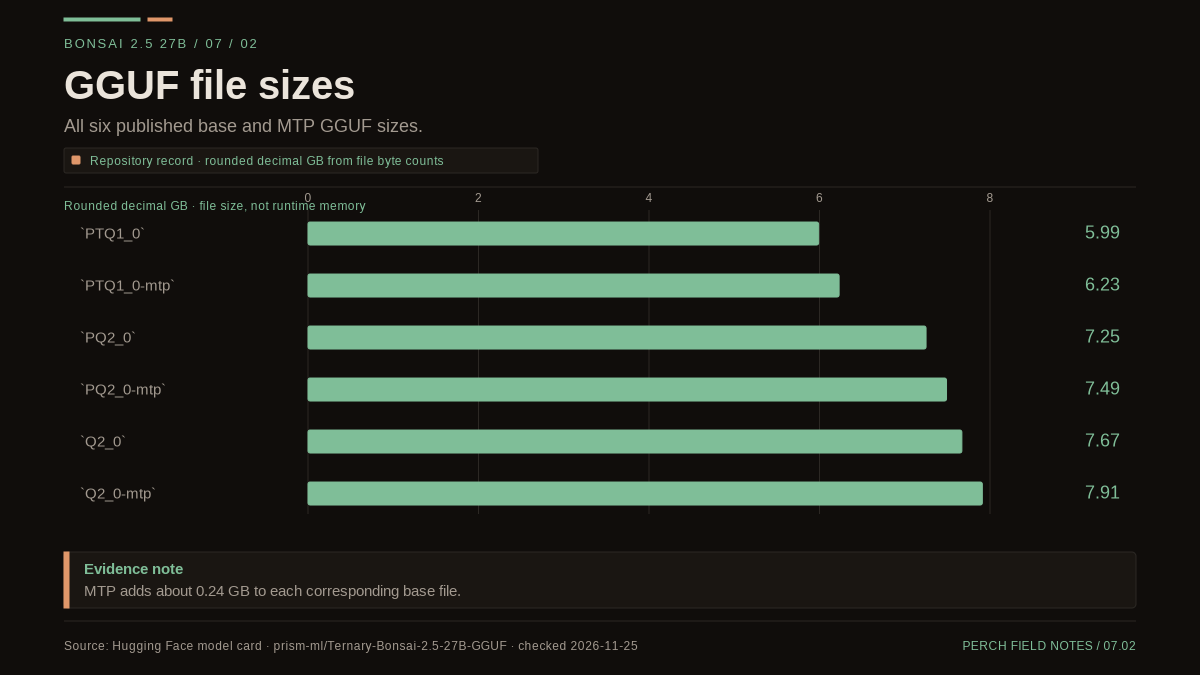
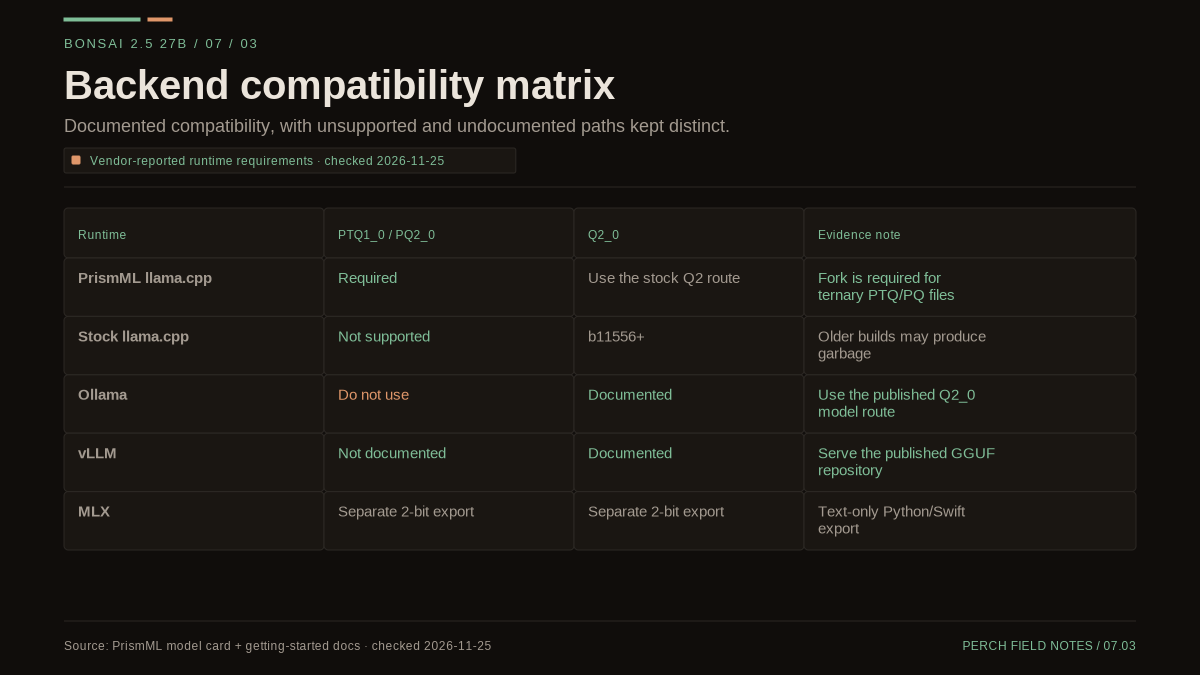
To install Bonsai 2.5 27B locally, choose the GGUF and runtime as one decision. Use Ternary-Bonsai-2.5-27B-PTQ1_0.gguf with PrismML’s llama.cpp fork for the smallest published base file, about 5.99 GB. Use Ternary-Bonsai-2.5-27B-Q2_0.gguf, about 7.67 GB, with stock llama.cpp build b11556 or newer. Do not load PTQ1_0 with stock llama.cpp, and do not assume an older stock build will work because it accepts the file.
The commands below take you from prerequisites to a first prompt. They start with the base files, a 32,768-token context and no MTP or vision projector. That gives you a clean baseline before adding memory cost. The sampling values and first prompt come from the model card; they are usage examples, not disclosed benchmark settings.
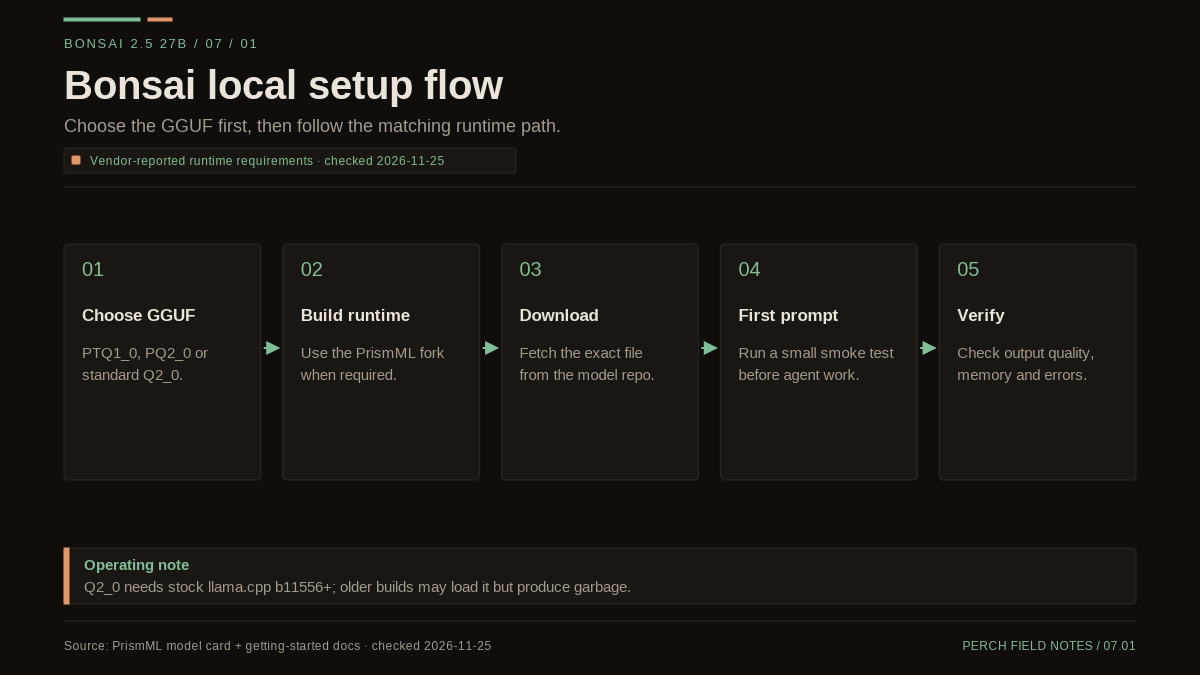
How do you choose PTQ1_0 or Q2_0?
Choose by runtime compatibility first, then by footprint. PTQ1_0 is the smaller option, but it requires PrismML’s fork. Q2_0 is larger, but it is the documented choice for stock llama.cpp b11556+. Neither filename is a promise about quality on your hardware. The supplied material contains no independent quantization-quality comparison, so there is no defensible score to assign to either file.
| Choice | Exact base filename | Published size | Required runtime | Best reason to choose it | Main boundary |
|---|---|---|---|---|---|
| PTQ1_0 | Ternary-Bonsai-2.5-27B-PTQ1_0.gguf |
5.99 GB | PrismML llama.cpp fork | Smallest published base GGUF | Not compatible with stock llama.cpp |
| Q2_0 | Ternary-Bonsai-2.5-27B-Q2_0.gguf |
7.67 GB | Stock llama.cpp b11556+ |
Use an existing stock runtime | Older builds may load it and emit garbage |
| PQ2_0, for comparison | Ternary-Bonsai-2.5-27B-PQ2_0.gguf |
7.25 GB | PrismML llama.cpp fork | Another published fork-compatible file | Larger than PTQ1_0; not the stock path |
The model card’s roughly 5.9 GB claim refers to the weight footprint. It is not total VRAM, system RAM or peak process memory. Context allocation, the KV cache, runtime buffers and any agent history sit beside the weights. The repository also publishes MTP variants: PTQ1_0 MTP is 6.23 GB, PQ2_0 MTP is 7.49 GB and Q2_0 MTP is 7.91 GB. Start without MTP so that a first-run failure has fewer variables.
There is also a naming inconsistency in the supplied compatibility material. It sometimes says TQ1_0, while the actual repository filename says PTQ1_0. Use the exact filename in the download command. Do not rename the file to match shorthand in a table, and do not substitute a similarly named quant without checking the repository listing in the official Ternary Bonsai 2.5 27B GGUF repository.
For a deeper file-by-file comparison, use the PTQ1_0 versus PQ2_0 versus Q2_0 quantization guide. For memory planning rather than file selection, use the Bonsai VRAM and RAM worksheet by quantization. A smaller download is useful only if the complete process fits and produces acceptable output.
What prerequisites do you need?
You need a shell environment, Git, CMake, a working C/C++ build toolchain and the Hugging Face hf command. The CUDA route shown below also needs a compatible NVIDIA toolkit and driver. These are requirements of the published build command, not a claim that one GPU or RAM amount is sufficient for every configuration.
Before downloading several gigabytes, check free space for the selected GGUF, the cloned runtime, build output and room for temporary files. Keep the PrismML fork and stock llama.cpp in separate parent directories. Mixing their binaries is the fastest way to turn a Quantization problem into a confusing runtime problem.
Use this preflight check in a POSIX shell:
git --version
cmake --version
hf --version
For an NVIDIA CUDA build, also confirm that the machine sees the intended GPU and that the CUDA toolkit is available to the build. If any command is missing, fix the toolchain before cloning. A model download will not repair a missing compiler, and a successful clone will not repair an unavailable CUDA toolkit.
The PrismML getting-started documentation is the authoritative place to check current platform and backend requirements. The frozen command set supplies an exact CUDA CMake flag, but it does not supply native Windows build commands or exact CPU, Metal and SYCL build flags. The guide therefore does not invent them. On Windows, use a shell environment that can execute the documented commands or follow current platform-specific PrismML instructions. Do not paste a POSIX ./bin/llama-cli path into PowerShell and assume it names a Windows executable.
If you want the shortest documented Q2_0 route without building the fork, read the Ollama Q2_0 commands and coding-agent connection. If you are on Apple Silicon, the Apple Silicon MLX setup for Bonsai 2.5 27B covers the separate text-only export. Neither route changes the rule that PTQ1_0 needs the PrismML fork.
How do you build PrismML llama.cpp?
Use a clean parent directory for the fork. The model card gives the clone and CUDA build commands below. The -DGGML_CUDA=ON option is specifically for an NVIDIA CUDA build; it is not a generic switch for every GPU.
git clone https://github.com/PrismML-Eng/llama.cpp && cd llama.cpp
cmake -B build -DGGML_CUDA=ON && cmake --build build -j
Run both lines from the same clean shell session. The first changes into the newly cloned llama.cpp directory. The second configures a build directory and compiles it. If configuration stops, read the first reported error rather than continuing to the model download. Missing build tools and CUDA detection failures happen before Bonsai is involved.
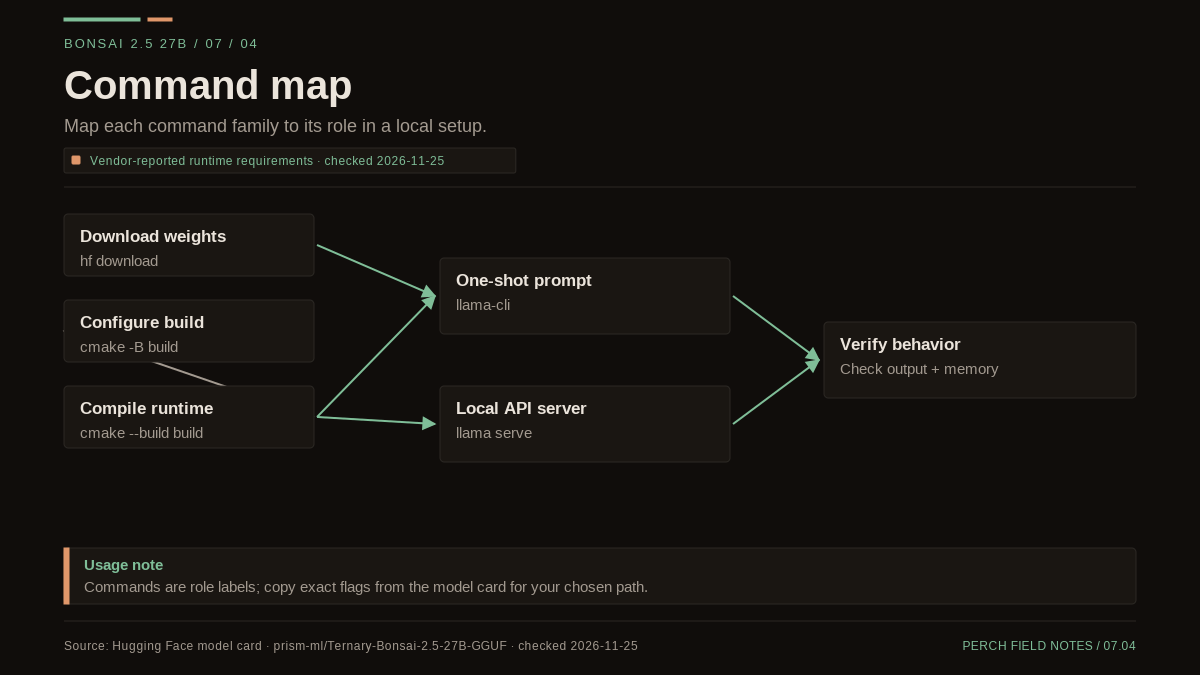
After the build completes, keep this directory for the PTQ1_0 run. Download the model into the same directory so the published relative command can find it:
hf download prism-ml/Ternary-Bonsai-2.5-27B-gguf Ternary-Bonsai-2.5-27B-PTQ1_0.gguf --local-dir .This ordering is deliberate. It avoids downloading the GGUF into a parent directory and then changing into llama.cpp, where the relative filename no longer resolves. The repository identifier and filename match the model-card command. If you organize files differently, pass the correct path to -m; do not create a second copy merely to hide a working-directory mistake.
PrismML documents CPU, Metal and SYCL backends as well as CUDA. The source packet does not include their exact build flags, so the safe instruction is to check the current getting-started documentation for your platform instead of guessing a CMake option. The same caution applies to a native Windows fork build. A verified platform command is better than a plausible but unsupported one.
Which backend flags and runtime settings matter?
The published CUDA build flag and the model-card CLI settings serve different jobs. CMake configures the executable; llama-cli options control one inference run. Keep those layers separate when troubleshooting.
| Backend or setting | Exact flag or value | What it controls | Boundary |
|---|---|---|---|
| NVIDIA CUDA build | -DGGML_CUDA=ON |
Enables the documented CUDA build path | Not a CPU, Metal or SYCL command |
| GPU layer offload | -ngl 99 |
Requests the model-card offload configuration | Actual placement depends on available memory |
| Flash attention | -fa on |
Enables the model-card attention setting | Use the published spelling and value |
| Context allocation | -c 32768 |
Starts with a 32,768-token context | Smaller than the documented 262,144-token maximum |
| Sampling temperature | --temp 1.0 |
Sets the example sampling temperature | Not a disclosed benchmark setting |
| Top-p | --top-p 0.95 |
Sets nucleus sampling | Usage example only |
| Top-k | --top-k 20 |
Limits the sampled candidate set | Usage example only |
| Minimum probability | --min-p 0 |
Sets the example minimum-p value | Usage example only |
| Output cap | -n 16384 |
Allows up to 16,384 generated tokens | Short caps can truncate thinking |
| CPU, Metal and SYCL builds | Not supplied in the frozen commands | Documented backend families | Check current PrismML instructions; do not guess flags |
The 32,768-token starting context is a conservative baseline, not a measured optimum. Its documented context is 262,144 tokens, but that does not mean every GPU can allocate it. Increase -c only after a short-context run is stable and you have measured memory. The 262K Bonsai context-window memory guide explains the competing costs of repository files, tool output and history.
How do you run PTQ1_0?
From the PrismML fork’s llama.cpp directory, run the model-card command. It uses the downloaded PTQ1_0 file, the CUDA-oriented offload example and the supplied quantum-computing prompt.
./bin/llama-cli -m Ternary-Bonsai-2.5-27B-PTQ1_0.gguf -ngl 99 -fa on -c 32768 --temp 1.0 --top-p 0.95 --top-k 20 --min-p 0 -p "Explain quantum computing in simple terms." -n 16384Wait for model loading to finish before judging generation. A useful success check has three parts: the runtime loads the expected file, the response is coherent rather than repeated symbols or unrelated tokens, and the process remains within your machine’s memory. A coherent answer does not prove benchmark quality, but garbage output is a strong sign that the file and runtime are mismatched.
By default, Bonsai reasons at xhigh. medium is available, while low is unsupported and behaves like xhigh. Thinking is on by default. If the output stops before a final answer, do not immediately blame model quality: the output cap may have been consumed by reasoning. The supplied command already allows 16,384 generated tokens, but difficult prompts can still need a different budget.
Once this baseline works, record the exact GGUF, fork state, backend, context, offload setting and MTP state beside your observations. Change one item at a time. If you add the 6.23 GB MTP file, remember that PrismML warns MTP can slow NVIDIA prefill by 9 to 23 percent. The supplied material does not provide an exact MTP CLI command, so this guide does not invent one.
Vision is another separate step. The optional projector files are about 0.93 GB in BF16 and 0.63 GB in Q8_0. Downloading the text GGUF does not configure image input. Use the Bonsai vision mmproj setup and benchmark limits before adding a projector, and do not assume the text-only MLX export supports images.
How do you run stock Q2_0?
Use a separate stock llama.cpp installation at build b11556 or newer. Do not reuse the PrismML fork binary for this test, because then you cannot tell whether the stock runtime requirement has been satisfied. Verify the installed version using the method provided by that stock build before loading Bonsai.
Download the exact Q2_0 base file with the model-card command:
hf download prism-ml/Ternary-Bonsai-2.5-27B-gguf Ternary-Bonsai-2.5-27B-Q2_0.gguf --local-dir .The model card documents this stock serving command:
llama serve -hf prism-ml/Ternary-Bonsai-2.5-27B-GGUF:Q2_0That command starts the documented server route. Wait until the runtime reports that it is ready, then connect a local client to the endpoint it reports. The supplied source packet does not fix a port or provide a client payload, so check the server output instead of assuming an address.
For a direct local-file smoke test, the following walkthrough adapts the model card’s published llama-cli options to the Q2_0 filename. It is an explicit adaptation, not a second verbatim vendor command:
llama-cli -m Ternary-Bonsai-2.5-27B-Q2_0.gguf -ngl 99 -fa on -c 32768 --temp 1.0 --top-p 0.95 --top-k 20 --min-p 0 -p "Explain quantum computing in simple terms." -n 16384If llama-cli is not on your path, invoke the executable from your verified stock build using that platform’s path convention. The important checks are the stock version, the exact Q2_0 filename and the absence of PrismML fork binaries in the command path.
Older stock builds are a specific failure case. PrismML also warns that they may load Q2_0 but produce garbage. Updating the model file will not fix an old runtime, and re-downloading the same GGUF will not fix it either. Update to b11556+, then repeat the same prompt.
If you prefer a managed local runtime, the Ollama Q2_0 commands and coding-agent connection provides the documented Ollama path and exact Q2_0 tag. If you need an OpenAI-compatible server with more deployment control, see the vLLM OpenAI-compatible Bonsai server setup and follow the model card’s repository command. Verify which GGUF that runtime selects, and do not substitute PTQ1_0 because it is smaller.
How do you troubleshoot the local setup?
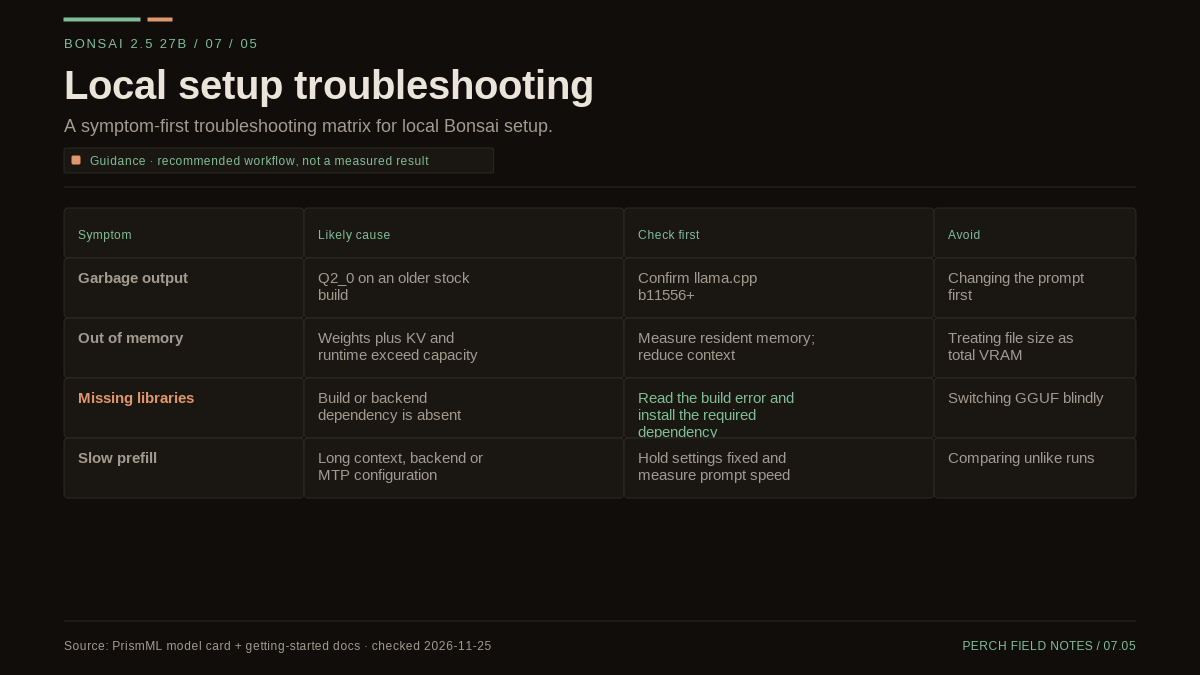
Start with the earliest failed stage. A build error, a missing file, an out-of-memory event and incoherent generation have different causes. The table maps common symptoms to checks without claiming that one remedy fits every machine.
| Symptom | Likely cause | What to check or change | What not to assume |
|---|---|---|---|
| PTQ1_0 loads but emits garbage | Stock llama.cpp is being used | Invoke the verified PrismML fork binary and repeat the baseline | The GGUF is not corrupted just because stock rejects its semantics |
| Q2_0 loads but emits garbage | Stock build is older than b11556 |
Verify and update the stock runtime | A successful file load does not prove compatibility |
-m cannot find the GGUF |
Wrong working directory or filename | Check the exact filename and pass the correct relative or absolute path | Do not rename PTQ1_0 to TQ1_0 |
| CMake configuration fails | Missing toolchain or unavailable backend prerequisites | Read the first error and repair Git, CMake, compiler or CUDA setup | The model is not involved yet |
| CUDA library or device error | Driver, toolkit and built backend do not line up | Verify the build environment and rebuild with the documented CUDA option | Do not install unrelated packages at random |
| Process runs out of memory during load | Weights plus runtime exceed available capacity | Use a smaller base file, confirm offload and close competing workloads | The 5.9 GB weight claim is not the process total |
| Out of memory after a long prompt | Context and KV cache grew beyond the budget | Return to -c 32768, then increase only after measurement |
Documented 262K context is not universal hardware fit |
| Answer stops mid-thought | Output cap is consumed by reasoning | Increase output room or use the supported medium setting |
low is not a faster supported mode |
| MTP makes prompt handling slower | Documented NVIDIA prefill penalty | Compare base and MTP with identical settings | A larger file does not guarantee faster prompts |
| Model responds coherently but coding patch is wrong | Model or harness limitation, not setup | Run the small coding test and inspect the diff | Successful loading is not proof of coding quality |
For out-of-memory failures, simplify before tuning. Remove MTP and vision from the experiment, return to the base GGUF, use the 32,768-token baseline and check whether -ngl 99 is appropriate for the available memory. If necessary, reduce offload rather than repeatedly raising context. The model card reports roughly 9.5 GB VRAM before -np 1 on a 10 GB RTX 3080 and about 7.8 GB afterward, but that is one vendor configuration, not a universal threshold.
No reliable CPU-only tokens-per-second figure exists in the supplied evidence. If you are testing CPU inference, treat speed as an open measurement and read the CPU-only Bonsai setup and memory tuning. Likewise, do not copy an RTX 4090 claim onto different hardware. The cross-hardware Bonsai tokens-per-second comparison separates vendor figures from community reports and explains why MTP and context must be recorded.
The Hacker News discussion of Bonsai 2.5 27B contains a 22.3 tokens-per-second Mac Mini M5 Pro report. It is a community anecdote with incomplete configuration, not a troubleshooting benchmark. Use it to find questions worth testing, not to predict your machine’s speed.
What should your first coding test be?
Begin with a bug whose correct answer you already know. Do not start by giving an agent your production repository or unrestricted shell access. A tiny fixture isolates model behavior from repository complexity and gives you a clear pass or fail signal.
Save this deliberately incorrect function as stats_util.py:
def average(values):
  return sum(values) / len(values)
Save these checks as test_stats_util.py:
from stats_util import average


def test_average_of_two_values():
  assert average([2, 4]) == 3


def test_average_of_empty_list():
  assert average([]) == 0.0
Run the tests once to confirm the fixture fails for the expected reason:
python -m pytest -qThen give Bonsai the function, the tests and this original smoke-test prompt. The prompt here is written for this walkthrough; it is not a vendor benchmark prompt or a reproduction of PrismML’s pytest demo.
The average() function in stats_util.py must return 0.0 for an empty list. The two tests in test_stats_util.py currently include a failing empty-list case. Explain the root cause, propose the smallest patch, and list the exact test command you would use to verify it. Do not claim the tests pass until they have been run.A useful response identifies the division by zero on an empty sequence, adds an explicit empty-input branch and asks to rerun python -m pytest -q. Review the proposed change before applying it. Then run the tests yourself. Record whether the diagnosis, patch and verification instruction were all correct; a plausible explanation with a broken patch is not a pass.
What you are running is a smoke test, not an estimate of SWE-bench performance. PrismML’s vendor table reports 75.6 on SWE-bench Verified, but Qwen3.8 FP16 leads that row at 80.6, and the coding average is 54.2 for Bonsai versus 60.5 for Qwen. The SWE-bench Verified 75.6 repository-repair analysis explains why a benchmark score does not guarantee a correct patch in your repository.
After the simple fixture, use a disposable repository with a known bug, tests and a clean version-control state. Ask for a minimal reproduction before a fix, require relevant tests, and inspect the final diff. The 180-tool-call Bonsai coding-agent workflow covers tool permissions and the full loop. For terminal work, sandbox and bound the commands you run; the Terminal-Bench 2.1 long-horizon terminal analysis is the better next read.
What does the setup evidence not establish?
The installation path is documented, but several practical questions remain open. There is no reliable CPU-only speed figure, no exact KV-cache byte table and no independent reproduction of the vendor benchmarks. The supplied sources also omit the benchmark hardware, prompts, scaffolds, seeds and pass-rate settings. Those gaps limit predictions; they do not invalidate the commands.
Quality has an honest loss in the published comparison. On the agentic coding average, Bonsai 2.5 27B trails Qwen3.8 FP16 by 6.3 points, by 10.7 points on Terminal-Bench 2.1 and by 5.0 points on SWE-bench Verified. The row-by-row Bonsai 2.5 27B benchmark teardown shows the full pattern. A compact local file is a useful trade, not evidence of universal parity.
The ExplainX overview of Bonsai agentic coding explicitly notes that the scores were vendor-run and not independently reproduced. The PrismML launch announcement remains the source for the published claims, including the offline pytest demonstration. That demonstration is useful workflow evidence, but it is not a replayable public benchmark with a supplied dataset and full transcript.
Treat speed figures with the same discipline. Launch-page figures and model-card figures differ, and ExplainX attributes the higher generation claim to MTP. Meanwhile, the card warns that MTP can slow NVIDIA prefill. Record hardware, GGUF, MTP state, context and runtime beside every measurement. Do not merge incomparable numbers into one expected speed.
The guide should be updated when PrismML publishes native Windows build steps, exact non-CUDA fork flags, a reproducible memory table or independent local evaluations. Until then, those are explicit gaps rather than hidden assumptions. The supplied LocalLLaMA thread provided as a community pointer was inconsistently accessible and supports no factual claim here.
Is Bonsai 2.5 27B ready for your local stack?
Yes, if you match the file to the runtime and verify a baseline before adding complexity. Choose PTQ1_0 with the PrismML fork when the smaller 5.99 GB base file matters and you are willing to maintain the fork. If staying on the stock runtime matters more, choose Q2_0 with stock llama.cpp b11556+. Start at 32,768 tokens, without MTP or vision, and require a coherent first prompt.
The verdict is narrower than a general model recommendation. Bonsai 2.5 27B is a local option with published tool-calling and image support, Apache 2.0 licensing and a compact weight footprint. It still trails the full-precision Qwen comparison on the published coding average, and its real speed and memory behavior depend on your configuration. Test a known coding bug before trusting it with unattended work.
Bonsai 2.5 27B is not a hosted One AI API Key model. If local runtime maintenance is not the right trade, compare hosted models currently available through One AI API Key. For the model-selection angle beyond installation, read the Bonsai 2.5 27B versus Qwen3.8 27B decision matrix and the Bonsai 2.5 27B launch verdict and setup router.
Complete Bonsai 2.5 27B guide
- Bonsai 2.5 27B launch verdict and setup router
- row-by-row Bonsai 2.5 27B benchmark teardown
- 180-tool-call Bonsai coding-agent workflow
- Tau, BFCL and AppWorld tool-calling analysis
- SWE-bench Verified 75.6 repository-repair analysis
- Terminal-Bench 2.1 long-horizon terminal analysis
- Ollama Q2_0 commands and coding-agent connection
- vLLM OpenAI-compatible Bonsai server setup
- Apple Silicon MLX setup for Bonsai 2.5 27B
- Bonsai VRAM and RAM worksheet by quantization
- cross-hardware Bonsai tokens-per-second comparison
- RTX 4090 Bonsai configuration and speed claims
- RTX 3060 12GB Bonsai feasibility and context tuning
- Mac Mini M5 Pro Bonsai setup and 22.3 tok/s audit
- CPU-only Bonsai setup and memory tuning
- 262K Bonsai context-window memory guide
- PTQ1_0 versus PQ2_0 versus Q2_0 quantization guide
- Bonsai vision mmproj setup and benchmark limits
- Bonsai 2.5 27B versus Qwen3.8 27B decision matrix
Sources
- PrismML launch announcement supports the release date, Apache 2.0 statement, benchmark claims, speed claims and offline demo.
- Ternary Bonsai 2.5 27B GGUF repository supports exact filenames, rounded file sizes, runtime compatibility, commands and memory examples.
- PrismML getting-started documentation supports the documented llama.cpp and MLX setup paths, backend families, tool support and image support.
- ExplainX overview supports the third-party agentic-coding framing, vendor-run caveat and MTP interpretation.
- Hacker News discussion supports community questions and the anecdotal Mac Mini speed report, not independent benchmark verification.
- LocalLLaMA discussion is an inconsistently accessible community pointer, not evidence for any factual claim in this guide.