Serve Bonsai 2.5 27B with vLLM when you want coding tools to talk to a local model through an OpenAI-compatible URL. The documented starting point is vllm serve "prism-ml/Ternary-Bonsai-2.5-27B-GGUF", followed by a client base URL such as http://127.0.0.1:8000/v1. That gives you a concrete integration path without pretending that the supplied material contains a complete production benchmark.
The important boundary is evidence. The published Ternary Bonsai 2.5 27B GGUF model card documents the vLLM command and a chat-completions request. It does not pin a vLLM version, identify the GPU used for a vLLM test, provide a concurrency result, or publish exact KV-cache memory. The article therefore separates the published Bonsai command from general vLLM controls that you should verify in your installed CLI before using them.
A sensible deployment starts with one admitted sequence, a measured context ceiling and loopback binding. Prove that a client can list the model, complete a short request and stream a longer response. Then raise concurrency only while memory, latency and error rate remain acceptable. The 5.9 GB-class weight footprint is useful for planning, but it is not the memory consumed by a running server.
What are the vLLM prerequisites?
Use a Python environment supported by the vLLM release you install, with enough system RAM and accelerator memory for both the model and its runtime. For an NVIDIA deployment, confirm that the driver and device are visible before troubleshooting Python. A useful preflight is:
python --version
nvidia-smi
python -m pip install vllm
vllm serve --help
nvidia-smi is relevant to NVIDIA systems, not a universal requirement. The supplied Bonsai sources document several llama.cpp backends and an MLX export, but they do not establish a CPU-only vLLM speed or a complete vLLM configuration for every platform. Do not convert a documented llama.cpp capability into an unverified vLLM promise.
The published command uses the repository identifier, so a standalone Hugging Face download is not required for the first launch. vLLM fetches the repository directly. If you instead want a local artifact for repeated testing, the model card supplies a separate hf download command covered in the next section. Check free disk space for the selected GGUF, the Hugging Face cache and any local copy. A cached repository can avoid a second download, but it does not remove the runtime memory requirement.
The PrismML getting-started documentation describes local and OpenAI-compatible serving as supported directions. It does not supply the missing vLLM version matrix. Beside your setup, record three things: the vLLM version, the exact model repository or filename, and the hardware visible to the runtime. Those records make a failure reproducible instead of reducing it to “vLLM does not work.”
Choose the client before launching the server. curl is enough for route checks. An OpenAI SDK is useful for application code. A coding agent needs a configurable base URL, model identifier and credential, plus support for the request features your harness uses. Confirm those fields in the client documentation rather than assuming that every tool branded as OpenAI-compatible implements the same subset.
Plan for the model’s reasoning behavior as well. PrismML says thinking is on by default, xhigh is the default reasoning level, medium is available, and low is unsupported in a way that behaves like xhigh. A short output cap can end a response before the final answer appears. Your first API test should therefore allow enough output tokens to observe a complete response, then record how much room the reasoning trace actually needs.
For file selection, use the PTQ1_0 and Q2_0 local installation walkthrough and the PTQ1_0 versus PQ2_0 versus Q2_0 quantization guide. The llama.cpp rule is explicit: PTQ1_0 and PQ2_0 require PrismML’s fork, while Q2_0 needs stock llama.cpp b11556 or newer. Those rules should not be casually transferred to vLLM. The vLLM source establishes a repository-id command, not a per-file compatibility table.
How do you serve the Bonsai GGUF with vLLM?
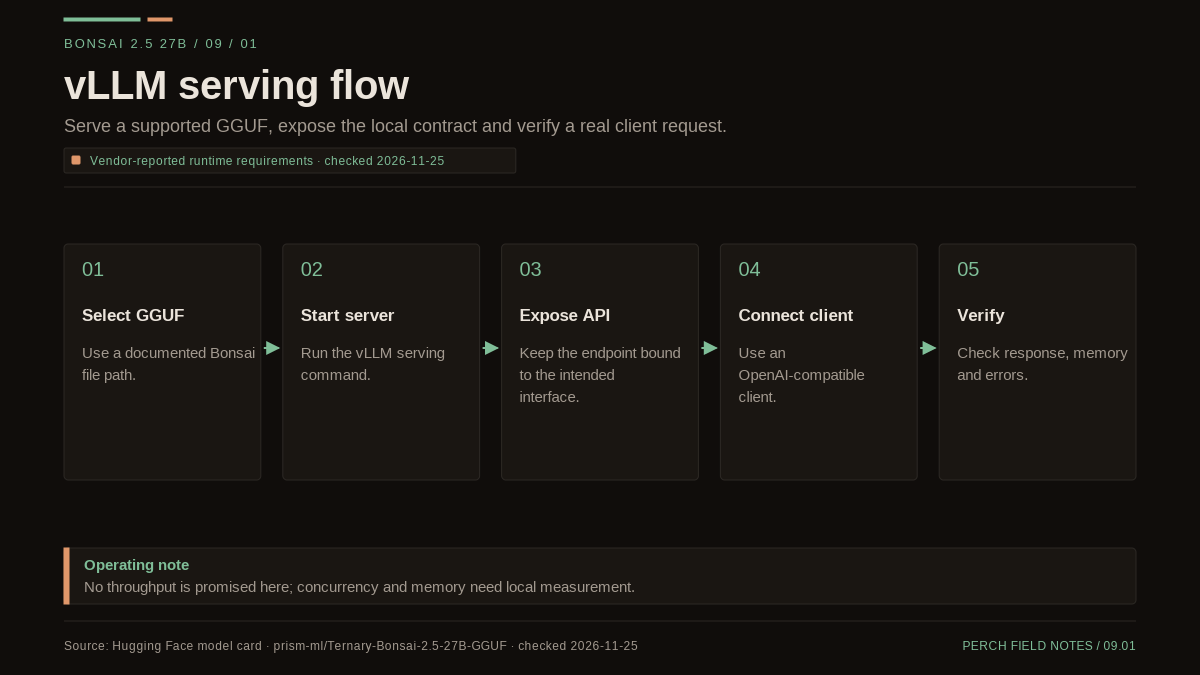
The least ambiguous first launch is the command printed on the model card:
The published repository command is one line:
vllm serve "prism-ml/Ternary-Bonsai-2.5-27B-GGUF"Installing vLLM itself is a separate setup step outside the model card:
python -m pip install vllmLeave the repository identifier exact, including Ternary, capitalization and the -GGUF suffix. Wait for model loading to finish before sending traffic. A process that has opened a port is not necessarily ready to serve; confirm readiness through the health and model-listing checks in the next section.
If you want a local Q2_0 artifact, the model card supplies this download command:
hf download prism-ml/Ternary-Bonsai-2.5-27B-GGUF Ternary-Bonsai-2.5-27B-Q2_0.gguf --local-dir .That command creates a local file, but the frozen source does not document a complete air-gapped vLLM invocation for a standalone GGUF path. A local-file loader may also need tokenizer or configuration material depending on the installed build. Handle local-file serving as a separate compatibility test. Do not replace the published repository command with PTQ1_0 or PQ2_0 merely because those files work in PrismML’s llama.cpp fork.
The published files are 5.99 GB for Ternary-Bonsai-2.5-27B-PTQ1_0.gguf, 6.23 GB for its MTP variant, 7.25 GB for Ternary-Bonsai-2.5-27B-PQ2_0.gguf, 7.49 GB for its MTP variant, 7.67 GB for Ternary-Bonsai-2.5-27B-Q2_0.gguf, and 7.91 GB for its MTP variant. Optional vision projectors are separate: approximately 0.93 GB for BF16 and 0.63 GB for Q8_0. These are disk footprints from repository byte counts, not measurements of vLLM resident memory.
Which vLLM command options are useful here?
The following table is an operational checklist. The model positional argument and --help are the documented starting points. The other names are common vLLM CLI controls; confirm their exact spelling and availability in the installed release before copying them into a service definition.
| Option or input | Purpose | Safe use for this Bonsai server |
|---|---|---|
vllm serve "prism-ml/Ternary-Bonsai-2.5-27B-GGUF" |
Selects the published model repository | Use unchanged for the first launch |
vllm serve --help |
Prints options supported by the installed release | Record the output with your vLLM version |
--served-model-name bonsai-2.5-27b |
Publishes a shorter client-facing model alias | Confirm the alias through /v1/models |
--host 127.0.0.1 |
Restricts listening to the local machine | Keep this default for a private workstation |
--port 8000 |
Selects the HTTP listener | Match the port in every client base URL |
--api-key "$BONSAI_API_KEY" |
Requires a bearer credential | Use a local secret and never commit it |
--max-model-len 32768 |
Caps the modeled context for a request | Treat 32,768 as a test ceiling, not a measured optimum |
--max-num-seqs 1 |
Limits concurrently admitted sequences | Start at one while measuring memory and latency |
A conservative local test can combine those controls. This is not a claim that PrismML benchmarked the command or that the values are optimal:
export BONSAI_API_KEY='replace-with-a-local-random-value'
vllm serve "prism-ml/Ternary-Bonsai-2.5-27B-GGUF" --served-model-name bonsai-2.5-27b --host 127.0.0.1 --port 8000 --api-key "$BONSAI_API_KEY" --max-model-len 32768 --max-num-seqs 1
The alias changes what clients send in the model field; it does not change the weights. The context ceiling constrains the request rather than granting the full 262,144-token model specification. The sequence limit is an admission control, not a guarantee that one request will fit. Weight loading, KV cache, runtime workspaces and the request’s actual prompt still compete for memory.
Do not add tensor-parallel, speculative-decoding or quantization flags from another model’s recipe without checking both the vLLM CLI and the Bonsai loader. In particular, an MTP filename in the repository does not prove that a generic vLLM flag enables that MTP path. The supplied vLLM command contains no MTP option. Record a plain baseline first, then investigate optional paths as separate experiments.
Which OpenAI-compatible routes does the server expose?
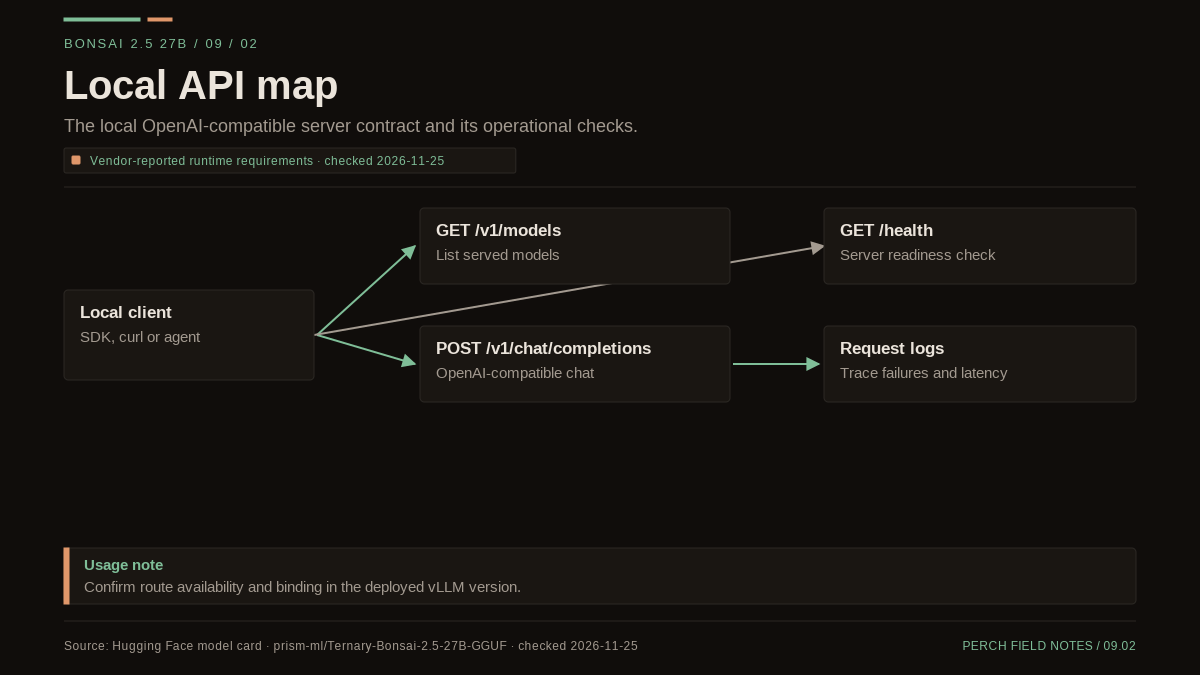
An OpenAI-compatible base URL normally ends in /v1. The SDK appends the operation path, so a client configured with http://127.0.0.1:8000/v1 should call /v1/chat/completions, not /v1/v1/chat/completions. The model card explicitly demonstrates the chat-completions route and uses prism-ml/Ternary-Bonsai-2.5-27B-GGUF as the request’s model identifier. If you publish the shorter alias shown above, use that alias instead.
| Route | Method | Role in the integration |
|---|---|---|
/health |
GET | Checks server liveness before a client sends model traffic |
/v1/models |
GET | Lists served model identifiers and confirms the alias |
/v1/chat/completions |
POST | Sends messages and receives a chat completion; supports streaming when enabled |
/openapi.json |
GET | Lets you inspect the routes and schemas exposed by the installed build |
The model card is explicit about /v1/chat/completions. For the other conventional vLLM routes, verify each one against your running server rather than treating them as a frozen Bonsai-specific contract. Authentication policy can also differ by route and configuration, so send the bearer credential consistently during preflight.
curl --fail http://127.0.0.1:8000/health
curl --fail -H "Authorization: Bearer $BONSAI_API_KEY" http://127.0.0.1:8000/v1/models
A successful model listing should show the identifier your client will send. If the response contains the repository identifier rather than the alias, either use that exact value or correct the --served-model-name configuration. Do not guess a model name from the article title.
The basic chat request has four important parts: the model identifier, an ordered messages array, an output limit and a streaming choice. A minimal authenticated request against the aliased test server looks like this:
curl --fail http://127.0.0.1:8000/v1/chat/completions -H "Authorization: Bearer $BONSAI_API_KEY" -H "Content-Type: application/json" --data '{"model":"bonsai-2.5-27b","messages":[{"role":"user","content":"Reply with a short summary of what a local API server does."}],"max_tokens":2048,"stream":false}'The 2,048-token cap is an integration example, not a benchmark setting. Increase it when a complete reasoning trace and final answer require more room. For a coding task, include only the repository context and tool results needed for the current step. A large context limit is not a reason to attach an entire repository to every request.
OpenAI compatibility describes the request and response surface, not identical behavior across every model. A client may read choices[0].message.content, stream deltas, submit tool schemas or expect provider-specific reasoning fields. Inspect the raw response from your server before deciding that a blank answer is a model failure. The Tau, BFCL and AppWorld tool-calling analysis explains why benchmark tool use still needs validation inside your own schema and execution harness.
How do you connect a client?
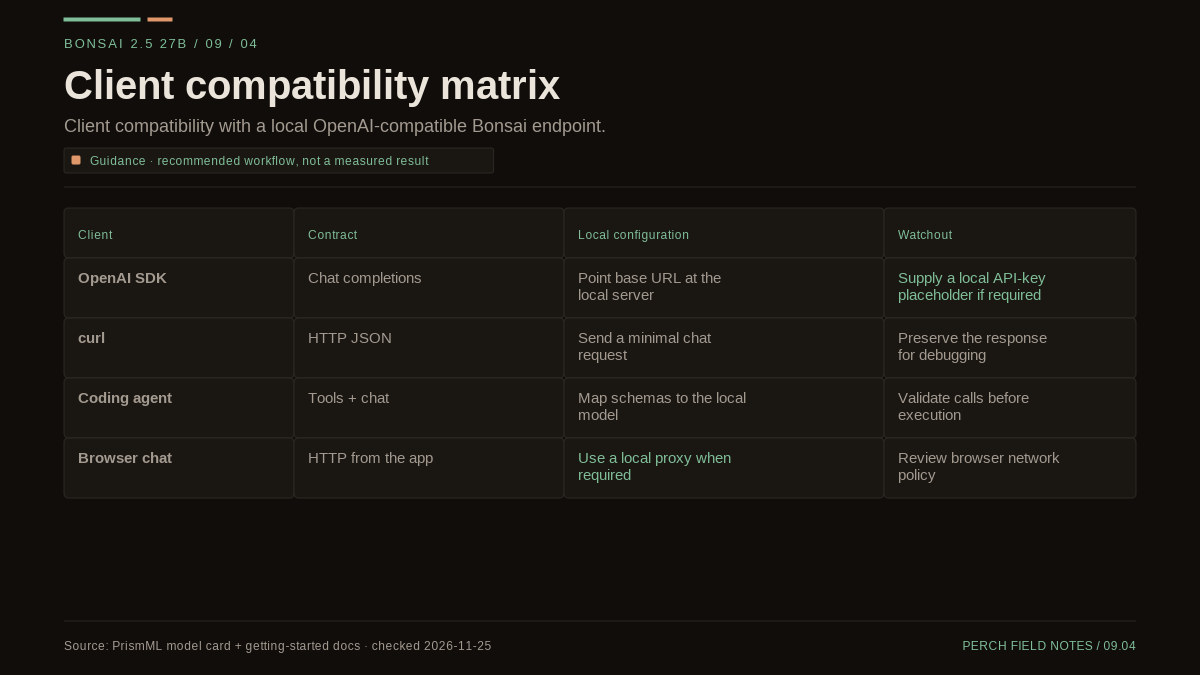
For Python, the OpenAI SDK can point at the local server without changing the request style used for a hosted provider. Install the SDK in your application environment, store the local credential in an environment variable and read the model alias from the server rather than hard-coding an assumption.
import os
from openai import OpenAI

client = OpenAI(
  base_url="http://127.0.0.1:8000/v1",
  api_key=os.environ["BONSAI_API_KEY"],
)

response = client.chat.completions.create(
  model="bonsai-2.5-27b",
  messages=[
      {"role": "user", "content": "List three checks for a local inference server."}
  ],
  max_tokens=2048,
)

print(response.choices[0].message.content)
Keep base_url at the API root ending in /v1. Do not append /chat/completions to the SDK base URL. If the application runs in another container or on another machine, 127.0.0.1 refers to that application’s own host, not the server. Use a reachable private address, configure the server bind address deliberately and protect the port with authentication and network controls.
For a coding tool, look for four settings: API base URL, model identifier, API key and protocol or chat-completions mode. Enter the same values you verified with curl. Some tools also expose context, output and timeout controls; set those from measured behavior rather than from the model’s maximum specification. If a tool requires the Responses API or another route that your server does not expose, a base URL alone will not make it compatible.
Begin with a tool that has a small, inspectable schema. Validate the returned arguments in your application before executing anything. The model does not receive shell or filesystem access merely because it is running locally; the client harness grants that access. Keep repository writes inside a workspace, require tests before accepting a patch and review the final diff. The 180-tool-call Bonsai coding-agent workflow provides a useful evaluation pattern, but PrismML’s demo is not an independently reproduced success rate.
Streaming is worth testing separately. Set stream to true and consume chunks incrementally so the client can render output and detect a stalled connection. Measure time to first token as well as total completion time. A non-streaming request can look healthy while hiding a long wait before the first visible token, which matters for an interactive coding assistant.
Retries belong in the concurrency design. A client that retries a timed-out request may create another generation while the first is still running. Bound retries, use request identifiers where the client supports them and distinguish a transport failure from a model error. This is especially important when --max-num-seqs is small: the server may be busy rather than broken.
Never log the bearer key, full prompts or private repository contents by default. For local development, loopback binding reduces exposure but does not make an open port safe. If you expose the server beyond one machine, use a protected network path and a credential that can be rotated without rebuilding the application.
How do concurrency and memory constrain the server?
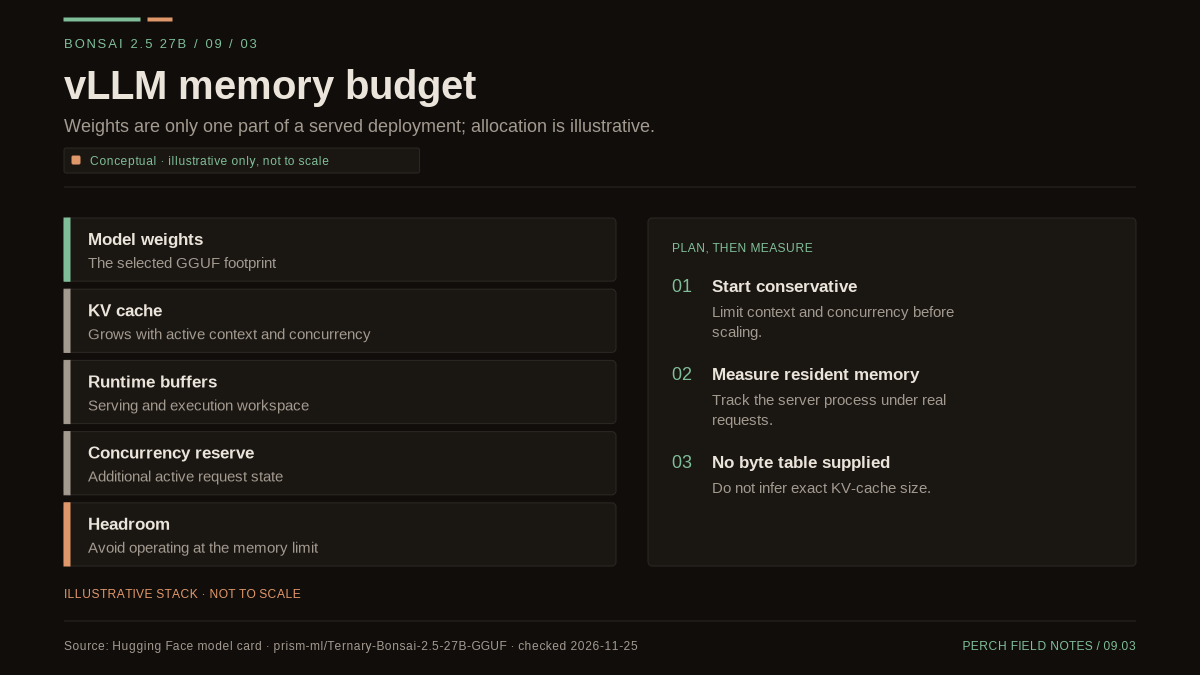
Concurrency has three separate boundaries. The configured model length limits an individual request. The sequence limit controls how many generations the server admits. Available memory determines whether those admitted requests can actually be scheduled and how much KV cache can be retained. Lowering one boundary does not automatically solve pressure at another.
A request also needs room for system instructions, tool schemas, repository excerpts, prior turns and the requested output. The model’s 262,144-token context is a vendor specification, not a promise that every GPU can serve that length alongside other traffic. The 262K Bonsai context-window memory guide and Bonsai VRAM and RAM worksheet provide the broader budgeting method.
| Constraint | What changes | Practical limit or response |
|---|---|---|
| Weight footprint | GGUF selection and optional files | Use the exact file size as a floor, not total memory |
| Configured context | Prompt, tool history and output share the window | Start below the model maximum and measure |
| KV cache | Grows with retained context and active sequences | No exact byte table is supplied; observe runtime memory |
| Admitted sequences | Multiple requests compete for compute and cache | Start with one and add load gradually |
| Runtime workspace | Accelerator allocations and serving overhead | Reserve headroom instead of filling all memory |
| MTP variant | Adds about 0.24 GB per paired file and may change speed behavior | Do not assume MTP is always faster |
| Vision projector | Adds a separate model component | Verify the vLLM vision path before enabling image input |
| Client retries | Can multiply work after a timeout | Cap retries and test queue behavior |
The model card’s memory example needs careful labeling. It reports roughly 9.5 GB of VRAM before -np 1 on a 10 GB RTX 3080, falling to about 7.8 GB afterward. That is a llama.cpp server example with one request slot, not a vLLM measurement and not a universal minimum. It is still a useful warning: a compact model can consume substantially more than its weight file once the runtime allocates cache and request state.
MTP is another reason not to copy a speed number into a capacity plan. The MTP variants add approximately 0.24 GB to each corresponding base file. PrismML warns that MTP can slow NVIDIA prefill by 9 to 23 percent, while ExplainX associates the higher launch throughput figure with MTP. Generation speed and prompt-processing speed can move in different directions.
Use a staged load test. First, send one short request and record resident memory after loading. Second, send a request near your intended context ceiling and record peak memory and latency. Third, run sequential requests to expose cache or stability problems. Only then introduce two clients, and add more one at a time while watching errors and queue delay. Stop when memory headroom disappears, latency rises beyond the application’s budget or responses become unreliable.
Do not infer a safe concurrency count from the 5.9 GB marketing figure. A production-like target is the highest concurrency that meets your measured latency and reliability requirements on the exact hardware, vLLM build, GGUF, context and output policy. The supplied sources do not establish that number. Until you measure it, --max-num-seqs 1 is a validation setting, not a final capacity recommendation.
What should you monitor?
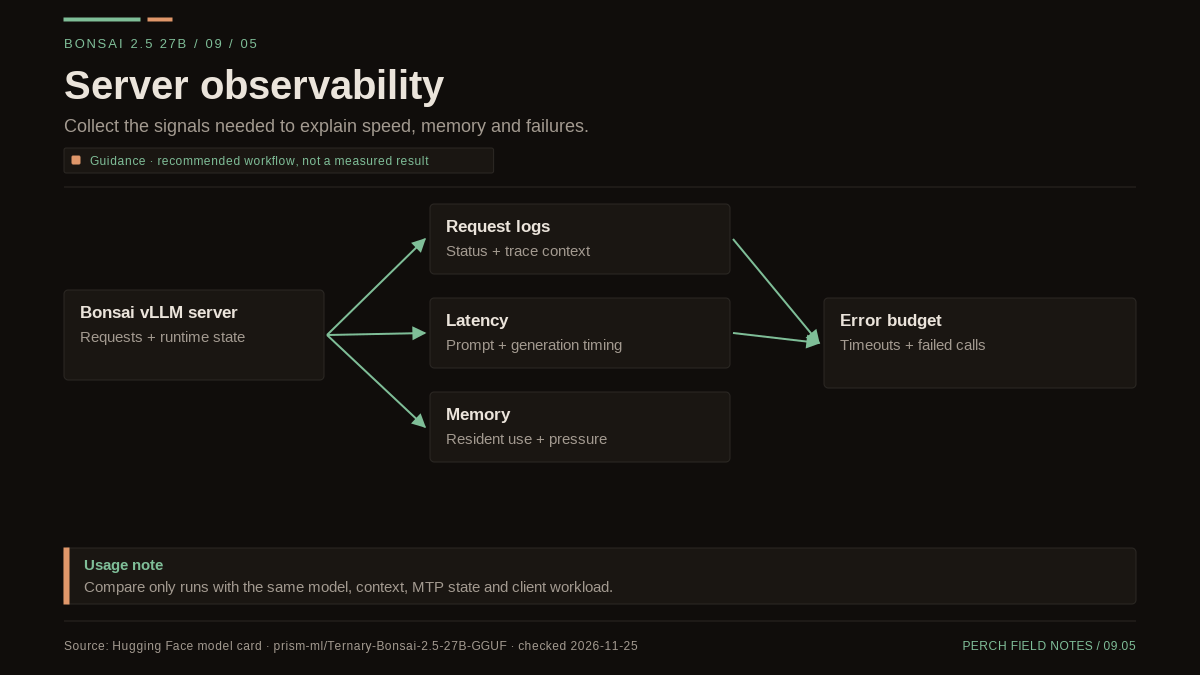
Begin with four signals: readiness, request outcome, latency and memory. Poll /health at a modest interval and treat a failure as a service incident. Query /v1/models after startup and after configuration changes. A 200 response from /health does not prove that the intended model is loaded or that a generation will succeed.
Record each request’s model alias, status, duration, input and output token counts when available, and whether it streamed. Measure time to first token separately from total generation time. Track transport errors, server errors, rejected requests and client timeouts as distinct categories. That separation tells you whether the problem is capacity, connectivity, authentication or model output.
For an NVIDIA server, nvidia-smi provides a quick view of memory use and device visibility. Also record process-level system RAM, because model loading, tokenization, the client and logging all consume host memory. If your vLLM build exposes a metrics route, verify it in /openapi.json before configuring a scraper. Do not assume a route name or metric schema from a different release.
curl --fail http://127.0.0.1:8000/health
curl --fail -H "Authorization: Bearer $BONSAI_API_KEY" http://127.0.0.1:8000/v1/models
nvidia-smi
Set alert thresholds from your own baseline and service objective. A memory alert should leave room for a request to finish, not fire only after allocation fails. A latency alert should account for reasoning-heavy prompts, because a short output cap can truncate thinking while a long prompt can delay the first token. Log enough metadata to reproduce a bad request without retaining private code or credentials.
The speed evidence is not a vLLM benchmark. PrismML’s launch page claims 291 generated tokens per second and 3,200 prompt tokens per second on an H100, and 204 generated tokens per second with roughly 3,060 prompt tokens per second on an RTX 4090. The model card’s plain-decode PTQ1_0 table lists 186 on H100 and 112 on RTX 4090. ExplainX’s agentic coding overview attributes the higher launch figure to MTP and repeats that the scores are vendor-run rather than independently reproduced.
A Hacker News commenter reported 22.3 tokens per second on a Mac Mini M5 Pro, but the configuration is incomplete and the report is anecdotal. It is not comparable with the H100 or RTX 4090 claims and says nothing definitive about vLLM concurrency. Use the cross-hardware Bonsai tokens-per-second comparison to design a fair local measurement instead of merging these figures.
How do you troubleshoot the server?
The vLLM command is missing or the environment cannot import it
Activate the intended Python environment and rerun python --version, python -m pip install vllm and vllm serve --help. Confirm that the shell is invoking the same environment where the package was installed. Avoid mixing commands from a system Python, a project virtual environment and a container. Record the installed version before changing model settings.
The repository cannot be downloaded or the model does not load
Check the exact repository identifier, network access and available disk space. The weights are public, so an authentication error may indicate a misconfigured Hugging Face environment rather than a private repository. Inspect the first loader error instead of the final exit line. If the server loads a local file but fails later, compare that setup with the published repository-id command; the supplied source does not establish every local-file loader requirement.
The loader rejects a quantization or architecture
Return to the exact published vLLM command. Do not substitute PTQ1_0 or PQ2_0 solely because PrismML’s llama.cpp fork supports them. Conversely, do not apply the stock llama.cpp b11556+ Q2_0 rule as a vLLM fix; it is a llama.cpp compatibility statement. Capture the vLLM version, selected artifact and loader message, then test the documented repository path separately.
The server runs out of memory
Reduce the configured context ceiling, lower the admitted sequence count and remove unnecessary request history. Check whether vision or an MTP experiment was added after the last successful baseline. A lower accelerator-memory fraction may preserve headroom but can also reduce cache capacity, so evaluate the complete request rather than treating the flag as a universal repair. The RTX 3060 12GB feasibility guide illustrates constraint-first testing, but its configurations are not vLLM guarantees.
The client receives 401, 404 or a model-not-found response
A 401 usually points to a missing or incorrect bearer credential. A model-related 404 often means the request’s model field does not match /v1/models. A route 404 can instead mean the client appended the wrong path or base URL. Check the full request URL, then the model alias, then authentication. Do not solve all three with the same configuration change.
The client cannot connect
Confirm the process is running, the port matches and the bind address is reachable from the client. 127.0.0.1 only accepts connections originating on the same host. A container or second machine needs a deliberate network path. Keep authentication enabled when changing the bind address, and do not expose an inference port publicly just to make a local client work.
Output is empty, garbled or stops before the answer
First inspect the raw response and finish reason. Thinking is on by default, and a small max_tokens value can truncate the reasoning trace. Increase the output allowance for a controlled test. Do not select low reasoning expecting a cheaper mode; PrismML says it is unsupported and behaves like xhigh. If the text is genuinely garbled, verify the exact artifact and runtime rather than increasing the token cap.
Tool calls are malformed or the agent repeats an action
Validate the tool schema and arguments in the client, restrict the available tools and cap retries. Vendor benchmark scores do not prove compatibility with a particular coding harness. Review whether the model received useful error output and whether the client executed an invalid call anyway. The agentic coding workflow and tool-calling analysis provide evaluation checks beyond a successful HTTP status.
Prompt processing is slow or latency rises under load
Measure prompt size, time to first token, output length and active sequences together. Long repository context can dominate prefill, and MTP may slow NVIDIA prefill even when generation behavior interests you. Reduce context before increasing concurrency. Compare results at a fixed prompt, output policy and model artifact so a configuration change does not masquerade as a runtime improvement.
Image requests fail
Bonsai is documented as a vision-language model, but the projector files are separate and the supplied vLLM snippet does not describe a vision invocation. Do not assume that loading the text GGUF enables image input. The Bonsai vision mmproj setup and benchmark limits covers the files and runtime boundary. A working vLLM image request is a separate verification milestone.
What is still unproven, and what would justify an update?
The launch evidence is vendor-published. PrismML’s Bonsai 2.5 27B launch announcement reports useful gains over Bonsai 2 27B, but the supplied material does not include an independent reproduction. The honest quality loss remains visible in the same table: Bonsai 2.5 27B has a vendor-reported agentic coding average of 54.2 versus 60.5 for Qwen3.8 FP16. Terminal-Bench 2.1 is 60.1 versus 70.8, and SWE-bench Verified is 75.6 versus 80.6. A working local endpoint does not erase those gaps.
For serving specifically, the unknowns are the vLLM version, GPU and driver, selected GGUF loading path, context ceiling, MTP state, vision state, concurrency, prompt mix and measured memory. There is also no exact KV-cache byte table and no reliable CPU-only tokens-per-second figure in the supplied evidence. The LocalLLaMA thread supplied as a community pointer was inconsistently accessible and supports no factual claim here.
A future update should replace these gaps with a reproducible run: vLLM version, exact command, hardware, model artifact, context, output cap, concurrency, prompt set, memory peak, time to first token, generation rate and error count. Until that exists, report your own measurements as local observations, not as confirmation of the vendor’s throughput claims.
Final verdict
Use vLLM for Bonsai 2.5 27B if an OpenAI-compatible local endpoint is the main requirement and you can validate the exact runtime on your hardware. Start with the published repository command, a loopback bind, one admitted sequence and a modest context ceiling. Connect one client, verify every route you depend on, and scale only after measuring memory, latency and failures.
Do not choose this setup because the 5.9 GB figure appears to guarantee easy concurrency, or because the launch throughput appears to be a vLLM result. Neither conclusion is established. Bonsai 2.5 27B is a local GGUF release, not a hosted One AI API Key model. To compare hosted models currently available through One AI API Key, use the catalogue rather than looking for a Bonsai server identifier.
The practical verdict is conditional but useful: vLLM provides the API integration pattern coding tools need, while model quality, memory and capacity still require workload-specific testing. Keep the baseline reproducible, protect the endpoint and let measured requests determine the final configuration.
Complete Bonsai 2.5 27B guide
- Bonsai 2.5 27B launch verdict and setup router
- row-by-row Bonsai 2.5 27B benchmark teardown
- 180-tool-call Bonsai coding-agent workflow
- Tau, BFCL and AppWorld tool-calling analysis
- SWE-bench Verified 75.6 repository-repair analysis
- Terminal-Bench 2.1 long-horizon terminal analysis
- PTQ1_0 and Q2_0 local installation walkthrough
- Ollama Q2_0 commands and coding-agent connection
- Apple Silicon MLX setup for Bonsai 2.5 27B
- Bonsai VRAM and RAM worksheet by quantization
- cross-hardware Bonsai tokens-per-second comparison
- RTX 4090 Bonsai configuration and speed claims
- RTX 3060 12GB Bonsai feasibility and context tuning
- Mac Mini M5 Pro Bonsai setup and 22.3 tok/s audit
- CPU-only Bonsai setup and memory tuning
- 262K Bonsai context-window memory guide
- PTQ1_0 versus PQ2_0 versus Q2_0 quantization guide
- Bonsai vision mmproj setup and benchmark limits
- Bonsai 2.5 27B versus Qwen3.8 27B decision matrix
Sources
- PrismML launch announcement supports the release claims, vendor benchmark rows and throughput figures.
- Ternary Bonsai 2.5 27B GGUF repository supports the exact vLLM command, chat-completions example, file names and compatibility caveats.
- PrismML getting-started documentation supports the documented local and OpenAI-compatible serving direction.
- ExplainX overview provides a third-party framing, the vendor-run caveat and the MTP interpretation.
- Hacker News discussion provides community questions and an anecdotal Mac speed report, not independent verification.
- LocalLLaMA discussion is an inconsistently accessible community pointer and is not used as evidence.