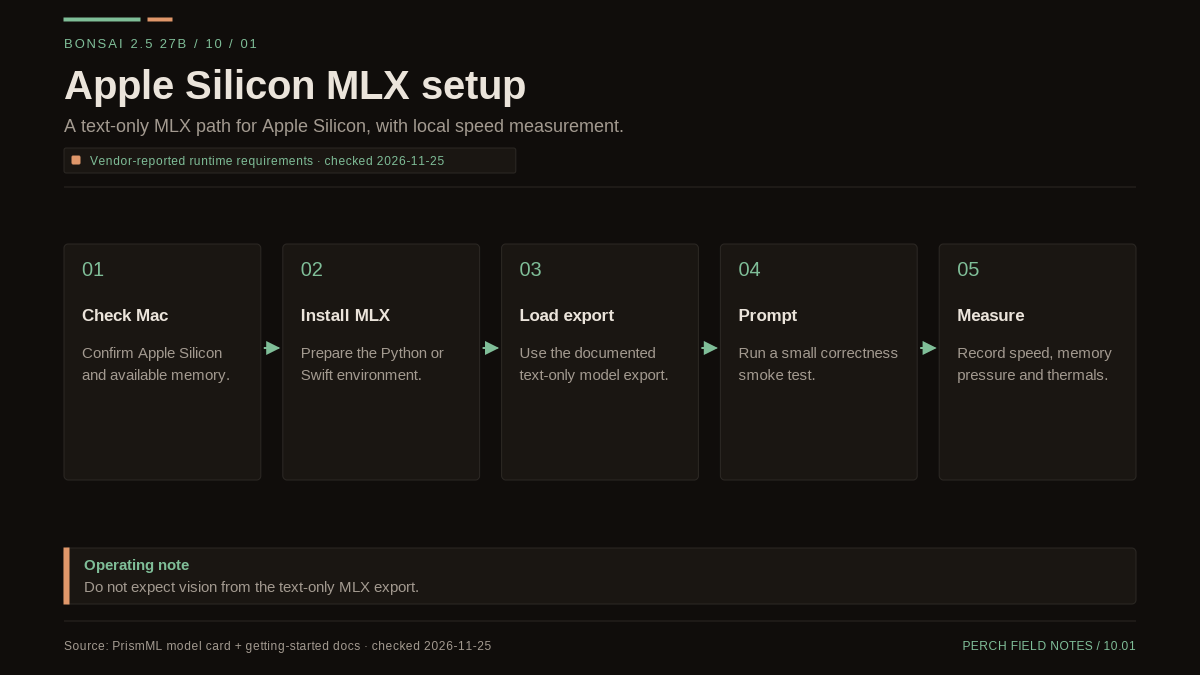
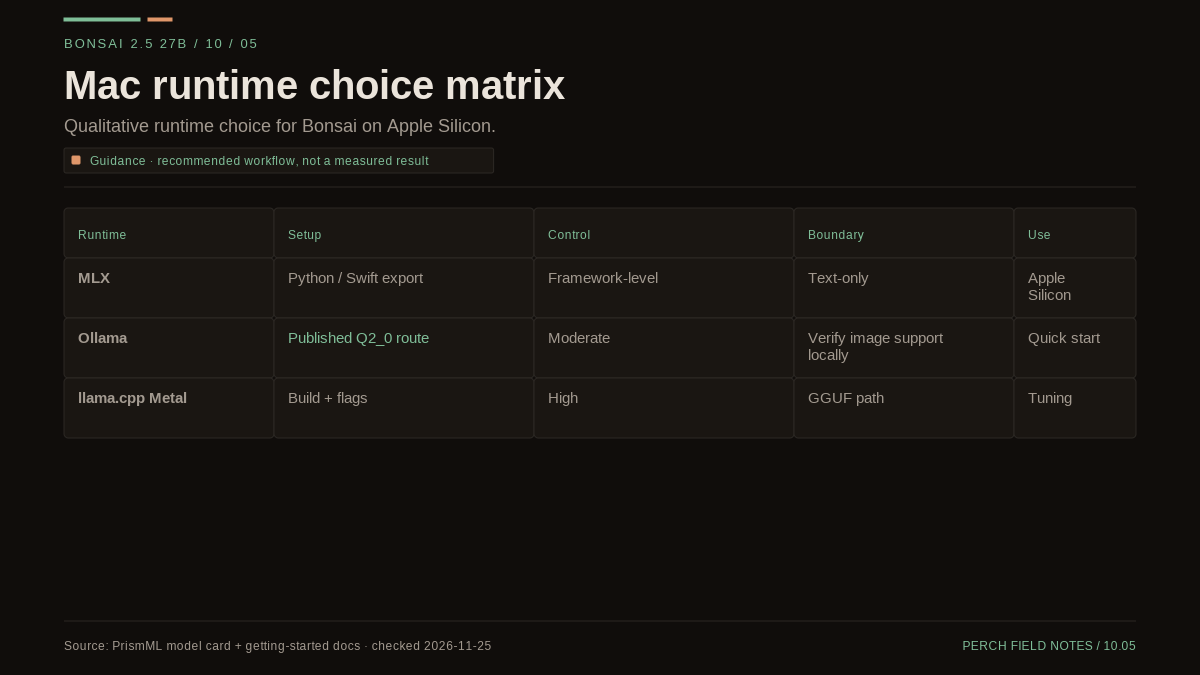
Bonsai 2.5 27B can run locally on an Apple Silicon Mac through PrismML’s text-only MLX export. Start with the repository prism-ml/Ternary-Bonsai-2.5-27B-mlx-2bit, use its bundled loader and requirements, and test with a short prompt before increasing context. The export is not the vision-enabled GGUF path, and its small weight footprint does not eliminate unified-memory pressure from the KV cache, macOS and other apps.
The practical verdict is cautious: MLX is a useful Apple-native route for private text experiments, but it is not the only Mac runtime and the published evidence does not establish a speed or memory minimum for every Mac. No vendor-published MLX decode speed figure is present in the supplied sources; the only Mac speed datapoint is a Hacker News commenter who reported 22.3 tokens per second on a Mac Mini M5 Pro, but omitted enough configuration detail that it cannot serve as a buying or tuning benchmark.
The guide separates documented requirements from planning advice. It covers supported Macs, the exact repository, installation and loading, the text-only boundary, unified-memory tuning, a repeatable speed test and failure recovery. It also marks what remains unknown so that a promising local result does not become an unsupported promise.
Which Macs support the MLX export?
The documented MLX path is for Apple Silicon. An Intel Mac is not a supported target for this export, and the supplied model material does not describe a Rosetta or CPU-only MLX fallback. Before installing anything, confirm that the shell is running natively on the Mac you intend to use.
uname -m
python3 -c 'import platform; print(platform.machine())'
sysctl -n hw.memsize
df -h .
On an Apple Silicon machine, the architecture check should report arm64. The memory command reports bytes rather than a friendly gigabyte label, so compare the result with the unified-memory configuration shown in Apple’s system information. The disk check matters because the model directory, Python environment and any Hugging Face cache need room beyond the visible model download.
The supplied material does not publish a complete compatibility matrix for base M1, M2, M3, M4 or M5 chips, nor does it state an exact minimum macOS version. Treat those omissions as real limits on the evidence, not as permission to claim that every Apple Silicon Mac will have the same experience.
A base-chip Mac may still be worth testing, especially for short text prompts, but start with the question of available unified memory rather than the chip name alone. A 27-billion-parameter model shares memory with macOS, the terminal, the Python runtime, the loader and the KV cache. More unified memory generally gives you more room to keep context and applications stable. It does not guarantee a particular generation speed, because memory bandwidth, thermals, runtime support and the workload also matter.
Do not use a community speed report as a supported-hardware list. The Hacker News Mac Mini M5 Pro report is useful as a lead for a reproducible test, not as proof that all M5 Pro systems will reproduce it. For a machine-specific follow-up, see the Mac Mini M5 Pro Bonsai setup and 22.3 tok/s audit.
Where is the MLX repository?
Use the model repository prism-ml/Ternary-Bonsai-2.5-27B-mlx-2bit. Do not substitute the similarly named GGUF repository and do not treat a generic conversion command as equivalent to loading this export. The official Ternary Bonsai 2.5 27B GGUF model card identifies the MLX build as text-only, exported from PQ2_0, with affine 2-bit weights, group size 128 and a bundled loader that applies the required Hadamard transforms.
That loader detail matters. Bonsai’s compressed representation, on the other hand, is not simply a conventional GGUF or MLX directory that every generic loader can interpret. The repository’s runtime/requirements.txt pins the relevant MLX packages. Use those requirements instead of assembling an untested mixture of current mlx, mlx-lm, mlx-vlm and Transformers releases. A generic loader may fail during import, may reject model metadata or may produce unusable output even when the files download correctly.
The repository also contains a text quickstart. The documented invocation is python quickstart.py "What is 2 plus 2?". Run it from the downloaded pack directory after installing the bundled requirements. It gives you a small correctness check before you spend time on a coding harness or a long context.
Keep three names separate during setup:
prism-ml/Ternary-Bonsai-2.5-27B-mlx-2bitis the Apple Silicon MLX export used in this guide.prism-ml/Ternary-Bonsai-2.5-27B-GGUFis the GGUF repository used by llama.cpp, Metal and other documented GGUF routes.PrismML-Eng/llama.cppis the vendor fork required forPTQ1_0andPQ2_0; it is not the Python MLX installation.
This distinction prevents a common category error. Downloading a GGUF does not prepare the MLX environment, and installing MLX does not make the GGUF vision projectors part of the text-only export. If your goal is to compare runtimes, use the PTQ1_0 versus PQ2_0 versus Q2_0 quantization guide and the PTQ1_0 and Q2_0 local installation walkthrough as separate paths.
How do you install and load Bonsai with MLX?
Use an isolated Python environment and keep the downloaded pack intact. The following sequence creates a working directory, installs the Hugging Face client, downloads the exact MLX repository, installs its bundled runtime requirements and launches the text quickstart. These commands are for an Apple Silicon Mac with Python 3 already available.
| MLX setup step | Action | Check before continuing |
|---|---|---|
| 1. Verify hardware | Confirm arm64, unified memory and free disk space |
Both architecture checks agree; enough space exists for the pack and environment |
| 2. Create environment | Make a dedicated directory and Python virtual environment | The prompt shows the virtual environment name |
| 3. Install download client | Install huggingface_hub inside that environment |
hf runs from the activated environment |
| 4. Download MLX pack | Fetch prism-ml/Ternary-Bonsai-2.5-27B-mlx-2bit |
The local directory contains the pack files and runtime directory |
| 5. Install runtime | Use python -m pip install -r runtime/requirements.txt |
Installation completes without architecture or dependency conflicts |
| 6. Load text model | Run the repository’s quickstart.py from the pack root |
A short text answer appears without loader errors |
| 7. Measure baseline | Time the run and record memory and swap | Results include runtime version, prompt and output settings |
First create and activate the environment, then download the model.
mkdir -p "$HOME/bonsai-mlx"
cd "$HOME/bonsai-mlx"
python3 -m venv .venv
source .venv/bin/activate
python -m pip install huggingface_hub
hf download prism-ml/Ternary-Bonsai-2.5-27B-mlx-2bit --local-dir ./bonsai-25-mlx
cd ./bonsai-25-mlx
python -m pip install -r runtime/requirements.txt
Run everything in the same terminal session so the activation step stays in effect. Opening a new tab can return you to the system Python environment, which may not contain the pinned packages. If hf is not found immediately after installation, stop and confirm that the virtual environment is active before troubleshooting the model itself.
Now run the supplied text quickstart from the pack root.
python quickstart.py "What is 2 plus 2?"A successful load establishes more than download completion. It shows that Python can import the runtime, the bundled loader can read the pack, the model can initialize on the available memory and the tokenizer can produce a short response. It does not establish long-context quality, coding ability, vision support or sustained speed. Those require separate tests.
As a reasoning model, it defaults to xhigh per PrismML, with medium available and low unsupported, low behaving like xhigh. Thinking is on by default. A small output cap can therefore spend the allowance on reasoning and truncate the response before a useful final answer. When a quick test returns only a partial thought, increase the output allowance before concluding that the model failed to follow the prompt.
Do not copy CUDA build flags from the general GGUF instructions into this MLX setup. MLX is the Apple-native path here; there is no CUDA configuration to enable. If you later compare it with llama.cpp, use the documented Metal route and keep the runtime versions beside the results. The cross-hardware Bonsai tokens-per-second comparison explains why otherwise similar numbers may not be comparable.
Why is the MLX export text-only?
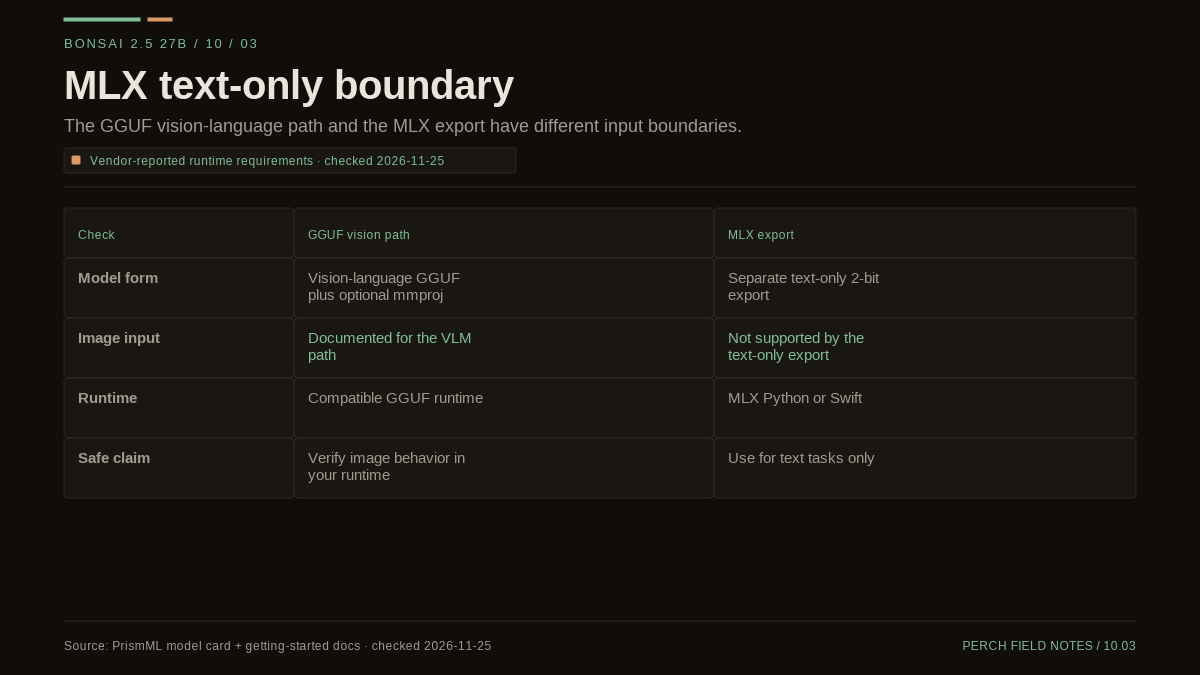
The MLX export is text-only even though Bonsai 2.5 27B is documented as a vision-language model, a property of this export rather than evidence that the underlying model has no vision capability. The PrismML getting-started documentation and the GGUF model card describe image input and separate vision projectors for appropriate GGUF setups. Neither makes those projectors part of the MLX pack.
In practice, do not pass an image path to the MLX quickstart and expect document understanding. Do not add a GGUF mmproj file to the MLX directory and assume the loader will discover it. The files belong to different runtime paths. If your task depends on screenshots, OCR, diagrams or visual question answering, choose a documented GGUF vision route instead of trying to extend the text-only MLX export by filename alone.
Coding agents feel this boundary too. An agent can work with text extracted from a screenshot, but that is not the same as sending the screenshot to a vision model. It can read source files, test output and tool schemas without image support. Whether a particular agent harness works smoothly with the local MLX endpoint or loader is a separate integration question; native tool calling at the model level does not automatically configure your editor or agent.
Use the Bonsai vision mmproj setup and benchmark limits when image input is a requirement. For text-only repository work, the 180-tool-call Bonsai coding-agent workflow is the more relevant companion. Keep the limitation visible in your test plan so that an image-related failure is not misreported as a general model-quality failure.
How much unified memory do you need?
There is no verified universal minimum in the supplied material. The often-quoted 5.9 GB figure is a weight-footprint claim, not total memory. The published PTQ1_0 GGUF is 5.99 GB, while PQ2_0 and Q2_0 are 7.25 GB and 7.67 GB. The MLX export is derived from PQ2_0, but its download size, loaded tensors, KV cache, runtime allocations and peak memory are different accounting categories. Do not subtract one from another and call the result a precise requirement.
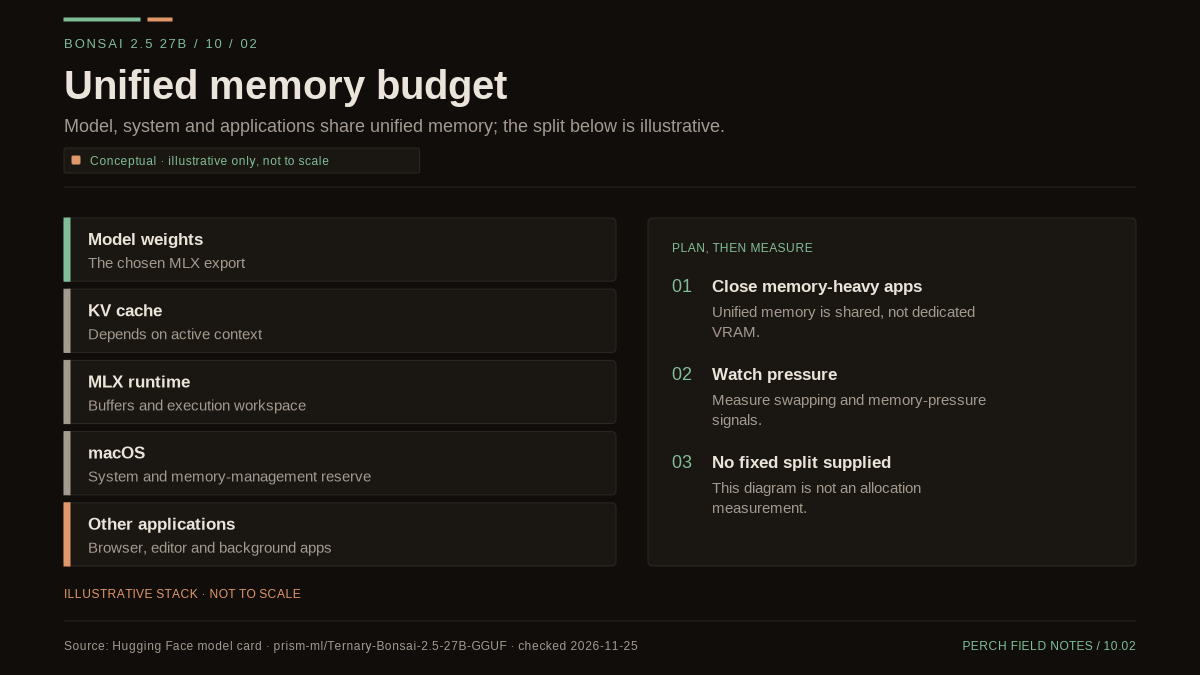
On macOS, unified memory is shared. The model does not get a private pool that can be added to a separate amount of system RAM. macOS, the terminal, browser windows, Python, the loader, model weights and the KV cache all compete for the same hardware. macOS can compress memory or swap to storage when the working set no longer fits comfortably, which may keep a process alive while making interaction and token generation feel much slower.
The exact KV-cache byte table is not supplied. The documented context length is 262,144 tokens, but that is a model specification, not a promise that the full window fits on a particular Mac. Hybrid attention, the selected runtime, context length and concurrent requests can all affect the working set. Start with a short context, measure resident memory and swap, then increase only while the workload remains stable.
The following configurations are planning bands, not vendor-certified minimums or measured benchmarks. They describe how to approach a Mac with different amounts of unified memory.
| Unified-memory configuration | Practical expectation | Conservative starting policy |
|---|---|---|
| 16 GB class | Tight for a 27B model plus a desktop workload; swapping is a realistic risk | Close unrelated apps, use short text context, one request at a time, and stop if memory pressure remains high |
| 24 to 32 GB class | More room for weights, runtime and moderate context, but no guaranteed agent ceiling | Begin with short context, measure peak memory, then add repository context gradually |
| 36 GB class and above | More headroom for larger text context and multiple applications | Still measure KV growth, swap and thermals before using long agent sessions |
| Any capacity with heavy apps open | Available memory can be much lower than the advertised configuration | Quit browsers, containers and other model processes before the baseline test |
These bands deliberately avoid saying that a specific chip and memory size will produce a specific tokens-per-second rate. A machine with more memory can still be limited by memory bandwidth or sustained thermals. A machine with less memory may handle a very short prompt but become unpleasant when an agent adds repository files and tool output.
Use Activity Monitor’s Memory tab to watch memory pressure and swap during a run. For a command-line snapshot, record the following before and after the test. A rising swap figure after load is a reason to reduce context or close applications before tuning anything else.
sysctl vm.swapusage
vm_stat
ps -o pid=,rss=,comm= -ax
The ps listing shows all processes, so use it to identify the Python process rather than attributing total system memory to Bonsai. For a single quickstart run, macOS /usr/bin/time -l can report elapsed time and maximum resident set size. The number is useful for comparison on the same machine, but it is not a portable estimate of every Mac’s requirement.
Context is usually the first tuning lever for an agent. Instead of placing an entire repository into every request, retrieve the relevant files, cap verbose test output and remove stale tool results. The 262K Bonsai context-window memory guide and Bonsai VRAM and RAM worksheet by quantization provide the broader budgeting method. On a Mac, add swap and competing applications to that worksheet.
How should you test speed on macOS?
Separate four measurements: model load time, prompt-processing speed, generation speed and memory pressure. A fast generation rate after a long load does not make the whole workflow fast. Likewise, a short prompt can prefill quickly while a repository-sized prompt exposes a very different bottleneck.
The supplied sources do not include a vendor-published MLX-versus-Metal speed comparison for Bonsai, and they do not provide enough MLX configuration detail to turn any single Mac result into a guarantee for another machine or a different model pack. Treat any speed figure you find, including the one below, as a lead to reproduce rather than a published result.
A Hacker News commenter separately reported 22.3 tokens per second on a Mac Mini M5 Pro, a community anecdote with incomplete configuration rather than an independent benchmark or a vendor figure. ExplainX’s overview also stresses that the published benchmark results are vendor-run and not independently reproduced. Use ExplainX’s vendor-run caveat as a reminder to compare like with like.
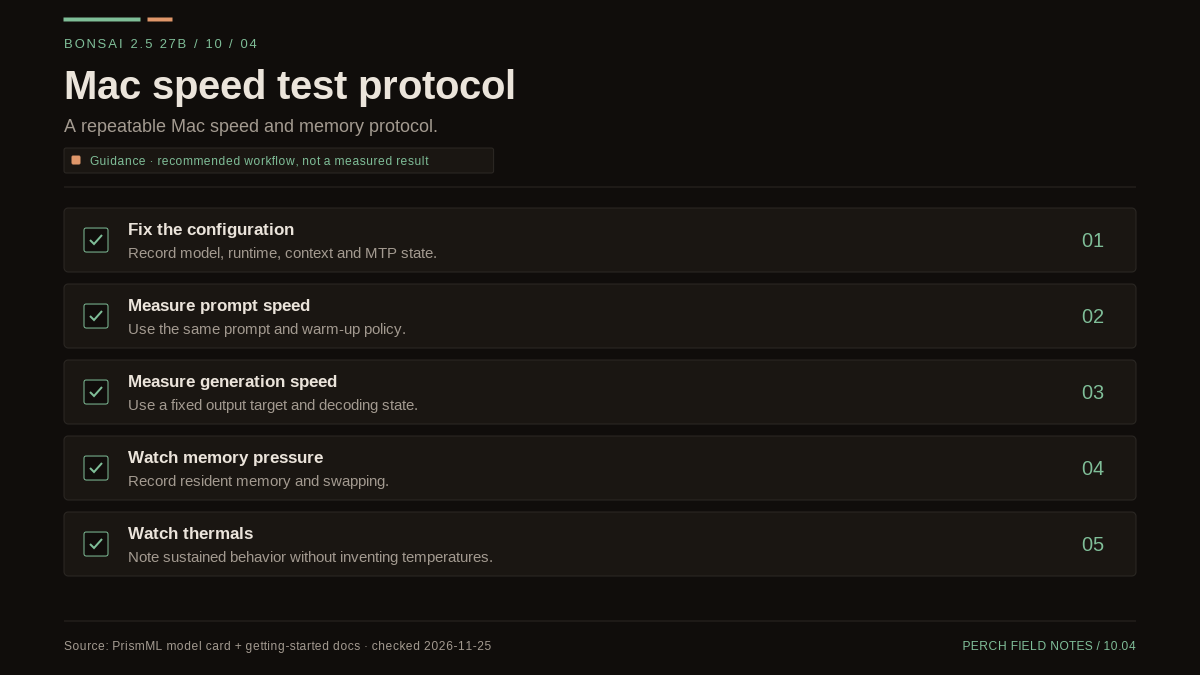
Use this protocol for your own baseline:
- Record the Mac chip, unified-memory capacity, macOS version and whether the machine was on battery or AC power.
- Note the exact MLX repository, local revision if available, Python version and installed requirement versions.
- Close the same unnecessary applications before every run and allow the machine to return to a comparable thermal state.
- Fix one short prompt and one repository-sized prompt. Record the prompt text or a stable identifier, context setting and output cap.
- Time a cold load separately from warm runs. Repeat the warm test several times and report the median rather than the fastest outlier.
- Capture time to first token, prompt-processing tokens per second, generated tokens per second and total elapsed time when the runtime exposes them.
- Watch maximum resident memory, memory pressure and swap. Note fan activity or clock behavior without inventing a thermal cause.
- Change one variable at a time. Context length, output cap and runtime are not interchangeable tuning knobs.
For the short quickstart, macOS time gives a simple resource record.
/usr/bin/time -l python quickstart.py "What is 2 plus 2?"That command does not replace a full prompt-throughput benchmark. It helps establish load time, elapsed time and maximum resident memory for a repeatable smoke test. If your loader or harness reports token counts and timers, use those values to calculate prompt and generation rates separately. Do not divide generated tokens by total elapsed time and label the result pure decode speed, because total time includes loading and prompt processing.
Reasoning state deserves the same treatment. Two runs with different output caps can spend different amounts of time before reaching a final answer, since thinking is on by default. A prompt that triggers a long reasoning trace can lower observed generation throughput even when the underlying runtime is unchanged. The documented xhigh and medium options deserve separate tests; do not use low as a third mode because PrismML says it is unsupported and behaves like xhigh.
Finally, do not assume that MTP results from a GGUF or NVIDIA table apply to this MLX export. The supplied evidence does not establish an equivalent MLX MTP configuration. Treat speculative decoding as a separate, documented experiment only if the exact pack and loader expose it. Until then, compare plain MLX with plain Metal under the same prompt and output policy.
How do you troubleshoot MLX on a Mac?
Start with the earliest failed stage. A download problem, import problem, loader problem and quality problem require different fixes. The LocalLLaMA Bonsai discussion is an inconsistently accessible community pointer, not evidence for a diagnosis. Use the official pack and your own logs first.
Why does hf or python use the wrong environment?
If the shell cannot find hf, confirm that .venv/bin/activate ran in the current terminal. If python points somewhere unexpected, print which python and python --version. A new terminal tab may not inherit the activated environment. Re-activate it and rerun the requirement installation from the pack root rather than installing packages globally.
Why does the MLX import fail?
An import failure before model loading usually points to the Python environment or bundled requirements. Confirm that the architecture checks report arm64, that the active interpreter is the virtual-environment Python and that runtime/requirements.txt was installed from the downloaded pack. Avoid replacing pinned versions with the latest packages as a first response; that destroys the known dependency combination and makes the failure harder to explain.
Why does quickstart.py not load the pack?
Check the current directory. The documented text command is python quickstart.py "What is 2 plus 2?", run from the model pack root after installing runtime/requirements.txt. Confirm that the download completed into bonsai-25-mlx and that you did not accidentally download the GGUF repository. A partial or interrupted download should be retried before changing runtime code.
Why is output garbled or obviously wrong?
First verify the exact MLX pack and bundled loader. Do not diagnose every bad response as a quantization-quality issue, and do not substitute a generic loader that cannot apply the export’s required transforms. Retry the short arithmetic prompt. If that fails consistently while setup checks pass, preserve the error output, repository revision and package versions for a reproducible report instead of tuning sampling parameters blindly.
Why does the Mac slow down or swap heavily?
Watch Activity Monitor and sysctl vm.swapusage while the model loads and while context grows. Quit unrelated applications, reduce context and output length, and avoid running several local models at once. If swap rises and generation collapses, the immediate problem is memory pressure, not necessarily the model’s reasoning quality. Do not respond by increasing context or adding an agent history dump.
Why does a response stop before the answer?
Thinking is on by default, so a short generation cap can end the run during reasoning. Increase the output allowance for the smoke test, then measure how much of the allowance is actually used. Remember that low is not a supported shortcut. If the runtime exposes medium, compare it separately rather than assuming the label maps directly to another model’s reasoning settings.
Why does image input fail?
That is expected for the text-only MLX export. Use a documented GGUF vision setup with the appropriate projector and runtime. Adding an mmproj filename to the MLX directory does not create a supported multimodal loader.
Why is MLX slower than expected?
Separate cold load from warm generation and separate prompt processing from decode. Confirm the exact runtime, context, output cap and reasoning state. Compare with Metal only under the same task policy, not with an H100 or RTX 4090 headline. Check memory pressure and thermals before concluding that the chip is underperforming.
What are the Mac-specific limitations?
The limitations below should travel with any recommendation. They are the difference between a useful local experiment and an unrealistic deployment promise.
| Mac limitation | What it means in practice | Safe response |
|---|---|---|
| Apple Silicon required for the documented MLX path | Intel Macs are not covered by this export | Verify arm64 before installation |
| MLX export is text-only | Image prompts and GGUF projectors do not add vision to this pack | Use a documented GGUF vision route for images |
| Unified memory is shared | macOS and other apps reduce the memory available to the model | Measure memory pressure and swap under the real workload |
| 262K is a documented model limit | It is not a guaranteed practical context on every Mac | Increase context from a measured short baseline |
| Exact KV-cache bytes are not published | Memory planning cannot be reduced to one exact formula | Record resident memory as context grows |
| Complete chip and macOS support matrix is missing | Base-chip and older-system compatibility is not fully established | Test the exact Mac and preserve logs |
| Vendor speed is not independent reproduction | No vendor MLX-versus-Metal comparison is in the supplied sources; any single Mac figure does not guarantee another machine’s result | Run repeated local tests with fixed settings |
| MTP behavior is runtime-specific | GGUF or NVIDIA MTP results do not establish MLX gains | Compare plain runs unless the pack documents MTP |
| Reasoning is on by default | Small output caps can truncate the final answer | Allow enough output and test medium separately |
None of these limitations makes MLX useless. They define the conditions under which it is a sensible choice. A developer who wants local text inference, can measure memory and accepts a slower feedback loop may find the export valuable. A team that requires image input, fixed latency or a fully specified hardware matrix needs more evidence before standardizing on it.
The supplied material also leaves several data gaps: no independent Mac benchmark set, no per-memory-tier minimum, no exact MLX KV-cache table, no complete macOS requirement and no reliable thermal comparison across Mac chips. This guide should be updated when reproducible tests provide those details. Until then, publish configuration and measurements with any speed claim rather than repeating a single number.
Should you choose MLX on your Mac?
Choose MLX if you have an Apple Silicon Mac with enough unified-memory headroom, your workload is text-only and you want an Apple-native local experiment. Use the bundled loader, begin with the short quickstart and keep a record of memory, swap and speed. It is a reasonable path for source-code text, tool schemas and offline prompts that do not need images.
Compare llama.cpp with Metal before deciding that MLX is the best runtime. The supplied sources do not settle which Apple path is faster, and the community Mac Mini report remains too incomplete to decide the question. If raw throughput matters, test both paths with the same prompts and output policy. If vision matters, use the documented GGUF path rather than the text-only MLX export.
Do not buy a Mac or promise an agent workflow on the strength of the 22.3 tokens-per-second anecdote. Do not equate the 5.9 GB weight claim with total memory. The honest outcome is a measured local baseline: a model that loads, answers a short prompt and remains stable at a context size your work can actually use.
Bonsai 2.5 27B is not a hosted One AI API Key model. If local memory and runtime maintenance are not acceptable, you can compare hosted models currently available through One AI API Key instead of assuming this local export has an API listing.
Complete Bonsai 2.5 27B guide
- Bonsai 2.5 27B launch verdict and setup router
- row-by-row Bonsai 2.5 27B benchmark teardown
- 180-tool-call Bonsai coding-agent workflow
- Tau, BFCL and AppWorld tool-calling analysis
- SWE-bench Verified 75.6 repository-repair analysis
- Terminal-Bench 2.1 long-horizon terminal analysis
- PTQ1_0 and Q2_0 local installation walkthrough
- Ollama Q2_0 commands and coding-agent connection
- vLLM OpenAI-compatible Bonsai server setup
- Bonsai VRAM and RAM worksheet by quantization
- cross-hardware Bonsai tokens-per-second comparison
- RTX 4090 Bonsai configuration and speed claims
- RTX 3060 12GB Bonsai feasibility and context tuning
- Mac Mini M5 Pro Bonsai setup and 22.3 tok/s audit
- CPU-only Bonsai setup and memory tuning
- 262K Bonsai context-window memory guide
- PTQ1_0 versus PQ2_0 versus Q2_0 quantization guide
- Bonsai vision mmproj setup and benchmark limits
- Bonsai 2.5 27B versus Qwen3.8 27B decision matrix
Sources
- PrismML’s Bonsai 2.5 27B announcement supports the release identity, license, architecture, benchmark context and vendor positioning.
- The Ternary Bonsai 2.5 27B GGUF model card supports the MLX repository identity, text-only boundary, file formats and runtime distinctions.
- PrismML’s getting-started documentation supports the documented local-runtime paths and the model’s text and vision positioning.
- ExplainX’s Bonsai 2.5 27B overview supports the third-party framing and the warning that published results are vendor-run rather than independently reproduced.
- The Hacker News Bonsai discussion is the source of the incomplete Mac Mini M5 Pro speed anecdote. It is community commentary, not verification.
- The LocalLLaMA Bonsai thread is included only as an inconsistently accessible community pointer. It supports no factual claim in this article.