Yes, Bonsai 2.5 27B can run without a discrete GPU. CPU inference is a documented backend, and the smallest published base GGUF is 5.99 GB. That makes a local trial plausible on a machine with enough available system memory, though it does not make the model fast and it does not establish a minimum RAM requirement. The supplied evidence contains no reliable CPU-only tokens-per-second figure and no exact KV-cache byte table.
The sensible CPU strategy is constraint-first: use a base GGUF, keep model layers off any GPU, start with bounded context, leave MTP and vision disabled, and measure before changing anything. The PrismML Bonsai 2.5 27B announcement supplies the model claims, while the Ternary Bonsai 2.5 27B GGUF model card supplies the files and compatibility rules. Neither supplies a CPU speed promise.
This guide is for CPU-only and integrated-graphics machines where the model will execute on the processor. It covers feasibility, quantization, runtime selection, threads, memory pressure, context and a repeatable measurement protocol. It does not translate H100 or RTX 4090 throughput into a guessed CPU result.
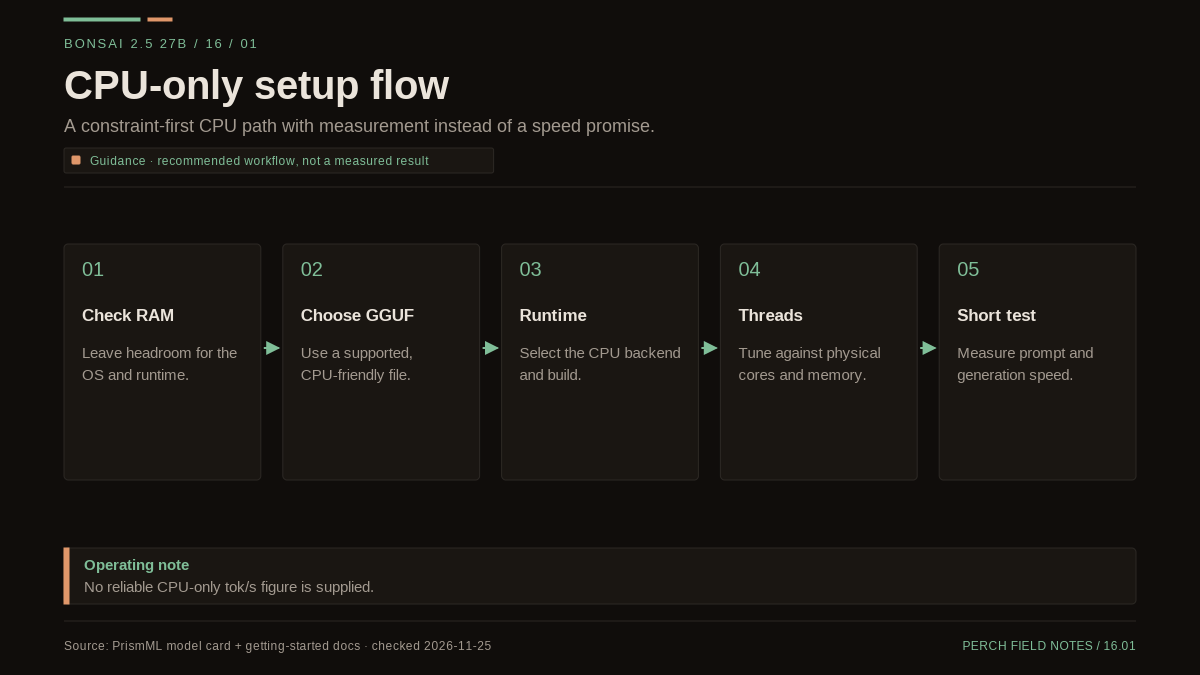
Can Bonsai 2.5 27B actually run on a CPU?
It can, according to the documented backend list. PrismML’s llama.cpp fork lists CPU alongside CUDA, Metal and SYCL. The stock Q2_0 route requires llama.cpp b11556 or newer. These are compatibility facts, not performance guarantees. An older stock build may appear to load Q2_0 while producing garbage, so the runtime version is a correctness check before it is a tuning knob.
The model is a ternary vision-language model based on Qwen3.8-27B. PrismML reports 27.36 billion total parameters, hybrid attention with about 75 percent linear and 25 percent full attention, and a documented context length of 262,144 tokens. Those architecture facts explain why the download is compact, but they do not tell you how quickly a particular CPU can execute it. The PrismML getting-started documentation confirms the local llama.cpp path and native tool and image support.
What does the 5.9 GB claim mean on a CPU?
It describes weights, not total runtime memory. The exact base Ternary-Bonsai-2.5-27B-PTQ1_0.gguf file is 5.99 GB. A running process also needs memory for the runtime, the selected context and its KV cache, computation buffers and any enabled optional components. The operating system and your other applications need their own share. On a 16 GB machine, for example, you cannot assume the entire installed capacity is available to the model.
On a CPU-only system the distinction matters even more, because there is no separate VRAM pool to offload the weights into. If system memory becomes overcommitted and the operating system starts swapping, responsiveness can deteriorate sharply. The useful question is therefore not “Is the file under 6 GB?” but “Can this machine hold the weights, context and runtime while leaving enough headroom for the operating system?”
No supplied source gives a universal CPU RAM minimum. Treat the file sizes as lower-bound planning inputs, not as a complete memory budget. The Bonsai VRAM and RAM worksheet by quantization provides the broader component checklist without inventing missing KV-cache values.
Which CPU configuration should you start with?
The following is a conservative test profile, not a vendor-certified configuration. Its purpose is to remove avoidable variables before you optimize. Record the actual CPU model, physical and logical core counts, installed and available RAM, operating system, runtime build and GGUF checksum when available. Without that inventory, a thread or context result cannot be interpreted.
| CPU configuration item | Conservative starting point | Why start there | Evidence boundary |
|---|---|---|---|
| Hardware inventory | Record CPU, cores, threads, RAM and memory configuration | Makes results reproducible and exposes constrained systems | No CPU model is being presented as tested |
| Backend | CPU only, with -ngl 0 in llama.cpp |
Prevents model-layer offload and isolates the CPU path | Tuning choice, not a speed claim |
| Base GGUF | Ternary-Bonsai-2.5-27B-Q2_0.gguf, 7.67 GB |
Uses the documented stock-runtime route | Requires stock llama.cpp b11556+ |
| Smaller-file alternative | Ternary-Bonsai-2.5-27B-PTQ1_0.gguf, 5.99 GB |
Reduces the published weight footprint | Requires PrismML’s llama.cpp fork |
| Context | 4,096 tokens for the first smoke test | Bounds prompt and KV-cache pressure | A starting recommendation, not a measured safe limit |
| MTP | Disabled; use a base file | Removes an optional component with unknown CPU benefit | CPU MTP performance is not supplied |
| Vision | Disabled; do not load an mmproj file | Avoids projector memory and extra work | CPU vision performance is not supplied |
| Concurrency | One model process and one request at a time | Reduces contention and clarifies measurements | A test policy, not a throughput target |
Integrated graphics do not change the principle. They may share system memory with the CPU, and the browser, desktop and other applications can compete for that same subsystem. Setting -ngl 0 makes the intended baseline explicit: no model layers are offloaded to the integrated GPU. Treat any later backend test as a separate configuration rather than silently mixing results.
Which GGUF is the best starting point for CPU inference?
For a first CPU-only run, choose between two clear routes: stock Q2_0 for runtime simplicity, or PrismML-fork PTQ1_0 for the smallest published base file. There is no evidence-based quality ranking that lets you declare one universally better on CPU workloads. The right choice depends on which runtime you can build reliably and how much memory headroom your machine has.
Why might Q2_0 be the simpler first choice?
Ternary-Bonsai-2.5-27B-Q2_0.gguf is 7.67 GB and works with stock llama.cpp b11556+. The compatibility rule here is unusually important: the model card warns that older builds may load the file but generate garbage. Verify coherent output before measuring speed, because a fast stream of malformed text is not a successful inference test.
The model card supplies this exact download command:
hf download prism-ml/Ternary-Bonsai-2.5-27B-gguf Ternary-Bonsai-2.5-27B-Q2_0.gguf --local-dir .Choose this route when you want a direct llama.cpp baseline without maintaining a special fork. The PTQ1_0 and Q2_0 local installation walkthrough covers the wider installation sequence. The PTQ1_0 versus PQ2_0 versus Q2_0 quantization guide compares every published file and runtime pairing.
When is PTQ1_0 worth testing?
Ternary-Bonsai-2.5-27B-PTQ1_0.gguf is 5.99 GB, the closest repository file to the marketed 5.9 GB-class footprint. It requires PrismML’s llama.cpp fork. The smaller weight file can reduce one part of the memory budget, but the supplied sources do not quantify a corresponding CPU speed increase or a quality difference against Q2_0.
The exact download command is:
hf download prism-ml/Ternary-Bonsai-2.5-27B-gguf Ternary-Bonsai-2.5-27B-PTQ1_0.gguf --local-dir .The documented fork clone command is:
git clone https://github.com/PrismML-Eng/llama.cpp && cd llama.cppThe supplied model-card build example enables CUDA. Do not copy that flag unchanged and call the result a CPU build. Use the fork’s CPU build instructions for your operating system, then confirm that the binary reports a CPU backend. This article does not invent a Windows-specific build recipe that the supplied documentation does not provide.
What about PQ2_0, MTP and vision files?
Ternary-Bonsai-2.5-27B-PQ2_0.gguf is 7.25 GB and also requires the PrismML fork. It is larger than PTQ1_0, but no supplied quantization quality score proves that the extra footprint buys better results. It is reasonable as a later comparison, not an automatic upgrade.
The MTP files are 6.23 GB for PTQ1_0-mtp, 7.49 GB for PQ2_0-mtp and 7.91 GB for Q2_0-mtp. Each adds about 0.24 GB over its base file. MTP may improve generation in some configurations, while the model card warns that it can slow NVIDIA prefill by 9 to 23 percent. The warning is NVIDIA-specific, and no CPU MTP result is supplied. Leave MTP off until the base configuration is correct, then measure it as an optional experiment.
Vision projectors are separate files: 0.93 GB for BF16 and 0.63 GB for Q8_0. Each adds memory and processing beyond the text model, so start without them. The Bonsai vision mmproj setup and benchmark limits explains the image path, but it does not establish CPU vision speed.
How should you choose a CPU runtime and tune threads?
Use direct llama.cpp as the measurement baseline because it exposes the model file, backend, context and thread controls in one place. For Q2_0, use stock llama.cpp b11556+. For PTQ1_0 or PQ2_0, use PrismML’s fork. Do not mix a fork-only file with a stock runtime.
Ollama is also documented with the Q2_0 route, and local OpenAI-compatible serving is available. Those can be useful when you need an API or an existing client, but they are not evidence of better CPU throughput. If you use Ollama, follow its documented controls and repeat the same measurement protocol rather than assuming flags or performance transfer from llama.cpp. The Ollama Q2_0 commands and coding-agent connection covers that path without claiming that PTQ1_0 works there.
vLLM is documented as a serving option, but the supplied material gives no CPU-specific tuning benchmark for it. Do not make it the first CPU baseline merely because it is documented. MLX is an Apple Silicon path, and its published Bonsai export is text-only; it is not the CPU route for an x86 machine.
What is a safe first CPU command?
The following is a conservative test invocation built around the documented Q2_0 filename. It is not PrismML’s benchmark command. Replace N with the integer thread count you are testing, and run from the directory containing the binary and GGUF. The model card uses ./bin/llama-cli; if your build places the binary elsewhere, invoke that binary while keeping the filename and options unchanged.
./bin/llama-cli -m Ternary-Bonsai-2.5-27B-Q2_0.gguf -ngl 0 -c 4096 -t N -p "Explain quantum computing in simple terms." -n 512For PTQ1_0, use the same structure with Ternary-Bonsai-2.5-27B-PTQ1_0.gguf and the PrismML fork binary. The 4,096-token context and 512-token output cap are deliberately bounded test choices. They are not vendor recommendations or measured limits. The prompt is the one used in the model-card example, not a disclosed benchmark prompt.
Check three things before tuning: the backend is CPU, the output is coherent, and the process fits in memory without sustained swapping. If any check fails, speed is irrelevant. The published GPU smoke test uses -ngl 99, flash attention enabled and a 32,768-token context. Those settings should not be inherited as a CPU default.
How many threads should you use?
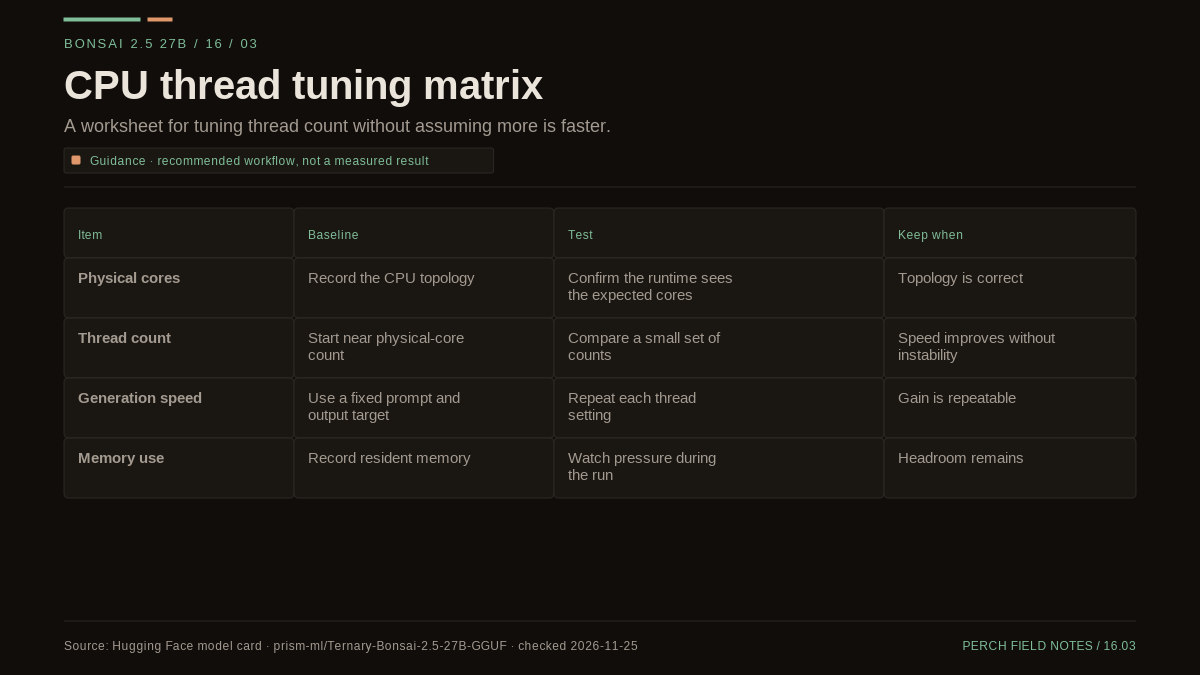
Begin with a repeatable hypothesis, not the largest possible number. If your CPU exposes P physical cores, a reasonable first experiment is P worker threads. That is a starting point, not a guarantee. CPU generation can be constrained by memory access as well as arithmetic, so adding threads may stop helping or may make the machine less responsive.
Test one variable at a time and keep the prompt, context, GGUF, output cap and backend fixed. Close unnecessary applications before a comparison, but record any background load you cannot remove. Do not compare a run with the browser idle against one with a build active and attribute the difference to threads.
| Thread tuning case | Candidate setting | When to test it | What to record | When to reject it |
|---|---|---|---|---|
| Diagnostic baseline | One thread | First run or when higher counts behave unexpectedly | Coherent output, generation speed, prompt speed, RAM | Correctness failure or unusable responsiveness |
| Physical-core starting point | P threads |
Normal first tuning pass | Same metrics plus CPU utilization | No stable improvement over the previous candidate |
| Responsiveness reserve | P - 1 threads |
When the desktop must remain usable | Speed alongside UI responsiveness and background latency | The reserve does not preserve acceptable interaction |
| Reduced-contention test | Fewer than P |
When other work must continue or memory access is saturated | Speed, utilization and competing workload | The combined workload becomes less effective overall |
| Logical-thread comparison | The exposed logical count | Only after the physical-core baseline is recorded | Whether speed, heat or contention changes | It adds instability without a repeatable benefit |
The table deliberately contains no expected tokens-per-second column. A thread count is not a portable performance result. Runtime build, instruction-set support, memory configuration, power policy, thermals and workload all matter. The cross-hardware Bonsai tokens-per-second comparison explains why incomparable speed figures should not be merged.
Which runtime mistakes should you avoid?
Do not run PTQ1_0 or PQ2_0 on an old stock llama.cpp build. Do not use a pre-b11556 build for Q2_0, even if the file appears to load. Do not assume the documented Ollama route accepts PTQ1_0. Do not enable MTP and vision while diagnosing a baseline memory problem. Each change makes it harder to identify the cause of a slow or invalid run.
Also separate model-load time from inference time. A cold start includes reading and initializing the weights; it is not the same as prompt processing or token generation. If you need an API, measure time to first token separately from completed response time. If you use the CLI, record load, prompt and generation phases independently when the runtime exposes them.
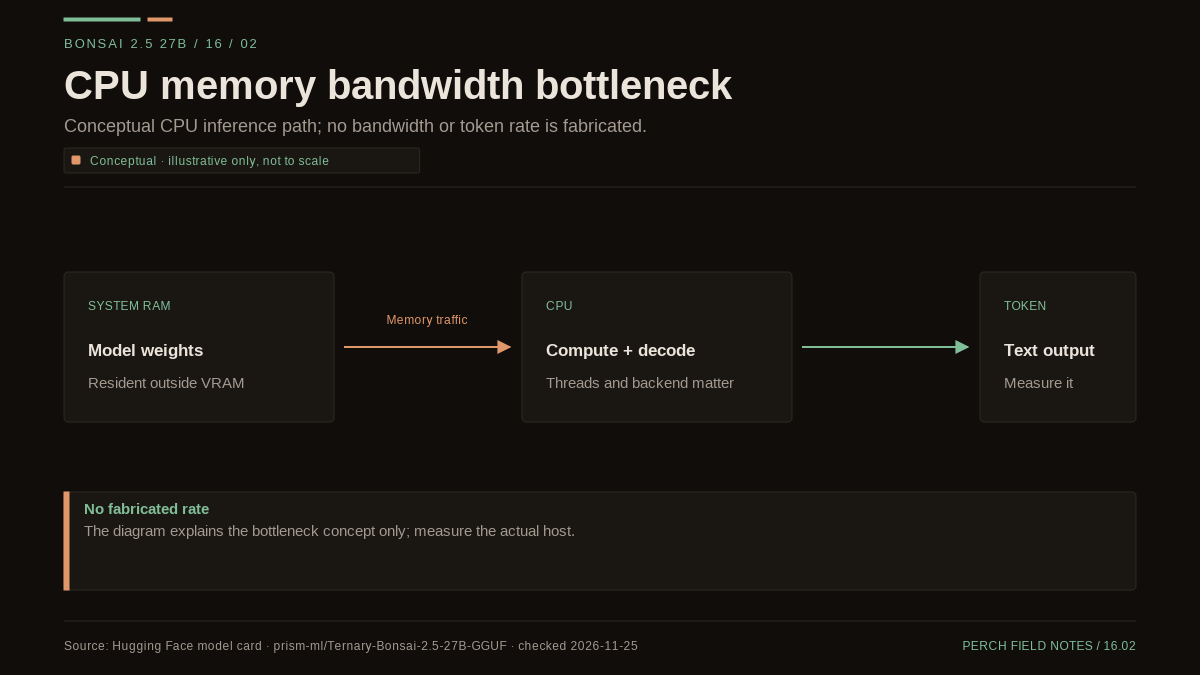
Why does memory bandwidth matter more than the download size?
During autoregressive generation, the model produces one token at a time and repeatedly uses its weights. CPU execution commonly depends on moving large amounts of weight data from system memory into the processor’s computation path. A compact file reduces stored weight volume, but ternary weights still require decoding, scaling and arithmetic in the runtime. File size alone therefore cannot predict speed.
Two CPUs with similar core counts can have different memory subsystems, clocks, cache behavior and instruction-set support. A laptop power policy, integrated graphics activity and thermal limits can also change the result. None of the supplied sources provides a CPU bandwidth figure, a memory-roof calculation or a measured CPU configuration for Bonsai. Calculating tokens per second from an advertised bandwidth number would create false precision.
Why should prompt speed and generation speed stay separate?
Prompt processing evaluates the input tokens before generation begins. Generation then produces output tokens sequentially. They stress the system differently, so a single “tokens per second” label can hide the part that dominates your experience. A long repository prompt may have substantial prefill cost even when the eventual answer is short. An interactive chat may feel constrained by generation speed and time to first token instead.
Keep both measurements: the runtime’s prompt-processing rate, its generation or evaluation rate, and the total request time. If the runtime reports only one, label it precisely rather than guessing the other. For an agent, also count model calls and tool calls, because many small requests can produce a poor experience even when one isolated generation run looks acceptable.
How can you tell whether memory is the limiting factor?
Watch available memory and swapping across the whole run, not just after startup. A process that fits initially may run out of headroom when context, output or optional components grow. Sustained swapping is a reason to reduce context or choose the smaller base GGUF before trying more threads. More threads do not create more memory bandwidth, and they can increase contention when the machine is already under pressure.
Keep the operating system and desktop usable. A benchmark that completes by making the rest of the machine unresponsive is not a practical configuration. Write down resident memory or the closest equivalent exposed by your operating system, peak memory, and any swap activity. Do not convert those observations into an exact KV-cache formula: the supplied evidence does not provide one, and the model’s hybrid attention design makes a simple full-attention assumption unsafe.
How should you tune context without exhausting RAM?
The documented 262,144-token context is a model capability, not a CPU allocation recommendation. A larger configured context can increase memory pressure and affect prompt handling. The practical limit on your machine depends on the runtime, cache implementation, GGUF, memory capacity and workload. No exact KV-cache byte table is supplied.
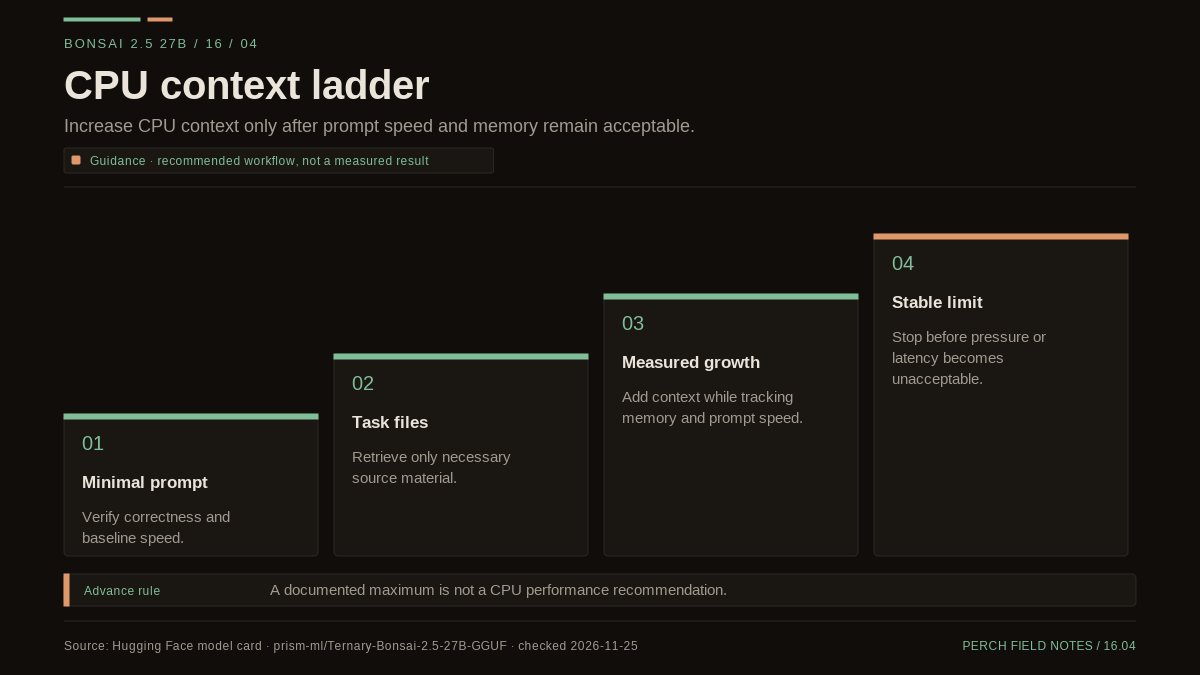
Begin with 4,096 tokens for a smoke test, including both prompt and reserved output space. If that run is coherent, stable and leaves memory headroom, increase context in one deliberate step. A useful ladder is to double the current setting, retest the same workload, and stop at the first sign of unacceptable memory use, swapping, prompt delay or lost responsiveness. These are test steps, not claims that any particular context size is safe on every CPU.
What should go inside a small CPU context?
Use retrieval and selection instead of sending an entire repository. Start with the task description, the most relevant file excerpts, a small set of tool schemas and the current error or test output. Add history only when it changes the next action. This reduces prompt work and makes it easier to see whether a failure came from missing information or from the model itself.
The 262K Bonsai context-window memory guide covers repository context, retrieval and summarization in more detail. For an agent, compact tool observations and remove stale steps. Do not silently truncate a compiler error or test result that contains the root cause. If the context is too small for the task, redesign the task or choose another runtime path rather than pretending the documented maximum solves the constraint.
How does reasoning affect a CPU run?
Bonsai defaults to xhigh reasoning. medium is available; low is unsupported and behaves like xhigh. Thinking is on by default, and a short output cap can truncate reasoning before the final answer. Here is the measurement trap: a run stopped mid-reasoning is not comparable with a complete answer, even if its token rate appears high.
For the first test, use enough output space to finish a short response, but keep the cap fixed across comparisons. If a response truncates, mark the run invalid for quality and latency comparison, then adjust the output allowance deliberately. Do not conclude that the model cannot answer merely because the test cap ended its reasoning. For quality evaluation, reasoning settings must match across candidates just as carefully as thread counts.
When should you test MTP or vision?
Only after the base text configuration is stable. MTP adds model data and has no supplied CPU speed result. Vision adds a projector and image-processing work. Enabling both while increasing context creates several independent changes, so any slowdown or memory failure becomes difficult to attribute. Test one optional component at a time, with the same text workload where possible, and keep the base result for comparison.
How do you measure CPU speed without inventing tokens per second?
Use a local protocol and publish the configuration alongside the result. The goal is not to produce a number that looks impressive. It is to know whether a specific GGUF, runtime and thread count is usable for a specific workload on a specific machine.
What should the measurement protocol hold constant?
- Write down the exact GGUF filename, file size and checksum when available. Note whether it is a base or MTP file.
- Name the runtime, its version or commit, build options, detected backend and operating system. For stock
Q2_0, verifyb11556+. - Capture the CPU model, physical and logical core counts, installed and available RAM, memory configuration and power policy if exposed.
- Note thread count, context size, flash-attention state, batch controls if changed, MTP state, vision state and concurrency.
- Use a fixed prompt and record it verbatim in your own test notes. Prefer the prompt length reported by the runtime rather than estimating from characters.
- Fix the output policy. Use a cap large enough for a complete short answer, and mark truncated runs as invalid rather than reporting their token rate as a success.
- Keep sampling and reasoning settings constant. The model-card sampling values are usage examples, not disclosed benchmark settings.
- Run a warm-up that you exclude from the reported result. Then repeat the measured request under the same conditions. Three repeats are a practical starting protocol, not a statistical guarantee.
- Capture prompt-processing speed, generation speed, time to first token when using an API, total response time, peak memory and swap activity.
- Change one variable at a time. If you change the GGUF and thread count together, you cannot attribute the result to either one.
A useful result statement has this structure: “On [CPU and RAM], with [runtime version], [exact GGUF], [backend], [threads], [context], [MTP state] and [vision state], the median of [number] runs on [fixed prompt and output policy] produced [prompt rate], [generation rate] and [total latency]. Peak memory was [measured value], with [swap observation].” Every bracket is a value you must actually record. None should be filled with a number from a different hardware class.
Which published speed numbers must not be reused as CPU estimates?
PrismML’s launch page claims 291 generated tokens per second and 3,200 prompt tokens per second on an H100, and 204 generated tokens per second with about 3,060 prompt tokens per second on an RTX 4090. The model card’s plain-decode PTQ1_0 table lists 186 on H100 and 112 on RTX 4090. MTP and configuration differences help explain why these figures should not be merged. None is a CPU measurement.
A Hacker News commenter reports 22.3 tokens per second on a Mac Mini M5 Pro. The Hacker News discussion of Bonsai 2.5 27B is a community source with incomplete configuration, not a controlled CPU benchmark. ExplainX’s Bonsai 2.5 27B agentic coding overview also relays an unsourced claim of about 74 tokens per second at 262K context on a 12 GB RTX 3060 with MTP. That claim is unverified and is not CPU-only evidence.
The LocalLLaMA Hugging Face discussion pointer was inconsistently accessible during source checking. It may help locate future reports, but it is not evidence for a speed or memory claim in this guide.
What makes a CPU result worth reporting?
Report the distribution of repeated runs, not just the fastest one. Note whether the prompt and generated lengths were comparable. Include cold load separately if startup matters. State whether the machine remained interactive and whether memory pressure changed during the run. A result without its hardware, runtime, GGUF, context and thread count is not reproducible.
Also test the real task. A short general prompt can establish that the runtime works, but it cannot predict a repository agent’s latency. A coding agent may make many model calls, consume tool output and wait between steps. Measure total task time and review effort, not only isolated token generation. Never describe CPU agentic coding as fast without that task-level evidence.
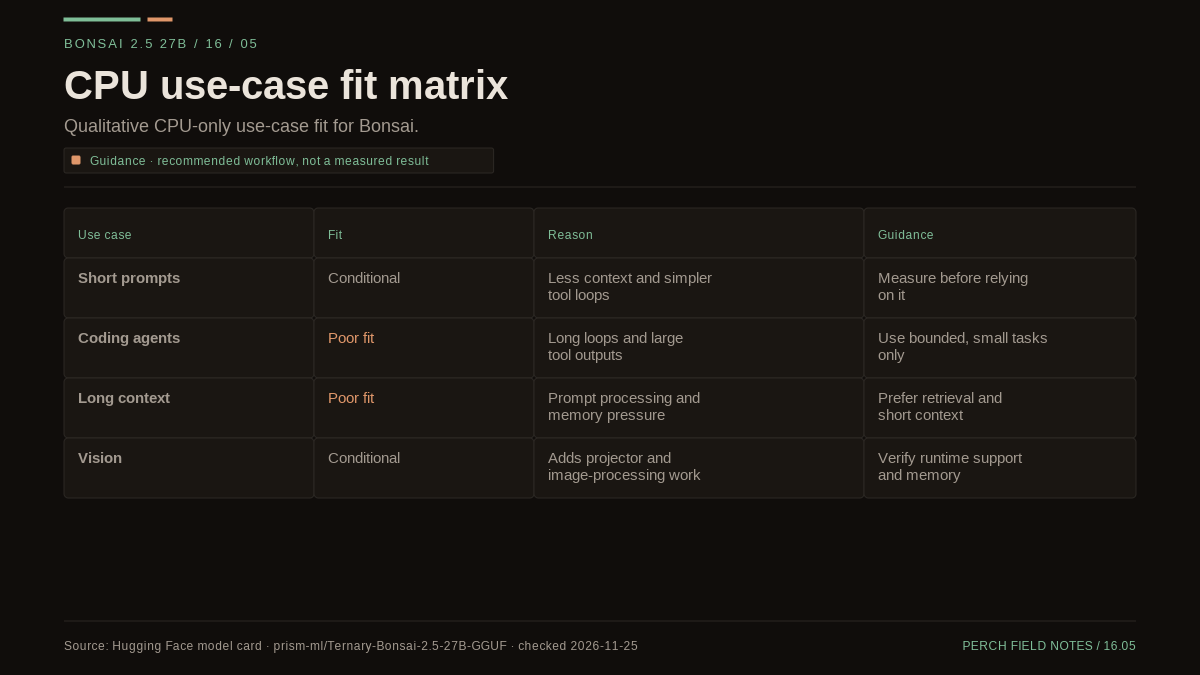
Which use cases fit a CPU-only Bonsai setup?
The best initial fit is bounded text work where offline operation matters and you can tolerate measured latency. The model’s compact weights are useful for local experimentation, but quality and speed are separate questions. PrismML’s published coding average is 54.2 versus 60.5 for Qwen3.8 FP16, and SWE-bench Verified is 75.6 versus 80.6. These are vendor-published scores, not independently reproduced results, and they say nothing about CPU throughput.
The honest loss matters for agents: Bonsai 2.5 improves substantially over Bonsai 2 27B, yet it still trails the FP16 reference on the coding average, Terminal-Bench 2.1 and SWE-bench Verified. CPU latency can multiply the cost of a long tool loop. A model that produces a reasonable patch after many calls may still be a poor interactive CPU agent. The 180-tool-call Bonsai coding-agent workflow and row-by-row Bonsai 2.5 27B benchmark teardown provide the quality and methodology context.
| Use case | CPU-only fit | Recommended constraint | Main caveat | Validation focus |
|---|---|---|---|---|
| Short bounded questions | Good first trial | Short prompt, small context, complete short answer | Latency is unknown until measured | Coherence, completion and local generation rate |
| Private offline drafting | Good first trial | One request, no unnecessary tools or history | Local execution does not guarantee factual accuracy | Human review and factual checking |
| Focused code explanation | Conditional | Provide selected files and symbols rather than a whole repository | Published coding quality is not universal | Correct explanation against the actual source |
| Document summarization | Conditional | Retrieve or chunk relevant passages before each call | Prompt processing may dominate long inputs | Missing facts, prompt speed and total time |
| Repository repair agent | Poor default for interactive CPU use | Narrow issue, bounded tools, tests and human review | Many model calls accumulate latency; coding scores trail FP16 | Patch correctness, tests, call count and task time |
| Long-horizon terminal work | Not recommended as a first CPU workload | Use a sandbox and strict step limits if experimented with | Long tool loops are not shown to be fast on CPU | Failure recovery, permissions and elapsed time |
| Whole-repository 262K context | Not a default CPU strategy | Prefer retrieval and a measured context ladder | Documented maximum is not a practical memory guarantee | Memory headroom, retrieval quality and prompt delay |
| Vision and document images | Later experiment | Text baseline first, then one projector and small inputs | Adds memory and processing; CPU speed is unknown | Extraction accuracy, memory and total latency |
For tool calling, the published five-row average is 77.2, close to Qwen3.8 FP16’s 77.7, but averages hide losses on BFCL v4 and AppWorld. Do not turn that average into a claim that every local harness will work well. A CPU deployment adds a different constraint: waiting time across calls. Validate schema correctness, retries and total task duration with the same care you would apply to output quality.
If your actual requirement is predictable low latency, high concurrency or long autonomous coding sessions, CPU-only Bonsai is not the evidence-backed first recommendation. It may still be valuable for offline experiments, sensitive local text and carefully scoped tasks. The decision should follow your measured workload rather than the size of the download.
What are the remaining limitations, and what is the verdict?
The evidence gaps are explicit. There is no reliable CPU-only tokens-per-second figure, no exact KV-cache byte table, no supplied CPU MTP comparison and no independent reproduction of the vendor benchmarks. Quantization quality differences are not established by published scores. The practical context limit and RAM headroom must be measured on the target machine.
A future update should add a reproducible CPU results table with hardware, runtime commits, GGUFs, thread counts, context settings, prompts, output policies and repeated measurements. It should also revise the guidance if PrismML publishes exact cache accounting, CPU MTP results or independent evaluations. Until then, adding a numeric CPU speed promise would be fabrication rather than useful tuning advice.
The verdict is conditional but clear: Bonsai 2.5 27B is a reasonable CPU-only experiment for bounded, offline text work if you use a compatible runtime, leave optional components off and measure on your own machine. Start with stock Q2_0 on llama.cpp b11556+, or test the 5.99 GB PTQ1_0 file on PrismML’s fork when memory headroom is the priority. Begin with short context, tune threads one variable at a time, and reject any configuration that swaps or fails to produce coherent output.
Do not choose it on the assumption that CPU agentic coding will be fast. Do not choose 262K context merely because it is documented. Choose it because the local workflow matters enough to test, then let measured latency and task quality decide whether it belongs in your stack. Bonsai 2.5 27B is not currently a hosted One AI API Key model. If you need hosted inference instead, you can compare hosted models currently available through One AI API Key.
Complete Bonsai 2.5 27B guide
The cluster posts below cover the surrounding decisions, from benchmark interpretation to hardware-specific setup. This CPU guide is the constraint-first route for machines without a discrete GPU.
- Bonsai 2.5 27B launch verdict and setup router
- row-by-row Bonsai 2.5 27B benchmark teardown
- 180-tool-call Bonsai coding-agent workflow
- Tau, BFCL and AppWorld tool-calling analysis
- SWE-bench Verified 75.6 repository-repair analysis
- Terminal-Bench 2.1 long-horizon terminal analysis
- PTQ1_0 and Q2_0 local installation walkthrough
- Ollama Q2_0 commands and coding-agent connection
- vLLM OpenAI-compatible Bonsai server setup
- Apple Silicon MLX setup for Bonsai 2.5 27B
- Bonsai VRAM and RAM worksheet by quantization
- cross-hardware Bonsai tokens-per-second comparison
- RTX 4090 Bonsai configuration and speed claims
- RTX 3060 12GB Bonsai feasibility and context tuning
- Mac Mini M5 Pro Bonsai setup and 22.3 tok/s audit
- 262K Bonsai context-window memory guide
- PTQ1_0 versus PQ2_0 versus Q2_0 quantization guide
- Bonsai vision mmproj setup and benchmark limits
- Bonsai 2.5 27B versus Qwen3.8 27B decision matrix
Sources
- PrismML’s Bonsai 2.5 27B announcement supports the release identity, architecture claims, vendor benchmark tables, GPU throughput claims and offline demo context. Its speed figures are not CPU measurements.
- The Ternary Bonsai 2.5 27B GGUF model card supports exact filenames and sizes, download commands, CPU backend availability, fork requirements, the stock
b11556+rule, MTP caveat and provider status. - PrismML’s getting-started documentation supports the vision-language description, tool and image support, Apache-2.0 licensing, llama.cpp and MLX paths, and OpenAI-compatible serving.
- ExplainX’s Bonsai 2.5 27B agentic coding overview supports the third-party caveat that benchmark scores were vendor-run and not independently reproduced. Its relayed RTX 3060 speed claim is treated as unverified.
- The Hacker News Bonsai 2.5 27B discussion is a community pointer for the incomplete Mac Mini speed anecdote and skepticism. It is not controlled performance evidence.
- The LocalLLaMA Hugging Face discussion is an inconsistently accessible community pointer, not evidence for any factual, memory or speed claim in this article.