Bonsai 2.5 27B can be tested on a Mac Mini M5 Pro through the documented MLX or Ollama paths, but the supplied evidence does not establish a reliable memory minimum or an expected Mac speed. The often-repeated 22.3 tokens per second figure is a Hacker News commenter’s anecdote, not a controlled benchmark. Treat this setup as a measured local experiment rather than a performance promise.
The practical appeal is clear. PrismML’s Ternary Bonsai 2.5 27B GGUF model card publishes a 5.99 GB base PTQ1_0 file, a 7.67 GB base Q2_0 file, Metal support through llama.cpp and a separate text-only MLX export. The PrismML launch announcement describes Apache-2.0 licensing, native tool calling, image input and a documented 262,144-token context. Those capabilities make a compact desktop trial worthwhile, but each one has a runtime boundary.
This guide follows a Mac Mini-specific sequence: check the memory configuration you actually own, choose one runtime, download only the matching model, establish a baseline, audit the speed report and run a bounded coding task. It does not assume a particular unified-memory tier, invent thermal results or turn community throughput into a buying criterion.
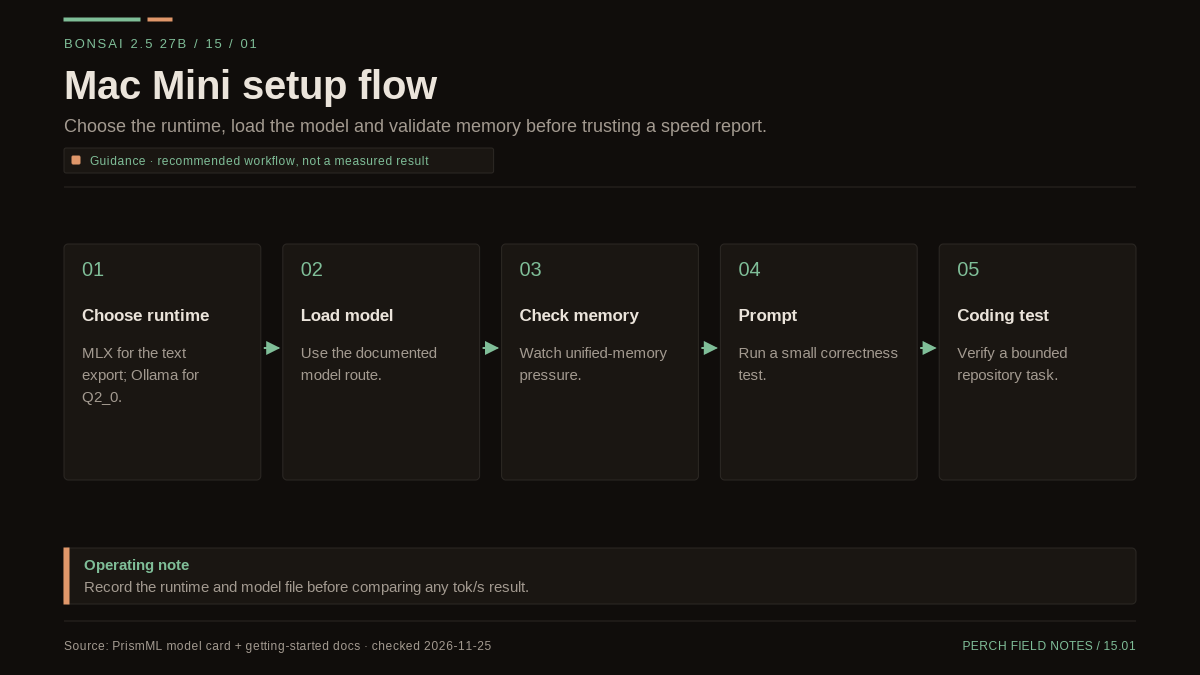
Will Bonsai 2.5 27B fit on a Mac Mini M5 Pro?
Probably, but “M5 Pro” alone is not enough information to guarantee a usable configuration. Check the Mac’s actual unified-memory amount, available storage and current memory pressure before downloading anything. The supplied sources do not publish a Mac Mini memory table, a minimum unified-memory requirement or a sustained-load thermal result. A successful model load is therefore the start of validation, not proof of comfortable headroom.
The model is a ternary vision-language model based on Qwen3.8-27B, according to PrismML. The vendor reports 27.36 billion total parameters, hybrid attention with about 75 percent linear and 25 percent full attention, and a 262,144-token context. Its ternary g128 weights use about 1.76 bits per weight with FP16 group-wise scaling. Those architecture facts explain the compact download, but they do not remove the runtime costs of attention state, context, tool history or image processing.
Keep three numbers separate:
- Download size. The base
PTQ1_0GGUF is 5.99 GB. BaseQ2_0is 7.67 GB. These are file footprints, not total memory requirements. - Runtime memory. Weights share unified memory with the KV cache, runtime structures, macOS and other applications. The exact KV-cache byte cost is not supplied.
- Practical context. The documented 262,144-token window is a model capability, not a promise that every Mac Mini configuration can use it while keeping the desktop responsive.
The Bonsai VRAM and RAM worksheet by quantization explains the memory components without inventing byte values. The 262K Bonsai context-window memory guide covers repository context and retrieval. On a desktop Mac, use both as planning tools, then replace their unknowns with measurements from your own machine.
Vision deserves a separate decision. Bonsai 2.5 27B is documented as a vision-language model, and the GGUF repository includes optional projector files. The MLX export is text-only. If image input is part of the workflow, do not select MLX on the assumption that the model’s vision capability automatically carries over. The Bonsai vision mmproj setup and benchmark limits explains that boundary.
Should you choose MLX or Ollama on the Mac Mini?
Choose MLX when you want the documented Apple Silicon text path and are prepared to follow the export’s own loading instructions. Choose Ollama when the short, documented Q2_0 command and local agent integration matter more than experimenting with a custom build. Choose PrismML’s llama.cpp fork with Metal when you need explicit GGUF control or the fork-only PTQ1_0 and PQ2_0 files.
The PrismML getting-started documentation supports llama.cpp, MLX and OpenAI-compatible serving. It does not make every quantization interchangeable across those routes. The runtime and exact model file must be selected together.
| Mac Mini runtime choice | Documented model route | Main advantage | Boundary to verify |
|---|---|---|---|
| MLX | prism-ml/Ternary-Bonsai-2.5-27B-mlx-2bit |
Apple Silicon text workflow with a dedicated export | Text-only; the supplied packet does not include a verified load command or Mac throughput result |
| Ollama | hf.co/prism-ml/Ternary-Bonsai-2.5-27B-GGUF:Q2_0 |
One documented run command and a local agent path | The documented Ollama route is Q2_0; do not assume PTQ1_0 or PQ2_0 support |
| PrismML llama.cpp with Metal | PTQ1_0, PQ2_0 or compatible Q2_0 GGUF |
Direct control over model file, context and offload flags | PTQ1_0 and PQ2_0 require PrismML’s fork; a Metal build is not the supplied CUDA build recipe |
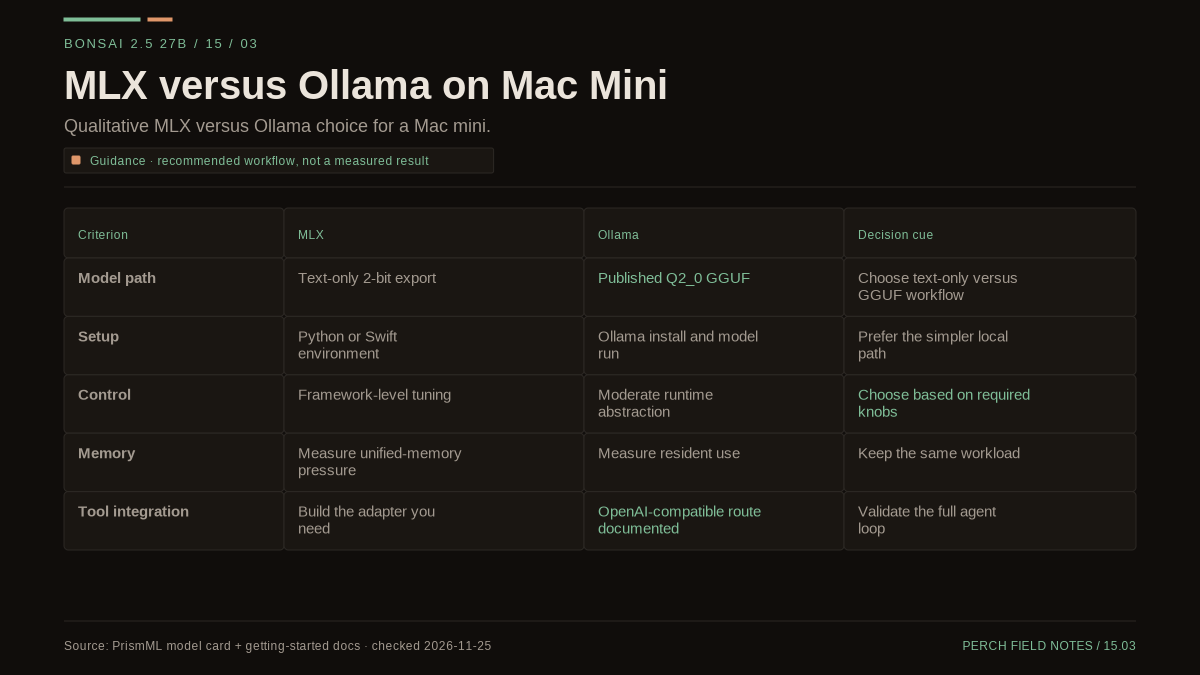
For a first MLX trial, start from the Apple Silicon MLX setup for Bonsai 2.5 27B. The export identifier is known, but the frozen source packet does not supply a tested package command, loader script or conversion procedure. This article therefore does not invent one. Follow the current export repository’s instructions and record the exact runtime version you use.
For Ollama, the Ollama Q2_0 commands and coding-agent connection is the narrower setup reference. Its documented Bonsai route uses Q2_0, not the smaller fork-only file. That distinction matters on a memory-constrained desktop: the convenience of the shorter route comes with a 7.67 GB base download rather than 5.99 GB.
For direct GGUF control, use the PTQ1_0 and Q2_0 local installation walkthrough and the PTQ1_0 versus PQ2_0 versus Q2_0 quantization guide. PrismML documents Metal as a llama.cpp backend. However, the build command in the model card is explicitly a CUDA example. Do not paste that flag into a Mac build and expect a Metal result.
How do you download Bonsai 2.5 27B for a Mac Mini?
Download only after choosing the runtime. Keeping multiple large variants is reasonable when you plan a controlled comparison, but it is unnecessary for a first smoke test. Leave storage headroom for the runtime, any local cache and the files required by your coding repository.
The model card supplies these exact Hugging Face download commands and Ollama route:
hf download prism-ml/Ternary-Bonsai-2.5-27B-gguf Ternary-Bonsai-2.5-27B-PTQ1_0.gguf --local-dir .
hf download prism-ml/Ternary-Bonsai-2.5-27B-gguf Ternary-Bonsai-2.5-27B-Q2_0.gguf --local-dir .
ollama run hf.co/prism-ml/Ternary-Bonsai-2.5-27B-GGUF:Q2_0
The first command fetches the 5.99 GB PTQ1_0 base file for the PrismML fork. The second fetches the 7.67 GB Q2_0 base file for a stock-compatible path. The Ollama command is the documented Q2_0 route. Preserve the capitalization and suffixes shown in the repository rather than substituting a guessed model alias.
If you choose the fork-only route, the supplied clone command is:
git clone https://github.com/PrismML-Eng/llama.cpp && cd llama.cppFollow the project’s Metal build instructions for macOS. The frozen packet does not contain a Mac-specific CMake command, so this guide does not manufacture one. PTQ1_0 and PQ2_0 require this fork. Q2_0 requires stock llama.cpp b11556 or newer; older builds may load it and still produce garbage.
Once the appropriate Metal binary is available, the model card’s generic smoke-test command provides a concrete first prompt:
./bin/llama-cli -m Ternary-Bonsai-2.5-27B-PTQ1_0.gguf -ngl 99 -fa on -c 32768 --temp 1.0 --top-p 0.95 --top-k 20 --min-p 0 -p "Explain quantum computing in simple terms." -n 16384Use that command with a compatible build and the matching PTQ1_0 file. Its sampling values are usage examples, not disclosed benchmark settings. Its 32,768-token context is a documented starting point, not a measured Mac Mini optimum.
The other published base and MTP files are Ternary-Bonsai-2.5-27B-PQ2_0.gguf at 7.25 GB, Ternary-Bonsai-2.5-27B-PTQ1_0-mtp.gguf at 6.23 GB, Ternary-Bonsai-2.5-27B-PQ2_0-mtp.gguf at 7.49 GB and Ternary-Bonsai-2.5-27B-Q2_0-mtp.gguf at 7.91 GB. Each MTP variant adds about 0.24 GB over its base file. No supplied source establishes an MTP generation gain on Apple Silicon.
Optional GGUF vision projectors are listed at 0.93 GB for BF16 and 0.63 GB for Q8_0. They are separate from the language-model weights and irrelevant to the text-only MLX export. If you do not need images, leaving them out reduces both download size and configuration complexity.
How should you tune unified memory on a Mac Mini M5 Pro?
Tune from a quiet baseline, not from the maximum context setting. Close unnecessary applications, load one model and keep MTP and vision disabled for the first text test. Record memory before loading, during prompt processing, during generation and after the request finishes. macOS memory-pressure reporting and the runtime’s own logs are more useful here than the advertised weight size.
The goal is not to find the largest context number that avoids an immediate crash. It is to find a configuration that remains responsive, produces coherent output and leaves room for the coding tools you intend to run beside the model. A desktop agent may need memory for an editor, terminal, repository index and test process at the same time as Bonsai.
| Memory configuration to test | Known weight footprint | Additional demands | Validation rule |
|---|---|---|---|
Text-only PTQ1_0 baseline |
5.99 GB | KV cache, runtime, macOS and apps; no MTP or projector | Start with the documented 32,768-token smoke-test context and measure actual pressure |
Ollama Q2_0 baseline |
7.67 GB | KV cache, Ollama, macOS and apps | Keep the documented model route fixed while measuring context and desktop responsiveness |
Stock Q2_0 MTP comparison |
7.91 GB | MTP state plus the same context and application load | Compare against base Q2_0 with the same prompt; do not assume a Mac speed gain |
| GGUF vision experiment | Base GGUF plus 0.63 GB Q8_0 or 0.93 GB BF16 projector | Image processing and runtime-specific vision state | Use only with a verified GGUF image path; MLX remains text-only |
| Long-context stress test | One fixed base file | Growing KV cache and agent history | Increase only after the baseline is stable; 262,144 tokens is documented, not guaranteed to fit |
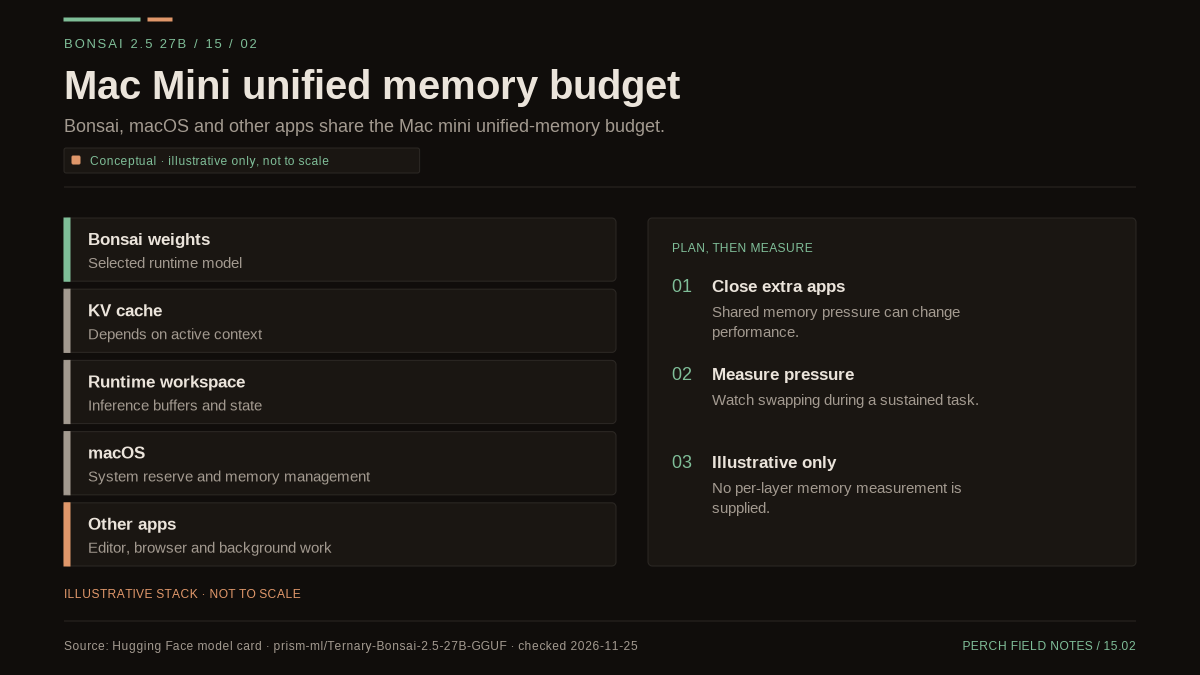
Change one variable at a time. For example, compare base Q2_0 with Q2_0-mtp while holding the runtime, context, prompt and output allowance constant. Do not change the quantization, add a projector and raise the context in the same run. Otherwise, a speed or memory difference cannot be attributed to a specific choice.
Treat memory pressure as a stop signal. If the desktop becomes unresponsive or the runtime starts struggling, reduce context, remove MTP or vision, close competing applications and retry the same request. Do not compensate by assuming that a low tokens-per-second reading is a permanent hardware limit. It may reflect a configuration that has already exhausted comfortable headroom.
Reasoning also affects the workload. PrismML says thinking is on by default, the default reasoning level is xhigh, medium is available and low is unsupported because it behaves like xhigh. A short output cap can truncate the reasoning trace before the final answer. When tuning memory or judging capability, keep the output allowance sufficient to finish the task and record the reasoning setting.
No exact KV-cache byte table is supplied, so a precise memory forecast would be fabricated. The useful output of this section is a measured configuration record: hardware memory, exact model file, runtime version, context, MTP state, vision state, observed memory pressure and whether the rest of the desktop remained usable.
What does the 22.3 tok/s Mac Mini report actually show?
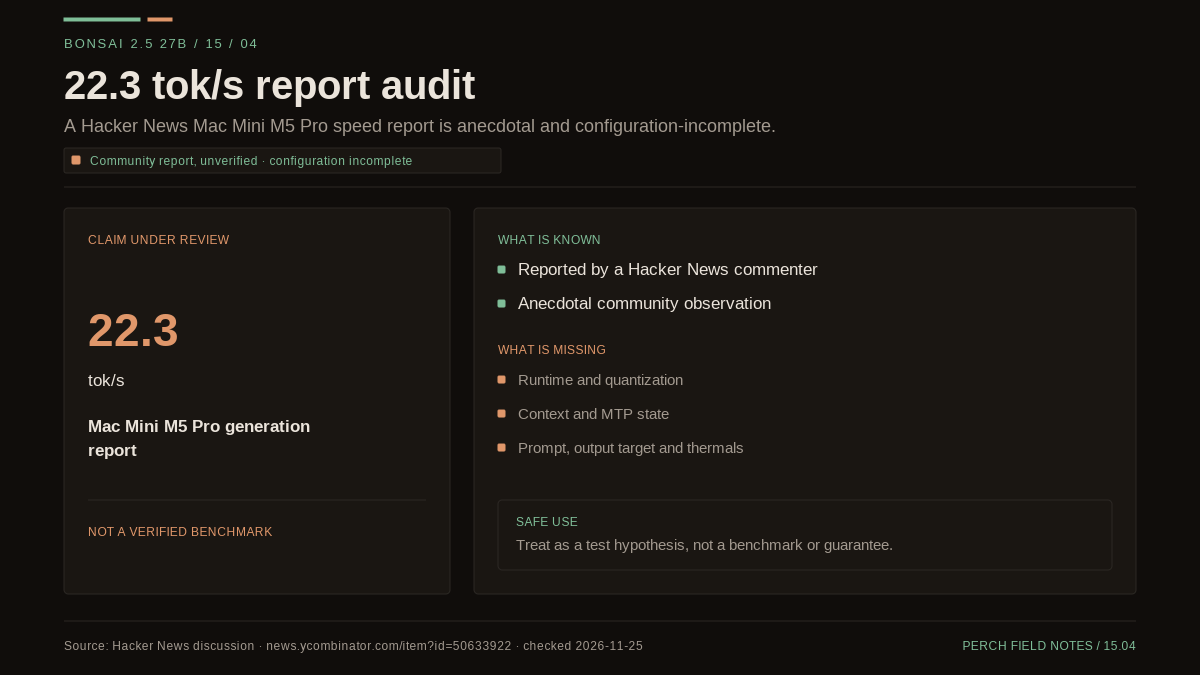
It shows that one Hacker News commenter reported 22.3 generated tokens per second on a Mac Mini M5 Pro. That is Community evidence. The supplied record does not include the runtime, exact GGUF or MLX export, unified-memory amount, context length, MTP state, prompt length, generation length, reasoning setting, measurement method or repeated runs. It cannot establish what another M5 Pro owner should expect.
The Hacker News discussion containing the Mac Mini report is useful as a pointer to early user experience. It is not an independent benchmark. The same discussion includes unsupported interpretations about equivalence to larger closed models, and those interpretations are disputed. Neither the 22.3 figure nor the surrounding commentary should be promoted into a verified quality or speed conclusion.
| Speed claim | Evidence class | Configuration stated | What prevents a fair comparison |
|---|---|---|---|
| 22.3 tok/s on Mac Mini M5 Pro | Community | Mac Mini M5 Pro only | Runtime, model variant, memory, context, MTP, prompt, output length and repetitions are missing |
| 291 generation / 3,200 prompt tok/s on H100 | Vendor | H100; ExplainX attributes the higher generation figure to MTP | Not independently reproduced; launch and plain-decode settings differ |
186 tok/s on H100, PTQ1_0 plain decode |
Vendor | H100 and plain-decode table | Not the same disclosed configuration as the 291 claim |
| 204 generation / about 3,060 prompt tok/s on RTX 4090 | Vendor | RTX 4090 launch claim | MTP context must be stated; not a Mac result |
112 tok/s on RTX 4090, PTQ1_0 plain decode |
Vendor | RTX 4090 plain-decode table | Cannot be merged with the 204 launch figure |
| About 74 tok/s at 262K context on RTX 3060 12GB with MTP | Third-party relay | ExplainX relays an unsourced X claim | Original method and configuration are unverified |
| CPU-only tok/s | Unknown | No reliable figure supplied | Any number would be invented |
ExplainX’s Bonsai agentic coding overview explicitly says the benchmark scores were vendor-run and not independently reproduced. It also attributes the launch page’s 291 H100 figure to MTP. The model card warns that MTP can slow NVIDIA prefill by 9 to 23 percent, a vendor observation about NVIDIA prefill rather than a measured Apple Silicon penalty and not proof of a Mac generation benefit.
Generation speed and prompt speed answer different questions. A high prompt-processing rate can coexist with a much lower generation rate. A short answer can look fast while a long reasoning trace exposes the sustained decode rate. When you test, exclude model-load time from generation timing, record generated tokens and elapsed generation time separately, and capture prompt-processing speed only if the runtime reports it.
A fair Mac test fixes the exact export or GGUF, runtime version, backend, context, MTP state, vision state, prompt, output allowance, reasoning level and sampling settings. Repeat the same request after the model is loaded and record the surrounding conditions. Do not compare an MLX run with an Ollama run, or a base file with an MTP file, without labeling both configurations.
The cross-hardware Bonsai tokens-per-second comparison provides the general measurement method. The RTX 4090 Bonsai configuration and speed claims, RTX 3060 12GB Bonsai feasibility and context tuning and CPU-only Bonsai setup and memory tuning show why hardware labels alone do not make throughput figures comparable.
The LocalLLaMA Hugging Face thread is an inconsistently accessible community pointer. It is not used as evidence for a Mac configuration or speed result.
This article should be updated when a reproducible Mac Mini M5 Pro log includes the full configuration, raw timing output, memory observations and repeated runs. Until then, 22.3 tok/s belongs in an anecdote column, not in an expected-performance sentence.
How should you run a coding test on the Mac Mini?
Start with a small, known regression in a repository you understand. A useful first task is a test that passes alone but fails when run with the surrounding suite, similar to the regression PrismML describes in its offline pytest demo. You need to recognize the correct root cause and inspect the proposed patch yourself. A single successful generation is not a reliability score.
PrismML reports 180 tool calls in its offline demo, followed by a patch that passed a previously unseen maintainer test. It is a Vendor demonstration, with no dataset, full transcript, harness or independent verification supplied. The prominent “65” in the demo has no reliably legible metric label, so it should not be quoted as a score. The 180-tool-call Bonsai coding-agent workflow explains how to reproduce the workflow safely.
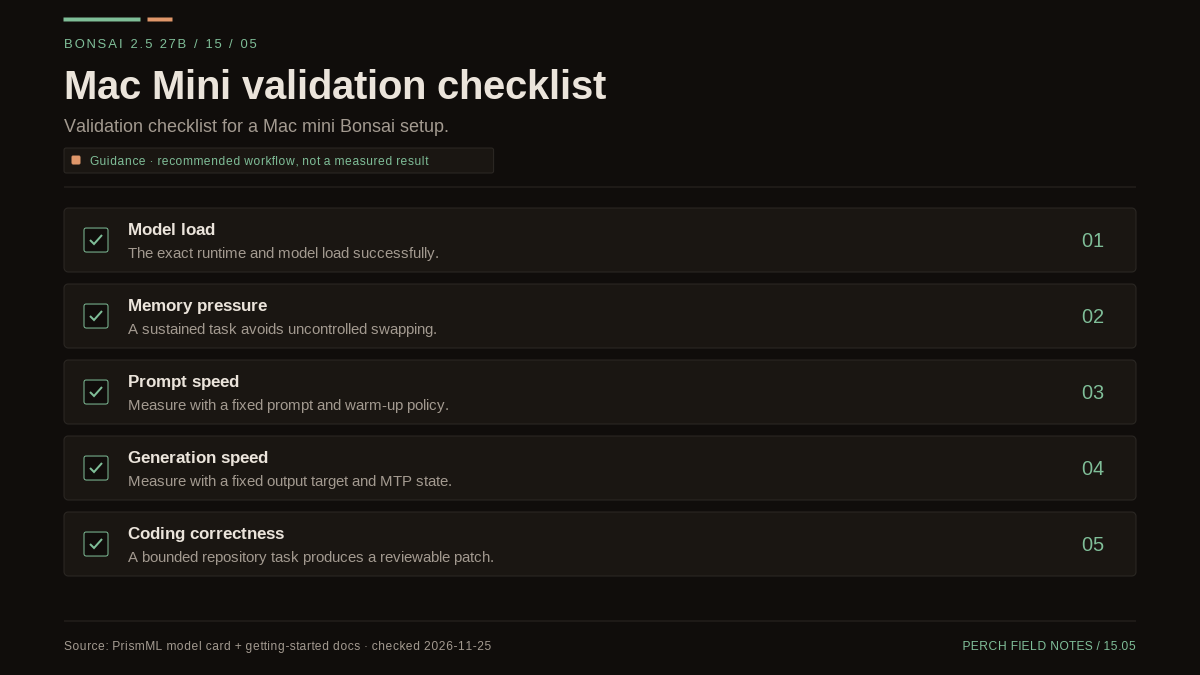
Use a bounded evaluation sequence:
- Prepare a clean repository copy. Keep a known-good baseline and make sure you can inspect or discard the agent’s changes without touching unrelated work.
- Begin with restricted permissions. Allow reading and inspection first. Add workspace writes only when the task requires a patch. Do not give broad system or network access for a first local trial.
- Supply the task and relevant files. Include the observed failure, the test command already used by the repository and the smallest useful set of source files. Avoid flooding the context with the entire project.
- Ask for reproduction before repair. Require the model to identify the failing interaction and explain a minimal reproduction before changing code.
- Verify the patch. Run the relevant tests, then the surrounding suite. Review the diff for unrelated edits, weakened assertions and changes that merely hide the symptom.
- Record the cost of review. Note tool-call failures, retries, context loss, generated tokens, memory pressure and the corrections a human had to make.
Keep expectations tied to the published evidence. Bonsai 2.5 27B’s vendor-reported coding average is 54.2, compared with 60.5 for Qwen3.8 FP16, a 6.3-point loss. It trails on SWE-bench Verified by 5.0 points and Terminal-Bench 2.1 by 10.7 points. The model improves substantially over Bonsai 2 27B, but it is not the quality leader in the supplied table. The SWE-bench Verified 75.6 repository-repair analysis and Terminal-Bench 2.1 long-horizon terminal analysis explain those workloads without inventing pass@1 settings.
Tool loops add another failure surface. Validate schemas, malformed calls, missing tools and recovery behavior rather than assuming benchmark tool-calling results transfer to your harness. The Tau, BFCL and AppWorld tool-calling analysis is the relevant companion. On a Mac Mini, also record whether the editor, terminal and test process remain responsive while the model is generating.
What should you check when the Mac Mini setup fails?
Use the symptom to narrow the problem before changing several settings at once.
- The output is garbage. For
Q2_0, verify stock llama.cppb11556or newer. ForPTQ1_0orPQ2_0, verify that you are using PrismML’s fork. An older stock build may loadQ2_0without producing valid text. - Ollama cannot find the smaller file. The documented Ollama route is
Q2_0. Do not substitutePTQ1_0orPQ2_0and assume compatibility. Return to the exacthf.co/prism-ml/Ternary-Bonsai-2.5-27B-GGUF:Q2_0route. - The model loads but the desktop struggles. Reduce context, disable MTP, remove the vision projector and close competing applications. Measure again before increasing the workload.
- The answer stops before a final result. Check the output allowance. Thinking is on by default, and a short cap can truncate reasoning.
mediumis available;lowis unsupported and behaves likexhigh. - MLX does not accept an image. That is expected for
prism-ml/Ternary-Bonsai-2.5-27B-mlx-2bit, which is text-only. Use a verified GGUF vision path if image input is required. - The filename does not match a compatibility table. Use the exact repository filenames. The supplied compatibility material uses inconsistent “TQ1_0” naming, while the actual base file is
PTQ1_0. - Prompt processing and generation seem contradictory. Measure them separately. MTP, context and output length can change the balance, and the NVIDIA prefill warning is not a Mac measurement.
- A client cannot connect to a local server. OpenAI-compatible serving is documented, but the frozen packet does not supply a complete endpoint recipe for every runtime. Verify the endpoint against the runtime’s own instructions rather than guessing a route.
If speed changes over a longer session, record the conditions and repeat the baseline. The supplied sources contain no Mac Mini thermal results, so this guide cannot attribute a slowdown to heat, power management or any other unmeasured cause.
So, should you run Bonsai 2.5 27B on a Mac Mini M5 Pro?
Yes for a controlled local text-coding trial, provided you measure memory and keep the evidence labels intact. MLX is the documented Apple Silicon text export. Ollama is the shorter documented Q2_0 route. PrismML’s llama.cpp fork with Metal is the direct GGUF route and the required path for PTQ1_0 and PQ2_0. None of those choices comes with a verified Mac Mini throughput guarantee.
No if you need vision through MLX, a guaranteed 22.3 tok/s result, a published universal memory minimum or independently reproduced benchmark scores. The honest loss is that Bonsai 2.5 27B trails Qwen3.8 FP16 on the published coding average and on major repository and terminal rows. The Bonsai 2.5 27B versus Qwen3.8 27B decision matrix frames that quality tradeoff, while the row-by-row Bonsai 2.5 27B benchmark teardown covers the missing methodology.
The model card says no inference provider currently deploys Bonsai 2.5 27B. It is not a hosted One AI API Key model, and there is no hosted API price to compare. If your decision is ultimately about managed inference, you can compare hosted models currently available through One AI API Key. For local use, the correct next step is a fixed-configuration smoke test followed by a reviewed coding patch, not a speed claim copied from a comment thread.
Complete Bonsai 2.5 27B guide
The cluster posts below cover the full decision surface, from benchmark methodology to runtime-specific setup and hardware constraints.
- Bonsai 2.5 27B launch verdict and setup router
- row-by-row Bonsai 2.5 27B benchmark teardown
- 180-tool-call Bonsai coding-agent workflow
- Tau, BFCL and AppWorld tool-calling analysis
- SWE-bench Verified 75.6 repository-repair analysis
- Terminal-Bench 2.1 long-horizon terminal analysis
- PTQ1_0 and Q2_0 local installation walkthrough
- Ollama Q2_0 commands and coding-agent connection
- vLLM OpenAI-compatible Bonsai server setup
- Apple Silicon MLX setup for Bonsai 2.5 27B
- Bonsai VRAM and RAM worksheet by quantization
- cross-hardware Bonsai tokens-per-second comparison
- RTX 4090 Bonsai configuration and speed claims
- RTX 3060 12GB Bonsai feasibility and context tuning
- CPU-only Bonsai setup and memory tuning
- 262K Bonsai context-window memory guide
- PTQ1_0 versus PQ2_0 versus Q2_0 quantization guide
- Bonsai vision mmproj setup and benchmark limits
- Bonsai 2.5 27B versus Qwen3.8 27B decision matrix
Sources
- PrismML’s Bonsai 2.5 27B announcement supports the release positioning, Apache-2.0 statement, benchmark tables, throughput claims and offline pytest demo.
- The Ternary Bonsai 2.5 27B GGUF model card supports the architecture, exact files and sizes, commands, runtime requirements, memory example and provider status.
- PrismML’s getting-started documentation supports the vision-language description, tool and image support, llama.cpp and MLX paths, and OpenAI-compatible serving.
- ExplainX’s Bonsai agentic coding overview supports the third-party framing, vendor-run caveat, MTP interpretation and clearly labeled relayed RTX 3060 claim.
- The Hacker News discussion supports community questions, skepticism and the anecdotal Mac Mini M5 Pro report, not independent benchmark verification.
- The LocalLLaMA discussion is an inconsistently accessible community pointer. It is not used as evidence.