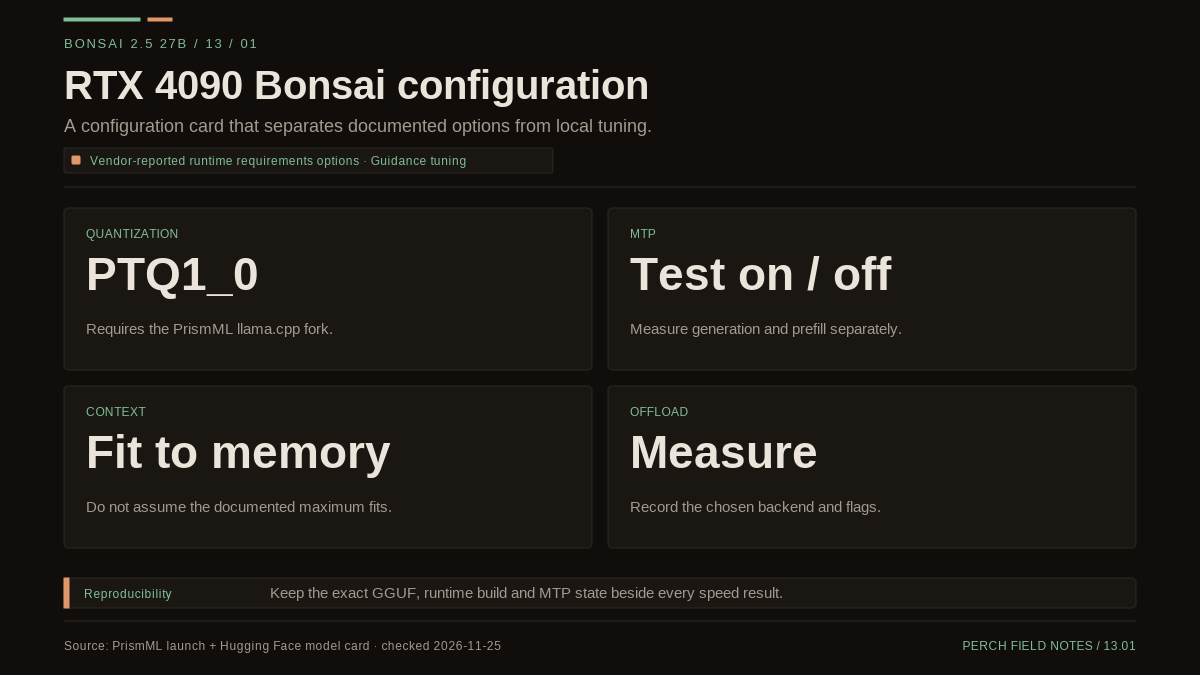
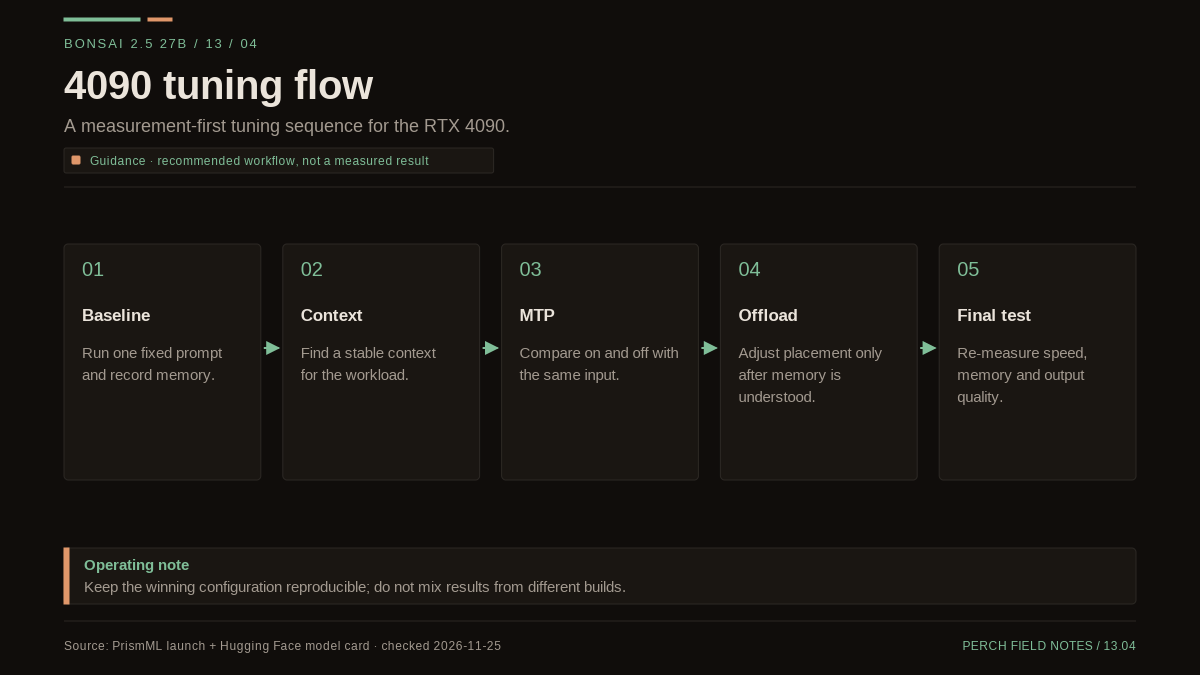
Start with the 24 GB RTX 4090, PrismML’s llama.cpp fork and Ternary-Bonsai-2.5-27B-PTQ1_0.gguf. Use -ngl 99 -fa on -c 32768, keep one sequence at a time and leave MTP off for the first baseline. Then compare the matching MTP file without changing anything else. That is a tuning starting point, not an independently measured optimum.
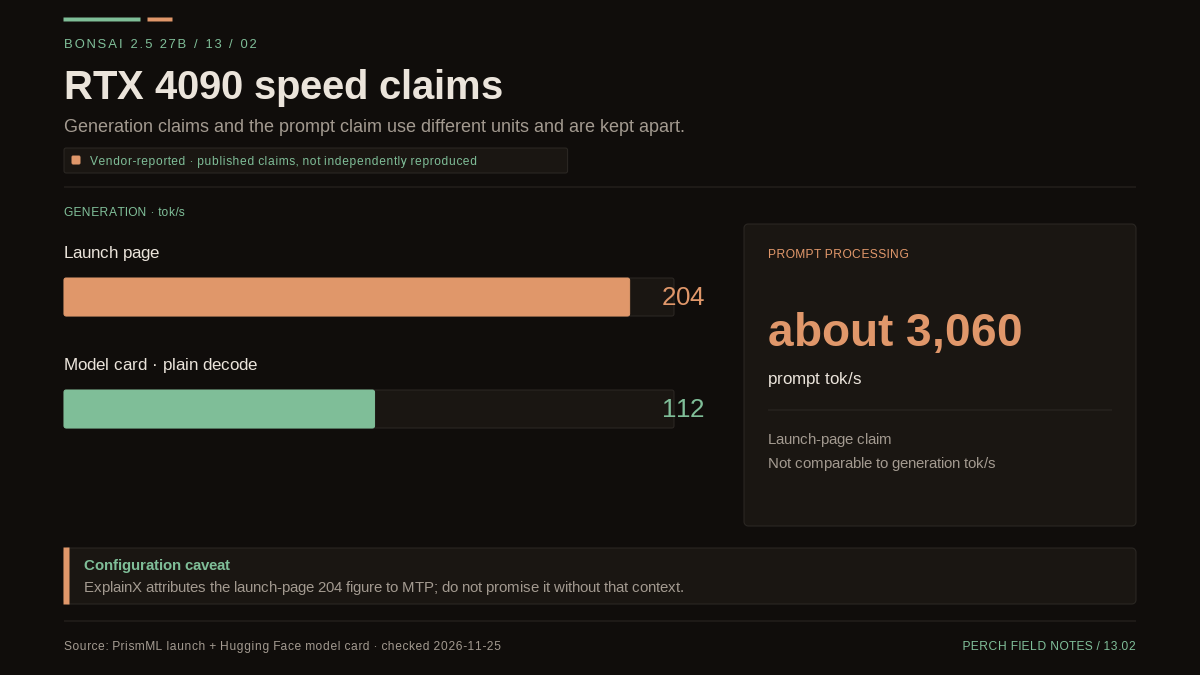
For expected speed, there is no single verified RTX 4090 result. Vendor sources report 112 generated tokens per second for plain-decode PTQ1_0 and a separate launch-page claim of 204 generated tokens per second with about 3,060 prompt tokens per second. The launch row does not provide a complete RTX 4090 reproduction recipe. Do not treat 204 tok/s as the non-MTP baseline. Measure your own prompt processing, generation and memory, and keep the evidence labels attached to the published numbers.
Why does Bonsai 2.5 27B fit an RTX 4090?
The RTX 4090 has enough nominal VRAM headroom to make Bonsai a straightforward full-GPU experiment. The base PTQ1_0 file is 5.99 GB and its MTP variant is 6.23 GB. Those weights leave substantially more room than the file size alone suggests for the KV cache, runtime allocations and the context window. With that much headroom, a 32,768-token starting configuration becomes a reasonable test on this card.
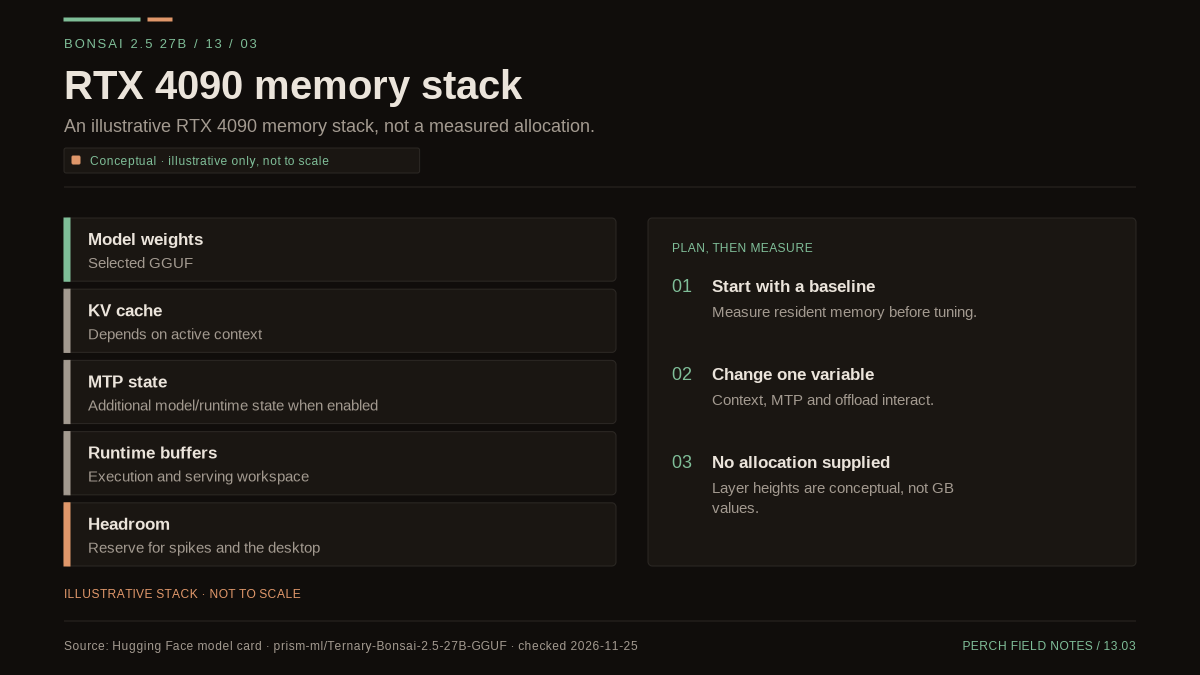
The important boundary is that 24 GB of nominal VRAM does not prove a particular resident-memory total. The model card reports roughly 9.5 GB VRAM before -np 1 on a 10 GB RTX 3080 and about 7.8 GB afterward. It is a Vendor observation for one specific configuration, not a formula for the 4090. Context, MTP, vision and the serving front end can all change the result. Use measured resident memory rather than converting a download size into a VRAM promise.
The workload also gives Bonsai a reason to fit here. It is a 27.36-billion-parameter ternary vision-language model based on Qwen3.8-27B, with native tool calling and image input documented by PrismML. A coding agent sends repeated prompts containing tool schemas, repository excerpts and observations. The RTX 4090 gives that workload room to be tested without immediately forcing partial CPU offload. It does not remove the need to keep tool output bounded or to review generated patches.
The card is not automatically the fastest or highest-quality choice for every task. Qwen3.8 FP16 still leads the published coding average by 6.3 points and Terminal-Bench 2.1 by 10.7 points. The case for Bonsai is the combination of compact local weights, Apache-2.0 licensing and agentic improvements over Bonsai 2, not universal benchmark leadership. The Bonsai 2.5 27B versus Qwen3.8 27B decision matrix keeps that quality and footprint tradeoff visible.
What is the recommended 4090 configuration?
Use this table as the first controlled setup. Values marked as model-card examples come directly from the published command. Memory remains a measurement target because no exact RTX 4090 KV-cache or resident-memory table is supplied.
| 4090 configuration | Starting setting | Why this setting is here |
|---|---|---|
| GPU | RTX 4090, nominal 24 GB VRAM | Provides headroom for a full-offload baseline without claiming an exact runtime footprint. |
| Quantization | Ternary-Bonsai-2.5-27B-PTQ1_0.gguf, 5.99 GB |
Smallest published base file and the file used by the model-card smoke test. |
| Runtime | PrismML llama.cpp fork with CUDA | PTQ1_0 requires this fork; CUDA is the relevant NVIDIA backend. |
| GPU offload | -ngl 99 |
Model-card setting that offloads eligible layers to the GPU. |
| Attention | -fa on |
Model-card setting; keep it fixed when comparing other variables. |
| Context | -c 32768 |
Model-card starting window, not a claim about the practical maximum. |
| Sequences | One request at a time; -np 1 when using a front end that exposes it |
Avoids adding parallel-request memory and mirrors the single-sequence memory example. |
| MTP | Off for baseline; compare PTQ1_0-mtp separately |
Generation may improve, but NVIDIA prefill can slow by 9 to 23 percent. |
| Output allowance | -n 16384 in the published smoke test |
Allows the default reasoning process room; it is not a disclosed benchmark setting. |
| Vision | Disabled for the first text benchmark | Projector files add memory and change the configuration being measured. |
Which quantization is the best starting point on a 4090?
PTQ1_0 is the first choice. It is the smallest published base GGUF, it matches the 5.9 GB-class positioning and it is the quantization used in the model card’s plain-decode speed table. On a 24 GB card, minimizing weight size is useful because it leaves more room for context and runtime overhead. It does not establish superior quantization quality. No supplied source provides controlled quality scores for PTQ1_0, PQ2_0 and Q2_0 on an RTX 4090.
There are three base files and three MTP alternatives:
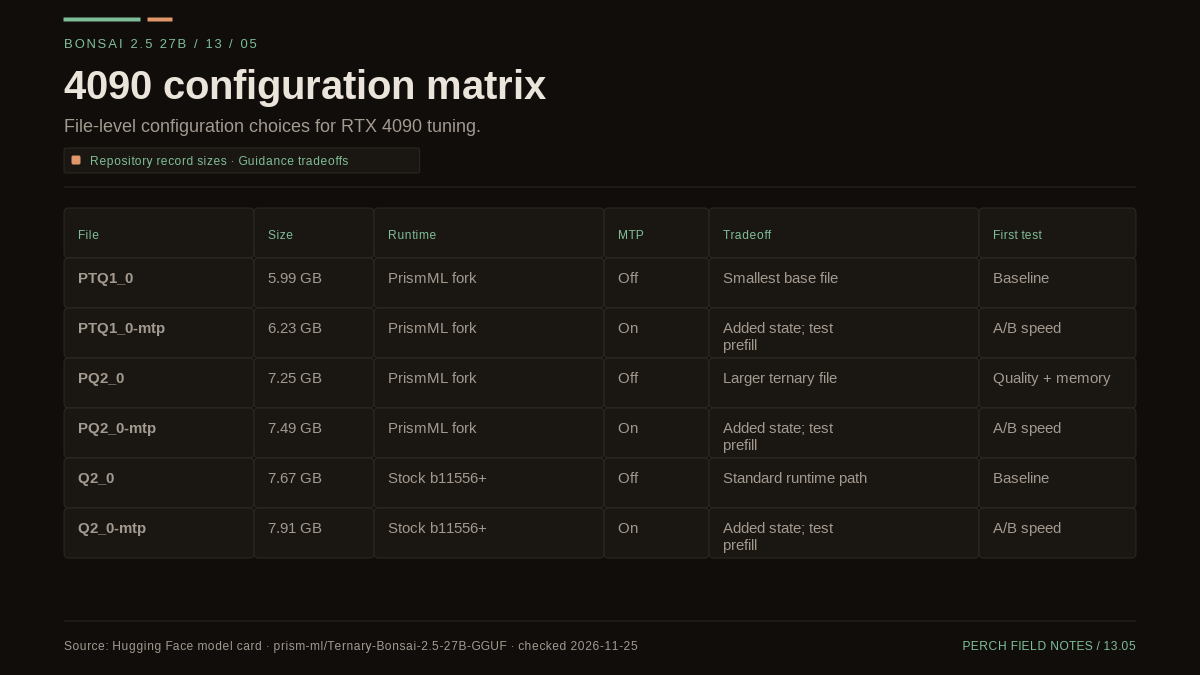
Ternary-Bonsai-2.5-27B-PTQ1_0.ggufis 5.99 GB. The MTP file,Ternary-Bonsai-2.5-27B-PTQ1_0-mtp.gguf, is 6.23 GB. Both require PrismML’s llama.cpp fork.Ternary-Bonsai-2.5-27B-PQ2_0.ggufis 7.25 GB.Ternary-Bonsai-2.5-27B-PQ2_0-mtp.ggufis 7.49 GB. These also require the fork. A larger file is not evidence of better answers.Ternary-Bonsai-2.5-27B-Q2_0.ggufis 7.67 GB, withTernary-Bonsai-2.5-27B-Q2_0-mtp.ggufat 7.91 GB. The baseQ2_0route requires stock llama.cppb11556+; older builds may load it but produce garbage.
The repository’s compatibility language is not perfectly clean. It also uses the name “TQ1_0” and pairings that do not line up neatly with the actual PTQ1_0 filenames. Use the exact filenames above. The PTQ1_0 versus PQ2_0 versus Q2_0 quantization guide provides the file-level compatibility comparison.
How do you download and build the recommended file?
The following sequence preserves the model card’s repository names and build commands. Run it from the checkout so the local GGUF path and ./bin/llama-cli resolve in the same directory. It is not a Windows-specific build recipe.
git clone https://github.com/PrismML-Eng/llama.cpp && cd llama.cpp
hf download prism-ml/Ternary-Bonsai-2.5-27B-gguf Ternary-Bonsai-2.5-27B-PTQ1_0.gguf --local-dir .
cmake -B build -DGGML_CUDA=ON && cmake --build build -j
The Ternary Bonsai 2.5 27B GGUF repository is the Record source for the files, sizes and runtime requirements. The PTQ1_0 and Q2_0 local installation walkthrough covers platform prerequisites and the stock Q2_0 route.
For a stock llama.cpp path that matters more than using the smallest file, choose Q2_0 instead. Use b11556+, then repeat the same baseline test. PQ2_0 is only a separate experiment if you have a reason to test that exact artifact. Do not describe it as a quality upgrade without evidence. The same rule applies to all MTP variants: file choice and MTP state must be recorded together.
Should MTP be on or off for RTX 4090?
Leave MTP off for the first run. The result is a plain-decode reference using PTQ1_0, the configuration named in the model card’s 112 tok/s RTX 4090 row. Once output is coherent and memory is stable, download the matching MTP artifact and repeat the same prompt with the same runtime, context, offload and output cap.
hf download prism-ml/Ternary-Bonsai-2.5-27B-gguf Ternary-Bonsai-2.5-27B-PTQ1_0-mtp.gguf --local-dir .The MTP file adds about 0.24 GB. More importantly, it changes the generation path. PrismML warns that MTP can slow NVIDIA prefill by 9 to 23 percent. For coding agents, which repeatedly process tool schemas, file excerpts, test output and conversation history, that is a real cost. A decode gain does not automatically make the complete agent loop faster.
For prompt-heavy repository work, prefer the configuration with the better measured end-to-end result, not the biggest generation number. For a long answer after a short prompt, MTP may be more attractive. Run both cases if your workload contains both. Keep one variable in the comparison: switch between the base and MTP files, but do not also change context, batch behavior, runtime version or sampling.
ExplainX’s Bonsai 2.5 27B agentic coding overview attributes the higher H100 launch figure to MTP and repeats that the benchmarks are vendor-run. The vendor-run label is useful context for the RTX 4090 launch claim, but it is not an independent 4090 test and does not supply a complete command. Treat it as Third-party interpretation of Vendor numbers.
The practical decision is simple: MTP off is the reproducible starting point; MTP on is an experiment you accept only if your own measurements show a worthwhile gain for your workload. The Bonsai VRAM and RAM worksheet by quantization explains the added memory components without inventing byte values.
How much context should you allocate on the 4090?
Start with -c 32768, because that is the model card’s example and it provides a useful working window without immediately targeting the documented maximum. The advertised context is 262,144 tokens, but that is a model capability statement, not proof that the full window fits or performs well on every GPU configuration.
Context consumes memory as the KV cache grows, and the supplied sources do not include an exact KV-cache byte table. Do not fill that gap with a guessed per-token number. Instead, measure memory at the context settings you actually use. The 262K Bonsai context-window memory guide explains how repository files, tool output, system instructions and agent history share the same window.
A coding task should not receive the entire window just because it exists. Send the relevant files and the latest observations, then summarize or discard stale history when the task moves on. The 180-tool-call Bonsai coding-agent workflow is a useful reference for keeping the loop bounded. Long tool transcripts can consume context and increase prefill work even when they do not improve the patch.
Increase context only after the current setting is stable. If memory pressure appears, remove optional components before making unsupported claims about the hardware limit. Disable vision for text tests, turn MTP off, reduce context and keep one sequence active. Changing one item at a time and recording the result separates a configuration problem from an unknown property of the model.
Vision deserves its own baseline. The optional projectors are approximately 0.93 GB for BF16 and 0.63 GB for Q8_0. Neither number is total vision runtime memory. If image input is part of the task, use the Bonsai vision mmproj setup and benchmark limits guide and benchmark vision separately from text. Do not compare a text-only run with a vision run as though MTP were the only difference.
Which offload flags should you use?
Start the full-offload test with -ngl 99. In this model-card command it requests GPU offload for eligible layers. It does not mean every runtime allocation, embedding-related component or KV-cache byte is included in a fixed 5.99 GB weight number. It also does not guarantee that adding context or MTP will stay within VRAM.
Leave -fa on fixed as well. Flash attention is part of the published configuration, but it is not an offload switch and it does not eliminate context memory. When comparing speed, changing -fa at the same time as MTP or context makes the result harder to interpret.
Use one sequence at a time. The model card’s RTX 3080 memory observation specifically used -np 1, reporting about 9.5 GB VRAM before that setting and about 7.8 GB afterward. On the 4090, begin with a single request or a single-sequence front end. Parallel requests add memory pressure and change throughput behavior. The vLLM OpenAI-compatible Bonsai server setup is the better route when you intentionally move from a local tuning test to concurrent serving.
If the full-offload run fails, lower -ngl gradually and observe whether the process starts. Partial offload can move work to system RAM, but the supplied sources give no RTX 4090 layer-by-layer performance table. Record the last successful value rather than claiming a universal layer threshold. A lower offload setting is a recovery path, not a recommended speed configuration.
What is the exact baseline command?
The model card supplies the PTQ1_0 smoke-test command. It uses a 32,768-token context and allows up to 16,384 generated tokens. The sampling values are usage examples, not disclosed benchmark settings.
./bin/llama-cli -m Ternary-Bonsai-2.5-27B-PTQ1_0.gguf -ngl 99 -fa on -c 32768 --temp 1.0 --top-p 0.95 --top-k 20 --min-p 0 -p "Explain quantum computing in simple terms." -n 16384For the MTP comparison, keep every argument identical and replace only the model filename with Ternary-Bonsai-2.5-27B-PTQ1_0-mtp.gguf. Do not change the prompt or output cap between the two runs. If you use llama serve rather than llama-cli, record that front end separately because the published speed claims do not identify enough serving details to make every route interchangeable.
The PrismML getting-started documentation documents the supported local and OpenAI-compatible paths. For a simpler stock-file route, the model card supplies llama serve -hf prism-ml/Ternary-Bonsai-2.5-27B-GGUF:Q2_0 and ollama run hf.co/prism-ml/Ternary-Bonsai-2.5-27B-GGUF:Q2_0. Those are Q2_0 examples, not evidence that PTQ1_0 works in Ollama. The Ollama Q2_0 commands and coding-agent connection covers that separate path.
How do you run a fair RTX 4090 speed test?
First establish coherence. Run the baseline command and confirm that the response is readable and follows the request. A fast stream of malformed text is not a valid speed result. Then record the exact GGUF filename, runtime commit or release, backend, context, MTP state, offload setting, prompt text, prompt length, output cap and generated token count.
Use the same fixed prompt for every comparison. The published smoke-test prompt is sufficient for an initial check, but a single short prompt does not represent a coding agent’s prefill load. For a workload test, save your own prompt and token count, then reuse it unchanged. Do not compare a short prompt’s generation rate with a long repository prompt’s prompt-processing rate as if they were the same metric.
Measure at least three separate quantities:
- Prompt processing. Record prompt tokens per second and the prompt’s actual length. A large number on a short prompt says little about a tool-heavy agent loop.
- Generation. Record generated tokens per second and how many tokens were actually produced. If the output cap truncates reasoning, the generation figure describes a different task from a complete answer.
- Memory and completion. Record observed GPU and process memory, whether the run completed, and whether the answer remained coherent. A run that finishes only after CPU fallback is not the same configuration as a full-GPU run.
Run the base file first. Repeat with the MTP file, changing nothing else. If you test context, return to one file and one MTP state before changing -c. If you test offload, keep context and MTP fixed again. The one-variable method is what turns a collection of vendor claims into a useful local comparison.
Which vendor speed claims belong beside your result?
The table keeps the published figures separate. The 112 and 204 rows are not a measured range for one configuration.
| Vendor speed claim | File or mode label | Generation | Prompt processing | Evidence boundary |
|---|---|---|---|---|
| Model card, RTX 4090 | Plain-decode PTQ1_0 |
112 tok/s | Not supplied in the frozen factpack | Vendor baseline claim; context, prompt and complete command are not supplied. |
| Launch page, RTX 4090 | MTP context is not fully specified for this row | 204 tok/s | About 3,060 tok/s | Vendor claim; do not present it as non-MTP speed or a guaranteed local result. |
| Model card, H100 | Plain-decode PTQ1_0 |
186 tok/s | Not supplied in the frozen factpack | Vendor comparison row, not a 4090 measurement. |
| Launch page, H100 | Higher launch configuration | 291 tok/s | 3,200 tok/s | Vendor claim; ExplainX attributes the higher figure to MTP. |
The PrismML Bonsai 2.5 27B launch announcement supplies the launch figures. The model card supplies the plain-decode rows. Because MTP, context and backend details are not held constant across the published results, neither subtraction nor averaging produces a valid expected speed. Use 112 tok/s as a labeled reference for the plain-decode claim and treat 204 tok/s as a separate, configuration-incomplete claim.
Community numbers should stay outside this table. A Hacker News commenter reports 22.3 tok/s on a Mac Mini M5 Pro, but the configuration is incomplete. ExplainX also relays an unsourced claim of about 74 tok/s at 262K context on a 12 GB RTX 3060 with MTP. Neither is verified, and neither predicts RTX 4090 performance. The cross-hardware Bonsai tokens-per-second comparison explains the evidence labels and the fair-test method across systems.
What should the tuning checklist record?
Complete each step before moving to the next. The pass condition is deliberately local: stable output and recorded measurements matter more than matching a marketing number.
| Tuning checklist | Change | Pass condition | Record |
|---|---|---|---|
| 1. Establish baseline | PTQ1_0, MTP off, -ngl 99, -fa on, -c 32768, one sequence |
Coherent response and no memory failure | Exact command, runtime version, generated tokens and timings |
| 2. Check memory | Keep the baseline unchanged | Process completes with observed headroom | GPU and process memory, including any CPU fallback |
| 3. Test MTP | Switch only to PTQ1_0-mtp |
Coherent output; decide whether decode gain justifies prefill cost | Prompt speed, generation speed, memory and end-to-end task time |
| 4. Test workload context | Keep file and MTP fixed; change only -c |
Relevant task completes without memory pressure | Actual prompt tokens, context setting and completion status |
| 5. Test offload recovery | Lower -ngl only after a full-offload failure |
Process starts and output remains coherent | Last successful offload value and any speed change |
| 6. Add vision separately | Use one documented mmproj file | Image task completes with memory headroom | Projector filename, size and separate memory result |
| 7. Repeat the winner | Run the selected configuration again | Similar measurements across repeated runs | Variation, failures and final configuration |
How do you troubleshoot the 4090 configuration?
Output is garbage or falls apart after loading. Check the runtime and file pairing first. PTQ1_0 and PQ2_0 require PrismML’s fork. Q2_0 needs stock llama.cpp b11556+; older builds may load the model and still generate garbage. Do not solve that compatibility problem by changing sampling values or buying more VRAM. Confirm the exact filename and runtime version, then rerun the baseline.
The process runs out of memory. Remove variables in a controlled order. Disable vision, turn MTP off, reduce -c and keep one sequence active. If full offload still fails, lower -ngl and accept that partial offload changes the performance profile. The 5.99 GB weight size is not total runtime memory, and the documented 262,144-token context is not a promise that every window fits on the card.
Generation is slower than expected. First check whether MTP is enabled. The vendor warning allows for a 9 to 23 percent NVIDIA prefill slowdown, so a decode-oriented configuration can be worse for tool-heavy prompts. Also check whether the process fell back to CPU, whether context grew, and whether another application is using VRAM. Do not invent clock or power settings to explain a result you have not measured.
The answer stops before finishing. Bonsai defaults to xhigh reasoning, thinking is on by default, and a short output cap can truncate the reasoning trace. medium is available. low is unsupported and behaves like xhigh. Increase the output allowance or use a supported reasoning setting, then judge whether the task actually completed. The published -n 16384 value is a smoke-test allowance, not a universal recommendation.
Prompt processing collapses at long context. Verify that the prompt really contains the token count you expect. Repository dumps and tool logs can consume the window quickly. Retrieve fewer, more relevant sections and summarize stale observations. If the configured context itself causes failure, reduce it. Do not infer a KV-cache byte size from the failure; the supplied evidence does not contain one.
MTP improves one number but not the task. Compare prompt processing, generation and total task time together. An agent that reads less efficiently may finish later even if its final answer streams faster. Keep MTP only when the workload-level result is better. Here is the honest loss in the optimization story: the feature advertised alongside a high throughput claim can penalize the prefill-heavy part of the same workflow.
A server route behaves differently from llama-cli. Record the front end, request shape and concurrency. The model card documents llama.cpp, Ollama, vLLM and OpenAI-compatible serving, but it does not publish an RTX 4090 command matrix that makes their throughput interchangeable. Start with one route and one request. The Hacker News Bonsai launch discussion is useful for community questions and skepticism, not for replacing a controlled local measurement.
What is the final RTX 4090 verdict?
Use PTQ1_0 without MTP as the baseline, with PrismML’s CUDA llama.cpp fork, -ngl 99, -fa on, -c 32768 and one sequence. That configuration is small enough to leave room for experimentation and close enough to the published command to make your measurements interpretable. Testing PTQ1_0-mtp should wait until the baseline is coherent and its memory use is recorded.
No evidence-based promise of 204 tok/s on every RTX 4090 exists, and there is no reason to treat 112 tok/s as a guaranteed floor. The honest expectation is a measured result between two incompletely specified vendor reference points, with MTP, context and workload determining which parts of the system matter. Keep the 9 to 23 percent possible prefill penalty visible once MTP is enabled.
The article will need an update when PrismML or an independent tester publishes the RTX 4090 runtime version, exact MTP state, context, prompt lengths, output lengths, complete command and repeated results. Exact KV-cache memory, practical full-context behavior and quantization quality differences also remain unknown. The LocalLLaMA GGUF release thread is an inconsistently accessible community pointer, not evidence for filling those gaps.
Bonsai 2.5 27B is not currently deployed by an inference provider according to the model card, and it is not a hosted One AI API Key model. If local experimentation does not meet your latency or quality requirements, you can compare hosted models currently available through One AI API Key. For this RTX 4090 setup, the winning configuration is the one that completes your real task with coherent output, acceptable memory and repeatable measurements, not the one that merely repeats the largest published number.
Complete Bonsai 2.5 27B guide
The cluster posts below cover the surrounding decisions without duplicating this RTX 4090 tuning path.
- Bonsai 2.5 27B launch verdict and setup router
- row-by-row Bonsai 2.5 27B benchmark teardown
- 180-tool-call Bonsai coding-agent workflow
- Tau, BFCL and AppWorld tool-calling analysis
- SWE-bench Verified 75.6 repository-repair analysis
- Terminal-Bench 2.1 long-horizon terminal analysis
- PTQ1_0 and Q2_0 local installation walkthrough
- Ollama Q2_0 commands and coding-agent connection
- vLLM OpenAI-compatible Bonsai server setup
- Apple Silicon MLX setup for Bonsai 2.5 27B
- Bonsai VRAM and RAM worksheet by quantization
- cross-hardware Bonsai tokens-per-second comparison
- RTX 3060 12GB Bonsai feasibility and context tuning
- Mac Mini M5 Pro Bonsai setup and 22.3 tok/s audit
- CPU-only Bonsai setup and memory tuning
- 262K Bonsai context-window memory guide
- PTQ1_0 versus PQ2_0 versus Q2_0 quantization guide
- Bonsai vision mmproj setup and benchmark limits
- Bonsai 2.5 27B versus Qwen3.8 27B decision matrix
Sources
- PrismML’s Bonsai 2.5 27B announcement supports the launch claims, benchmark context and RTX 4090 throughput figures. The figures are vendor-published.
- The Ternary Bonsai 2.5 27B GGUF model card supports exact filenames, file sizes, commands, runtime compatibility, the plain-decode speed table and the RTX 3080 memory example.
- PrismML’s getting-started documentation supports the documented local runtimes, vision-language description, tool and image support, and OpenAI-compatible serving.
- ExplainX’s Bonsai 2.5 27B agentic coding overview supports the third-party MTP interpretation and the warning that benchmark scores were vendor-run, not independently reproduced.
- The Hacker News discussion supports community questions and the incomplete Mac Mini speed anecdote. It is not independent benchmark evidence.
- The LocalLLaMA discussion is an inconsistently accessible community pointer. It is not used as evidence.