Bonsai 2.5 27B is a plausible candidate for a 12GB RTX 3060, but the supplied evidence does not verify a working configuration or a tokens-per-second result on that card. The sensible first test is text-only inference with a base GGUF, no MTP and no vision projector. Choose Ternary-Bonsai-2.5-27B-PTQ1_0.gguf at about 5.99 GB with PrismML’s llama.cpp fork, or Ternary-Bonsai-2.5-27B-Q2_0.gguf at about 7.67 GB with stock llama.cpp b11556 or newer.
Those numbers are file sizes, not total VRAM. Context, the KV cache, runtime buffers and any offloaded layers still need a budget. The documented 262,144-token context is a model capability, not a promise that it fits on 12GB. The circulated claim of about 74 tokens per second at 262K context on an RTX 3060 12GB with MTP is an unsourced relay, not a benchmark you should use to plan a purchase.
The guide treats the card as a constraint rather than a target. It separates published file facts from vendor examples, community anecdotes and unknowns, then gives a baseline that can be measured without mixing variables.
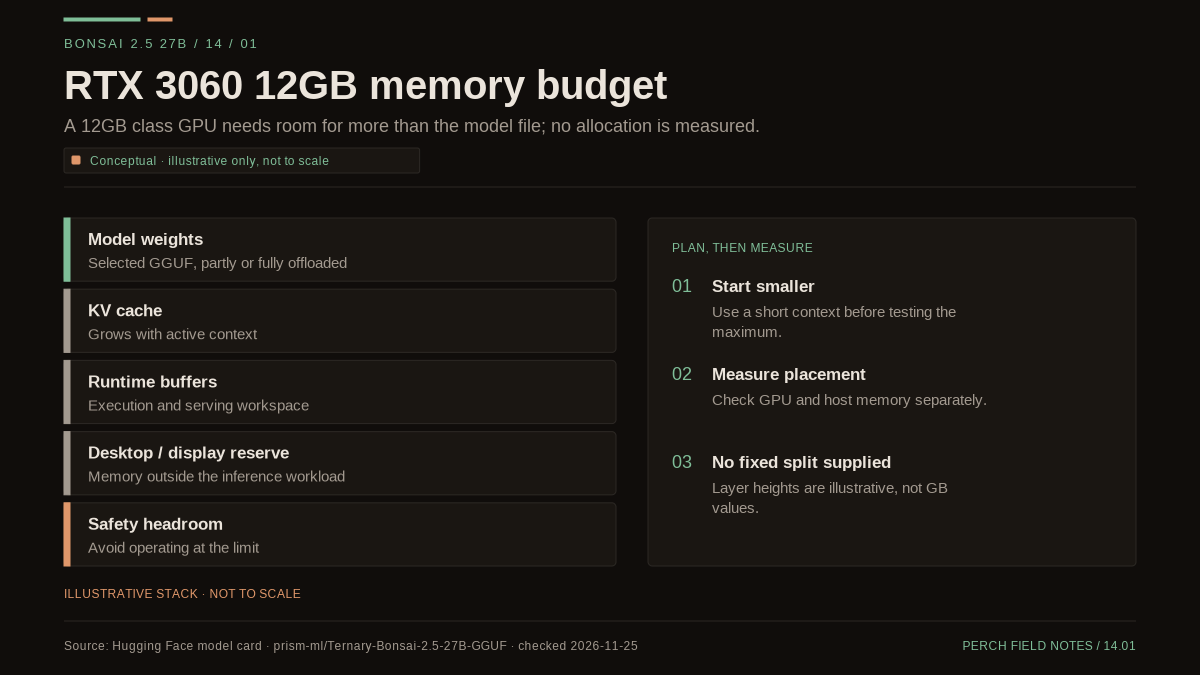
Can Bonsai 2.5 27B fit a 12GB memory budget?
Possibly, but only as a complete runtime configuration. The marketing footprint of about 5.9 GB describes weights. The repository’s PTQ1_0 base file is 5.99 GB, while PQ2_0 and Q2_0 base files are larger. A process also needs memory for context and KV state, runtime work areas and, if enabled, additional components. A desktop display and other GPU workloads can compete for the same card.
Start with one request, one model and no optional components. Treat it as an experimental baseline, not a concurrency recommendation. It makes memory failures easier to attribute. If the base file does not load reliably with the intended runtime, adding MTP, a vision projector or a longer context cannot repair the fundamental fit.
What are the realistic 12GB configurations?
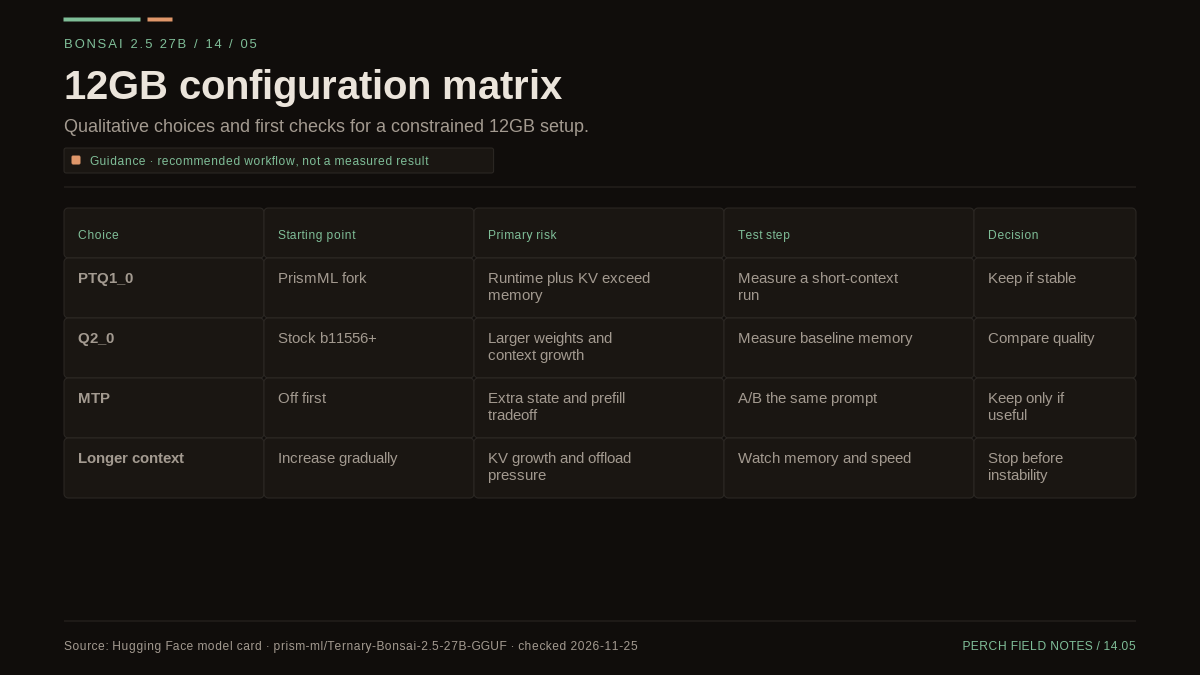
The table compares published artifacts and proposed starting points. Every row remains unverified on the RTX 3060 12GB. The context column deliberately avoids a fabricated safe maximum: the model card’s 32,768-token CLI example is a reference point, not proof that it fits on this card.
| Configuration | Exact GGUF | Published size | Runtime requirement | Starting approach | Main uncertainty |
|---|---|---|---|---|---|
| PTQ1_0 base | Ternary-Bonsai-2.5-27B-PTQ1_0.gguf |
5.99 GB | PrismML llama.cpp fork | First candidate; no MTP or vision; test context before raising it | Actual load and peak VRAM on 12GB |
| PTQ1_0 with MTP | Ternary-Bonsai-2.5-27B-PTQ1_0-mtp.gguf |
6.23 GB | PrismML llama.cpp fork | Add only after a stable base run | Generation gain versus slower NVIDIA prefill and extra memory |
| PQ2_0 base, comparison | Ternary-Bonsai-2.5-27B-PQ2_0.gguf |
7.25 GB | PrismML llama.cpp fork | Not the first memory-saving choice | No supplied quality comparison justifies the extra size over PTQ1_0 |
| PQ2_0 with MTP, comparison | Ternary-Bonsai-2.5-27B-PQ2_0-mtp.gguf |
7.49 GB | PrismML llama.cpp fork | Defer on a tight budget | Added footprint with no RTX 3060 measurement |
| Q2_0 base | Ternary-Bonsai-2.5-27B-Q2_0.gguf |
7.67 GB | Stock llama.cpp b11556+ |
Stock-runtime candidate; no MTP or vision | Whether the complete process fits at the tested context |
| Q2_0 with MTP | Ternary-Bonsai-2.5-27B-Q2_0-mtp.gguf |
7.91 GB | Stock llama.cpp b11556+ |
Add only if the base run is stable and MTP support is verified | No supplied MTP command or 3060 result |
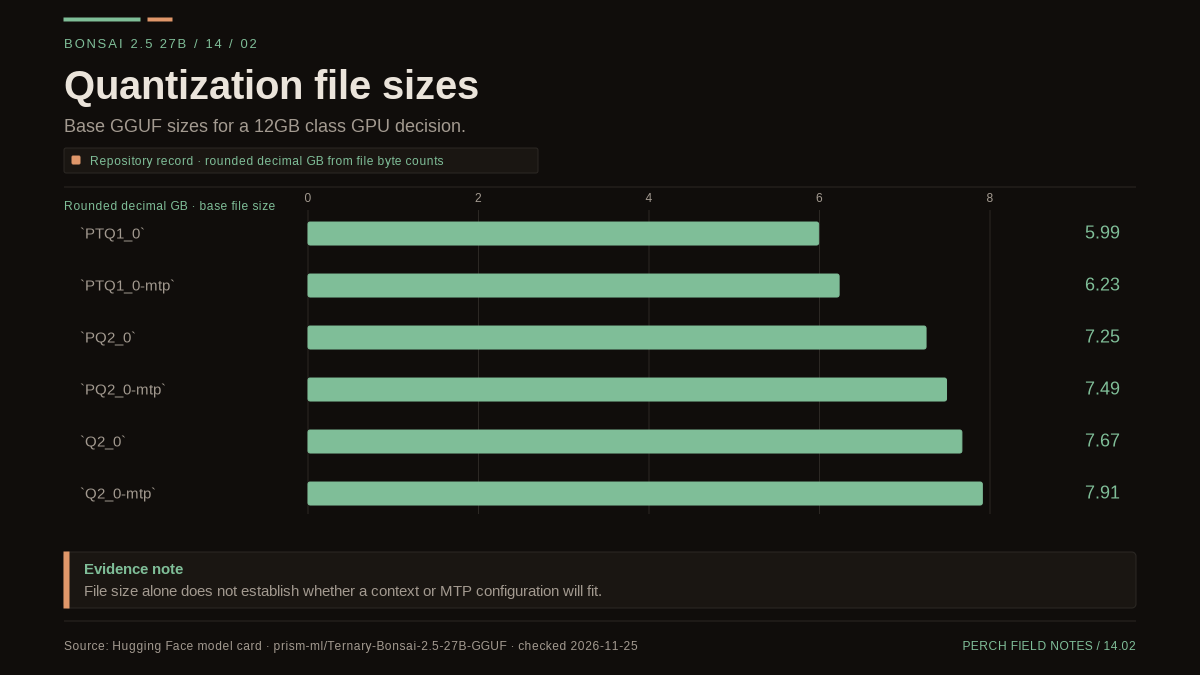
The two best starting choices sit at opposite ends of a compatibility tradeoff. PTQ1_0 is the smallest published base file, but it needs PrismML’s fork. Q2_0 is 1.68 GB larger than PTQ1_0 by the published rounded figures, yet it is the documented stock llama.cpp route. PQ2_0 sits between them at 7.25 GB and also requires the fork. No supplied independent quality ladder proves that the larger file produces better answers for your workload.
The model card’s memory example is useful only as evidence that configuration matters. PrismML reports roughly 9.5 GB VRAM before -np 1 on a 10GB RTX 3080, falling to about 7.8 GB afterward. That is a vendor-reported, hardware-specific example, not an RTX 3060 measurement or a universal minimum. Do not copy its resulting numbers onto a different card.
Which memory risks matter most?
A weight-only estimate misses the components most likely to change during a session. The risk table turns each component into a concrete check. It intentionally supplies no invented KV-cache byte count or fixed reserve.
| Memory risk | Why it matters on 12GB | Early warning | Safe response |
|---|---|---|---|
| Base weights plus runtime | The GGUF file size is not the complete process allocation | Failure during model load | Use the smaller base file, confirm the runtime and reduce competing GPU work |
| Configured context and KV cache | A larger -c setting increases the memory budget even before a long repository is added |
Load succeeds but long prompts fail | Return to a smaller context and increase one measured step at a time |
| MTP artifact and runtime state | Each published MTP file adds about 0.24 GB before any other effects | Base works, MTP version fails or slows | Disable MTP and repeat the identical baseline |
| Vision projector | BF16 and Q8_0 projectors add 0.93 GB and 0.63 GB respectively | Text works, image input causes pressure | Keep the baseline text-only |
| Other GPU workloads | The nominal 12GB is shared with desktop and application work | Memory use changes between otherwise identical runs | Close competing workloads and repeat |
| Partial CPU offload | Remaining layers require system RAM and CPU transfers | GPU memory falls while latency rises | Treat it as a fallback and measure the slowdown |
| Serving and agent history | Extra requests, tool output and retained context consume resources | A short smoke test passes but an agent stalls | Start with one request and bound tool output |
The Bonsai VRAM and RAM worksheet by quantization provides the broader planning version. For this card, record the peak memory reported by your own tools at load, after prompt processing and during generation. A single startup reading does not describe the whole request.
Which should you choose, Q2_0 or PTQ1_0?
Choose PTQ1_0 when minimizing the published weight footprint matters and you can maintain PrismML’s llama.cpp fork. Choose Q2_0 when a stock llama.cpp b11556+ installation is the simpler operational path. Do not choose PTQ1_0 and then load it with stock llama.cpp. Do not assume an old stock build is acceptable because it opens Q2_0 without an immediate error.
The official Ternary Bonsai 2.5 27B GGUF repository is the record for filenames and rounded sizes. It also exposes a naming inconsistency in supporting material: shorthand sometimes says TQ1_0, while the actual base artifact says PTQ1_0. Download and pass the exact repository filename. Renaming it to match shorthand does not improve compatibility.
For the smallest-file route, use the model-card download command:
hf download prism-ml/Ternary-Bonsai-2.5-27B-gguf Ternary-Bonsai-2.5-27B-PTQ1_0.gguf --local-dir .For the stock route, use the corresponding Q2_0 command:
hf download prism-ml/Ternary-Bonsai-2.5-27B-gguf Ternary-Bonsai-2.5-27B-Q2_0.gguf --local-dir .Build the matching runtime before judging either file. The published CUDA build sequence for the PrismML fork is:
git clone https://github.com/PrismML-Eng/llama.cpp && cd llama.cpp
cmake -B build -DGGML_CUDA=ON && cmake --build build -j
The PrismML getting-started documentation is the source to consult for current platform prerequisites and backend paths. The packet supplies the CUDA flag above, but not native Windows build steps or exact non-CUDA fork flags. A budget GPU does not remove those toolchain requirements.
Q2_0 has a shorter documented stock serving path:
llama serve -hf prism-ml/Ternary-Bonsai-2.5-27B-GGUF:Q2_0The command does not prove a 12GB fit; it selects the documented stock route. Watch model loading and the first request, then record memory and output behavior. If the server reports readiness but the first long request fails, the limiting component may be context rather than weights.
Ollama also has a documented Q2_0 route, ollama run hf.co/prism-ml/Ternary-Bonsai-2.5-27B-GGUF:Q2_0. It is not evidence that PTQ1_0 works in Ollama. The Ollama Q2_0 commands and coding-agent connection covers that path, while the PTQ1_0 versus PQ2_0 versus Q2_0 quantization guide explains the full file set. For a complete installation walkthrough, use the PTQ1_0 and Q2_0 local installation walkthrough.
No independent quantization-quality result exists in the supplied sources. A coherent response from either file is a setup check, not proof that one quantization preserves more benchmark quality. If quality matters, compare both on the same small, known task and keep runtime, context, prompt and output settings fixed.
What are the context limits on 12GB?
The documented model context is 262,144 tokens. That vendor capability is separate from the amount a 12GB GPU can allocate; the model card uses -c 32768 in its example CLI command, but the packet does not identify that value as an RTX 3060 optimum or maximum. It also supplies no exact KV-cache byte table from which to calculate a reliable ceiling.
Treat context as a measured ladder. First establish that a short, controlled request completes. Then raise the configured context in deliberate steps, checking load behavior, peak memory, prompt handling and generation after each change. Stop when memory becomes unstable or the workload no longer needs the extra room. The procedure can find a practical setting for one machine; it cannot establish a universal limit for every RTX 3060 owner.
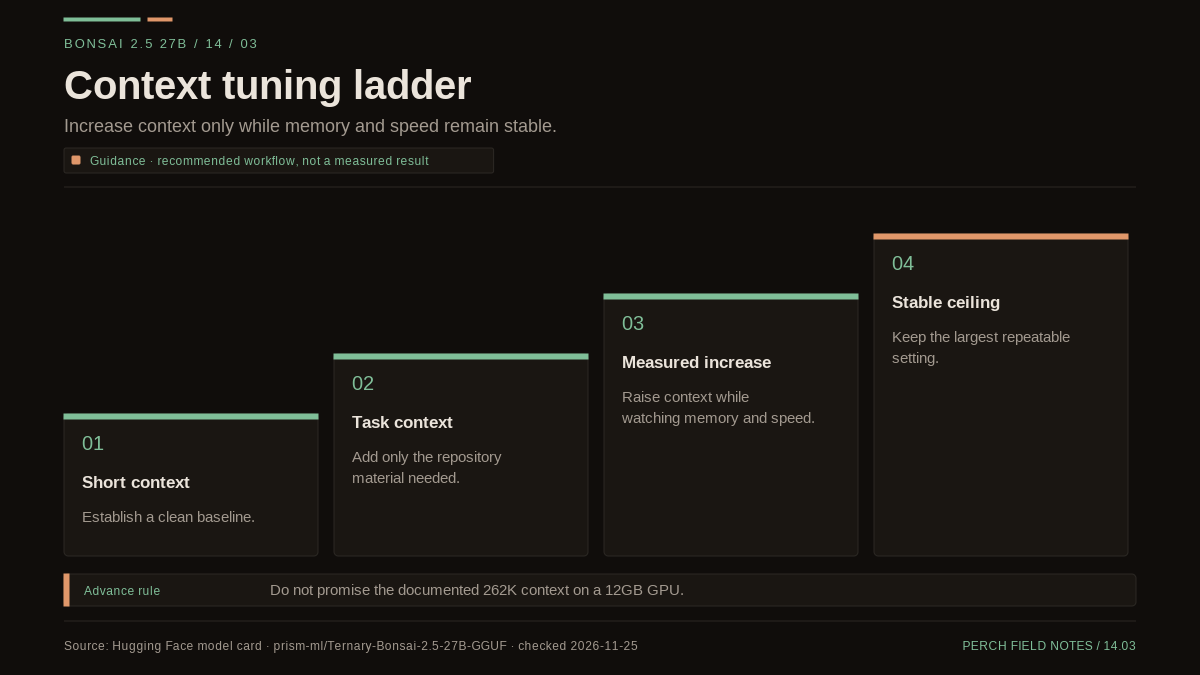
Repository work makes this harder because context is consumed by more than the user’s latest message. System instructions, tool schemas, retrieved files, command output and previous turns all compete for the same window. A 262K model can still be the wrong tool for a 12GB budget if the agent retains every intermediate result. Bound tool output, retrieve only relevant files and summarize old state before increasing -c.
The 262K Bonsai context-window memory guide covers repository retrieval and agent history. The 180-tool-call Bonsai coding-agent workflow explains how a tool loop can expand that history. Neither article turns the documented maximum into a hardware guarantee.
Reasoning also affects the usable output budget. By default, Bonsai reasons at xhigh; medium is available; low is unsupported and behaves like xhigh. Thinking is on by default, and a short generation cap can be consumed before the final answer appears. The published example allows -n 16384, which is an output cap, not a context measurement. If a response ends abruptly, inspect reasoning length before blaming context or model quality.
A practical context test should record the configured limit, approximate prompt size, generated length, runtime, GGUF and memory at each stage. Do not report only the largest -c value that launches. A setting that loads but cannot process the intended repository is not a successful configuration.
Is MTP worth the tradeoff on 12GB?
Not as a first step. MTP adds a separate published artifact and changes the performance profile. PTQ1_0 grows from 5.99 GB to 6.23 GB, PQ2_0 from 7.25 GB to 7.49 GB and Q2_0 from 7.67 GB to 7.91 GB. Each increase is about 0.24 GB at the published rounded sizes. The extra footprint has to fit alongside the rest of the runtime.
The potential benefit is generation speed. ExplainX attributes PrismML’s higher 291 tok/s H100 launch claim to MTP, while the model card lists 186 tok/s for plain-decode PTQ1_0 on H100. The same pattern appears on RTX 4090: the launch page claims 204 tok/s, compared with 112 tok/s in the model-card plain-decode table. These are vendor claims on different hardware and configurations, not measurements of a 3060.
The cost is not limited to file size. The model card warns that MTP can slow NVIDIA prefill by 9 to 23 percent. A coding agent may process a substantial prompt and tool history before generating the next action, so faster token generation does not automatically produce a faster task. Prompt handling and generation need separate measurements.
Another evidence gap remains: the supplied packet does not provide an exact MTP enablement command. Do not invent a flag or assume that selecting a similarly named file is sufficient. First verify support in the runtime documentation for the exact MTP artifact. Keep the base file as the known-good fallback.
A fair MTP comparison changes only the MTP state. Use the same GGUF family, context, prompt, output cap, offload and runtime build. Record prompt-processing time, generation time and peak memory. If the MTP run reduces memory headroom, slows prefill or fails to load, the smaller base configuration is the better budget choice even if a vendor slide shows a higher generation number.
The cross-hardware Bonsai tokens-per-second comparison keeps the H100, RTX 4090 and community figures separate. The RTX 4090 Bonsai configuration and speed claims is useful for understanding how the published claims are framed, but its settings and speed cannot be transferred to a 12GB card.
When should you use CPU offload?
Use offload as a fallback when the desired configuration does not fit entirely on the GPU, not as the opening move. The model-card CLI example uses -ngl 99. That requests its published offload configuration; it does not guarantee how many layers will remain on the GPU when memory is tight. If loading fails, reduce GPU layer offload in measured steps and confirm where the runtime actually places the model.
Partial offload can allow a configuration to run by keeping some layers in system RAM. It also introduces CPU work and data movement between memory domains. The packet supplies no reliable CPU-only tokens-per-second number and no RTX 3060 offload measurement, so the only honest expectation is that speed must be measured. Do not attach a guessed slowdown percentage.
System RAM matters more in this mode, but the supplied sources do not establish an exact RAM requirement for a given context, runtime or offload split. Avoid turning a rule of thumb into a purchase requirement. Check available system memory before the run, then observe the process while it loads and serves a request.
The model card’s RTX 3080 example, roughly 9.5 GB VRAM before -np 1 and 7.8 GB afterward, suggests that runtime options can materially change a reported footprint. It does not explain a universal formula, and it does not authorize assuming the same drop on a 3060. Quote it as a vendor example with its hardware attached.
Offload is especially unattractive for an interactive coding loop if the resulting latency makes each tool turn slow. A smaller base GGUF with a shorter context may be more useful than a larger configuration held together by constant CPU transfers. Compare task completion, not just whether the process stays alive.
The CPU-only Bonsai setup and memory tuning is the next reference if GPU placement continues to fail. It also preserves the unknown speed boundary. If neither full nor partial GPU placement meets the workload, a different local model or a hosted route may be the more practical decision.
Does the community’s 74 tok/s RTX 3060 claim survive an audit?
No. It remains an unverified relay. ExplainX repeats an unsourced X claim of about 74 tok/s at 262K context on a 12GB RTX 3060 with MTP. The supplied material does not include the original test, a reproducible configuration or an independent result. It also does not resolve whether the context figure describes the configured window, the actual prompt length or both.
The number is tempting because it combines the exact card, the model’s headline context and MTP. Those three details are not enough to reproduce it. The GGUF variant, runtime version, offload split, prompt length, generated length, sampling settings and background load are missing. No supplied memory trace shows that the claimed configuration actually ran on 12GB.
Claim audit
| Claim or data point | Evidence class | What it supports | Why it is not an RTX 3060 prediction |
|---|---|---|---|
| About 74 tok/s at 262K on RTX 3060 12GB with MTP | Third-party relay of an unsourced X claim | A question worth testing | No original test, GGUF, runtime, offload details, prompt length or independent verification |
| 291 tok/s generation and about 3,200 tok/s prompt on H100 | Vendor launch claim | PrismML’s advertised H100 configuration | Different hardware; ExplainX attributes the generation figure to MTP |
| 204 tok/s generation and about 3,060 tok/s prompt on RTX 4090 | Vendor launch claim | PrismML’s advertised RTX 4090 configuration | A 24GB card is not evidence for a 12GB card or the same context |
| 186 tok/s H100 and 112 tok/s RTX 4090 for plain-decode PTQ1_0 | Vendor model-card table | A separate plain-decode comparison | Not directly comparable with MTP launch figures and not a 3060 result |
| MTP can slow NVIDIA prefill by 9 to 23 percent | Vendor warning | A reason to measure prompt handling | It is a range, not a guaranteed penalty on one runtime or card |
Roughly 9.5 GB before -np 1, about 7.8 GB after, on RTX 3080 10GB |
Vendor hardware-specific example | Configuration can change reported VRAM | Different GPU and undisclosed broader configuration |
| 22.3 tok/s on Mac Mini M5 Pro | Community report on Hacker News | An anecdote with incomplete configuration | Different platform and no reproducible settings |
| Exact KV-cache bytes, CPU-only speed and verified 3060 maximum context | Unknown | Explicit research gaps | No supplied measurement exists to quote |
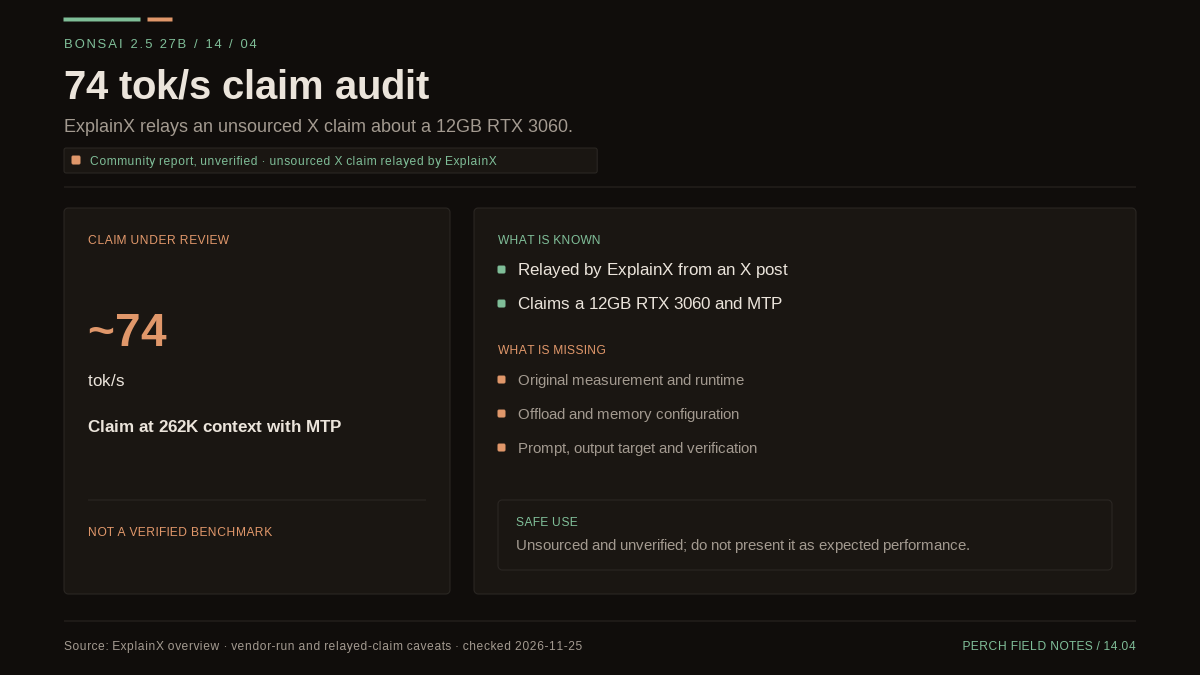
The PrismML launch announcement is the primary source for the H100 and RTX 4090 claims. The model-card repository supplies the separate plain-decode table and MTP warning. The ExplainX overview of Bonsai agentic coding is the third-party relay for the 74 tok/s statement and explicitly notes that benchmark scores were vendor-run rather than independently reproduced.
The Hacker News discussion of Bonsai 2.5 27B contains the Mac Mini anecdote and skepticism. It is useful for identifying questions, not for filling the 3060 data gap. The supplied LocalLLaMA thread provided as a community pointer was inconsistently accessible and supports no factual claim here.
To generate a useful local result, publish the exact GGUF, runtime build, backend, -c, -ngl, MTP state, prompt length, generated length and memory observations beside the speed. Separate prompt processing from generation. Repeat the same request after closing unrelated GPU workloads. A single number without that context would repeat the weakness of the claim being audited.
How do you troubleshoot a 12GB RTX 3060 setup?
Fix the earliest failed stage first. A build problem, incompatible GGUF, memory failure and truncated answer have different causes. Changing five settings at once makes it impossible to know which change helped.
Start with the base file and the exact runtime pairing. PTQ1_0 and PQ2_0 require PrismML’s llama.cpp fork. Q2_0 requires stock llama.cpp b11556+; older builds may load the file and emit garbage. A successful load is therefore not sufficient evidence of compatibility. Check the runtime version and executable path before downloading the model again.
The model card publishes this PTQ1_0 CLI example:
./bin/llama-cli -m Ternary-Bonsai-2.5-27B-PTQ1_0.gguf -ngl 99 -fa on -c 32768 --temp 1.0 --top-p 0.95 --top-k 20 --min-p 0 -p "Explain quantum computing in simple terms." -n 16384Use it as a reference configuration, not a promise that -ngl 99 and -c 32768 will fit your card. If it fails during load, reduce competing GPU work, confirm the fork binary and lower offload. If it loads but fails on a longer request, reduce context before changing quantization. The sampling values are usage examples, not disclosed benchmark settings.
For Q2_0, keep the stock runtime separate from the fork. If output is incoherent, verify b11556+ first. Replacing the GGUF with another copy of the same file will not repair an old runtime. If using the stock llama serve command, wait for its readiness output and use the endpoint it reports rather than assuming an address.
Common failures and useful checks:
- Out of memory during load: Remove MTP and vision, select the smaller base GGUF, close other GPU workloads and reduce GPU layer offload. Do not interpret the 5.9 GB marketing figure as the process total.
- Out of memory after a long prompt: Reduce
-cand bound repository or tool output. A startup success does not validate the intended context. - Garbage output from PTQ1_0 or PQ2_0: Confirm that the executable came from PrismML’s fork, not stock llama.cpp.
- Garbage output from Q2_0: Verify stock llama.cpp
b11556+. Loading the file is not proof that the build understands it correctly. - MTP version fails while base works: Return to the base artifact. The extra 0.24 GB and runtime support both need verification before MTP is useful.
- Prompt handling becomes slower with MTP: Compare identical base and MTP runs. The documented NVIDIA prefill penalty may outweigh the generation benefit for the workload.
- Answer stops before a final result: Inspect the output cap and reasoning length.
lowis not a supported faster mode; use the availablemediumsetting or adjust output room. - Image input fails or adds pressure: Keep the first configuration text-only. The optional projectors are 0.93 GB for BF16 and 0.63 GB for Q8_0, before their runtime effects.
- Partial offload runs but feels slow: Record the latency rather than guessing. Decide whether the workload remains useful with CPU transfers in the path.
- A coding agent loses track or stalls: Reduce retained history and tool output before raising context. Model setup and harness design are separate problems.
Once a text baseline is stable, test one small coding task whose correct result you already know. Require a proposed patch and run the tests yourself. The vendor-published coding average for Bonsai is 54.2 versus 60.5 for Qwen3.8 FP16, and it trails by 10.7 points on Terminal-Bench 2.1 and 5.0 points on SWE-bench Verified. Those are vendor-run comparisons without independent reproduction, but they are an honest warning against assuming frontier-level coding quality from a compact file.
The row-by-row Bonsai 2.5 27B benchmark teardown explains the averages and regressions. The Bonsai 2.5 27B versus Qwen3.8 27B decision matrix helps decide whether the footprint trade is worthwhile. Neither comparison supplies a missing RTX 3060 speed result.
What is the verdict for a 12GB RTX 3060?
Bonsai 2.5 27B is worth a controlled local test, not an unconditional recommendation. PTQ1_0 with PrismML’s fork is the first candidate when the smallest published base file matters. Q2_0 with stock llama.cpp b11556+ is the alternative when stock-runtime compatibility matters more. Start text-only, without MTP, and find the largest context that remains stable for the actual workload rather than chasing 262K.
Do not buy the card expecting 74 tok/s. Do not assume the RTX 3080 memory example transfers to it. Do not call partial offload fast without measuring. The evidence supports exact filenames, runtime requirements and a test procedure, but not a verified 3060 configuration, context ceiling or speed.
This article needs updating when PrismML or an independent tester publishes a reproducible RTX 3060 12GB run with the exact GGUF, MTP state, runtime build, context, offload and memory trace. Until then, those remain explicit gaps. Bonsai 2.5 27B is not a hosted One AI API Key model; if maintaining a constrained local runtime is not the right trade, compare hosted models currently available through One AI API Key. For the wider release context, read the Bonsai 2.5 27B launch verdict and setup router.
Complete Bonsai 2.5 27B guide
- Bonsai 2.5 27B launch verdict and setup router
- row-by-row Bonsai 2.5 27B benchmark teardown
- 180-tool-call Bonsai coding-agent workflow
- Tau, BFCL and AppWorld tool-calling analysis
- SWE-bench Verified 75.6 repository-repair analysis
- Terminal-Bench 2.1 long-horizon terminal analysis
- PTQ1_0 and Q2_0 local installation walkthrough
- Ollama Q2_0 commands and coding-agent connection
- vLLM OpenAI-compatible Bonsai server setup
- Apple Silicon MLX setup for Bonsai 2.5 27B
- Bonsai VRAM and RAM worksheet by quantization
- cross-hardware Bonsai tokens-per-second comparison
- RTX 4090 Bonsai configuration and speed claims
- Mac Mini M5 Pro Bonsai setup and 22.3 tok/s audit
- CPU-only Bonsai setup and memory tuning
- 262K Bonsai context-window memory guide
- PTQ1_0 versus PQ2_0 versus Q2_0 quantization guide
- Bonsai vision mmproj setup and benchmark limits
- Bonsai 2.5 27B versus Qwen3.8 27B decision matrix
Sources
- PrismML launch announcement supports the release, license, vendor benchmark tables, H100 and RTX 4090 speed claims, and the offline demo.
- Ternary Bonsai 2.5 27B GGUF repository supports exact filenames, rounded file sizes, runtime requirements, commands, MTP warning and the RTX 3080 memory example.
- PrismML getting-started documentation supports documented llama.cpp and MLX paths, backend families, tool support and image support.
- ExplainX overview supports the third-party framing, vendor-run benchmark caveat, MTP interpretation and the relayed 3060 claim.
- Hacker News discussion supports community questions and the anecdotal Mac Mini report, not independent benchmark verification.
- LocalLLaMA discussion is an inconsistently accessible community pointer, not evidence for any factual claim in this guide.