The documented context window for Bonsai 2.5 27B is 262,144 tokens, but that number is a model ceiling, not a promise that every GGUF, GPU or coding agent can use it. The practical limit is the smaller of your configured context, available memory, runtime behavior and the amount of useful evidence your task actually needs.
Use 262K as an opt-in setting for evidence-heavy work, not as the default for every request. Start with a measured working context, reserve room for the answer and reasoning, retrieve repository evidence instead of attaching everything, and compact agent history before old tool output crowds out the current task. This approach cannot eliminate memory pressure, but it makes the limit visible and gives you a controlled way to raise it.
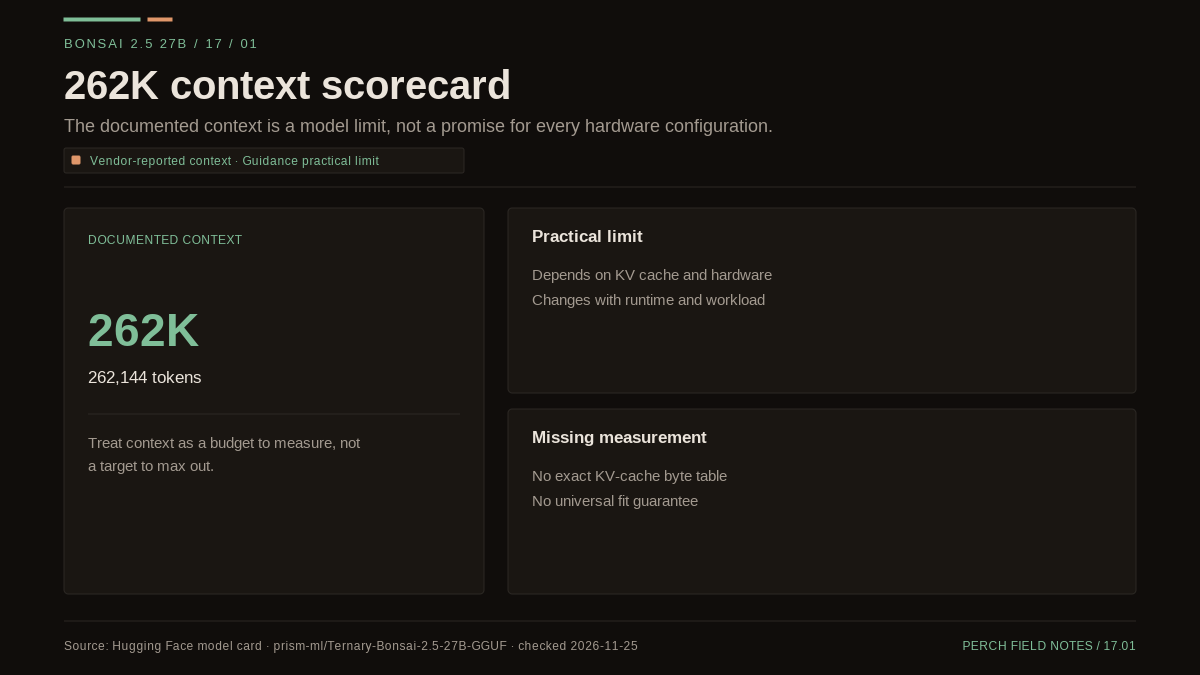
What context length is documented for Bonsai 2.5 27B?
PrismML documents 262,144 tokens for Ternary Bonsai 2.5 27B. The PrismML launch announcement and the Ternary Bonsai 2.5 27B GGUF model card are the relevant supplied sources. Treat this as a Vendor claim about model capability. Neither source establishes that every local runtime defaults to that setting or that every hardware configuration can sustain it.
The published model-card smoke test is a useful reality check. Its llama-cli example sets -c 32768, a 32,768-token context, and uses -n 16384 for the output allowance. Treat it as a usage example, not a disclosed long-context benchmark and not a recommended maximum. It shows why “the model documents 262K” and “this command is configured for 32K” can both be true. Your harness must deliberately select and verify the context it requests.
The architecture also matters when reasoning about memory. PrismML describes a ternary vision-language model based on Qwen3.8-27B with hybrid attention, approximately 75 percent linear attention and 25 percent full attention. The description is not a published KV-cache byte formula; it is a warning against applying a generic full-transformer estimate and presenting the result as a measured Bonsai requirement.
Context configurations: starting points, not guarantees
| Configuration | Context setting | Appropriate use | Main constraint | Evidence status |
|---|---|---|---|---|
| Published smoke-test baseline | 32,768 configured tokens | Verify coherent output and establish a memory baseline | The example also allows 16,384 output tokens; this is not a 262K test | Model-card command |
| Vendor-documented ceiling | 262,144 tokens | Evaluate a genuinely large corpus or long evidence trail after shorter tests pass | Memory, runtime, prefill cost and task quality remain unmeasured at this setting | Vendor claim |
| Measured working limit | Record the exact setting that passes your tests | Normal repository work with predictable headroom | Specific to GGUF, runtime, backend, MTP, vision, hardware and request shape | Your measurement |
| Retrieval-managed long task | Keep the configured setting at or below the measured working limit | Multi-stage investigation where fresh evidence matters more than raw transcript size | Retrieval can miss evidence; summaries can discard details | Recommended policy, not a model benchmark |
The distinction between a configured limit and a working limit is central. A runtime may accept a large context argument and still perform poorly because memory is exhausted, prompt processing becomes unacceptable, or the model loses track of a relevant detail. Conversely, a smaller configured window may be the better operational choice when retrieval supplies the right files at the right time.
The PrismML getting-started documentation also documents native tool calling, image input and several local serving paths. Those features affect the budget: tool schemas consume input space, returned observations consume more, and image input follows runtime-specific handling. A text-only context number should not be read as a promise that every combination of tools, images and history has the same practical capacity.
How does the KV cache turn tokens into memory pressure?
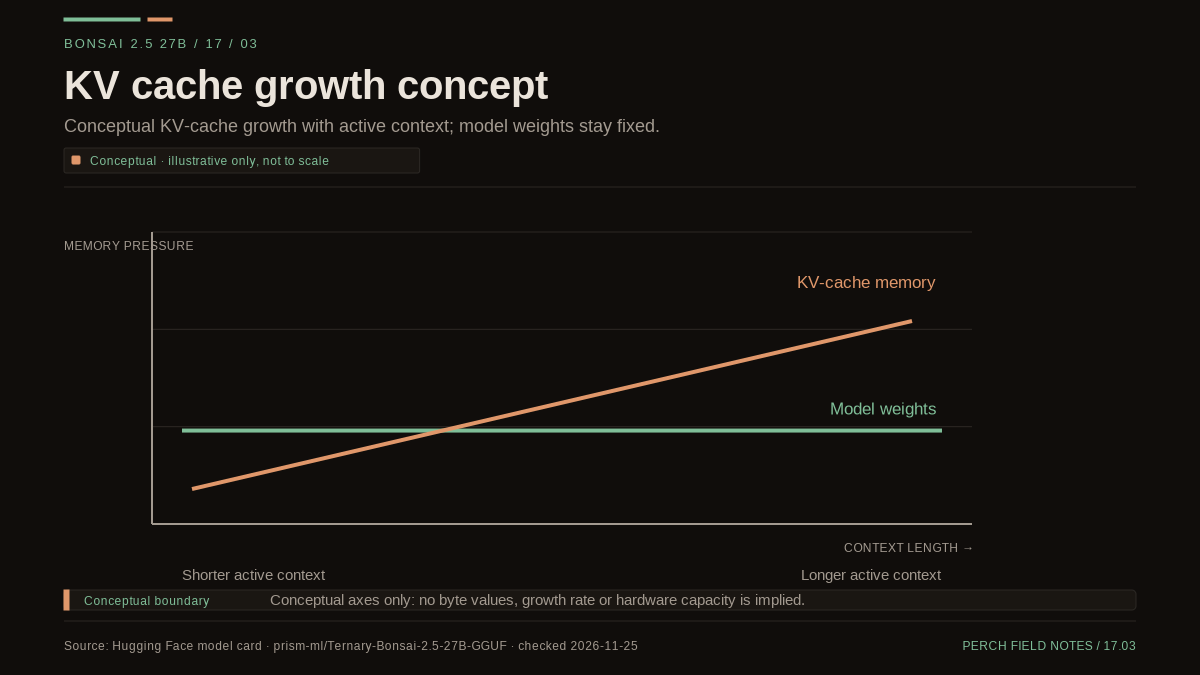
In a conventional full-attention layer, the runtime retains keys and values for earlier tokens so that generating the next token can attend to the preceding sequence. Those cached representations are separate from model weights. As more tokens remain available for attention, the cache generally needs more memory. The weights do not become larger merely because the prompt becomes longer, but the working state does.
Working state is why a small download is not a small runtime. The base Ternary-Bonsai-2.5-27B-PTQ1_0.gguf file is 5.99 GB, yet a running process must also accommodate cache state, runtime allocations and the selected workload. Bonsai’s hybrid attention design means the exact relationship cannot be inferred from a simple full-attention rule. The supplied sources publish no exact KV-cache byte table, so a precise per-token or 262K total would be invented.
Why prompt processing and generation need separate measurements
Prompt processing, often called prefill, handles the incoming sequence before generation proceeds. Generation then produces new tokens. A long prompt can increase both memory demand and the work needed before the first useful output. Measuring only steady-state generation speed misses that cost. Measuring only peak memory misses whether the interaction remains responsive.
The launch page claims 3,200 prompt tokens per second on an H100 and about 3,060 on an RTX 4090. Those are Vendor throughput claims, not results for a 262K repository prompt. The model card warns that MTP can slow NVIDIA prefill by 9 to 23 percent. If your agent repeatedly retrieves files, appends observations and re-sends history, prefill behavior belongs in the test plan alongside memory.
MTP is not a context-compaction mechanism. The MTP GGUF alternatives add roughly 0.24 GB over their corresponding base files. They may change generation behavior, but no supplied source isolates their KV-cache effect at 262K. Treat MTP as another configuration variable to hold constant while measuring context capacity, not as a way to make memory pressure disappear.
Vision adds another boundary. The published projector files are approximately 0.93 GB in BF16 and 0.63 GB in Q8_0, while the documented MLX export is text-only. The source set does not provide an exact image-token accounting table. If a workflow includes screenshots or documents, measure that exact path rather than extrapolating from a text-only run.
The Bonsai VRAM and RAM worksheet by quantization is the companion reference for weight files, projectors, MTP and runtime components. Its practical lesson applies here: total memory is a stack of costs, and the context window controls only one part of that stack.
How should you budget repository context?
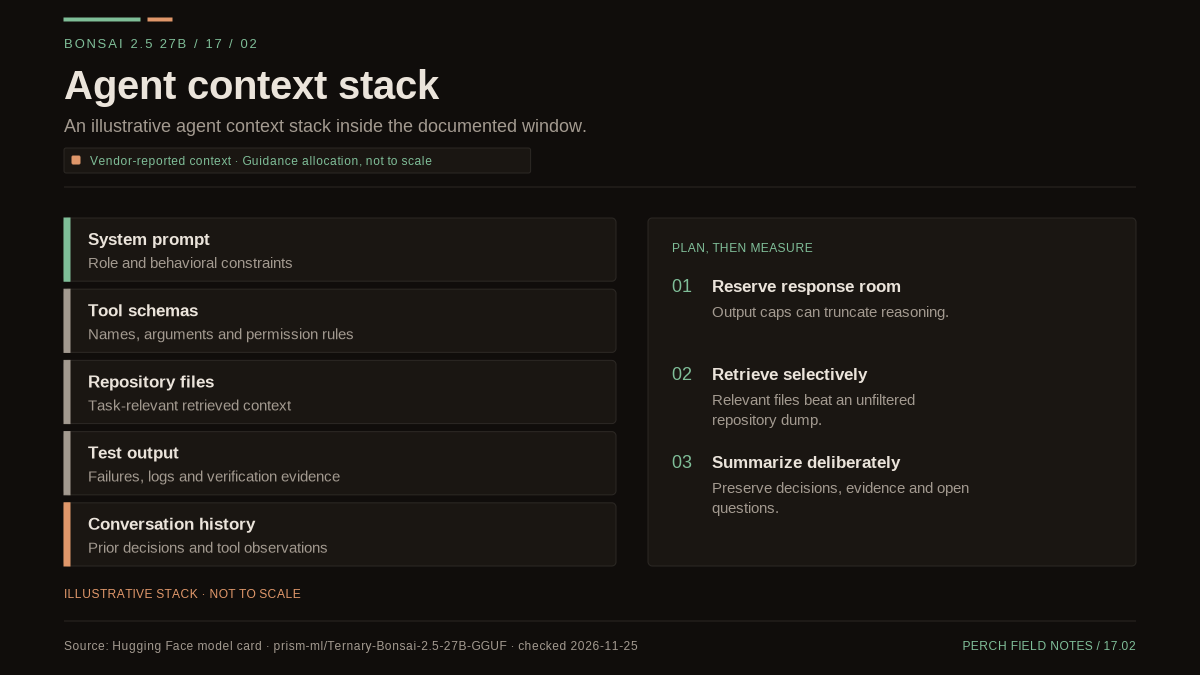
A repository agent does not begin with an empty prompt. It begins with instructions, tool definitions, a task, runtime conventions and whatever context the harness attaches automatically. Every retrieved file and every tool result then competes with history and the space needed for the response. A 262K ceiling can be consumed by ordinary agent plumbing before the repository evidence arrives.
Context budget worksheet
Use this worksheet before increasing -c or the equivalent setting in your serving stack. The numbers must come from your harness and runtime; do not estimate them from file size or a generic characters-per-token ratio.
| Budget line | What to record | Why it belongs in the budget |
|---|---|---|
| System and task instructions | Token count for the fixed preamble, task statement and constraints | This is paid on every request and is easy to overlook |
| Tool definitions | Token count for names, descriptions and schemas | A large tool surface can consume substantial prompt space |
| Retrieved repository evidence | Token count for files, slices, symbols and citations | More retrieval is not always better if it duplicates or distracts |
| Current observations | Token count for test output, errors, diffs and command results | Raw logs can dominate the window while adding little reusable evidence |
| Compacted history | Token count for decisions, verified facts and prior outcomes | History should preserve task state, not every repeated payload |
| Response and reasoning reserve | Output allowance plus any separate harness reserve | Thinking is on by default, and short output caps can truncate reasoning |
| Safety reserve | Tokens left unused for late evidence or an unexpected retry | A prompt that exactly fills the window leaves no recovery room |
A useful accounting rule is:
Working prompt budget = configured context minus response reserve minus safety reserve.
Then track system instructions, tools, retrieved evidence, observations and compacted history against that working prompt budget. Verify how your runtime counts input and output rather than assuming every server exposes identical accounting. Leave the output reserve visible in the harness even when the model API reports only prompt usage.
Build the smallest complete evidence package
Start with the task and the evidence required to act on it. For a failing test, that may mean the relevant test, the implementation under test, the exact failure and the nearest dependency. For a cross-file behavior change, add the call sites and interfaces that define the contract. A repository map can help locate those pieces, but the map itself is not a substitute for reading the decisive code.
Preserve provenance. Each retrieved slice should carry its path, line range or symbol, and the reason it was included. If a later summary says “the parser rejects empty input,” it should point back to the test or implementation that establishes the behavior. Doing so makes verification possible and reduces the chance that an agent treats an old inference as a current fact.
Avoid silent duplication. Search results, a full file and a quoted excerpt may contain the same code. Deduplicate before sending the package, and prefer the smallest slice that preserves syntax and meaning. When a tool returns a long log, retain the failure, relevant stack frames and the command outcome instead of repeatedly attaching the entire log.
Reasoning output also needs room. The model defaults to xhigh, medium is available, low is unsupported and behaves like xhigh, and thinking is on by default. A short generation cap can truncate reasoning before the final answer. The failure differs from exhausting input context, so record output truncation separately from prompt rejection or memory exhaustion.
How should an agent manage history without losing the task?
An agent transcript is a record of interactions, not necessarily the best context for the next interaction. It can contain obsolete file contents, superseded plans, repeated errors and large tool payloads. Two things need to stay conceptually separate: a durable task state and the raw event history. The model should receive the state plus the fresh evidence it needs, while the harness retains the raw history for audit and recovery.
PrismML reports an offline pytest investigation involving 180 tool calls, but the supplied material includes no complete transcript or harness. The demo shows the shape of a repository workflow; it does not establish how much context the run used or prove that a 262K window is the right setting. The 180-tool-call Bonsai coding-agent workflow covers the loop and its safety boundaries.
What belongs in durable task state?
A compact state record should answer these questions:
- What is the objective, and what is explicitly out of scope?
- Which repository state and files are currently being examined?
- Which facts have been verified by reading code or running a test?
- Which changes have been applied, and what were the results?
- Which approaches were tried and rejected, with the reason?
- What is the next action, and what unresolved failure blocks it?
The structure preserves progress without requiring every previous message. It also gives the agent a place to record negative results. “Increasing this setting did not change the failure” can prevent a retry loop, provided the statement is tied to an actual observation rather than a guess.
When should old turns be compacted?
Compact after a meaningful phase completes, such as reproducing a failure, identifying a root cause or finishing a focused patch. Compaction is less useful when it interrupts active exploration before the evidence has been interpreted. The aim is not to summarize on a fixed schedule but to remove payloads that no longer help the next decision.
Never let a summary silently replace source evidence that is still contested. If two files disagree, preserve both references and the unresolved question. If a test failed after an edit, retain the exact assertion and the relevant output. A summary that says only “tests have issues” discards the information needed to recover.
There is also a quality caveat. In PrismML’s vendor-published broad table, Bonsai 2.5 27B scores 80.90 on instruction following, down 1.65 points from Bonsai 2 27B’s 82.55. That row is not a long-context or summarization benchmark, and it was not independently reproduced. It does not prove history compaction fails. It does argue against assuming that repeated rewrites of instructions and task state will be followed perfectly.
Use explicit checkpoints in the harness. After a summary, restate the objective, current verified facts, latest test result and next action in a stable structure. After a fresh retrieval, update references before asking for another patch. Doing so keeps the model’s working context aligned with the repository’s current state rather than its state several turns ago.
Which retrieval strategy should you use for a repository?
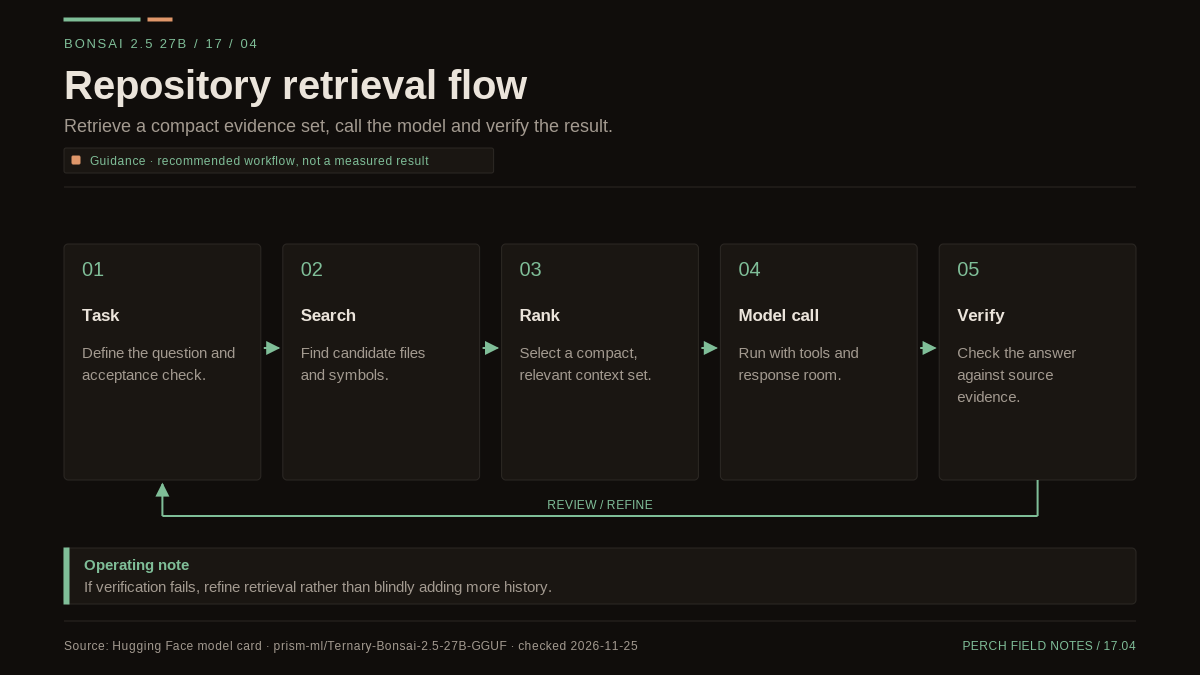
Retrieval is the practical alternative to treating the entire repository as one static prompt. It lets the agent expand evidence around the task instead of paying for every file on every turn. It also introduces a new failure mode: the right file may never be selected. Retrieval quality therefore needs verification just as much as context size.
Retrieval strategies
| Strategy | Best use | Main failure mode | Required check |
|---|---|---|---|
| Repository map and file inventory | Locate modules, entry points and test areas | A map can be stale or too shallow to identify behavior | Open the actual files and confirm current paths |
| Exact-text and identifier search | Find a named function, error string, configuration key or call site | Similar names can produce irrelevant matches | Inspect surrounding definitions and usages |
| Symbol and dependency tracing | Follow an interface, import or call chain | A partial trace can miss dynamic or indirect paths | Check tests and runtime behavior |
| Failing-test-centered retrieval | Collect the test, assertion, implementation and immediate dependencies | The first failing assertion may not be the root cause | Reproduce before accepting a patch |
| Semantic retrieval, if supplied by the harness | Find conceptually related code when exact terms are unknown | Rankings may omit a decisive file or return duplicates | Require path-level review and test confirmation |
| Bounded fresh reread | Re-read a changed file before editing or final review | Re-reading too much recreates the original context problem | Limit to the active symbols and changed regions |
A reliable sequence is task, search, rank, bounded read, model call, verification. Search establishes candidates. Ranking chooses what enters the budget. Bounded reads supply enough surrounding code to interpret the match. Verification then checks the proposed action against the repository. Do not collapse those stages into “retrieve some files and trust the result.”
How do you know retrieval worked?
Use observable checks. Did the agent open the file it cited? Does the cited line still contain the claimed behavior? Does the relevant test exercise the selected path? Can a second search using a different term find a contradictory implementation? These checks catch stale references and incomplete candidate sets without requiring a larger static prompt.
The published SWE-bench Verified score of 75.6 is vendor-reported and lacks disclosed prompts, scaffolds, seeds and independent reproduction. It cannot tell you which retrieval method will work on your repository. The SWE-bench Verified 75.6 repository-repair analysis explains why patch evaluation still needs local tests and review. Likewise, the Terminal-Bench 2.1 long-horizon terminal analysis is useful for task shape, not proof that a long transcript improves results.
Refresh retrieval when the repository changes. An old file slice remains in history even after another tool edits the file. Before the next patch, retrieve the current version and update the durable state; this prevents the agent from reasoning about a conflict that no longer exists or overwriting a change it has forgotten.
For long investigations, use staged evidence packages. First locate the subsystem, then inspect the relevant implementation, then add tests and call sites needed for the proposed change. Each stage can compact completed exploration. A staged approach like this is usually easier to debug than attaching a large corpus and hoping the model selects the right detail, although no supplied Bonsai study measures the quality difference between those approaches.
How do you measure the practical memory limit?
Measure a configuration, not a model name. “Bonsai used X GB” is incomplete without the exact GGUF, runtime version, backend, context setting, MTP state, vision state, prompt size and generation allowance. Two runs with different settings are not comparable, even if they use the same weights.
A repeatable measurement sequence
- Freeze the configuration. Record the exact filename, runtime and version, backend, context setting, MTP state, projector state, request count and output allowance.
- Establish a loaded baseline. Record memory after weights and runtime initialize but before a large prompt. Keep host RAM, GPU memory and unified memory distinct.
- Add a representative prompt. Use a task you already understand, record its measured token count, and watch memory during prompt processing rather than checking only after completion.
- Generate a bounded response. Reserve output space, capture peak memory, and record whether the response completes without truncation or corruption.
- Append a realistic observation. Add a test result, diff or bounded log, then measure again. Agent memory pressure often changes between turns, not just at initial load.
- Raise one variable at a time. Change the context setting or evidence package, repeat the same checks, and record the first failure mode.
- Verify correctness. A run that stays in memory but misses the decisive evidence has not passed the practical test.
Start from the published 32,768-token smoke-test scale when it fits the hardware, then increase only after the baseline is coherent. Do not begin with 262K merely because it is documented. A ladder gives you a working limit you can explain and a clear point at which memory, latency or task quality changes.
Watch for several different failures. An allocation error indicates memory pressure. A rejected request may indicate a configured or counted context limit. Garbage output can indicate a runtime compatibility problem rather than a context problem. A truncated answer can indicate an output cap. A correct-looking but unsupported patch can indicate missing evidence. Recording the symptom prevents an incorrect fix such as adding more RAM to solve a retrieval failure.
The model card reports roughly 9.5 GB VRAM before -np 1 on a 10 GB RTX 3080, dropping to about 7.8 GB afterward. That is a Vendor observation for a specific configuration. The supplied description does not establish its context setting, so it cannot be converted into a 262K capacity estimate. It also does not make 7.8 GB a universal requirement.
What do the long-context speed claims prove?
ExplainX relays an unsourced claim of about 74 tokens per second at 262K context on a 12 GB RTX 3060 with MTP. The relay lacks enough configuration detail for verification. It is not a planning guarantee and does not establish usable quality at that context length. The RTX 3060 12GB Bonsai feasibility and context tuning treats this as a claim audit rather than a benchmark.
The Hacker News Mac Mini M5 Pro speed report says 22.3 tokens per second. That is a Community anecdote with incomplete configuration, not a long-context result. The Mac Mini M5 Pro Bonsai setup and 22.3 tok/s audit keeps that distinction visible. The LocalLLaMA Hugging Face discussion is an inconsistently accessible community pointer, not evidence. No reliable CPU-only tokens-per-second figure is supplied either, so a CPU speed promise would be invented.
For fair comparisons, separate prompt-processing speed from generation speed and record MTP state, context and prompt length. The cross-hardware Bonsai tokens-per-second comparison provides the measurement framework. A fast short prompt does not establish fast 262K prefill, and a high generation rate does not establish that a long agent history remains useful.
Finally, test concurrency separately. A single-request memory result does not describe multiple simultaneous agents, each with its own cache and history. If your serving stack batches or shares prefixes, record that behavior as part of the runtime configuration. Do not multiply or divide single-request measurements to claim a capacity the source material never reports.
When should you summarize, truncate or retrieve again?
Summarization, truncation and retrieval solve different problems. Summarization preserves interpreted task state. Truncation removes low-value raw material. A fresh retrieval brings current evidence back. Choosing the wrong action can save tokens while making the next decision worse.
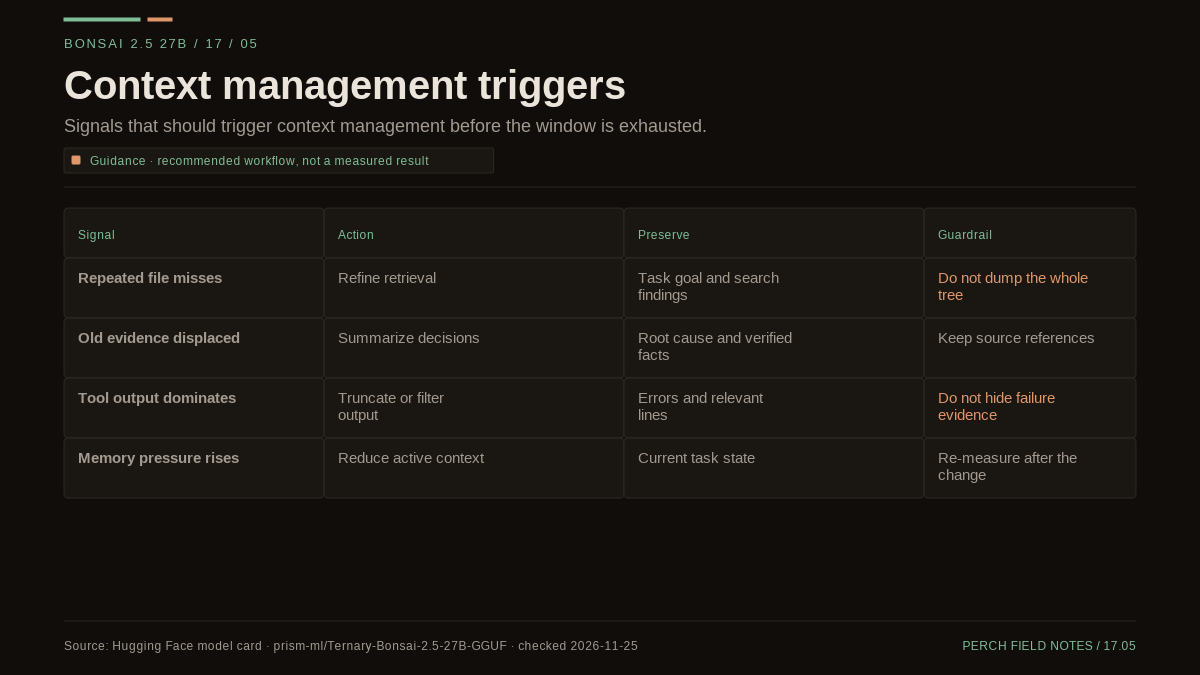
Summarize when the task has a stable checkpoint
Summarize after the agent has reproduced a bug, confirmed a root cause, completed a bounded change or finished a research phase. Preserve the objective, verified facts, decisions, rejected approaches, latest test result and next action. Replace repeated payloads with references to the retained raw history.
Do not summarize away unresolved evidence. Exact identifiers, assertions, error messages, file paths and line references should survive when they are still needed. If a detail is likely to determine the next patch, keep the source excerpt or retrieve it again instead of relying on a paraphrase.
Truncate when raw material is repetitive or stale
Long logs, repeated search output and superseded file contents are common candidates. Keep the decisive lines and the outcome. If the full output is needed for audit, retain it outside the model context and provide a bounded excerpt with a reference.
Be careful with truncation order. Cutting the beginning of a stack trace may remove the root cause; cutting the end may remove the final assertion or summary. Prefer structured extraction over blind character limits. When the remaining output is still too large, return a clear statement that the observation was bounded rather than pretending the excerpt is complete.
Retrieve again when the evidence has changed or was never sufficient
Retrieve after an edit changes the file, after a test reveals a new path, or when a summary references evidence the model can no longer inspect. Retrieval is also the right response when the current package is small but irrelevant. Adding more old history cannot fix a missing file.
Avoid a retrieve-and-append loop without compaction. Each new search can add another copy of similar code until the window is full again. After incorporating fresh evidence, remove superseded slices and update the durable state. The next request should contain the current package, not an archaeological record of every search that preceded it.
Use explicit pressure signals
Useful signals include the measured remaining budget, repeated payloads, a completed phase, an upcoming large tool result, a repository change and a unresolved discrepancy between summary and source. These are operational triggers, not Bonsai-specific thresholds. The supplied sources do not publish a recommended percentage at which this model must summarize.
A practical loop is: measure, decide, compact or retrieve, restate the checkpoint, then continue. Compare the claimed result with tests or source code after every model call. Doing so ties context management to task correctness rather than to an arbitrary token target.
What is the verdict for using 262K tokens?
The documented 262,144-token context of Bonsai 2.5 27B is real, but the supplied evidence does not establish a universal practical 262K configuration. Exact KV-cache bytes, hardware-specific ceilings, independent long-context quality and a measured optimum for repository agents are all unknown. The 5.9 GB-class weight claim is not total runtime memory, and the unverified RTX 3060 speed relay is not proof of capacity.
The sound approach is conditional. Use a smaller measured context for routine work, retrieve task-specific evidence, reserve output and recovery space, and compact completed history. Increase the configured window only when a real task needs more simultaneous evidence and your measurements show acceptable memory and responsiveness. Validate the result against code and tests, because fitting more text does not by itself improve the answer.
This article will be updated when PrismML publishes exact cache accounting, reproducible long-context settings or an independent evaluation. Until then, keep the vendor claim, your measurements and community anecdotes visibly separate. Bonsai 2.5 27B is a local GGUF release, not a hosted One AI API Key model; if hosted access is the requirement, compare hosted models currently available through One AI API Key.
Complete Bonsai 2.5 27B guide
- Bonsai 2.5 27B launch verdict and setup router
- row-by-row Bonsai 2.5 27B benchmark teardown
- 180-tool-call Bonsai coding-agent workflow
- Tau, BFCL and AppWorld tool-calling analysis
- SWE-bench Verified 75.6 repository-repair analysis
- Terminal-Bench 2.1 long-horizon terminal analysis
- PTQ1_0 and Q2_0 local installation walkthrough
- Ollama Q2_0 commands and coding-agent connection
- vLLM OpenAI-compatible Bonsai server setup
- Apple Silicon MLX setup for Bonsai 2.5 27B
- Bonsai VRAM and RAM worksheet by quantization
- cross-hardware Bonsai tokens-per-second comparison
- RTX 4090 Bonsai configuration and speed claims
- RTX 3060 12GB Bonsai feasibility and context tuning
- Mac Mini M5 Pro Bonsai setup and 22.3 tok/s audit
- CPU-only Bonsai setup and memory tuning
- PTQ1_0 versus PQ2_0 versus Q2_0 quantization guide
- Bonsai vision mmproj setup and benchmark limits
- Bonsai 2.5 27B versus Qwen3.8 27B decision matrix
Sources
- PrismML’s Bonsai 2.5 27B announcement supports the documented context, architecture description, vendor throughput claims, instruction-following benchmark row and offline pytest demo.
- The Ternary Bonsai 2.5 27B GGUF model card supports the exact GGUF sizes, 32,768-token smoke-test configuration, MTP prefill warning, RTX 3080 memory observation and provider status.
- PrismML’s getting-started documentation supports the vision-language description, native tool and image support, local runtime paths and text-only MLX boundary.
- ExplainX’s Bonsai 2.5 27B agentic coding overview supports the third-party framing, the vendor-run caveat, the MTP interpretation and the clearly labeled, unverified RTX 3060 relay.
- The Hacker News discussion supports community questions and the anecdotal Mac Mini M5 Pro speed report, not independent long-context verification.
- The LocalLLaMA discussion is an inconsistently accessible community pointer. It is not used as evidence.