Bonsai 2.5 27B can accept images locally, but only through a vision-capable GGUF setup that includes a separate multimodal projector. Downloading a language GGUF alone gives you the text path. The supplied Apple Silicon MLX export is explicitly text-only, so it is not a vision route.
The practical choice is between the two published mmproj files, then a runtime that actually loads the projector and passes image input to the model. The PrismML Bonsai 2.5 27B announcement and Ternary Bonsai 2.5 27B GGUF model card document a vision-language model, image input and optional projector files. They do not establish that every serving command shown for text also exposes an image request.
The evidence is promising but narrow. The vendor reports a broad vision-category score of 83.66, up from 81.89 for Bonsai 2 27B but below Qwen3.8 FP16 at 86.07. These are vendor-published aggregates, not independently reproduced OCR or document-quality results. Use the model for a measured local trial, not on the assumption that one category score proves reliable document understanding.
How does Bonsai 2.5 27B process images?
According to PrismML, Bonsai 2.5 27B is a ternary vision-language model based on Qwen3.8-27B. Its reported 27.36 billion total parameters split into 24.35 billion language parameters, a 0.47-billion-parameter vision tower and 2.54 billion embedding and language-model-head parameters. The language design uses hybrid attention, approximately 75 percent linear and 25 percent full attention. The documented context length is 262,144 tokens.
For a local image request, think of the runtime as coordinating three stages:
- Image input: the client or runtime supplies the actual image through a multimodal interface.
- Vision projection: the vision tower and projector produce representations that the language side can use.
- Text response: the language model generates an answer grounded in those representations and the prompt.
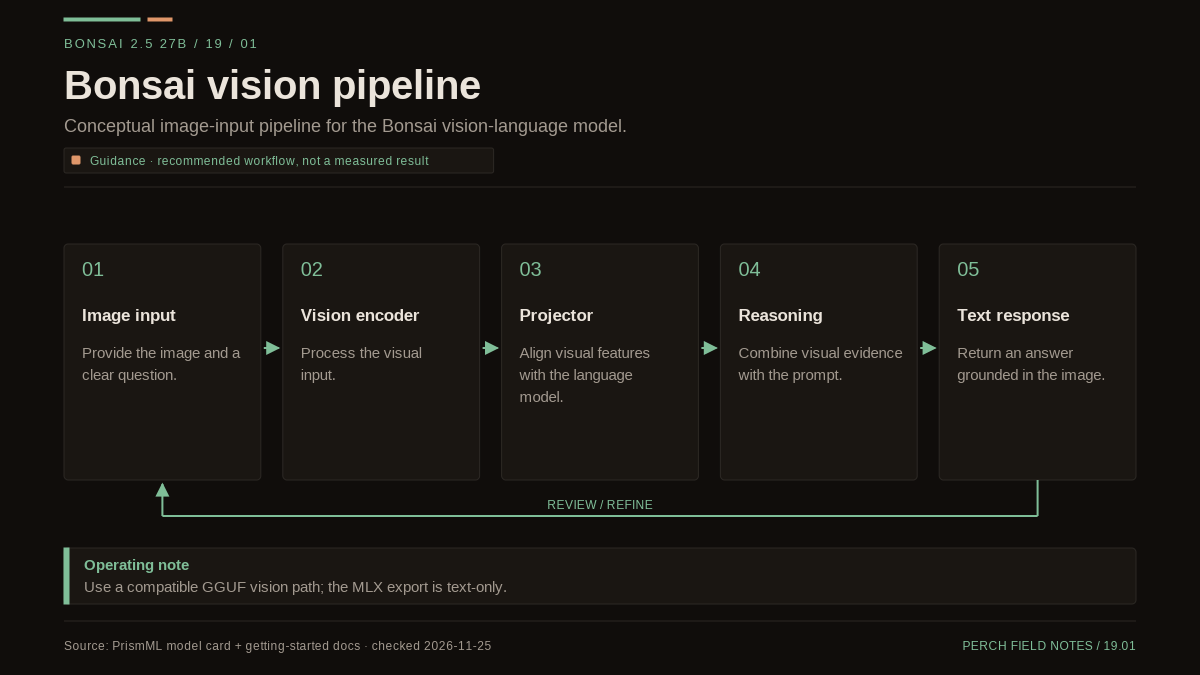
The separate projector matters because the published GGUF distribution is not one all-in-one vision file. The language GGUF carries the language-side weights. An mmproj GGUF carries the multimodal projection component used with it. A runtime must load both and expose an image-input path. Merely placing an image filename in a text prompt does not demonstrate that the model received pixels.
The frozen source set does not disclose the vision tower’s internal layer structure, image patch size, preprocessing recipe, maximum image dimensions or the number of context tokens consumed by a given image. Those details should not be guessed from other vision-language models, and they mean that the documented 262,144-token context is not a promise that any particular image workload will fit comfortably on any GPU.
The ternary weight format is relevant to footprint, not proof of image quality. The published ternary weights are g128 at about 1.76 bits per weight, with FP16 group-wise scaling in a blockwise Hadamard basis. The marketed 5.9 GB-class figure refers to a language weight file. Vision adds a projector, while runtime memory also includes the KV cache, context, application overhead and any agent history. The Bonsai VRAM and RAM worksheet by quantization is the right place to plan those separate costs.
Which mmproj files do you need?
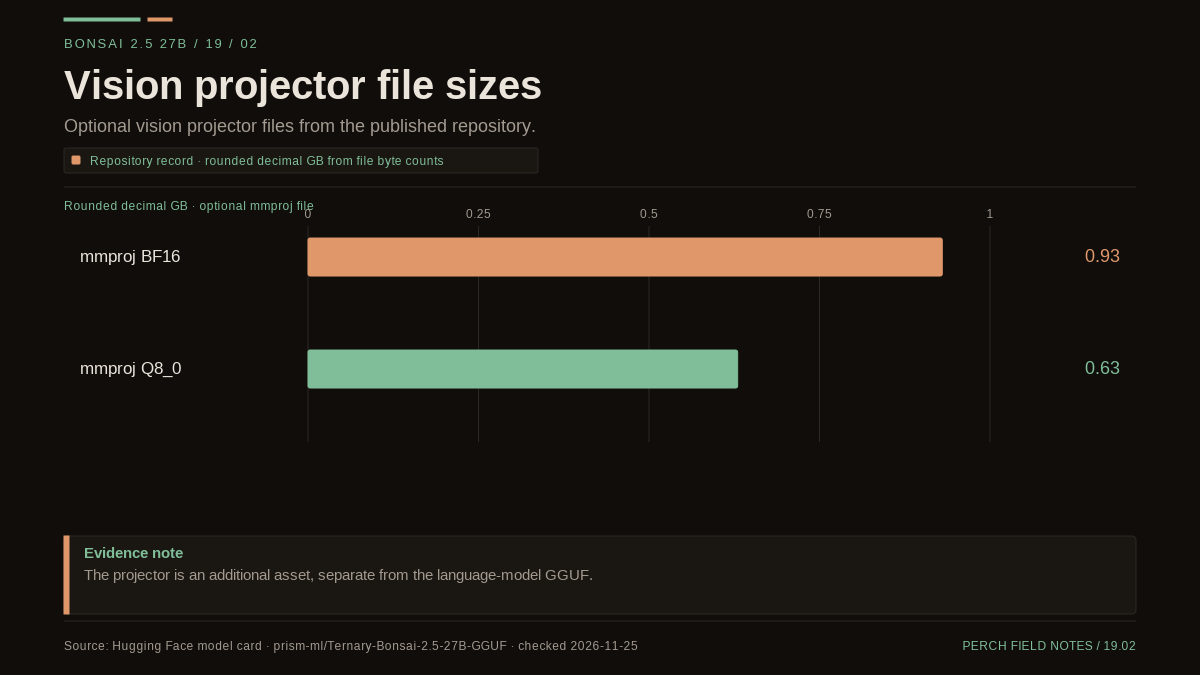
The model repository publishes two optional vision files. Their exact names and rounded decimal sizes are:
| Vision file | Published size | What it contains | Selection note |
|---|---|---|---|
Ternary-Bonsai-2.5-27B-mmproj-BF16.gguf |
0.93 GB | BF16 multimodal projector | Larger published projector. No supplied image-quality comparison establishes when it is worth the extra download. |
Ternary-Bonsai-2.5-27B-mmproj-Q8_0.gguf |
0.63 GB | Q8_0 multimodal projector | Smaller published projector. Test it on your own images rather than assuming the size reduction is free. |
These are projector files, not replacements for the language model. Pair one with a supported Bonsai language GGUF in a runtime that handles multimodal GGUF input. The projector is a separate choice from the language quantization: the supplied evidence does not publish a matrix proving that one projector is optimal for PTQ1_0, PQ2_0 or Q2_0.
The language-side options remain distinct. Ternary-Bonsai-2.5-27B-PTQ1_0.gguf is 5.99 GB and Ternary-Bonsai-2.5-27B-PQ2_0.gguf is 7.25 GB; both require PrismML’s llama.cpp fork. Ternary-Bonsai-2.5-27B-Q2_0.gguf is 7.67 GB and requires stock llama.cpp b11556+. MTP variants exist, but they are language-file alternatives, not vision projectors. The PTQ1_0 versus PQ2_0 versus Q2_0 quantization guide covers those filenames and compatibility boundaries in full.
You can apply the model card’s documented hf download pattern to a language file and the smaller projector:
hf download prism-ml/Ternary-Bonsai-2.5-27B-gguf Ternary-Bonsai-2.5-27B-PTQ1_0.gguf --local-dir .
hf download prism-ml/Ternary-Bonsai-2.5-27B-gguf Ternary-Bonsai-2.5-27B-mmproj-Q8_0.gguf --local-dir .
For the BF16 projector, use Ternary-Bonsai-2.5-27B-mmproj-BF16.gguf in the second command instead. Downloading both files only completes acquisition. It does not verify that your chosen runtime has loaded the projector or that your client is sending an image.
Adding the rounded published sizes gives an illustrative PTQ1_0 plus Q8_0 download total of about 6.62 GB, or 6.92 GB with BF16. Those sums are not VRAM requirements: they exclude the KV cache, runtime buffers, operating-system costs, MTP choices and any additional model data. A specific model-card observation of roughly 9.5 GB VRAM before -np 1 and 7.8 GB afterward on a 10 GB RTX 3080 is also not established as a vision configuration in the frozen record.
Start with the smaller projector when storage or memory pressure matters, then compare it against BF16 on the same images with the same language GGUF and runtime. Record transcription errors, missed fields, unsupported statements and review time. No supplied source reports that comparison, so this is a test plan rather than a recommendation backed by measured quality.
Which runtimes support image input?
The safest documented local vision route is a compatible GGUF runtime plus the language file and an mmproj file. Backend support and image-input support are different questions. PrismML documents CUDA, Metal, CPU and SYCL backends, but a backend alone does not prove that a particular client sends images correctly.
| Runtime or export | Vision status in the supplied evidence | Quantization or version boundary | What to verify before use |
|---|---|---|---|
| PrismML llama.cpp fork | Documented GGUF vision route with a separate projector | Required for PTQ1_0 and PQ2_0; CUDA, Metal, CPU and SYCL are listed | Load both language GGUF and mmproj; confirm the fork’s image-input interface and test one known image. |
| Stock llama.cpp | GGUF projector route is the relevant path; confirm multimodal loading in the exact build | Q2_0 requires b11556+; older builds may load it but generate garbage |
Use Q2_0, verify projector loading and keep the runtime at or above the documented minimum. |
| Ollama | Q2_0 model serving is documented; the supplied command does not demonstrate an image request | The documented route uses the Q2_0 Hugging Face model | Confirm that the installed runtime and client expose image input before calling this a vision setup. |
| vLLM | Model serving is documented; no image-payload example is supplied | Use the documented model route without inventing flags | Verify the installed version’s multimodal request path with a real image and a known answer. |
| Local OpenAI-compatible serving | Serving is documented; image transport is not specified in the frozen commands | Compatibility depends on the chosen runtime and adapter | Confirm the client sends image content, not only a filename or text description. |
| MLX Python or Swift export | No vision through the supplied export | prism-ml/Ternary-Bonsai-2.5-27B-mlx-2bit is text-only |
Use a GGUF vision path for images; do not expect the text-only MLX weights to accept them. |
| Hexagon preset | Not a verified current vision option | Galaxy S26 Ultra configuration requires an unreleased fix | Wait for the fix and explicit image-support evidence rather than treating the preset as availability. |
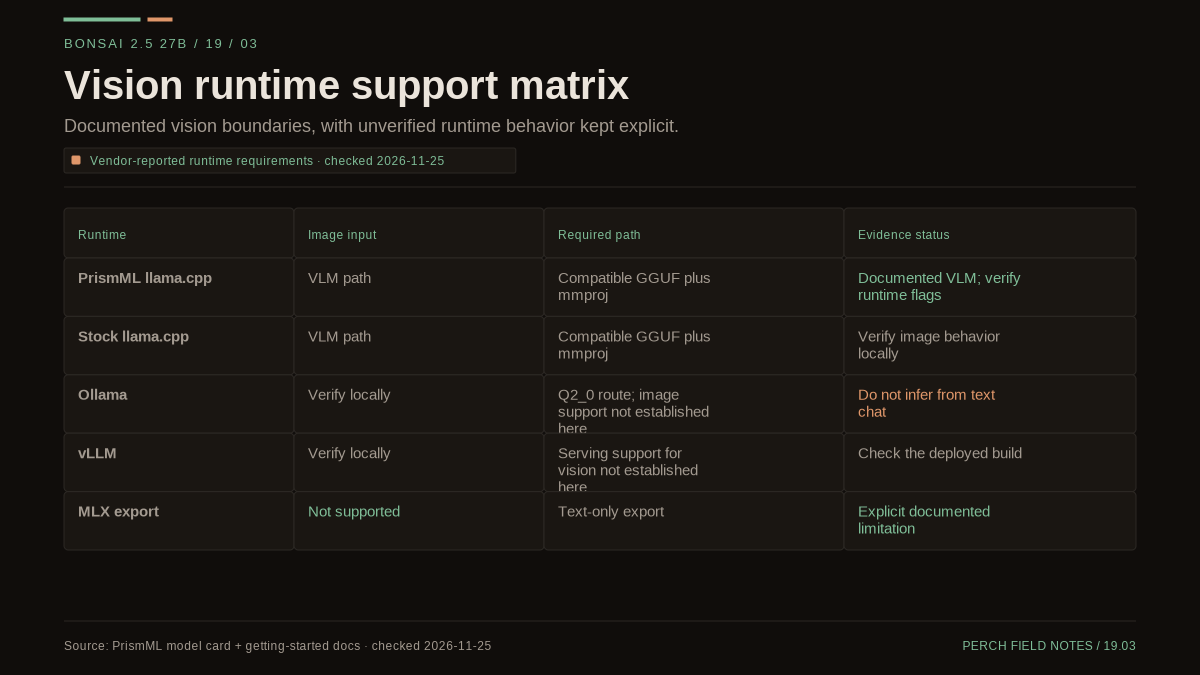
The PrismML getting-started documentation describes the model as a ternary VLM with tool and image support and lists llama.cpp, MLX and OpenAI-compatible serving. Read that as model-level documentation, not as proof that every command in every runtime version accepts the same image payload. The supplied material gives exact text-serving examples for Ollama and vLLM, but it does not give a verified end-to-end image request for either.
For direct control, begin with the PTQ1_0 and Q2_0 local installation walkthrough, then add the projector using the exact runtime’s multimodal documentation. The Ollama Q2_0 commands and coding-agent connection and vLLM OpenAI-compatible Bonsai server setup remain useful for their documented text and server paths, but neither should be treated as an image-input verification guide on the present evidence.
Apple Silicon users need an explicit decision. The Apple Silicon MLX setup for Bonsai 2.5 27B covers the text-only export. If image input is mandatory, choose a GGUF runtime that can load the projector and verify its Metal path instead. A Mac speed report for text generation does not establish vision throughput, and the Mac Mini M5 Pro Bonsai setup and 22.3 tok/s audit labels that community number as anecdotal.
CPU inference is documented, but no reliable CPU-only vision speed figure is supplied. The CPU-only Bonsai setup and memory tuning guide provides a measurement-first approach without inventing tokens per second. Whichever backend you choose, test a single image before scaling to a document batch.
How should you prompt Bonsai with images?
A useful image prompt separates perception from interpretation. Ask the model to transcribe what is visible before it explains, compares or recommends. That makes errors easier to locate: a wrong answer caused by misread text is different from a correct reading followed by faulty reasoning.
Use this grounding pattern for a first visual question:
Inspect the supplied image. Answer only from information that is visibly present. Quote the relevant text or describe the relevant region before drawing a conclusion. If the image does not contain enough evidence, say what is missing instead of guessing.
For a screenshot or diagram, add a bounded output contract:
List the visible labels in reading order. Then describe each connection or layout relationship that is explicitly shown. Mark uncertain labels as uncertain. Do not infer hidden settings, values or intentions.
For a chart, ask for the axes, units, legend and data labels before interpretation:
Extract the chart title, axis labels, units, legend entries and visible values. Keep extracted values separate from your interpretation. If a value cannot be read, mark it unreadable rather than estimating it.
These prompts are evaluation aids, not claims about benchmark settings. These CLI sampling values are usage examples, and the supplied benchmark methodology does not disclose prompts. The model defaults to xhigh reasoning; medium is available, while low is unsupported and behaves like xhigh. Thinking is on by default, and a short output cap can truncate reasoning before the final answer. Give the request enough output room, especially when you ask for transcription plus analysis.
Keep the first test easy to grade: pick an image whose contents you already know, such as a screenshot with a short visible sentence or a table with three clearly labeled rows. Check that the answer includes the actual visible content. If the model describes something unrelated, investigate the runtime and image transport before judging model quality. A text-only path can produce fluent prose without ever using the image.
Then vary one factor at a time. Test the same image with Q8_0 and BF16, or with a short prompt and a structured extraction prompt, while holding the language GGUF and runtime constant. Save the exact image, prompt, projector filename, language filename, runtime version and response. This turns an impressive demo into a comparison you can repeat.
The 262K Bonsai context-window memory guide is useful when prompts contain several images or long OCR output. The supplied record does not state an image-to-token conversion, so do not calculate a guaranteed capacity from pixel dimensions. Measure the runtime’s actual context use and resident memory on your configuration.
What do the vision benchmarks prove?
The only published vision numbers in the frozen fact pack are broad-category aggregates. The one vision row groups CharXiv, OCRBench v6, RealWorldQA, HallusionBench, MMMU-Pro and MathVision together. It does not publish the six component scores separately in the supplied table.
| Model | Published vision-category score | Difference from Bonsai 2 27B | Difference from Qwen3.8 FP16 | Evidence label |
|---|---|---|---|---|
| Qwen3.8 FP16 | 86.07 | +4.18 | Reference | Vendor-published comparison row |
| Bonsai 2 27B | 81.89 | Reference | -4.18 | Vendor-published comparison row |
| Bonsai 2.5 27B | 83.66 | +1.77 | -2.41 | Vendor-published comparison row |
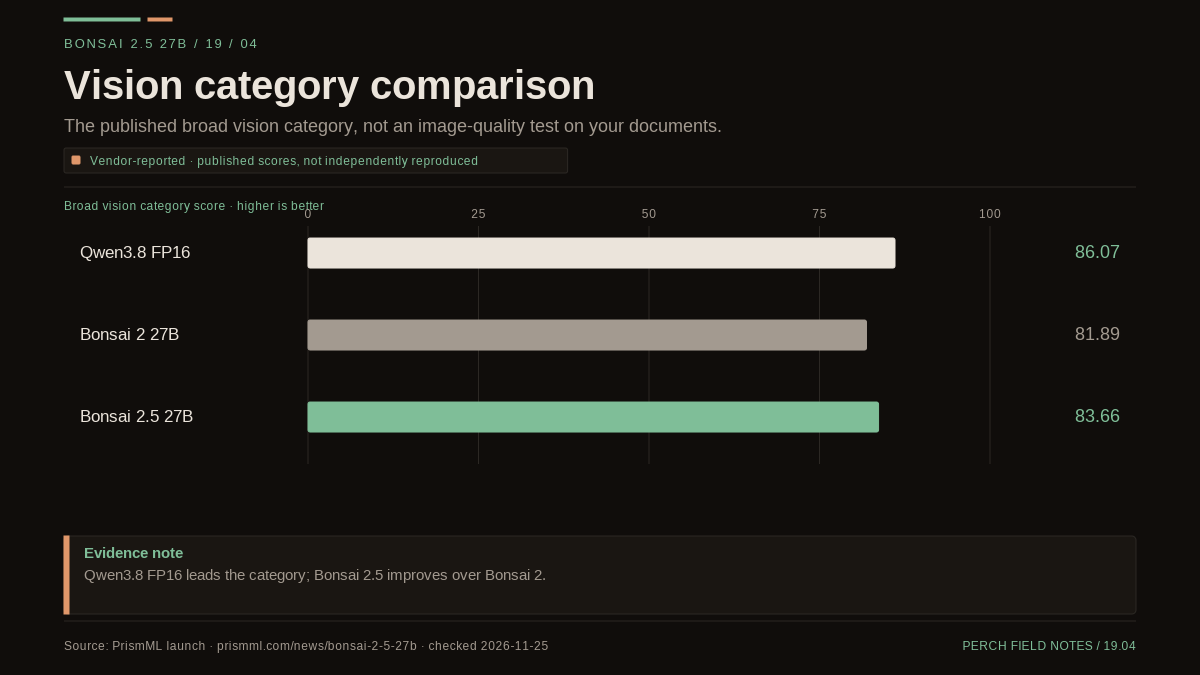
The fair reading is a modest predecessor gain with a remaining gap. Bonsai 2.5 27B gains 1.77 points over Bonsai 2 27B on the published vision category. It trails Qwen3.8 FP16 by 2.41 points. Qwen also leads every other broad category in the supplied comparison, so the vision row does not overturn the broader quality picture. The Bonsai 2.5 27B versus Qwen3.8 27B decision matrix puts that result beside footprint, runtime and speed tradeoffs.
The category number proves only that PrismML reports 83.66 for this group of evaluations under its own evaluation process. It does not prove 83.66 percent OCR accuracy, because the table does not define the aggregate as a percentage or provide a simple average formula. It does not isolate CharXiv from OCRBench, and it does not show whether one difficult component moved the result.
Methodology gaps matter more here than in a simple text prompt. The supplied benchmark tables omit evaluation hardware, image preprocessing, prompts, scaffolds, seeds, category weighting and confidence intervals. There is no independent reproduction in the source set. ExplainX’s overview of the Bonsai 2.5 27B results explicitly notes that the scores were vendor-run and not independently reproduced. The row-by-row Bonsai 2.5 27B benchmark teardown examines the same evidence limits across the full table.
The inclusion of OCRBench v6 makes OCR a reasonable evaluation target. The inclusion of HallusionBench makes hallucination behavior a reasonable test target. Neither name supplies a component score or a guarantee for your documents. A model can perform well on a curated benchmark mixture and still miss a low-contrast receipt, a merged table cell or a domain-specific abbreviation.
Treat 83.66 as a screening signal. The deciding evidence is a local set of representative images with known answers, scored consistently across the projector and runtime choices you are considering.
How does Bonsai handle OCR and documents?
The vision architecture and published benchmark grouping justify testing OCR and document questions. They do not justify a claim of production-grade OCR, handwriting recognition, table reconstruction or multi-page retrieval. No supplied source reports those image-quality tests.
A useful document workflow starts with provenance and ground truth:
- Select representative pages. Include clean digital text, a scan, a screenshot and one difficult layout that reflects your actual workload.
- Preserve the originals. Record filename, page number, dimensions and any preprocessing you apply. Do not silently rotate, crop or sharpen only the test image.
- Ask for transcription first. Separate visible text from summary, classification or extraction so reading errors remain visible.
- Use a fixed schema for fields. Specify field names, allowed values and how to represent missing or unreadable values.
- Verify every extracted field. Compare the response with the source image and a human-approved answer, not only with another model response.
- Test pages separately before batching. The supplied record gives no verified multi-page image limit or document chunking behavior.
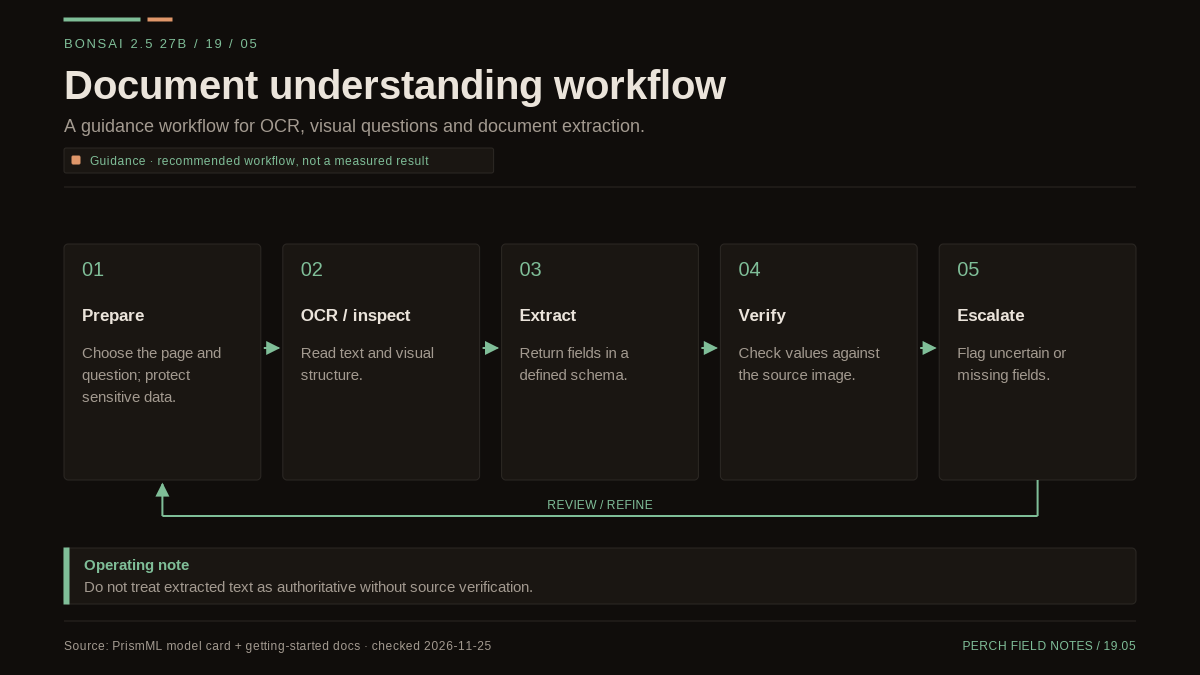
For exact transcription, use a prompt that permits uncertainty:
Transcribe all visible text in reading order. Preserve spelling, punctuation, numbers and line breaks where possible. Use
[illegible]for text you cannot read. Do not translate, summarize or fill gaps from context. After the transcription, list any regions where reading order is uncertain.
For a form or receipt, request structured extraction without letting the model invent absent values:
Extract the fields
vendor,date,total,taxandline_itemsfrom the image. Return only values that are visibly supported. Usenullfor a missing field and[illegible]for an unreadable value. Keep currency symbols and decimal separators exactly as shown. Do not calculate missing totals.
For a visual question about a manual or diagram, require a visible basis:
Answer the question using only the supplied page. First quote the label or sentence that supports the answer. If the page refers to another section that is not visible, state that the answer cannot be completed from this image alone.
These instructions reduce ambiguity, but they do not eliminate hallucination. Review number-heavy fields especially closely. A plausible date, total or part number can be wrong even when the surrounding prose looks correct. For tables, compare row and column labels as well as cell values; a single shifted column can invalidate an otherwise neat extraction.
Measure the workload in ways that match the decision. For transcription, count wrong or missing characters and fields against the ground truth. For question answering, record whether the answer is correct, unsupported or incomplete. For extraction, record precision and review effort. Keep results separate by image type so a clean digital page does not hide failures on scans.
Do not use the broad vision score as a substitute for this local evaluation. OCRBench v6 is one named component among six, and its individual result is not published in the supplied table. Your document set answers a different question: whether this projector, language GGUF and runtime are dependable enough for your images.
What are the limitations of local Bonsai vision?
The first limitation is runtime fragmentation. The model supports image input, but the supplied MLX export does not. PTQ1_0 and PQ2_0 require PrismML’s llama.cpp fork. Q2_0 needs stock llama.cpp b11556+. Ollama and vLLM are documented serving routes, yet the frozen commands do not demonstrate image requests. A setup that produces good text is therefore not automatically a working vision setup.
The second limitation is evidence quality. The 83.66 vision score is vendor-published and aggregated. Hardware, preprocessing, prompts, scaffolds, seeds, weighting and confidence intervals are missing. There are no separate component scores and no independent reproduction. The 1.77-point predecessor gain is real arithmetic on the published row, but its practical meaning for OCR or documents remains unknown.
The third limitation is memory uncertainty. The 5.9 GB-class claim describes weights, not total VRAM. Adding a projector increases the file footprint, and image workloads add context and runtime costs that are not fully specified. No exact KV-cache byte table or image-token conversion is supplied. The documented 262,144-token context should not be advertised as a universal vision capacity.
The fourth limitation is the missing image-quality record. The supplied sources do not report accuracy on handwriting, low-contrast scans, rotated pages, dense tables, charts, screenshots or domain-specific documents, and they do not publish a BF16-versus-Q8_0 projector quality comparison. All of them are open tests, not established weaknesses or strengths.
Community discussion does not close these gaps. The Hacker News discussion of Bonsai 2.5 27B includes anecdotal speed commentary and disputed interpretations, not a controlled vision evaluation. The supplied LocalLLaMA Hugging Face discussion pointer was inconsistently accessible and is not evidence. Neither should be used to fill in missing OCR results.
Naming and availability have rough edges too. The published compatibility material uses “TQ1_0” in places while the actual files use PTQ1_0. Follow exact repository filenames. The Hexagon preset exists, but the Galaxy S26 Ultra configuration requires an unreleased fix. The model card says no inference provider currently deploys the model, and Bonsai 2.5 27B is not hosted on One AI API Key.
The guide should be updated when PrismML publishes verified image-enabled commands, projector quality comparisons, separate vision-component scores or independent reproductions. Until then, preserve the distinction between documented capability, vendor-reported performance and your own measurements.
Should you use Bonsai 2.5 27B for vision?
Yes, if you want a local GGUF vision experiment and can verify the complete image path. Use a supported language file, add one published mmproj file and confirm that your runtime actually receives the image. Start with Q8_0 when its smaller footprint is useful, then compare BF16 on the same workload if quality is inadequate.
No, if your requirement is vision through the supplied MLX export. That export is text-only. Also wait if you need independently verified OCR accuracy, a guaranteed image context limit or a hosted API. The current evidence supports a careful local trial, not those promises.
The verdict is workload-specific: Bonsai 2.5 27B has a documented vision architecture, published projector files and a respectable vendor-reported category score, but the gap to Qwen3.8 FP16 and the missing methodology prevent a blanket quality claim. If you need a hosted option instead, you can compare hosted models currently available through One AI API Key. That catalogue is separate from this local release.
Complete Bonsai 2.5 27B guide
- Bonsai 2.5 27B launch verdict and setup router
- row-by-row Bonsai 2.5 27B benchmark teardown
- 180-tool-call Bonsai coding-agent workflow
- Tau, BFCL and AppWorld tool-calling analysis
- SWE-bench Verified 75.6 repository-repair analysis
- Terminal-Bench 2.1 long-horizon terminal analysis
- PTQ1_0 and Q2_0 local installation walkthrough
- Ollama Q2_0 commands and coding-agent connection
- vLLM OpenAI-compatible Bonsai server setup
- Apple Silicon MLX setup for Bonsai 2.5 27B
- Bonsai VRAM and RAM worksheet by quantization
- cross-hardware Bonsai tokens-per-second comparison
- RTX 4090 Bonsai configuration and speed claims
- RTX 3060 12GB Bonsai feasibility and context tuning
- Mac Mini M5 Pro Bonsai setup and 22.3 tok/s audit
- CPU-only Bonsai setup and memory tuning
- 262K Bonsai context-window memory guide
- PTQ1_0 versus PQ2_0 versus Q2_0 quantization guide
- Bonsai 2.5 27B versus Qwen3.8 27B decision matrix
Sources
- PrismML: Bonsai 2.5 27B announcement supports the launch claims, broad benchmark table and vendor positioning.
- Hugging Face: Ternary Bonsai 2.5 27B GGUF supports architecture, exact language and projector filenames, sizes, runtime boundaries and provider status.
- PrismML: getting started supports the vision-language, image-input, llama.cpp, MLX and OpenAI-compatible serving documentation.
- ExplainX: Bonsai 2.5 27B agentic coding overview supports the third-party note that the benchmark scores were vendor-run and not independently reproduced.
- Hacker News discussion is a community discussion containing anecdotal reports and skepticism, not benchmark evidence.
- LocalLLaMA discussion is an inconsistently accessible community pointer, not evidence.