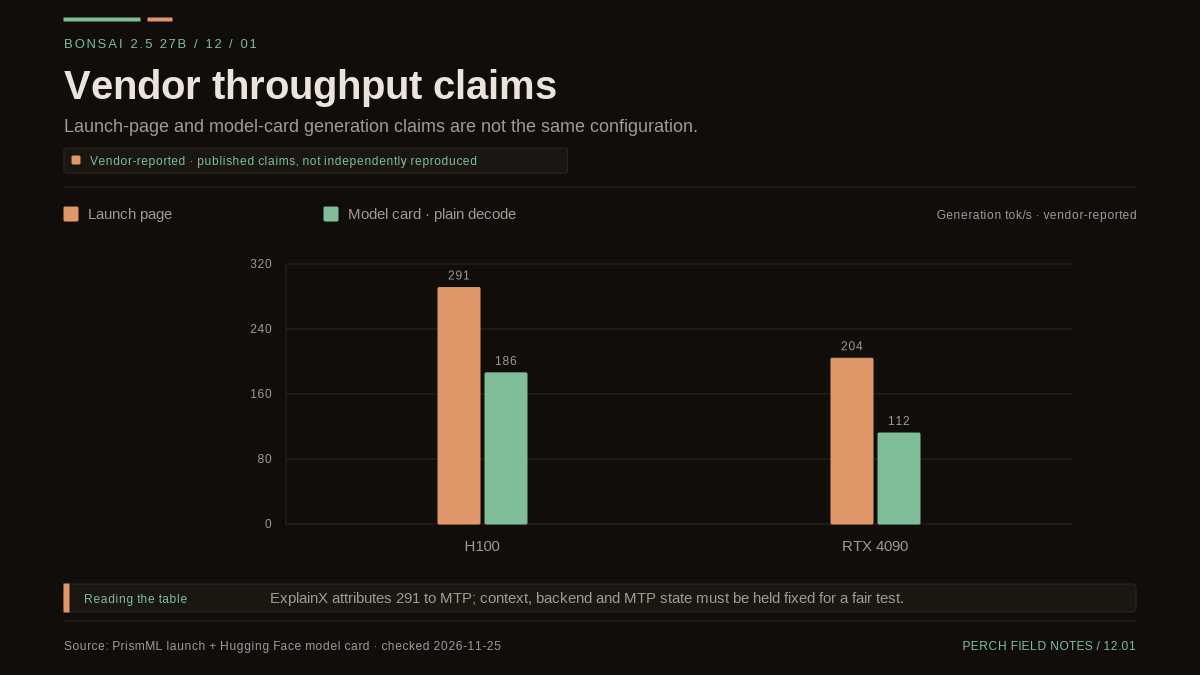
Bonsai 2.5 27B has published speed claims, but it does not have one verified tokens-per-second result. PrismML’s launch page claims 291 generated tokens per second on an H100 and 204 on an RTX 4090. Its model card gives lower plain-decode PTQ1_0 figures of 186 and 112 respectively. A Hacker News commenter reports 22.3 tokens per second on a Mac Mini M5 Pro, while no reliable CPU-only figure is supplied.
The direct answer is therefore conditional: high-end NVIDIA results are promising vendor claims, the Mac number is an anecdote, and CPU speed remains unknown. Do not plan a purchase or promise an application latency from the largest number. First identify the exact GGUF, runtime, MTP state, context length and prompt length. Then measure generation speed and prompt speed separately on the target system.
This guide compares the published claims without merging them into a fake leaderboard. It also provides a repeatable test method for your own hardware. For the broadest release decision, start with the Bonsai 2.5 27B launch verdict and setup router. This model is a local weights release, not a hosted One AI API Key model.
What speed does the vendor actually claim?
The PrismML Bonsai 2.5 27B announcement publishes the largest numbers. The Ternary Bonsai 2.5 27B GGUF model card publishes a separate plain-decode table. Keep the source attached to each value.
| Source and configuration label | Hardware | Generation claim | Prompt-processing claim | Evidence boundary |
|---|---|---|---|---|
| Launch page | H100 | 291 tok/s | 3,200 tok/s | Vendor claim. ExplainX attributes 291 to MTP; the supplied material does not provide a complete reproducible configuration. |
| Launch page | RTX 4090 | 204 tok/s | About 3,060 tok/s | Vendor claim. Do not present 204 as a plain-decode result or a guaranteed MTP result. |
Model card, plain-decode PTQ1_0 |
H100 | 186 tok/s | Not supplied | Vendor table with a clearer decode label, but no complete prompt, context or runtime log in the packet. |
Model card, plain-decode PTQ1_0 |
RTX 4090 | 112 tok/s | Not supplied | Vendor table. This is not directly comparable with the launch-page MTP interpretation. |
All four rows are vendor-published, not independently reproduced. The table is useful because it shows the range of claims, not because it establishes a controlled hardware ranking. An H100 label does not tell you the prompt length, context allocation, runtime build, power state or sampling configuration. An RTX 4090 label does not tell you whether a particular application will reproduce either published number.
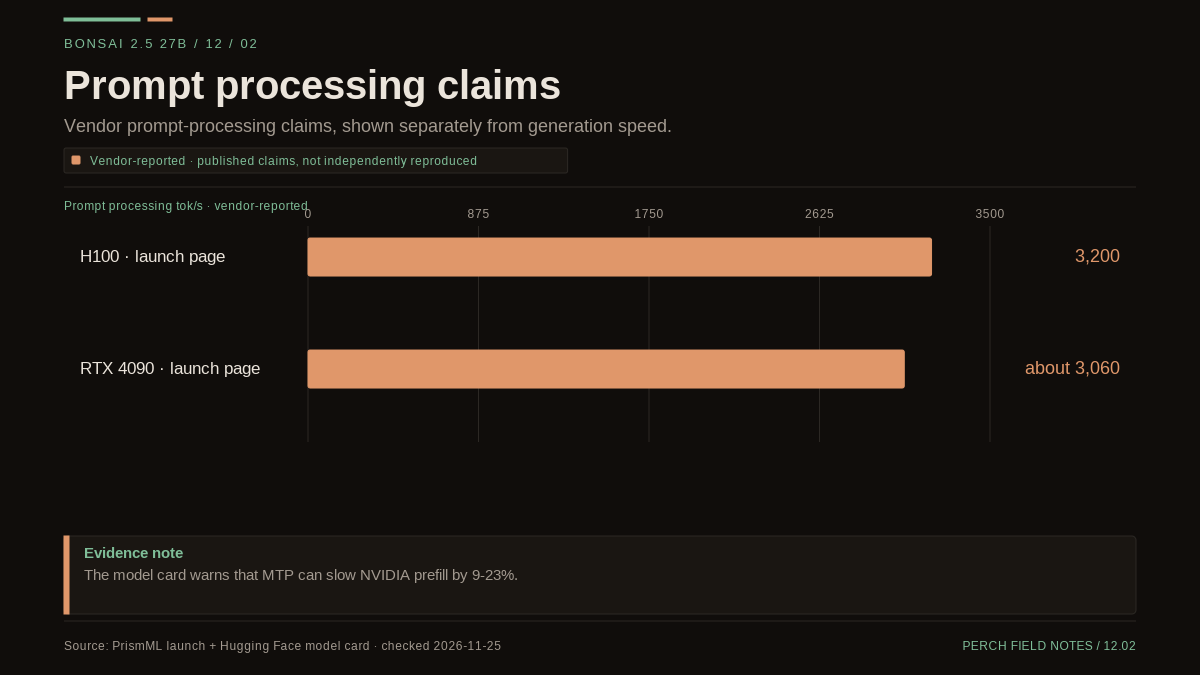
The prompt figures need their own caution. A prompt-processing rate describes how quickly a runtime processes input tokens. It is not the same metric as generated tokens per second, and it is not a complete measure of time to first useful output. Queueing, preprocessing, runtime overhead and the actual input length still matter. The supplied claims do not include enough detail to turn 3,200 prompt tokens per second into an end-to-end latency guarantee.
For practical planning, treat 291 and 204 as conditional upper claims from the launch page. Treat 186 and 112 as the model card’s plain-decode reference points. Neither pair is a promise for a different GGUF, backend or context configuration.
What does the model-card speed table reveal?
The model card’s plain-decode PTQ1_0 table is the cleaner starting point for a baseline comparison because it explicitly labels the decode mode. It reports 186 generated tokens per second on H100 and 112 on RTX 4090. The label does not fill in the missing methodology. The supplied material still omits the exact prompt, generation length, context setting, runtime version and complete hardware configuration.
The card also publishes prompt-processing claims that belong beside, not inside, the generation comparison. PrismML lists 3,200 prompt tokens per second on H100 and about 3,060 on RTX 4090 on the launch page. Those figures should be tested with known input lengths. A short prompt and a long repository context exercise prefill differently, so a single unlabeled prompt rate cannot represent every workload.
The documented command is a smoke test, not the missing benchmark recipe. It uses a 32,768-token context and allows up to 16,384 output tokens. PrismML explicitly presents its sampling values as usage examples rather than disclosed benchmark settings. Copying the command gives you a coherent starting point, but it does not recreate the launch-page measurement.
File choice matters as much as the GPU name. The base Ternary-Bonsai-2.5-27B-PTQ1_0.gguf is 5.99 GB. PQ2_0 is 7.25 GB and Q2_0 is 7.67 GB. The first two require PrismML’s llama.cpp fork; Q2_0 requires stock llama.cpp b11556+. A speed result from one artifact cannot be assigned to another without testing. The PTQ1_0 versus PQ2_0 versus Q2_0 quantization guide and PTQ1_0 and Q2_0 local installation walkthrough cover those compatibility boundaries.
Memory observations are also separate from speed observations. The model card reports roughly 9.5 GB VRAM before -np 1 on a 10 GB RTX 3080, falling to about 7.8 GB afterward. One specific configuration is not a universal minimum and not a throughput result. Use the Bonsai VRAM and RAM worksheet by quantization before assuming a large context or MTP variant will fit.
How does MTP change the tokens-per-second comparison?
MTP means multi-token prediction. In general, an MTP component proposes additional future tokens that the main model can check, rather than relying only on a single next-token decode path. For this buying decision, the documented consequences matter more than the internal mechanism: MTP may improve generation speed, adds model data and can make prompt processing slower on NVIDIA.
The repository publishes separate MTP files. Ternary-Bonsai-2.5-27B-PTQ1_0-mtp.gguf is 6.23 GB, Ternary-Bonsai-2.5-27B-PQ2_0-mtp.gguf is 7.49 GB and Ternary-Bonsai-2.5-27B-Q2_0-mtp.gguf is 7.91 GB. Each MTP variant adds about 0.24 GB over its corresponding base file. That extra footprint is measurable; the supplied evidence does not provide an independent token-acceptance rate or a universal speed gain.
ExplainX’s Bonsai 2.5 27B overview attributes the 291 tokens-per-second H100 launch claim to MTP. A third-party interpretation rather than a complete vendor benchmark log, in other words. The model card separately warns that MTP can slow NVIDIA prefill by 9 to 23 percent. Here is the central tradeoff: a faster decode path can coexist with slower input processing.
Do not describe MTP as a free upgrade. A coding agent may process a large repository prompt, generate a patch, run tools and then process more output. Improving only the generation phase does not establish a faster complete task. Conversely, a workload with little input and substantial generation may value decode speed more heavily. The right measurement follows the workload rather than the headline.
A fair MTP test has two stages. First, measure the exact base GGUF with MTP disabled. Second, measure the matching MTP GGUF with MTP enabled, holding the runtime, prompt, context, output cap and concurrency constant. Record both prompt-processing speed and generation speed. Also record whether the output stopped naturally or hit the token cap, because a truncated reasoning trace is not a completed task.
MTP is not the same as serving several requests at once. Single-request tokens per second does not predict aggregate throughput under concurrency, and a server’s batching policy can change both latency and throughput. If the target application serves multiple users, test that server configuration separately. The vLLM OpenAI-compatible Bonsai server setup covers the serving path without promising a number.
What do community speed reports actually establish?
Community reports are useful for finding configurations to test. They are not substitutes for controlled measurements. Two speed claims appear in the supplied material, and both need prominent evidence labels.
| Report | Claimed speed | Hardware and configuration stated | Evidence label and correct use |
|---|---|---|---|
| Hacker News commenter | 22.3 tok/s | Mac Mini M5 Pro; runtime, GGUF, MTP, context and prompt details are incomplete | Community anecdote. Use it to design a Mac test, not as a benchmark or purchase guarantee. |
| Unsourced X claim relayed by ExplainX | About 74 tok/s | 12 GB RTX 3060 at 262K context with MTP; no reproducible configuration supplied | Third-party relay of an unsourced claim. Unverified and unsuitable for capacity planning. |
| LocalLLaMA thread | No verified speed figure adopted | Community discussion linked to the Hugging Face release | Inconsistently accessible community pointer only. It is not evidence for a throughput value. |
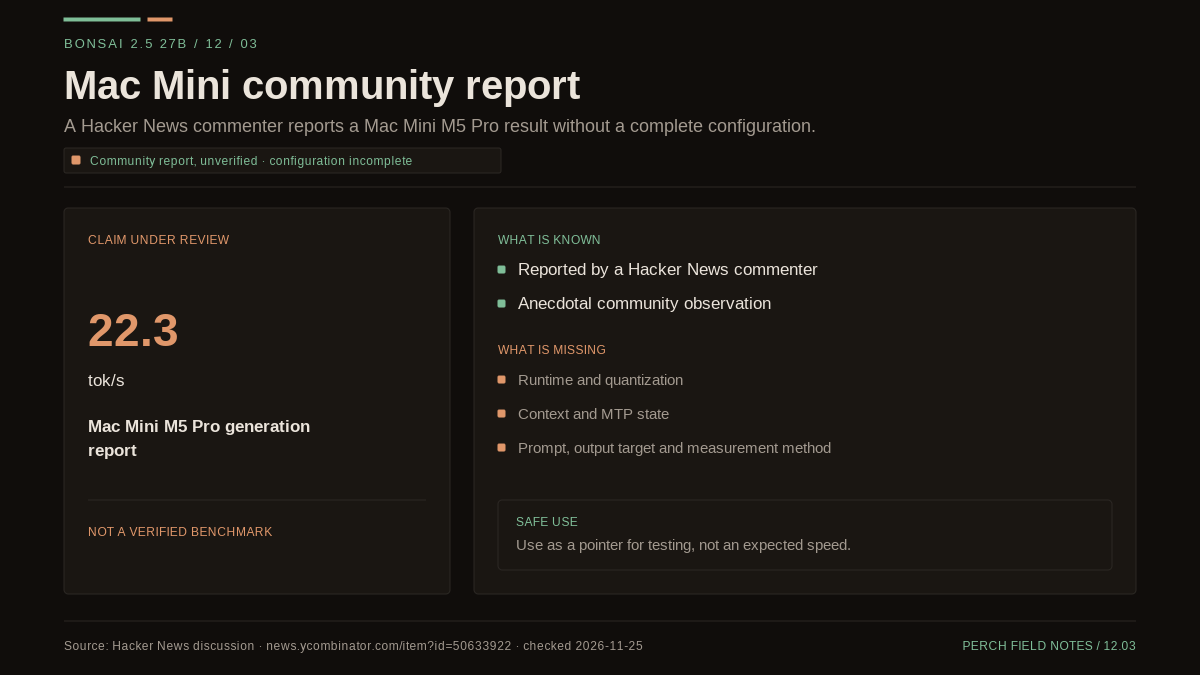
The Hacker News launch discussion contains the 22.3 tokens-per-second Mac Mini M5 Pro report. The hardware name is helpful, but the configuration is incomplete. Without the exact export or GGUF, runtime build, context length, prompt length, MTP state and generation length, the number cannot be compared fairly with the NVIDIA claims. It also does not establish a result for every M5 Pro memory configuration.
The roughly 74 tokens-per-second RTX 3060 claim is weaker still. ExplainX relays it from an unsourced X post and associates it with 262K context and MTP. The supplied evidence does not establish that the full documented context was usable in that setup, how memory was allocated, or how speed was measured. Do not turn it into an expected speed for a 12 GB card. The RTX 3060 12GB Bonsai feasibility and context tuning treats it as a claim audit.
The LocalLLaMA Hugging Face discussion was inconsistently accessible during source checking. It is included as a pointer for readers who want to follow community discussion, not as support for any factual claim in this article.
For Apple Silicon, the documented MLX export is text-only. A Mac result from that export cannot automatically be assigned to a GGUF running through Metal, and neither result establishes vision throughput. The Apple Silicon MLX setup for Bonsai 2.5 27B and Mac Mini M5 Pro Bonsai setup and 22.3 tok/s audit provide the runtime-specific test paths.
How do you run a fair tokens-per-second benchmark?
A fair benchmark begins by defining the question. Are you comparing plain decode, testing MTP, measuring long-prompt prefill, or estimating interactive response time? Those questions require different runs. Never combine prompt tokens per second and generated tokens per second into one score, and never compare a short-prompt result with a long-context result without labeling the difference.
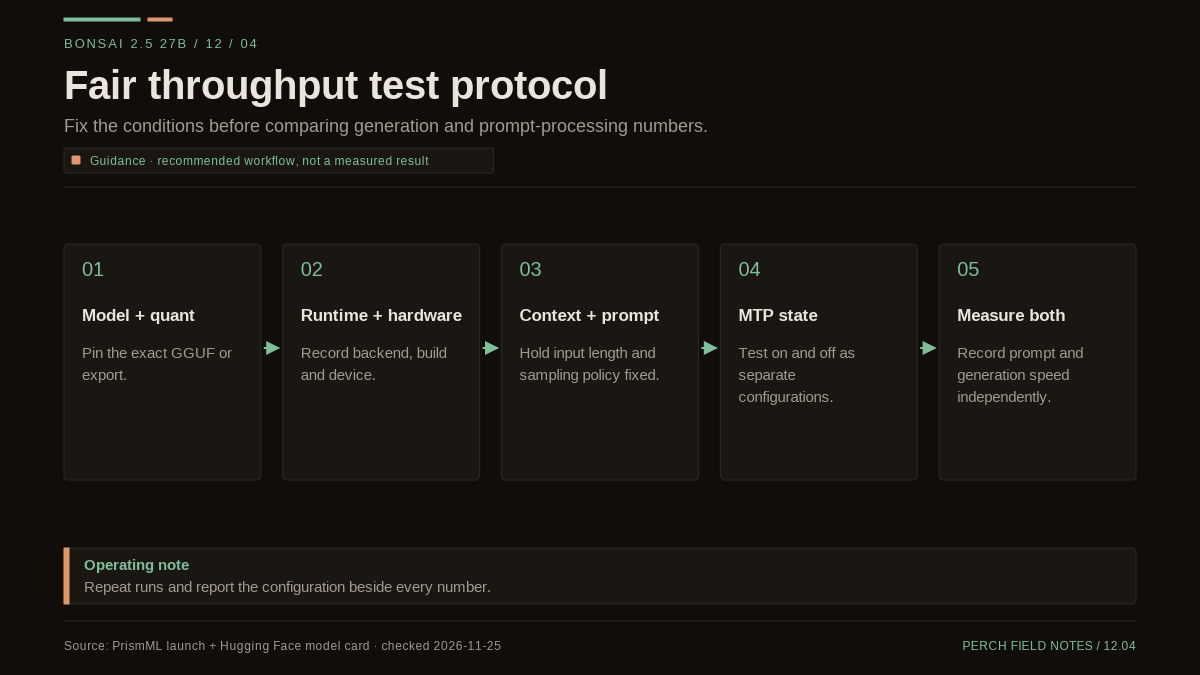
Use generation tokens divided by decode time for generated tokens per second. Use input tokens divided by prefill time for prompt tokens per second. Keep time to first token and total request time as separate observations. A high generation rate says little about queueing or a slow prefill phase, while a high prompt rate says little about the duration of a long answer.
| Benchmark dimension | What to fix or record | Why it changes the result |
|---|---|---|
| Model artifact | Exact GGUF filename and checksum; base or MTP variant | Different files and variants are not interchangeable measurements. |
| Runtime | Product, version or commit, backend and launch command | PrismML’s fork, stock llama.cpp and server runtimes have different requirements and execution paths. |
| Hardware | GPU or CPU model, memory configuration and relevant system load | A product-family label alone does not identify the tested machine. |
| Quantization | PTQ1_0, PQ2_0 or Q2_0 |
File size and runtime support differ; no supplied quality score justifies assuming equal output. |
| Context | Allocated context and actual input token count | A configured 262K window is not proof that the test processed 262K tokens. |
| MTP | Explicitly off or on, with the matching file | MTP can change decode speed, prefill speed and memory use. |
| Sampling and reasoning | Record sampling values and reasoning mode | The documented defaults and examples are not a disclosed benchmark recipe. |
| Prompt | Exact prompt text, token count and input format | Prompt length and content affect prefill and generated length. |
| Generation | Output cap, actual generated tokens and stop reason | A token-cap stop can truncate reasoning and is not a completed answer. |
| Serving conditions | One request or defined concurrency; record batching if applicable | Single-request speed does not establish multi-user throughput. |
| Run conditions | Warm-up state, repeated runs, temperatures or throttling observations | A single cold or thermally constrained run may not represent steady operation. |
| Outputs and resources | Coherence check, task result, prompt rate, generation rate and memory observations | Fast but incorrect or truncated output is not a useful application result. |
Start with the exact model-card command on the documented CUDA path. It is a reproducible smoke-test anchor, not a reconstruction of PrismML’s unpublished benchmark settings:
./bin/llama-cli -m Ternary-Bonsai-2.5-27B-PTQ1_0.gguf -ngl 99 -fa on -c 32768 --temp 1.0 --top-p 0.95 --top-k 20 --min-p 0 -p "Explain quantum computing in simple terms." -n 16384Do not copy that CUDA build path unchanged to Metal, CPU or SYCL. Do not add an assumed seed flag or other undocumented option merely to make the command look more scientific. Record the settings the runtime actually reports. The PrismML getting-started documentation identifies the supported runtime families and backends.
Follow the same sequence for each configuration:
- Load the exact artifact and verify coherent output before measuring speed.
- Run a warm-up, then repeated measured runs with the same prompt and output cap.
- Save the runtime timing output and record actual prompt and generated token counts.
- Report prompt-processing speed, generation speed, time to first token and total wall time separately.
- Repeat with the matching MTP file, changing only the MTP state.
- Add a separate long-input test with a known token count rather than relying on the configured context number.
- Check answer quality and stop reason. Discard or label runs that fail coherence checks or hit the cap mid-reasoning.
- Publish the command, environment and raw observations alongside any summary number.
Reasoning deserves special attention. Bonsai 2.5 27B defaults to xhigh; medium is available, while low is unsupported and behaves like xhigh. Thinking is on by default. A short output allowance can truncate the reasoning trace before the final answer. For a speed comparison, identical caps keep the test controlled, but a truncated run should not be presented as successful task completion.
Finally, test the workload that matters. A chat completion, a repository repair and a tool-driven agent have different input sizes, output lengths and pauses for external tools. The 180-tool-call Bonsai coding-agent workflow explains why tool time and context growth belong in an end-to-end evaluation even though they are not model decode tokens.
What should you expect from CPU-only inference?
No reliable CPU-only tokens-per-second figure is supplied. The honest answer is that no reliable CPU-only figure exists. CPU inference is a documented backend, but backend support is not speed evidence. Any specific CPU estimate in this article would be invented.
A CPU-only run moves model data from system memory to the processor during generation. Memory bandwidth, CPU architecture, thread configuration, runtime build and competing system work can all affect the result. The 5.99 GB PTQ1_0 file is a weight footprint, not total RAM requirements. The KV cache, selected context, runtime, MTP data and any vision projector add further demands. No exact KV-cache byte table is supplied, so do not build a precise memory forecast from the download size alone.
Begin with a short context, one request and a supported artifact. PTQ1_0 and PQ2_0 require PrismML’s llama.cpp fork; Q2_0 requires stock llama.cpp b11556+. Log the exact runtime and thread settings, then change one variable at a time. Increasing threads is not guaranteed to increase throughput, so measure rather than assuming that every logical processor should be used.
CPU testing should separate responsiveness from batch usefulness. A slow interactive answer may still be acceptable for an occasional offline experiment, while a long coding-agent loop can become frustrating as latency accumulates across prompts, tool observations and patches. Vision adds another projector and more processing, so it should not be the first CPU performance test. The CPU-only Bonsai setup and memory tuning guide provides the constraint-first workflow without fabricating a speed target.
If a responsive application is the requirement and no suitable accelerator is available, compare the measured local result with a hosted option. You can compare hosted models currently available through One AI API Key. Bonsai 2.5 27B is not currently hosted there, and the supplied model card says no inference provider currently deploys it.
Which hardware and configuration should you choose?
Use the hardware ladder as a routing tool, not a ranking. The published numbers become less complete as you move away from the two named NVIDIA GPUs, so the measurement burden increases.
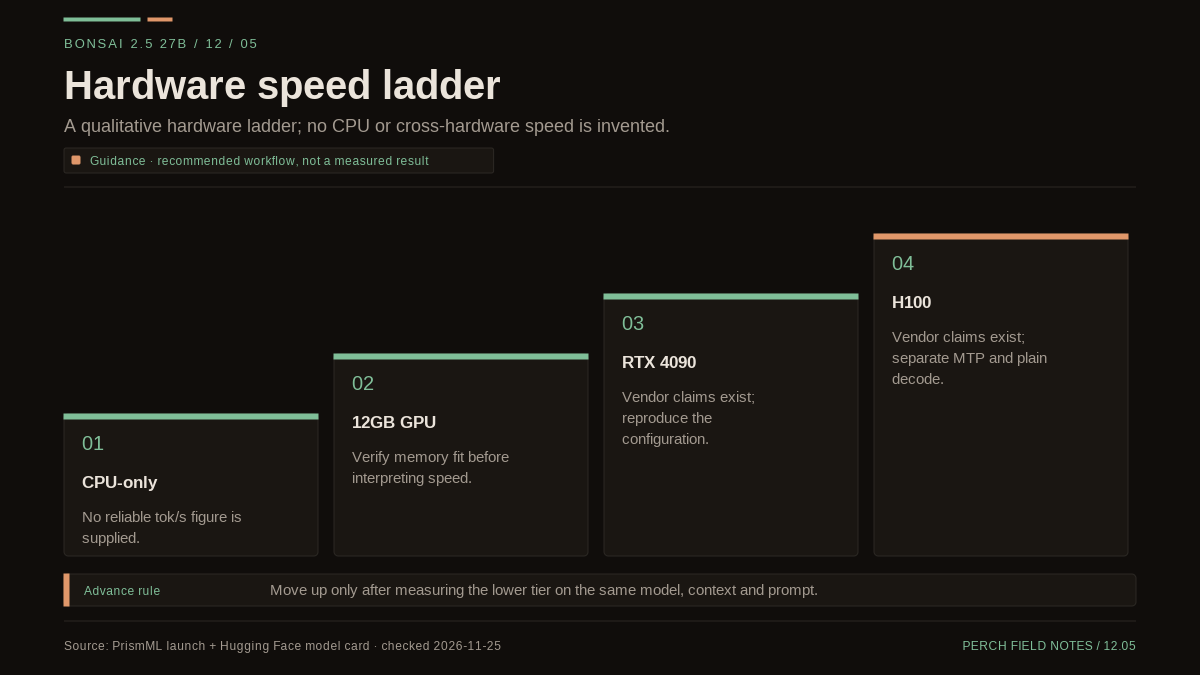
Go with an H100 path when you already have access and the workload justifies controlled local testing. It has the largest published generation and prompt claims, but those claims do not establish rental value, multi-user capacity or a result on your serving stack. Measure the actual server configuration before making a cost or latency decision.
For the most complete consumer-NVIDIA claim set in the supplied material, take the RTX 4090 path. Start from the model card’s 112 tokens-per-second plain-decode reference, then test the MTP variant separately. Do not promise the launch page’s 204 tokens per second without its configuration context. The RTX 4090 Bonsai configuration and speed claims covers the tuning sequence.
A 12 GB RTX 3060 path deserves attention only after a memory and context test. The roughly 74 tokens-per-second report is unverified, and the documented 262K context is not a promise that 262K fits on a 12 GB card. Start smaller, measure resident memory and increase context only while the workload remains stable.
Pick the Mac Mini M5 Pro path if the local workflow and text-only MLX limitation fit your needs. Treat 22.3 tokens per second as a community lead, then measure the exact runtime and memory configuration. Do not transfer a result between MLX and Metal without testing both.
CPU-only inference suits runs where local operation matters more than interactive speed, or exploratory offline workloads. Set no numerical expectation until you have a repeatable local result. Start with short prompts and bounded outputs, then decide whether the measured experience is useful.
Across every path, use the same decision rules:
- For a plain-decode baseline, compare the model-card configuration with your measured
PTQ1_0run, not with the largest launch figure. - For maximum generation speed, test MTP and record the prefill penalty on your actual prompts.
- For long-context work, measure the real input length and memory use. The 262K Bonsai context-window memory guide explains why the documented maximum is hardware-dependent.
- For concurrent users, benchmark the server under the intended load. Single-request CLI numbers are not capacity guarantees.
- For image input, use a supported vision path and measure it separately. The Bonsai vision mmproj setup and benchmark limits covers the projector and runtime boundaries.
- For a model-selection decision, compare quality and runtime support as well as speed. The Bonsai 2.5 27B versus Qwen3.8 27B decision matrix avoids treating a speed claim as the whole decision.
What is the honest speed verdict for Bonsai 2.5 27B?
Bonsai 2.5 27B may be fast on high-end NVIDIA hardware, but the supplied evidence does not support one universal expected speed. The strongest generation claims are 291 tokens per second on H100 and 204 on RTX 4090 from the launch page. The model card’s plain-decode PTQ1_0 figures are lower at 186 and 112. MTP appears to explain part of the difference, while the model card warns of a 9 to 23 percent NVIDIA prefill penalty.
The Mac Mini report of 22.3 tokens per second is anecdotal. The RTX 3060 figure of about 74 at 262K context is an unsourced relay. CPU throughput is unknown. None of these gaps disproves the vendor claims, but together they rule out a defensible cross-hardware promise.
The practical verdict is to benchmark the exact configuration you intend to run. Generate and prompt metrics should stay separate, with MTP and context recorded explicitly and output verified as coherent and complete. A future update should replace these evidence gaps only when reproducible logs or independent tests provide the missing hardware, prompt, runtime and context details. Until then, the fairest speed comparison is the one another reader can repeat.
Complete Bonsai 2.5 27B guide
The cluster posts below cover the full model decision, from benchmark meaning to hardware setup. This throughput article is one part of that evidence map.
- Bonsai 2.5 27B launch verdict and setup router
- row-by-row Bonsai 2.5 27B benchmark teardown
- 180-tool-call Bonsai coding-agent workflow
- Tau, BFCL and AppWorld tool-calling analysis
- SWE-bench Verified 75.6 repository-repair analysis
- Terminal-Bench 2.1 long-horizon terminal analysis
- PTQ1_0 and Q2_0 local installation walkthrough
- Ollama Q2_0 commands and coding-agent connection
- vLLM OpenAI-compatible Bonsai server setup
- Apple Silicon MLX setup for Bonsai 2.5 27B
- Bonsai VRAM and RAM worksheet by quantization
- RTX 4090 Bonsai configuration and speed claims
- RTX 3060 12GB Bonsai feasibility and context tuning
- Mac Mini M5 Pro Bonsai setup and 22.3 tok/s audit
- CPU-only Bonsai setup and memory tuning
- 262K Bonsai context-window memory guide
- PTQ1_0 versus PQ2_0 versus Q2_0 quantization guide
- Bonsai vision mmproj setup and benchmark limits
- Bonsai 2.5 27B versus Qwen3.8 27B decision matrix
Sources
- PrismML’s Bonsai 2.5 27B announcement supports the H100 and RTX 4090 generation and prompt-processing claims. These are vendor-published figures, not independent measurements.
- The Ternary Bonsai 2.5 27B GGUF model card supports the plain-decode
PTQ1_0table, exact GGUF filenames and sizes, runtime requirements, memory example and MTP prefill warning. - PrismML’s getting-started documentation supports the documented llama.cpp, MLX and OpenAI-compatible runtime paths and the CPU, CUDA, Metal and SYCL backend list.
- ExplainX’s Bonsai 2.5 27B agentic coding overview supports the third-party MTP interpretation, the vendor-run evidence caveat and the clearly labeled relayed RTX 3060 claim. It is not an independent benchmark.
- The Hacker News discussion supports the anecdotal Mac Mini M5 Pro speed report and community skepticism, not verified throughput.
- The LocalLLaMA discussion is an inconsistently accessible community pointer. It is not used as evidence.