Bonsai 2.5 27B is worth testing if you want a compact local coding agent and can accept vendor-published evidence while you validate it on your own repositories. PrismML’s update makes clear gains over Bonsai 2 27B, especially on SWE-bench Verified, Terminal-Bench 2.1 and the tool-calling average. It does not beat Qwen3.8 FP16 across the board. Qwen still leads the coding average, Terminal-Bench 2.1, SWE-bench Verified and every broad capability category in the supplied comparison.
The practical case is the combination: a 5.9 GB-class weight file, Apache-2.0 licensing, native tool calling, image input and a documented 262,144-token context. The PrismML launch announcement is dated November 24, 2026, and the Ternary Bonsai 2.5 27B GGUF model card publishes the downloadable files and runtime commands. This is a local release. It is not currently a hosted model on One AI API Key, and the supplied model card says no inference provider currently deploys it.
Is Bonsai 2.5 27B worth running locally?
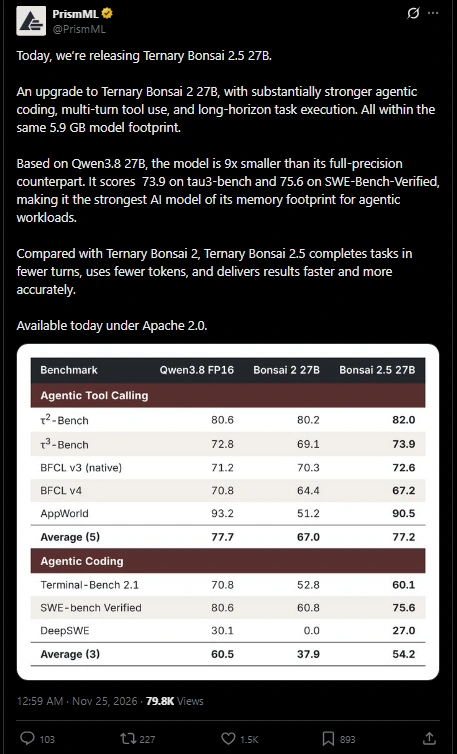
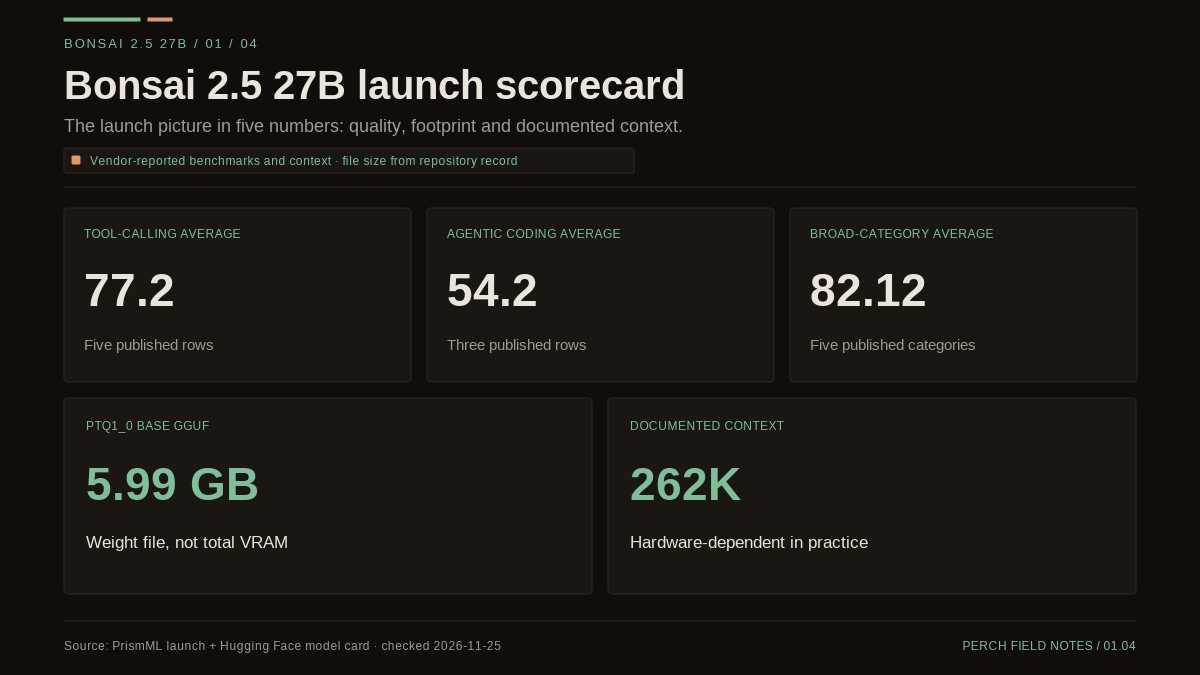
Yes, with a narrow definition of “worth.” It is a credible upgrade for people already running compact local models, particularly for repository repair, terminal work and tool-driven agents. The coding average rises from 37.9 for Bonsai 2 27B to 54.2, a 16.3-point gain. The tool-calling average rises from 67.0 to 77.2, a 10.2-point gain. Those are meaningful movements in PrismML’s published tables.
The same tables also set a boundary. Against Qwen3.8 FP16, Bonsai 2.5 27B trails by 6.3 points on the coding average and 2.20 points on the broad average. Its broad average improves by only 0.57 points over Bonsai 2 27B. Instruction following actually declines by 1.65 points versus the predecessor. This is an agentic-coding update, not evidence of universal superiority.
Try it if you run local coding agents, need an offline path for sensitive code, or want to inspect and modify Apache-2.0 weights. Wait if you need a hosted API, an independently reproduced score, a guaranteed tokens-per-second figure or the highest quality in every category. For a hosted alternative, you can compare hosted models currently available through One AI API Key. That catalogue is separate from the local GGUF release.
What is Bonsai 2.5 27B, and how small is it?
PrismML identifies the model as Ternary Bonsai 2.5 27B, a ternary vision-language model based on Qwen3.8-27B. The vendor reports 27.36 billion total parameters: 24.35 billion language parameters, a 0.47-billion-parameter vision tower and 2.54 billion embedding and language-model-head parameters. Its hybrid attention design is approximately 75 percent linear attention and 25 percent full attention. The documented context length is 262,144 tokens.
The weight format is ternary g128 at about 1.76 bits per weight, with FP16 group-wise scaling in a blockwise Hadamard basis. The resulting footprint, as PrismML describes it, is roughly nine times smaller than its FP16 counterpart; the model card lists that FP16 reference at 53.8 GB. The repository’s base PTQ1_0 file is 5.99 GB, which is the closest match to the marketed 5.9 GB-class claim.
A weight footprint, not total VRAM: a running process also needs memory for the KV cache, the selected context window, the runtime, tool definitions and agent history. MTP variants add model data, and vision uses a separate projector. The published projectors are approximately 0.93 GB in BF16 and 0.63 GB in Q8_0. A 5.99 GB download therefore does not establish a 5.99 GB runtime requirement.
The model card gives one concrete vendor measurement: roughly 9.5 GB VRAM before -np 1 on a 10 GB RTX 3080, dropping to about 7.8 GB afterward. Treat that as a specific configuration, not a universal minimum. Context, MTP, vision and concurrency can change the result. The Bonsai VRAM and RAM worksheet by quantization and 262K Bonsai context-window memory guide cover the missing memory math without inventing KV-cache byte values.
Native tool calling and image input are documented. The Apple Silicon MLX export is text-only, however, so the vision-language description does not mean every runtime supports images. The Bonsai vision mmproj setup and benchmark limits explains that boundary and the projector files.
What do the launch benchmarks actually show?
All benchmark scores below are vendor-published, not independently reproduced. No evaluation hardware, prompts, scaffolds, seeds, category weighting or confidence intervals are disclosed by PrismML. ExplainX’s agentic coding overview explicitly notes that the scores were vendor-run. Read the tables as a useful launch signal, not a controlled replication.
What does the agentic tool-calling snapshot show?
| Benchmark | Qwen3.8 FP16 | Bonsai 2 27B | Bonsai 2.5 27B |
|---|---|---|---|
| Tau2-Bench | 80.6 | 80.2 | 82.0 |
| Tau3-Bench | 72.8 | 69.1 | 73.9 |
| BFCL v3 native | 71.2 | 70.3 | 72.6 |
| BFCL v4 | 70.8 | 64.4 | 67.2 |
| AppWorld | 93.2 | 51.2 | 90.5 |
| Average, 5 rows | 77.7 | 67.0 | 77.2 |
Tau2-Bench and Tau3-Bench go to Bonsai 2.5 27B against Qwen3.8 FP16. It trails Qwen by 0.6 points on BFCL v3 native, 3.6 points on BFCL v4 and 2.7 points on AppWorld. The five-row average is 0.5 points behind Qwen, despite two individual wins.
The predecessor comparison is stronger. AppWorld rises by 39.3 points, Tau3-Bench by 4.8 points, BFCL v4 by 2.8 points and the average by 10.2 points. AppWorld is the headline gain, but it still does not overtake Qwen. BFCL v4 is the clearest remaining loss in this group. The Tau, BFCL and AppWorld tool-calling analysis explains what those rows do and do not establish for a real harness.
What does the agentic coding snapshot show?
| Benchmark | Qwen3.8 FP16 | Bonsai 2 27B | Bonsai 2.5 27B |
|---|---|---|---|
| Terminal-Bench 2.1 | 70.8 | 52.8 | 60.1 |
| SWE-bench Verified | 80.6 | 60.8 | 75.6 |
| DeepSWE | 30.1 | 0.0 | 27.0 |
| Average, 3 rows | 60.5 | 37.9 | 54.2 |
The vendor page and ExplainX call the last benchmark DeepSWE v1.1; the screenshot shortens the label to DeepSWE. Against Bonsai 2 27B, SWE-bench Verified improves by 14.8 points, Terminal-Bench 2.1 by 7.3 points and the coding average by 16.3 points. DeepSWE moves from 0.0 to 27.0.
Against Qwen3.8 FP16, the losses remain: 5.0 points on SWE-bench Verified, 10.7 points on Terminal-Bench 2.1, 3.1 points on DeepSWE and 6.3 points on the average. The fair conclusion is that Bonsai 2.5 narrows the gap while retaining a much smaller published footprint. It does not erase the gap. The SWE-bench Verified 75.6 repository-repair analysis and Terminal-Bench 2.1 long-horizon terminal analysis are the right next reads for those workloads.
What do the broad capability scores show?
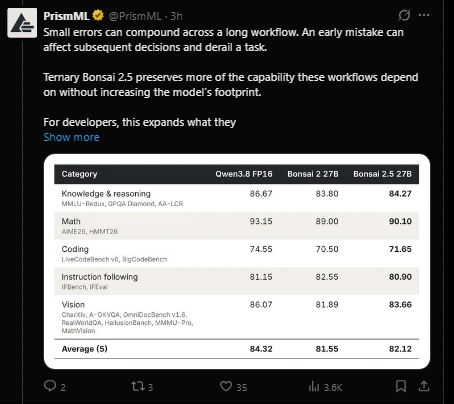
The broad table is more conservative. Qwen3.8 FP16 leads every category, and Bonsai 2.5 27B improves only modestly over Bonsai 2 27B in four of the five rows:
- Knowledge and reasoning, covering MMLU-Redux, GPQA Diamond and AA-LCR: 86.67 for Qwen3.8 FP16, 83.80 for Bonsai 2 27B and 84.27 for Bonsai 2.5 27B.
- Math, covering AIME26 and HMMT26: 93.15, 89.00 and 90.10 respectively.
- Coding, covering LiveCodeBench v6 and BigCodeBench: 74.55, 70.50 and 71.65 respectively.
- Instruction following, covering IFBench and IFEval: 81.15, 82.55 and 80.90 respectively. Bonsai 2.5 loses 1.65 points versus its predecessor here.
- Vision, covering CharXiv, OCRBench v6, RealWorldQA, HallusionBench, MMMU-Pro and MathVision: 86.07, 81.89 and 83.66 respectively.
- The reported five-category averages are 84.32 for Qwen3.8 FP16, 81.55 for Bonsai 2 27B and 82.12 for Bonsai 2.5 27B.
This split matters. A large improvement on repository-oriented benchmarks can coexist with a small change on a broad coding category because the underlying tasks differ. The row-by-row Bonsai 2.5 27B benchmark teardown goes deeper into the missing methodology, and the Bonsai 2.5 27B versus Qwen3.8 27B decision matrix frames the quality, footprint and runtime tradeoff without treating FP16 and quantized Qwen as identical.
What does the offline pytest demo establish?
PrismML reports an entirely offline workflow in which Bonsai 2.5 27B investigated a pytest 9.1 regression. The failing test passed alone but failed alongside other tests. The model inspected the repository, built a minimal reproduction, traced the failure, implemented a patch and passed a previously unseen maintainer test. The demo reports 180 tool calls.
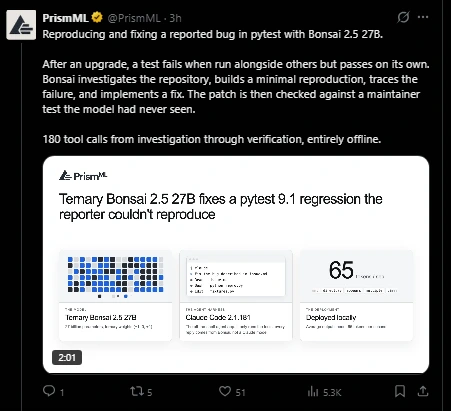
Useful workflow evidence, not a success rate: the supplied material does not include the dataset, full transcript, harness or an independently repeated result. The prominent “65” in the demo has no reliably legible metric label, so it should not be interpreted as a score. The 180-tool-call Bonsai coding-agent workflow focuses on reproducing the agent loop safely rather than treating the demo as a benchmark.
What throughput should you expect on each hardware platform?
There is no single verified Bonsai 2.5 27B throughput number. The launch page and model card publish different generation figures, MTP appears to explain part of the difference, and the backend, context and prompt are not held constant. Keep the evidence labels attached to every number.
What are the H100 claims?
The launch page claims 291 generated tokens per second and 3,200 prompt tokens per second on an H100. The model card’s plain-decode PTQ1_0 table reports 186 generated tokens per second on the same hardware class. ExplainX attributes the higher launch figure to MTP. These are vendor claims, with the MTP interpretation supplied by a third party, not independent measurements.
What are the RTX 4090 claims?
The launch page reports 204 generated tokens per second and about 3,060 prompt tokens per second on an RTX 4090. The model card’s plain-decode PTQ1_0 table lists 112 generated tokens per second. Do not promise 204 tokens per second without stating the MTP context, and do not merge the prompt-processing claim with the lower plain-decode result. The RTX 4090 Bonsai configuration and speed claims covers the tuning and measurement boundaries.
What about memory-constrained NVIDIA GPUs?
The RTX 3080 example is a memory observation, not a speed result: about 9.5 GB VRAM before -np 1 and about 7.8 GB afterward on a 10 GB card. For the 12 GB RTX 3060, ExplainX relays an unsourced claim of about 74 tokens per second at 262K context with MTP, unverified and lacking enough configuration detail to use as a planning guarantee. The RTX 3060 12GB Bonsai feasibility and context tuning treats it as a claim audit, not a benchmark.
What about Apple Silicon and CPU-only systems?
A Hacker News commenter reports 22.3 tokens per second on a Mac Mini M5 Pro, but that figure is a community anecdote with incomplete configuration, not a controlled result. The Mac Mini M5 Pro Bonsai setup and 22.3 tok/s audit keeps the evidence boundary explicit.
No reliable CPU-only tokens-per-second figure is supplied. CPU inference is documented, but a speed promise would be invented. The CPU-only Bonsai setup and memory tuning guide starts with short context and measurement rather than a fabricated estimate.
Across all hardware, record the exact GGUF, runtime version, backend, MTP state, context length, prompt length, generation length, prompt speed and generation speed. MTP can improve generation, but the model card warns that it can slow NVIDIA prefill by 9 to 23 percent. The cross-hardware Bonsai tokens-per-second comparison provides the fair-test method.
Which quantization and runtime should you choose?
Choose the file and runtime together. PTQ1_0 and PQ2_0 require PrismML’s llama.cpp fork. Q2_0 requires stock llama.cpp b11556 or newer; older builds may load it but produce garbage. The published compatibility table also uses the name “TQ1_0” and pairings that do not cleanly match the actual PTQ1_0 filenames, so use the exact repository filenames below rather than the shorthand alone.
| Quantization and exact base filename | Published size | Required runtime | Practical choice |
|---|---|---|---|
Ternary-Bonsai-2.5-27B-PTQ1_0.gguf |
5.99 GB | PrismML llama.cpp fork | Smallest published base file; closest to the 5.9 GB-class claim. Validate output on your workload. |
Ternary-Bonsai-2.5-27B-PQ2_0.gguf |
7.25 GB | PrismML llama.cpp fork | Larger fork-only option. No quantization quality scores are supplied, so do not assume it is better. |
Ternary-Bonsai-2.5-27B-Q2_0.gguf |
7.67 GB | Stock llama.cpp b11556+ |
Straightforward stock-runtime route. Avoid older builds that may load the file but generate garbage. |
The MTP alternatives are Ternary-Bonsai-2.5-27B-PTQ1_0-mtp.gguf at 6.23 GB, Ternary-Bonsai-2.5-27B-PQ2_0-mtp.gguf at 7.49 GB and Ternary-Bonsai-2.5-27B-Q2_0-mtp.gguf at 7.91 GB. Each adds about 0.24 GB over its base file. MTP is a speed and memory tradeoff, not a free upgrade: generation may improve while NVIDIA prefill slows.
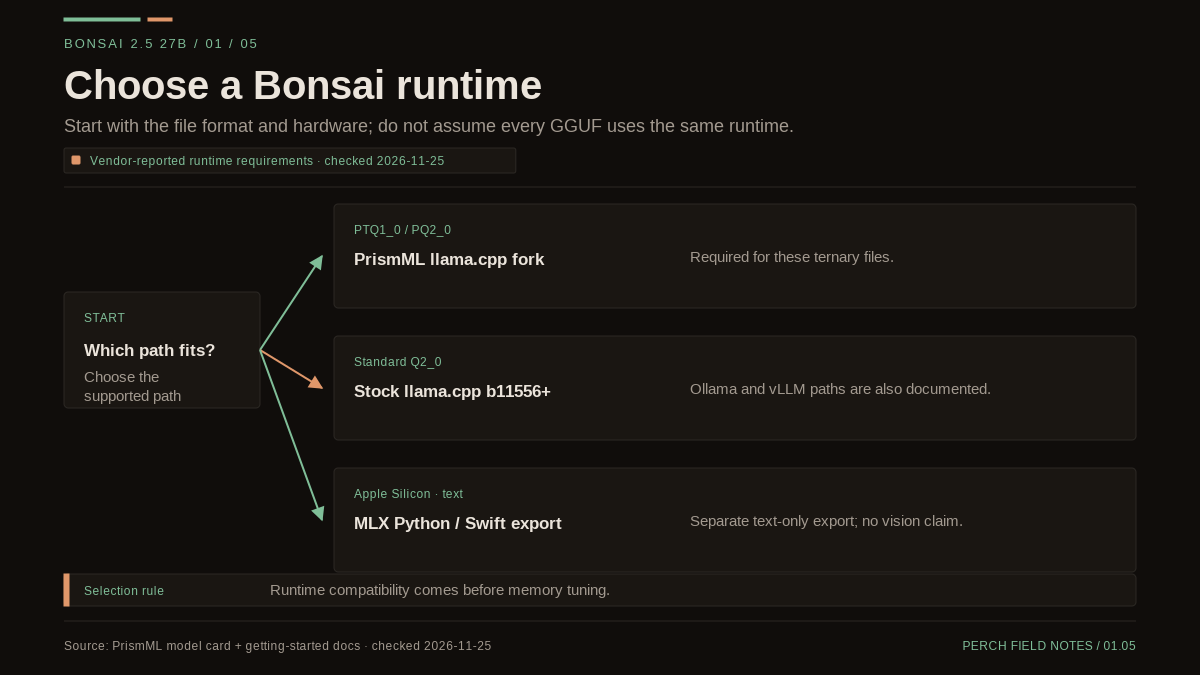
The PrismML getting-started documentation covers the supported llama.cpp, MLX and OpenAI-compatible paths. For direct control, PrismML’s llama.cpp fork documents CUDA, Metal, CPU and SYCL backends. For a stock Q2_0 path, use llama.cpp b11556+. Ollama and vLLM are documented serving options, and local OpenAI-compatible serving is available. The model card gives these exact examples:
llama serve -hf prism-ml/Ternary-Bonsai-2.5-27B-GGUF:Q2_0
ollama run hf.co/prism-ml/Ternary-Bonsai-2.5-27B-GGUF:Q2_0
vllm serve "prism-ml/Ternary-Bonsai-2.5-27B-GGUF"
Do not assume PTQ1_0 works in Ollama merely because the repository contains it. The documented Ollama route uses Q2_0. The Ollama Q2_0 commands and coding-agent connection and vLLM OpenAI-compatible Bonsai server setup cover those paths without inventing model names or throughput.
On Apple Silicon, the documented MLX export is prism-ml/Ternary-Bonsai-2.5-27B-mlx-2bit, and it is text-only. Use the Apple Silicon MLX setup for Bonsai 2.5 27B for that route. A Hexagon preset exists, but the Galaxy S26 Ultra configuration requires an unreleased fix according to PrismML, so it is not a supported promise in this launch guide. The PTQ1_0 versus PQ2_0 versus Q2_0 quantization guide provides the full file-level comparison.
How should you run your first local coding test?
Start with one exact file and one documented runtime. The following PTQ1_0 CUDA path is the model-card example. It is not a Windows-specific build recipe, and the CUDA flag should not be copied unchanged to Metal, CPU or SYCL systems. The PTQ1_0 and Q2_0 local installation walkthrough handles platform prerequisites and troubleshooting.
First clone PrismML’s llama.cpp fork:
git clone https://github.com/PrismML-Eng/llama.cpp && cd llama.cppFrom inside that checkout, download the smaller base file and build with the published CUDA commands. Keeping the GGUF beside the build directory makes the relative ./bin/llama-cli path and model filename in the next command resolve together:
hf download prism-ml/Ternary-Bonsai-2.5-27B-gguf Ternary-Bonsai-2.5-27B-PTQ1_0.gguf --local-dir .
cmake -B build -DGGML_CUDA=ON && cmake --build build -j
Run the model-card smoke test. The published command uses a 32,768-token context and allows up to 16,384 output tokens:
./bin/llama-cli -m Ternary-Bonsai-2.5-27B-PTQ1_0.gguf -ngl 99 -fa on -c 32768 --temp 1.0 --top-p 0.95 --top-k 20 --min-p 0 -p "Explain quantum computing in simple terms." -n 16384Those sampling values are usage examples, not disclosed benchmark settings. The model defaults to xhigh reasoning. medium is available; low is unsupported and behaves like xhigh. Thinking is on by default, and a short output cap can truncate the reasoning trace before the final answer. If output stops mid-task, increase the output allowance before treating the model as incapable.
If you choose stock Q2_0, the model card supplies this download and serving route:
hf download prism-ml/Ternary-Bonsai-2.5-27B-gguf Ternary-Bonsai-2.5-27B-Q2_0.gguf --local-dir .
llama serve -hf prism-ml/Ternary-Bonsai-2.5-27B-GGUF:Q2_0
Use stock llama.cpp b11556+ for that file. Once the smoke test produces coherent text, move to a coding task you already understand. A known pytest regression is a good first evaluation because you can recognize the correct root cause and inspect the patch. Follow the same sequence PrismML demonstrated: inspect the repository, build a minimal reproduction, trace the failure, implement a focused change, run the relevant tests and review the final diff.
Keep the first run bounded. Start with a short context, one request and read-only or workspace-limited permissions. Record resident memory, prompt-processing speed, generation speed and tool-call failures. Then repeat with an unfamiliar issue and compare the review effort against a larger model. A single successful demo does not establish reliability, but a repeatable local test gives you evidence that applies to your own stack.
What are the honest limitations and evidence gaps?
The largest limitation is evidence quality. The benchmark tables, memory example, throughput claims and pytest demo come from PrismML. ExplainX provides a third-party overview but explicitly says the scores were not independently reproduced. Hacker News and Reddit are community channels, not controlled evaluations. No supplied source establishes an independent Bonsai 2.5 27B benchmark replication.
The methodology gaps are substantial. The benchmark tables omit hardware, prompts, scaffolds, seeds, category weighting and confidence intervals. The broad table reports category aggregates without the component scores. The offline demo omits the dataset, complete transcript and harness. These omissions do not prove the results are wrong, but they prevent a clean reproduction and make cross-model comparisons less certain.
The honest losses are equally important. Qwen3.8 FP16 leads the coding average by 6.3 points, Terminal-Bench 2.1 by 10.7 points, SWE-bench Verified by 5.0 points, BFCL v4 by 3.6 points and AppWorld by 2.7 points. Bonsai 2.5 27B also loses 1.65 points to Bonsai 2 27B on instruction following. Its broad average is 2.20 points behind Qwen and only 0.57 points ahead of its predecessor.
Memory and speed claims need configuration labels. The 5.9 GB-class claim describes weights, not total VRAM. The 262,144-token context is documented, but the practical limit depends on KV cache, runtime, MTP, vision and hardware. No exact KV-cache byte table is supplied. The H100 and RTX 4090 launch figures are not directly comparable with the model card’s plain-decode figures because MTP and other settings differ. No reliable CPU-only speed figure is supplied either.
Runtime compatibility has rough edges. PTQ1_0 and PQ2_0 require PrismML’s fork; Q2_0 needs stock llama.cpp b11556+. The published compatibility table uses inconsistent “TQ1_0” naming, the MLX export is text-only, and the Hexagon Galaxy S26 Ultra configuration depends on an unreleased fix. These are reasons to follow exact filenames and test the chosen path rather than treating every backend as interchangeable.
The Hacker News launch discussion includes the anecdotal Mac Mini speed report, practical skepticism and an unsupported claim of equivalence to a much larger closed model. That equivalence is not established by the supplied benchmark tables and is disputed in the discussion. The LocalLLaMA Hugging Face thread is an inconsistently accessible community pointer, not evidence for any factual claim here.
We will update this pillar when PrismML publishes reproducible benchmark settings, a complete pytest transcript or an independent evaluation. Until then, the open questions are CPU throughput, exact KV-cache memory, practical 262K-context limits, quantization quality differences and the reliability of long tool loops across repositories. Those gaps should remain visible in any buying or architecture decision.
So, should you choose Bonsai 2.5 27B?
Choose it for a local trial if compact weights, offline operation and agentic coding matter more than leading every benchmark. The predecessor gains are strong enough to justify testing, especially on SWE-bench-style repair and terminal workflows. Choose a different path if you need hosted access, independently verified quality or a universal generalist. The model card says no provider currently deploys Bonsai 2.5 27B, there is no hosted API price, and it is not a One AI API Key model.
The final verdict is conditional but clear: Bonsai 2.5 27B is a meaningful compact coding upgrade, not a new universal champion. Run the exact GGUF on a repository you know, measure memory and throughput in your runtime, and require tests plus diff review before trusting an agent-generated patch. If you need a hosted comparison instead, compare hosted models currently available through One AI API Key.
Complete Bonsai 2.5 27B guide
Use this launch pillar as the decision router. The specialist posts below cover benchmarks, agent workflows, installation, hardware, memory, quantization and vision without repeating the full launch detail.
- row-by-row Bonsai 2.5 27B benchmark teardown
- 180-tool-call Bonsai coding-agent workflow
- Tau, BFCL and AppWorld tool-calling analysis
- SWE-bench Verified 75.6 repository-repair analysis
- Terminal-Bench 2.1 long-horizon terminal analysis
- PTQ1_0 and Q2_0 local installation walkthrough
- Ollama Q2_0 commands and coding-agent connection
- vLLM OpenAI-compatible Bonsai server setup
- Apple Silicon MLX setup for Bonsai 2.5 27B
- Bonsai VRAM and RAM worksheet by quantization
- cross-hardware Bonsai tokens-per-second comparison
- RTX 4090 Bonsai configuration and speed claims
- RTX 3060 12GB Bonsai feasibility and context tuning
- Mac Mini M5 Pro Bonsai setup and 22.3 tok/s audit
- CPU-only Bonsai setup and memory tuning
- 262K Bonsai context-window memory guide
- PTQ1_0 versus PQ2_0 versus Q2_0 quantization guide
- Bonsai vision mmproj setup and benchmark limits
- Bonsai 2.5 27B versus Qwen3.8 27B decision matrix
Sources
- PrismML’s Bonsai 2.5 27B announcement supports the release date, Apache-2.0 statement, positioning, benchmark tables, throughput claims and offline pytest demo.
- The Ternary Bonsai 2.5 27B GGUF model card supports the architecture, exact filenames and sizes, runtime commands, compatibility requirements, memory example and provider status.
- PrismML’s getting-started documentation supports the vision-language description, tool and image support, llama.cpp and MLX paths, and OpenAI-compatible serving.
- ExplainX’s Bonsai 2.5 27B agentic coding overview supports the third-party framing, the vendor-run caveat, the MTP interpretation and the clearly labeled relayed RTX 3060 claim.
- The Hacker News discussion supports community questions, skepticism and the anecdotal Mac Mini M5 Pro report, not independent benchmark verification.
- The LocalLLaMA discussion is an inconsistently accessible community pointer. It is not used as evidence.