Yes, you can use Bonsai 2.5 27B as a local coding agent, but the useful question is not whether it can finish one impressive demo. What matters is whether your harness can turn model output into safe repository actions, useful observations and a verified patch. PrismML documents native tool calling and OpenAI-compatible serving in its getting-started documentation for Bonsai 2.5 27B, which makes a custom local loop practical. Still, the model should not decide for itself which files it may change or which commands it may run.
The vendor’s 180-tool-call pytest example is a workflow signal, not a success rate. It suggests that Bonsai can stay engaged across inspection, reproduction, diagnosis, patching and verification. It does not disclose enough to reproduce the original run or compare it fairly with another agent. A better local test gives the model a disposable repository, a narrow task contract, a small set of validated tools and acceptance checks that the agent cannot edit.
Below, that idea becomes a harness design. It separates what the demo actually shows from what a safe implementation should do, supplies a synthetic order-dependent pytest fixture, and defines the records needed to evaluate patch quality, tool behavior and review effort. The example policies and limits below are recommendations for your own test, not settings attributed to PrismML’s demo.
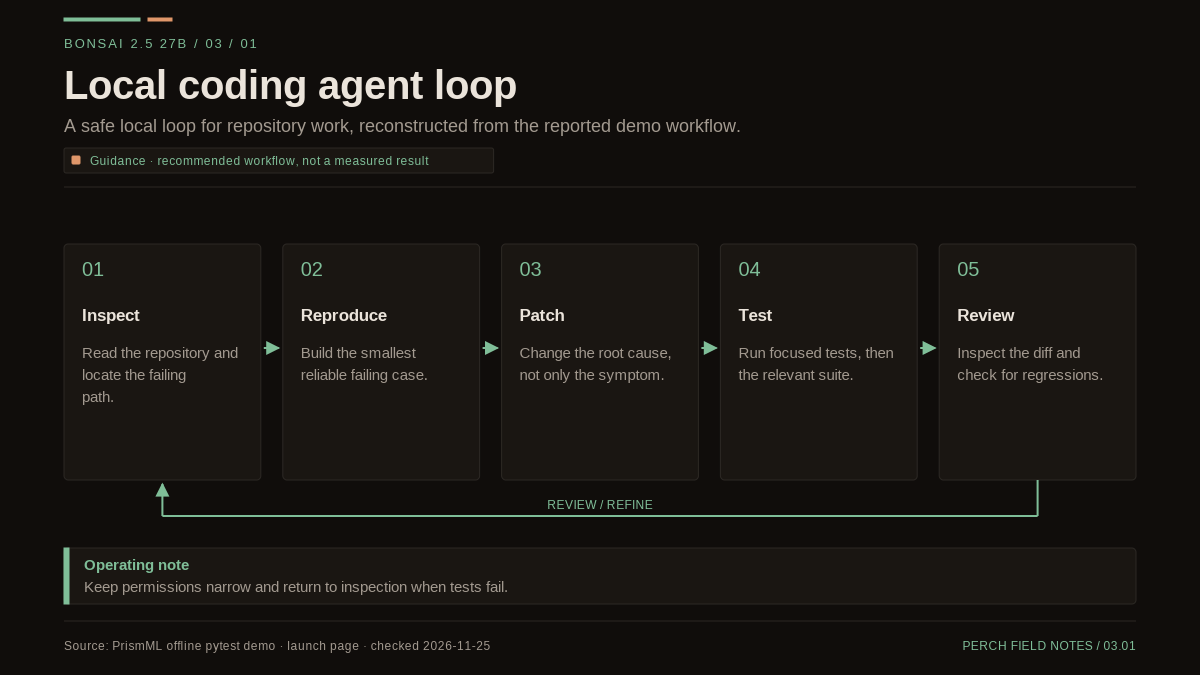
What does the 180-tool-call pytest demo actually show?
According to PrismML’s Bonsai 2.5 27B announcement, the offline example concerns a pytest 9.1 regression. A test passed when run alone but failed when run with other tests. The reported sequence was to inspect the repository, build a minimal reproduction, trace the failure, implement a patch and pass a previously unseen maintainer test. The demo reports 180 tool calls and shows both “Claude Code 2.1.181” and “Deployed locally” in the interface.
Those are Vendor claims. The visible client label and deployment status are Record evidence from the screenshot, but they do not disclose the connection method, tool definitions, model-serving options or permission policy. The client name is not proof that an off-the-shelf configuration will reproduce the result. It also does not establish that every action in the run was model-initiated rather than part of the surrounding client workflow.
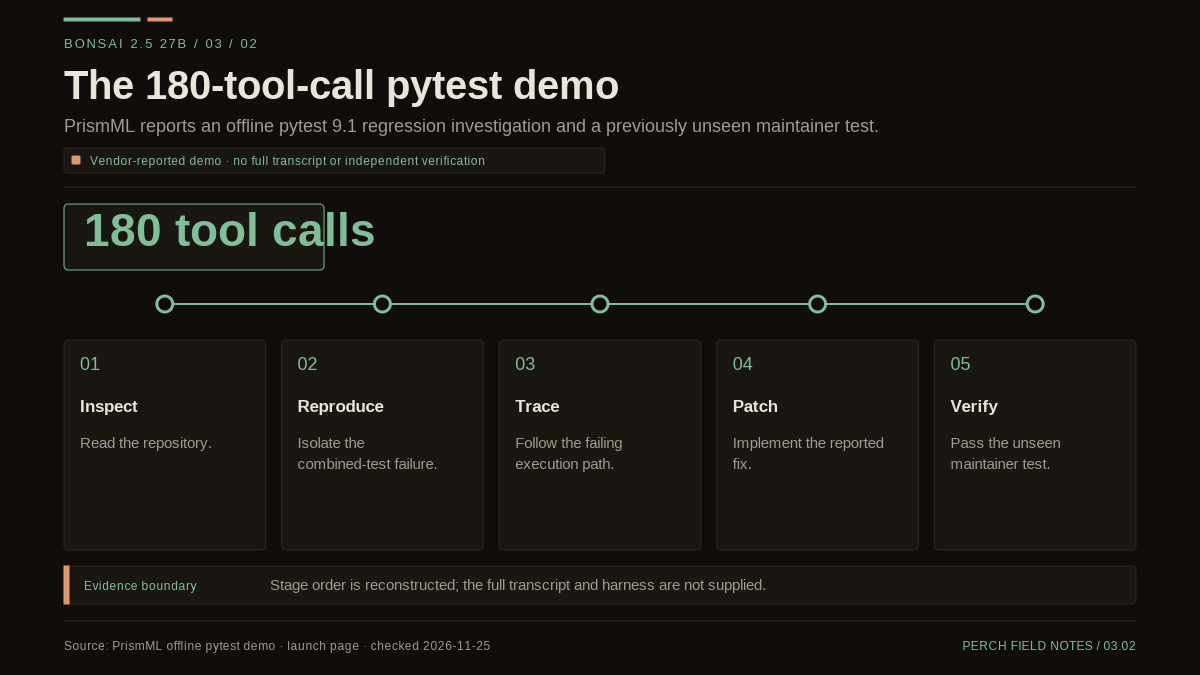
The failure shape is useful because it points toward order dependence or shared state. That is a general debugging hypothesis, not a confirmed root cause for the vendor’s repository. A test that passes alone and fails in company can be affected by module import order, process-global configuration, fixtures, environment mutation or an earlier test’s cleanup. The agent has to distinguish those possibilities with observations rather than immediately patching the assertion that happened to fail.
The tool-call count is equally easy to overread. A call might list a directory, read a file, search for a symbol, run one test, inspect a traceback or reread a patch. Some calls may be productive and others may be retries. Without the transcript, 180 cannot tell you the number of unique diagnoses, the amount of human intervention, the elapsed time or the cost. It is not evidence that 180 calls are necessary, efficient or reliable.
Several important items are Unknown: the repository, dataset, full prompt, tool schemas, permission boundaries, context allocation, decoding settings, retry policy and independent verification. The prominent “65” in the demo has no reliably legible metric label, so it must not be turned into a pass rate. ExplainX’s agentic-coding overview also notes that the published scores are vendor-run and not independently reproduced.
The fair conclusion is narrow. PrismML demonstrated a long-horizon repository task with a local model and reported a successful patch. Your evaluation should reproduce the task shape, not the marketing number: start with a known order-dependent failure, make the agent show its reproduction, constrain its edits and require an independent check. The Bonsai launch verdict and setup router provides the broader model and runtime context.
How should a local Bonsai coding agent loop be structured?
Treat the model as a proposal engine inside a larger state machine. It can suggest a tool call, explain a hypothesis or produce a patch. The harness owns the task state, validates every proposal, executes approved actions and decides whether the acceptance criteria have been met. That separation is what makes a local agent testable rather than merely conversational.
A minimal architecture has six parts:
- Task contract. Store the symptom, allowed paths, forbidden actions, available checks and completion rule. Keep this text stable so context compaction cannot silently change the assignment.
- Model adapter. Send the system policy, task contract, tool schemas and relevant history to the local endpoint. Parse the response into plain text, structured tool calls or a final answer. Reject malformed output instead of guessing.
- Policy gate. Resolve paths against the workspace root, validate arguments, enforce command allowlists and check budgets. A denial is an observation returned to the model, not an invitation to try a different spelling of the same unsafe action.
- Tool executor. Run reads, searches, patch operations and approved tests. Capture exit status, standard output, standard error, elapsed time and the exact command or patch. Apply output limits before adding a large log to model context.
- Evidence ledger. A compact record belongs in the evidence ledger: hypotheses, reproductions, changed files, test outcomes and rejected approaches. It survives context compaction and is the basis for the final report.
- Verifier and reviewer. Check the target reproduction, the relevant module, the full suite where practical, patch scope and held-out behavior. A model’s statement that tests pass is not verification.
The loop should look like this in control-flow terms. This is an illustrative skeleton, not a drop-in client or a reconstruction of PrismML’s scaffold:
task = load_task_contract()
workspace = prepare_disposable_workspace(task)
ledger = EvidenceLedger(task.acceptance_checks)

while not ledger.complete and not policy.budget_exhausted():
  reply = model.step(
      system_policy=policy.system_prompt,
      task=task,
      tools=tool_schemas,
      history=ledger.model_history(),
  )

  if not reply.tool_calls:
      ledger.record_proposal(reply.text)
      continue

  for proposed_call in reply.tool_calls:
      decision = policy.authorize(proposed_call, workspace)
      ledger.record_decision(proposed_call, decision)

      if not decision.allowed:
          observation = policy.denial_message(decision)
      else:
          observation = executor.run(decision.normalized_call)
          ledger.record_observation(observation)

      history.append(tool_result(proposed_call.id, observation))

  if ledger.loop_detected():
      stop_with_reason("repeated action without new evidence")
The important line is policy.authorize. Tool names and JSON schemas describe what an action means; they do not make it safe. The executor should normalize and revalidate arguments, then run with the workspace as its only writable root. Keep credentials, shell startup files and unrelated repositories outside that boundary.
Use narrow schemas with explicit bounds. For example, a read tool can accept a relative path and a small line range. A test tool can accept a short list of test node identifiers. The model should not supply arbitrary shell strings when a structured operation will do. If a future task needs package installation or a broad build command, add a separately reviewed tool rather than quietly widening the existing one.
{
"name": "run_pytest",
"description": "Run a bounded list of pytest targets inside the task workspace.",
"parameters": {
  "type": "object",
  "properties": {
    "targets": {
      "type": "array",
      "items": { "type": "string", "minLength": 1, "maxLength": 200 },
      "minItems": 1,
      "maxItems": 4
    }
  },
  "required": ["targets"],
  "additionalProperties": false
}
}
The schema deliberately has no shell field and no model-controlled timeout. The harness supplies the fixed working directory, executable, timeout and environment. It still has to resolve every target beneath the workspace and reject options or traversal that the schema alone cannot catch.
Structured output also improves recovery. Every call needs an identifier, every result needs to refer to that identifier, and validation errors should say which argument failed. A tool result should distinguish “command ran and tests failed” from “command could not run.” Those are different debugging states. The Tau, BFCL and AppWorld tool-calling analysis examines why benchmark tool use does not automatically transfer to a particular harness.
Which tool permissions should the harness enforce?
Start with read-only access, then grant only the write operation required by the task. The model should never approve its own escalation. A human or a predeclared task policy must authorize broader access before the run, and the gate should record that decision.
The following table is a proposed safe baseline for a disposable coding task. It is not a description of the vendor demo’s permissions.
| Agent tool | Default permission | Guardrail | Evidence returned |
|---|---|---|---|
list_files |
Allow inside workspace | Relative paths only; exclude hidden and generated directories by policy | Matching paths and truncation notice |
read_file |
Allow inside workspace | Reject absolute paths, traversal and symlink escapes; cap lines and bytes | Path, requested range and content |
search_text |
Allow inside workspace | Search only approved source roots; cap matches | File, line and matched text |
inspect_symbol |
Allow inside workspace | Use repository index or bounded search; no whole-repository dump | Symbol location and nearby source |
apply_patch |
Allow only declared source paths | Reject test edits, deletions, binary files and path escapes; validate unified patch | Applied files and resulting diff |
run_pytest |
Allow approved node identifiers | Fixed working directory; no network; timeout and output cap | Command, exit code and bounded logs |
git_status and git_diff |
Read-only allow | No configuration changes, commits or destructive options | Working-tree status and diff |
| General shell | Deny by default | Separate approval and sandbox required; never expose production credentials | Denial or sandboxed execution record |
| Network and package installation | Deny by default | Prepare dependencies before the agent run; review any exception | Denial or approved download record |
| Secret access | Deny | Do not mount credential directories or environment secrets | Denial only |
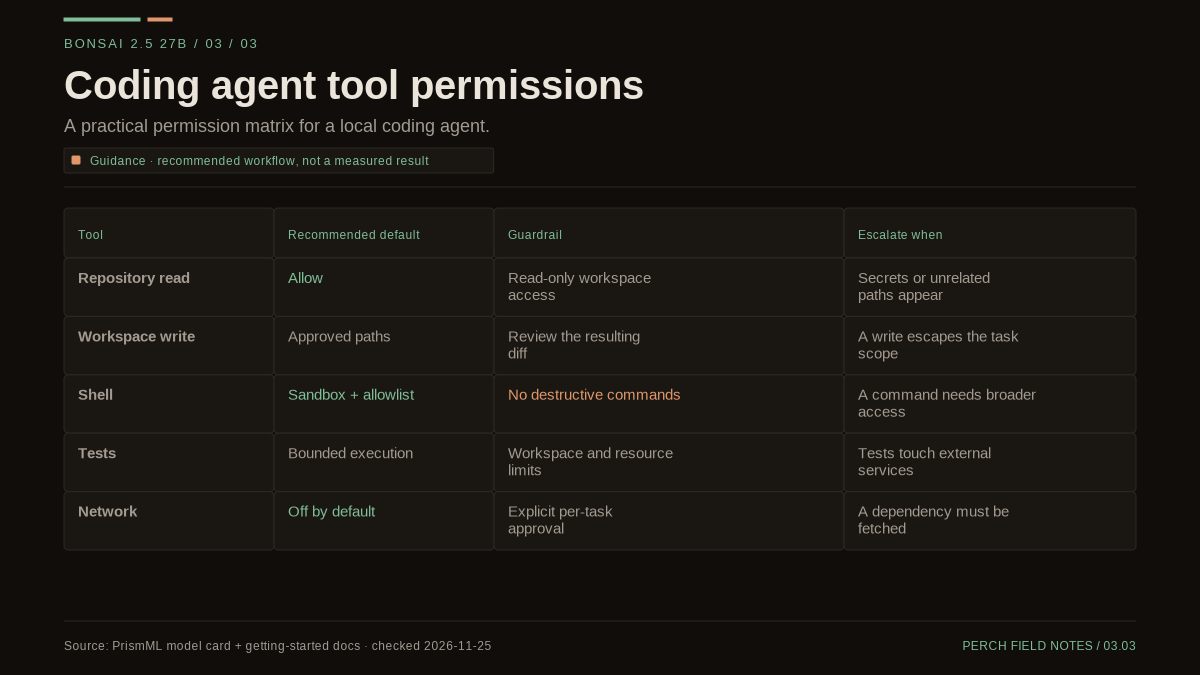
Path checks need more than a string prefix. Resolve the candidate path, resolve the workspace root and verify that the candidate remains beneath the root. Reject symlinks that lead outside it. Apply the same rule to patch targets and test working directories. A filename such as .env should be denied even when it sits inside the repository, because the task does not require it and tool output could copy secrets into model context.
Command execution needs an allowlist at the argument level. For pytest, approve specific node identifiers or a bounded test directory. Reject options that write outside the workspace, invoke plugins from untrusted paths or suppress failures. If the project’s normal suite needs environment variables, provide only the nonsecret values it requires. Prepare the environment and install dependencies before the agent starts, then disable network access during the run where the runtime supports it.
Keep patch authority separate from test authority. The agent may change declared application files, but it must not rewrite the tests that define success. It may read tests to understand expected behavior, but it may not delete a failing assertion, add a skip, lower coverage or alter a fixture merely to produce green output. The verifier should compare the final diff against the declared writable paths and reject changes outside them.
Budgets belong in the same policy layer. An illustrative first run might cap the session at 40 tool calls, each command at 60 seconds and each tool observation at 16 KiB. Those values are test-harness choices, not measured Bonsai limits or PrismML settings. When a cap is reached, stop with the evidence collected so far. Do not let the model reset its own counter or continue under a fresh task description.
How can you reproduce the pytest workflow safely?
Use a disposable copy of a repository with tests, or create the small fixture below. Do not begin with a production checkout, an uncommitted worktree or a machine that has credentials available to the agent. Record the starting commit and existing failures before the model sees the task.
If you already have a supported local server, keep it. Otherwise, the model card documents a Q2_0 route through Ollama and provides this exact download command:
hf download prism-ml/Ternary-Bonsai-2.5-27B-GGUF Ternary-Bonsai-2.5-27B-Q2_0.gguf --local-dir .
ollama run hf.co/prism-ml/Ternary-Bonsai-2.5-27B-GGUF:Q2_0
The Ternary Bonsai 2.5 27B GGUF repository is the source for exact files and runtime notes. Q2_0 requires stock llama.cpp build b11556 or newer; older builds may load it and produce garbage. PTQ1_0 and PQ2_0 require PrismML’s llama.cpp fork. Do not mix those paths. The PTQ1_0 and Q2_0 local installation walkthrough covers the full setup decision.
Configure the harness with the local OpenAI-compatible base URL and model identifier reported by your chosen server. Do not guess the identifier from the filename. First send a simple request without tools and confirm that the response is coherent. Then send one harmless read-only tool call and confirm that the server, adapter and parser agree on the tool-call format. Native tool support in the model does not eliminate client-side parsing work.
Build a deterministic order-dependent fixture
Create sample/__init__.py:
from .registry import RegistryCreate sample/registry.py with an intentionally broken class-level write:
class Registry:
  value = None

  def set_value(self, value):
      Registry.value = value

  def get_value(self):
      return self.value
Create tests/test_order_dependency.py:
from sample import Registry


def test_a_sets_a_value():
  registry = Registry()
  registry.set_value(42)
  assert registry.get_value() == 42


def test_b_starts_clean():
  registry = Registry()
  assert registry.get_value() is None
The fixture above is synthetic and is not the pytest 9.1 repository from the demo. Its second test passes alone because the class attribute is still None. Running the module in definition order lets the first test write 42 to the class, so the second instance sees the changed value and fails. That gives you a controlled reproduction of the demo’s broad failure shape.
Run these commands from the fixture root:
python -m pytest tests/test_order_dependency.py::test_b_starts_clean -q
python -m pytest tests/test_order_dependency.py -q
python -m pytest -q
The first command should pass. The second should fail. Record all three outcomes as the baseline. If the full suite has unrelated failures, separate them from the target failure rather than asking the agent to fix everything at once.
Give the agent a task contract like this: “Repair the order-dependent failure in this disposable repository. Inspect before editing. Reproduce the isolated test and the module run. Change application code only; do not edit tests. Run the target, module and full suite. Return the final diff and explain the root cause.” This is a proposed evaluation prompt, not a recovered vendor prompt.
For this fixture, the correct application-level repair is to assign self.value in set_value rather than writing Registry.value. A patch that resets shared state inside the second test or weakens its assertion is not acceptable. Store that ground truth outside the agent’s readable workspace so it cannot simply copy the answer.
After the agent returns, run an unseen check. Save the following as tests/test_registry_instances.py, but do not expose it to the agent until patch generation is finished:
from sample import Registry


def test_instances_do_not_share_values():
  first = Registry()
  second = Registry()
  first.set_value("left")
  assert second.get_value() is None
Then run:
python -m pytest tests/test_registry_instances.py -q
python -m pytest -q
git diff --check
git diff -- sample tests
A valid result requires the held-out check to pass, the full suite to introduce no new failures and the diff to stay within the declared application path. The agent’s own explanation should identify shared class state, not merely name the failing assertion.
| Task stage | Agent action | Check before moving on | Evidence to retain |
|---|---|---|---|
| Intake | Read task contract and restrictions | Starting commit and baseline failures recorded | Task text and baseline test results |
| Inspect | Locate relevant code and tests | Claims point to real files and lines | Search results and file references |
| Reproduce | Run isolated test, combined tests and suite | Failure shape matches the reported symptom | Exact commands and exit codes |
| Diagnose | State a root-cause hypothesis | Hypothesis explains why order changes the result | Short causal explanation |
| Patch | Change only approved application files | Diff is narrow and tests remain untouched | Unified patch and changed paths |
| Verify | Run target, module and full suite | No new failure and no hidden test edits | Test outcomes and bounded logs |
| Review | Run held-out check and inspect diff | Acceptance criteria pass without model assistance | Final verifier report |
How should the agent manage repository context?
Bonsai 2.5 27B has a vendor-documented context length of 262,144 tokens, a model specification rather than a promise that a coding harness should place an entire repository, every traceback and all prior attempts into one request. Practical context is also constrained by the serving configuration, runtime memory and the amount of useful evidence the model can attend to at once.
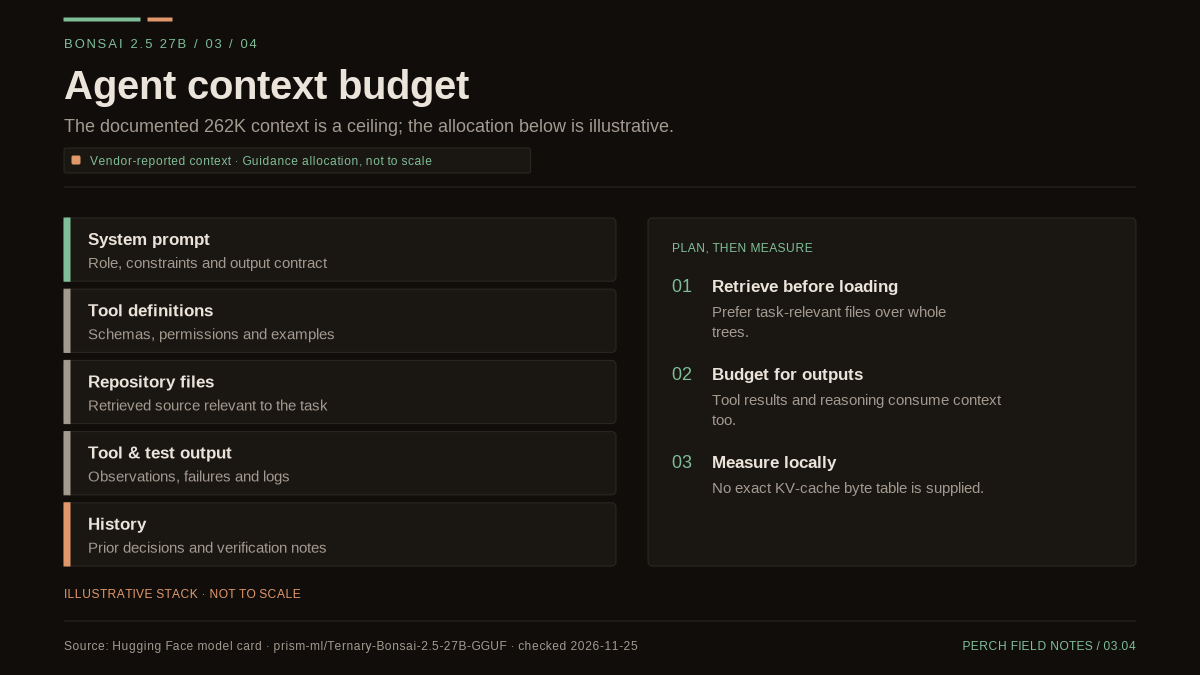
Organize context into layers. The immutable layer contains the system policy and task contract. The working layer contains a repository map, the current hypothesis, relevant file excerpts and the latest patch. The observation layer contains bounded command results. The archive layer contains older searches, rejected hypotheses and logs that can be retrieved by reference. Only the first three need to remain fully visible.
Start with search rather than bulk reads. Ask for file paths, symbol locations and small ranges around relevant code. Once the agent identifies the likely module, read that file and its direct tests. Avoid repeatedly dumping the same directory listing or full test log. A search result with file and line references is often enough to choose the next read.
Every useful tool result should enter the evidence ledger with a stable summary: command, exit code, relevant failure lines, files touched and interpretation. Store the complete log outside model context. When the log is needed again, retrieve the relevant slice rather than replaying the entire output. This keeps the model’s history focused on decisions and preserves an audit trail for the reviewer.
Compact old history deliberately. Preserve the task contract, accepted facts, current root-cause hypothesis, active patch, failed approaches and outstanding checks. Replace long stretches of exploration with a short summary plus references. Do not silently truncate the most recent test result or remove a denial from the policy gate. After compaction, re-read any source file that the next edit depends on instead of trusting a summary alone.
Use explicit context-pressure triggers. Examples include repeated large file reads, a tool result that consumes most of the remaining budget, a model response that loses earlier constraints or a task that has changed direction several times. The response should be retrieval, summarization or stopping, not an endless chain of truncated outputs. Record the trigger and what was removed.
The 262K Bonsai context-window memory guide explains the hardware side. The Bonsai VRAM and RAM worksheet by quantization helps separate model-file size from runtime memory. No exact KV-cache byte table is supplied, so measure resident memory at the context setting you actually use instead of deriving a number from the 5.9 GB weight claim.
How should the harness recover from failures?
Recovery is part of the task, not an exceptional path. A local coding agent will encounter malformed calls, unhelpful searches, failed tests and wrong hypotheses. The harness should make each failure produce new evidence or stop the run. Repeating the same action with the same context is not recovery.
| Failure mode | Detection | Safe recovery | Stop or escalate when |
|---|---|---|---|
| Malformed tool call | Schema or parser validation fails | Return the exact validation error once; allow a corrected call | The same malformed shape repeats |
| Repeated search or reread | Action and observation hashes repeat | Ask for the current hypothesis and a different bounded action | No new evidence appears |
| Failure does not reproduce | Baseline commands disagree with task | Save commands and environment; recheck baseline before editing | The symptom remains unreproduced |
| Wrong root cause | Patch does not change the target failure | Revert only the agent patch; inspect traceback and state flow | Two evidence-based hypotheses fail |
| Target passes, suite regresses | Full-suite comparison finds new failures | Inspect diff and isolate affected tests | Regression cannot be separated from baseline |
| Test gaming | Tests, skips or assertions change | Reject patch and restore approved test content | Agent repeats a forbidden edit |
| Context pressure | Budget threshold or lost constraints | Compact from ledger and reread critical files | Essential evidence no longer fits |
| Command timeout or memory error | Executor reports timeout or runtime failure | Reduce scope; record partial output; adjust runtime separately | Resource failure persists |
| Permission denial | Policy gate rejects path or command | Return denial and offer an allowed alternative | Agent tries to bypass the gate |
| Reasoning truncation | Response ends before answer or tool call | Increase output room or use supported medium reasoning |
Output remains incomplete |
Bonsai defaults to xhigh reasoning. medium is available, while low is unsupported and behaves like xhigh. Thinking is on by default, and a short output cap can truncate the reasoning trace before the final answer. If a run repeatedly stops mid-response, treat that as a configuration problem to record and correct, not as proof that the model cannot solve the task.
Retries need a purpose. A malformed call can receive one schema correction. A failed test can lead to a new read or a revised hypothesis. A timeout can lead to a narrower target. Each retry should state what changed since the previous attempt. The Terminal-Bench 2.1 long-horizon terminal analysis provides related guidance on decomposition, shell boundaries and bounded retries.
Recovery should stay reversible. Before the first patch, save the starting diff or create a clean task checkpoint in the harness’s own storage. If a hypothesis fails, restore only the agent’s changes through the normal review workflow. Do not solve a model failure by running broad destructive repository commands or by hiding pre-existing test failures.
Most importantly, allow “not solved” as a valid result. A run that reproduces the bug, identifies two rejected hypotheses and stops at its budget is more useful than a run that returns an unexplained patch and claims success. Your evaluation should reward honest stopping because it exposes where the model or harness needs improvement.
What belongs on the evaluation checklist?
Evaluate the system, not just the final answer. A patch can pass visible tests while hiding a bad root cause, widening the diff or requiring heavy human repair. Prepare a small task set before testing and keep the acceptance checks outside the agent’s writable area.
Use a progression of task types. Start with a known bug to validate the harness. Add an unfamiliar issue to test diagnosis. Include an order-dependent failure like the fixture above. Then try a bounded multi-file change with clear interfaces. A separate held-out repository or issue for final evaluation keeps repeated prompt tuning from turning every task into a memorized example.
For each run, record:
- The exact GGUF filename, runtime name and version, hardware, context setting, MTP state and model-serving options.
- The task contract, tool schemas, permission policy, output caps, retry limits and any human interventions.
- The starting commit, dependency setup and baseline failures.
- Every tool call, denial, timeout and significant observation, with timestamps if you measure wall time.
- The final patch, changed paths, target results, full-suite results and held-out results.
- Human review findings: correctness, unnecessary edits, missed edge cases, explanation quality and repair time.
Score outcomes in separate fields. Task success should mean all predeclared checks pass. Patch quality should consider scope and root-cause fit. Regression safety should compare the final suite with baseline. Tool efficiency can report calls and repeated actions, but a lower count is not automatically better if the agent skipped reproduction. Review effort should record what a human had to correct. Policy safety should count denied bypass attempts and unauthorized changes.
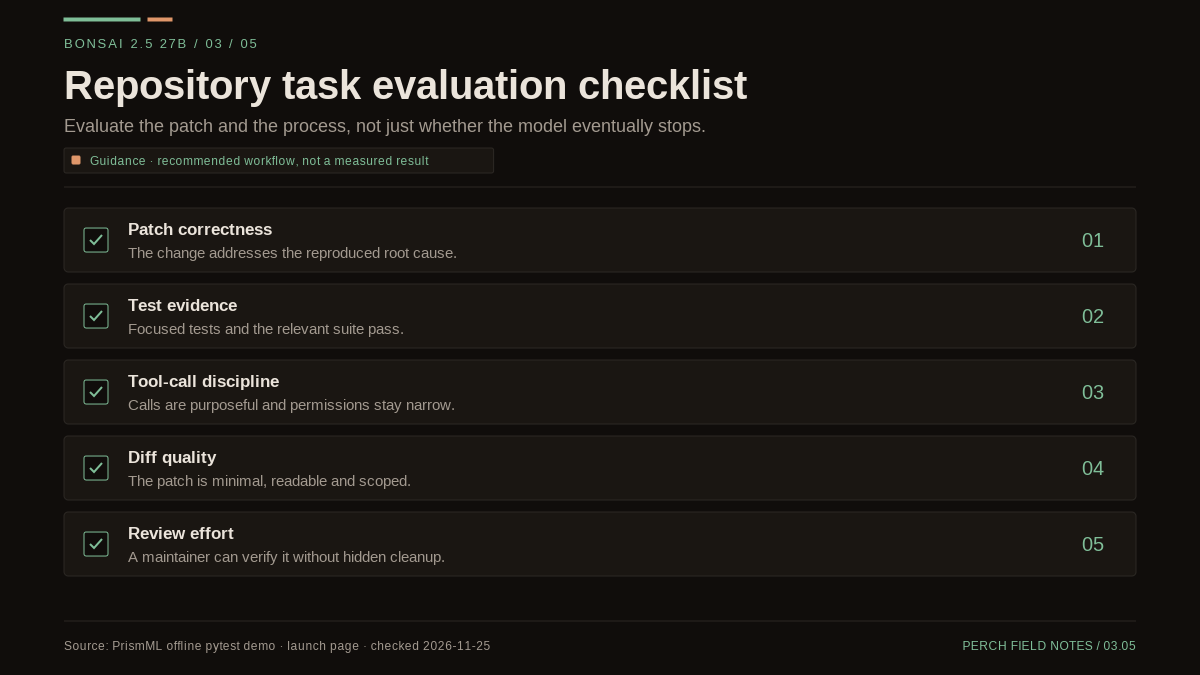
Run each task under a declared protocol. If you repeat a task to estimate variability, report the number of attempts and how you selected or aggregated them. Do not label a result pass@1 unless you actually used and disclosed that protocol. The supplied Bonsai evidence does not provide prompts, scaffolds, seeds or pass@1 settings, and this article does not invent them.
The loss should stay visible. In PrismML’s vendor table, Bonsai 2.5 27B trails Qwen3.8 FP16 by 6.3 points on the coding average, 10.7 on Terminal-Bench 2.1 and 3.6 on BFCL v4. Its instruction-following category also declines by 1.65 points versus Bonsai 2 27B. Those numbers do not predict your repository result, but they rule out an honest “best at everything” conclusion. The SWE-bench Verified 75.6 repository-repair analysis examines the stronger repair signal without generalizing it to every codebase.
Community material can suggest tests, but it cannot replace them. The Hacker News Bonsai 2.5 27B discussion contains anecdotal speed reports and disputed comparisons with larger models. The LocalLLaMA Bonsai GGUF pointer is an inconsistently accessible community pointer, not evidence for a success rate or runtime claim.
As of the frozen evidence check on November 25, 2026, no independent reproduction of the benchmark methodology or the 180-call demo is supplied. A future update should replace these gaps with a published task set, complete transcript, runtime configuration and repeated local results. Until then, the correct output of your own evaluation is a measured record, not a borrowed benchmark conclusion.
What is the verdict for a local coding agent?
Bonsai 2.5 27B is worth testing as a local repository agent when you can own the harness and review the patch. Its vendor-reported coding gains over Bonsai 2 27B and documented tool support make the experiment credible. The 180-call pytest demo shows an intended workflow that resembles real maintenance: reproduce before patching, investigate with tools and verify against a test the model has not seen.
It is not yet evidence of autonomous reliability. The missing transcript, harness details and independent results prevent a defensible success rate. Qwen3.8 FP16 remains ahead in the vendor’s coding comparison, and a compact footprint does not remove the need to measure speed, memory or long-context behavior. Use a disposable workspace, narrow permissions, structured evidence and a held-out check. Let those decide whether Bonsai earns a place in your coding stack.
Bonsai 2.5 27B is not a hosted One AI API Key model. If you need an API route instead of local inference, compare hosted models currently available through One AI API Key.
Complete Bonsai 2.5 27B guide
You can compare hosted models currently available through One AI API Key. The cluster posts below cover the local model’s evidence, setup and workload-specific tradeoffs:
- Bonsai 2.5 27B launch verdict and setup router
- row-by-row Bonsai 2.5 27B benchmark teardown
- Tau, BFCL and AppWorld tool-calling analysis
- SWE-bench Verified 75.6 repository-repair analysis
- Terminal-Bench 2.1 long-horizon terminal analysis
- PTQ1_0 and Q2_0 local installation walkthrough
- Ollama Q2_0 commands and coding-agent connection
- vLLM OpenAI-compatible Bonsai server setup
- Apple Silicon MLX setup for Bonsai 2.5 27B
- Bonsai VRAM and RAM worksheet by quantization
- cross-hardware Bonsai tokens-per-second comparison
- RTX 4090 Bonsai configuration and speed claims
- RTX 3060 12GB Bonsai feasibility and context tuning
- Mac Mini M5 Pro Bonsai setup and 22.3 tok/s audit
- CPU-only Bonsai setup and memory tuning
- 262K Bonsai context-window memory guide
- PTQ1_0 versus PQ2_0 versus Q2_0 quantization guide
- Bonsai vision mmproj setup and benchmark limits
- Bonsai 2.5 27B versus Qwen3.8 27B decision matrix
Sources
- PrismML launch announcement supports the offline pytest demo, 180-tool-call count, benchmark rows and vendor positioning.
- Ternary Bonsai 2.5 27B GGUF repository supports exact filenames, download commands, runtime requirements and provider status.
- PrismML getting-started documentation supports native tool calling, image input, Apache 2.0 availability and local serving paths.
- ExplainX agentic-coding overview provides a third-party framing and explicitly notes that the scores are vendor-run, not independently reproduced.
- Hacker News discussion provides community questions and anecdotes only; it is not independent benchmark verification.
- LocalLLaMA discussion is an inconsistently accessible community pointer, not evidence for any factual or performance claim.