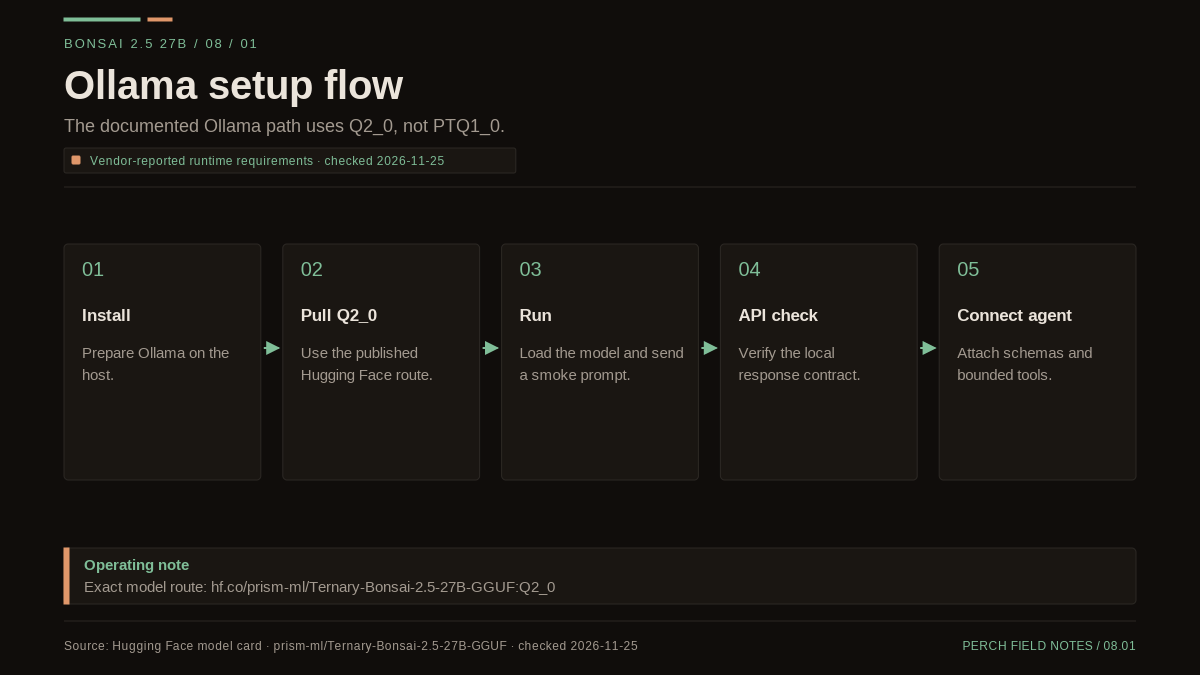
Run Bonsai 2.5 27B in Ollama with the exact Q2_0 command ollama run hf.co/prism-ml/Ternary-Bonsai-2.5-27B-GGUF:Q2_0, which is the documented Ollama path in PrismML’s model card. It pulls a 7.67 GB base GGUF, starts an interactive chat and makes the model available through Ollama’s local API. It does not pull the 5.9 GB-class PTQ1_0 file, and it does not require you to invent a short model name.
The shortest useful setup has four checks: confirm Ollama is running, pull the exact Hugging Face identifier, verify a coherent response, then point an OpenAI-compatible client at http://localhost:11434/v1. After that, test a coding agent with one read-only tool before giving it permission to edit files or run commands.
The guide stays on that path and covers prerequisites, the pull and run commands, output verification, native and OpenAI-compatible routes, a small agent bridge, context and memory limits, and troubleshooting. The broader Bonsai 2.5 27B launch verdict and setup router explains the model’s benchmarks and alternative runtimes; this article is the Ollama-specific working guide.
What Ollama prerequisites does Bonsai 2.5 27B need?
You need a working Ollama installation, enough storage for the base Q2_0 file and enough memory to load it with runtime overhead. The first pull also needs network access to Hugging Face. Once the weights are cached, the model can run locally without sending prompts to a hosted inference provider.
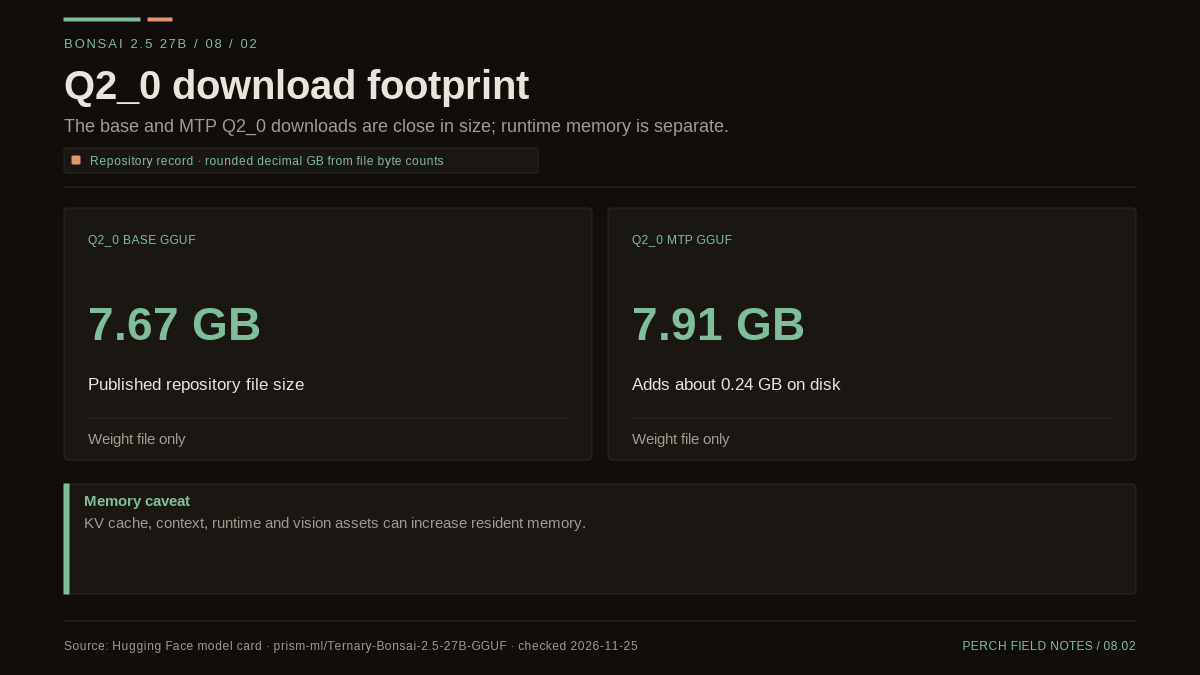
Allow for the 7.67 GB Ternary-Bonsai-2.5-27B-Q2_0.gguf file, plus disk headroom for Ollama’s cache and any temporary download data. The supplied sources do not define an exact free-space minimum beyond the published file size, so treat 7.67 GB as the weight footprint rather than a complete storage allowance. The MTP variant is larger at 7.91 GB, but this guide uses the base file because that is the variant named in the documented Ollama command.
Memory planning needs the same separation. The weights are only one part of a running process. The KV cache, selected context length, serving runtime and agent history add costs. No exact KV-cache byte table or universal Ollama VRAM minimum is supplied. A machine that can store the file is not automatically a machine that can run your intended context comfortably. The Bonsai VRAM and RAM worksheet by quantization provides the fuller measurement framework.
PrismML documents CPU, CUDA, Metal and SYCL backends for Bonsai generally, but that statement is not a guarantee that every Ollama package exposes every backend in the same way. Install the current Ollama release appropriate for your operating system, record its version, and test the actual load on your machine. The model card says Q2_0 needs stock llama.cpp b11556 or newer, with older builds potentially loading the file but producing garbage. The supplied sources do not map that llama.cpp build threshold to a specific Ollama release number, so this guide does not invent one.
You also need port 11434 available on the local machine. Ollama Desktop normally manages its local service. The ollama serve command is for starting the service when it is not already running, not a second server to launch blindly alongside the desktop app. If you only want terminal chat, the CLI is enough. If you want a coding agent or application integration, keep the local service running and use either the native Ollama API or its OpenAI-compatible route.
No Git clone, CMake build or manual GGUF placement is required for this Ollama path, which is its main advantage. If your goal is explicit offload flags, the smaller PTQ1_0 file or direct llama.cpp experimentation, follow the PTQ1_0 and Q2_0 local installation walkthrough instead. PrismML’s getting-started documentation is the vendor reference for the supported runtime family.
How do you pull and run the Q2_0 GGUF?
Use the full Hugging Face model identifier. The repository is prism-ml/Ternary-Bonsai-2.5-27B-GGUF, and Q2_0 selects the published quantization tag. The hf.co prefix tells Ollama to resolve the model through Hugging Face. Preserve the capitalization and suffix exactly.
ollama pull hf.co/prism-ml/Ternary-Bonsai-2.5-27B-GGUF:Q2_0This is the download-only form of PrismML’s documented ollama run command. Separating the pull is useful when you want to confirm storage and network behavior before starting an interactive session. It also makes scripted setup easier to read. Do not replace the identifier with a guessed name such as bonsai2.5 or bonsai:27b; neither is the supplied Ollama identifier.
After the pull completes, start the interactive session:
ollama run hf.co/prism-ml/Ternary-Bonsai-2.5-27B-GGUF:Q2_0On a fresh installation, ollama run can perform the pull itself, and using ollama pull first simply makes the two stages explicit. The Ternary Bonsai 2.5 27B GGUF repository is the source for the files and the vendor command. The base Q2_0 file is 7.67 GB, not the 5.9 GB figure used in launch coverage; the smaller figure aligns with PTQ1_0, which requires PrismML’s llama.cpp fork and is not the Ollama route documented here.
The following commands cover the normal management loop. Replace the model argument with the full identifier shown above rather than typing a new alias.
| Ollama command | What it does | When to use it |
|---|---|---|
ollama --version |
Prints the installed CLI version | Record it before diagnosing loader or backend problems |
ollama list |
Lists locally available models | Confirm the Q2_0 pull is present |
ollama pull hf.co/prism-ml/Ternary-Bonsai-2.5-27B-GGUF:Q2_0 |
Downloads the base Q2_0 weights | Use before a scripted first run |
ollama run hf.co/prism-ml/Ternary-Bonsai-2.5-27B-GGUF:Q2_0 |
Pulls if needed, loads the model and opens chat | Use for the first interactive check |
ollama show hf.co/prism-ml/Ternary-Bonsai-2.5-27B-GGUF:Q2_0 |
Shows locally recorded model information | Inspect the selected model without starting chat |
ollama ps |
Lists models currently loaded in memory | Find a model that is still resident |
ollama stop hf.co/prism-ml/Ternary-Bonsai-2.5-27B-GGUF:Q2_0 |
Unloads the named model | Release memory before another test |
ollama serve |
Starts the local API service | Use only when no Ollama service is already running |
ollama rm hf.co/prism-ml/Ternary-Bonsai-2.5-27B-GGUF:Q2_0 |
Removes the local model and its cached weights | Reclaim disk only when you no longer need it |
Inside the interactive session, /bye exits and /clear clears the conversation, and /set parameter num_ctx 32768 sets a 32,768-token context for that session. The value is a conservative starting test point, not a measured optimum or a promise that every machine can support it. Raise it only after checking memory and response quality.
The base model is the right first choice because it has the exact documented Ollama command. The repository also lists Ternary-Bonsai-2.5-27B-Q2_0-mtp.gguf at 7.91 GB, but the supplied model card does not give an equivalent MTP-specific Ollama run command. Do not assume changing the tag selects MTP behavior correctly. The PTQ1_0 versus PQ2_0 versus Q2_0 quantization guide explains the file-level differences and runtime boundaries.
How do you verify the model and its output?
Verification has two parts. First, confirm that Ollama registered and loaded the intended model. Second, confirm that it produces coherent text rather than garbage. A successful download alone does not establish either point.
Start with the local model list and the server version:
ollama --version
ollama list
ollama ps
curl http://localhost:11434/api/version
ollama list should include the full Q2_0 identifier. ollama ps tells you whether a model is currently loaded; it may be empty before the first inference. The /api/version response confirms that the local service answers, but it does not by itself reveal the bundled llama.cpp build. Keep the CLI version and raw API response with your test notes.
For a direct API check, send a small native chat request with streaming disabled:
curl http://localhost:11434/api/chat -H "Content-Type: application/json" -d '{
  "model": "hf.co/prism-ml/Ternary-Bonsai-2.5-27B-GGUF:Q2_0",
  "messages": [
    {"role": "user", "content": "Reply with exactly this marker and nothing else: Bonsai Q2_0 ready"}
  ],
  "stream": false,
  "options": {"num_ctx": 32768, "num_predict": 4096}
}'
The marker prompt is a test written for this guide, not a vendor benchmark prompt. The context and output values are starting settings, not disclosed evaluation parameters. Bonsai defaults to xhigh reasoning, thinking is on by default, and a short output cap can truncate reasoning before the final answer. If the marker does not appear, inspect the full response rather than assuming the model is broken. Repeated nonsense, corrupted tokens or an answer unrelated to every instruction is a stronger warning sign than extra reasoning text.
Use three practical acceptance checks:
- Identity: the request names the full Q2_0 identifier, and
/api/tagsorollama listshows that model locally. - Coherence: the response is readable, follows the immediate instruction and contains no obvious token corruption.
- Repeatability: a second short request after
/clearor a fresh conversation produces coherent output without relying on hidden history.
Do not treat the marker as an intelligence score. It is a transport and loader smoke test. Once it passes, ask a small coding question in a disposable repository and check whether the answer refers to real symbols and files. Model identity, API connectivity and coding quality are separate claims.
The vendor’s benchmark evidence also needs a boundary. The PrismML launch announcement reports a 54.2 agentic coding average for Bonsai 2.5 27B, behind Qwen3.8 FP16 at 60.5. Terminal-Bench 2.1 is 60.1 versus 70.8, and SWE-bench Verified is 75.6 versus 80.6. Those are vendor-published comparisons, not Ollama-specific results. The row-by-row Bonsai 2.5 27B benchmark teardown explains the missing hardware, prompts, scaffolds and independent reproduction.
Which OpenAI-compatible endpoint routes can a local client use?
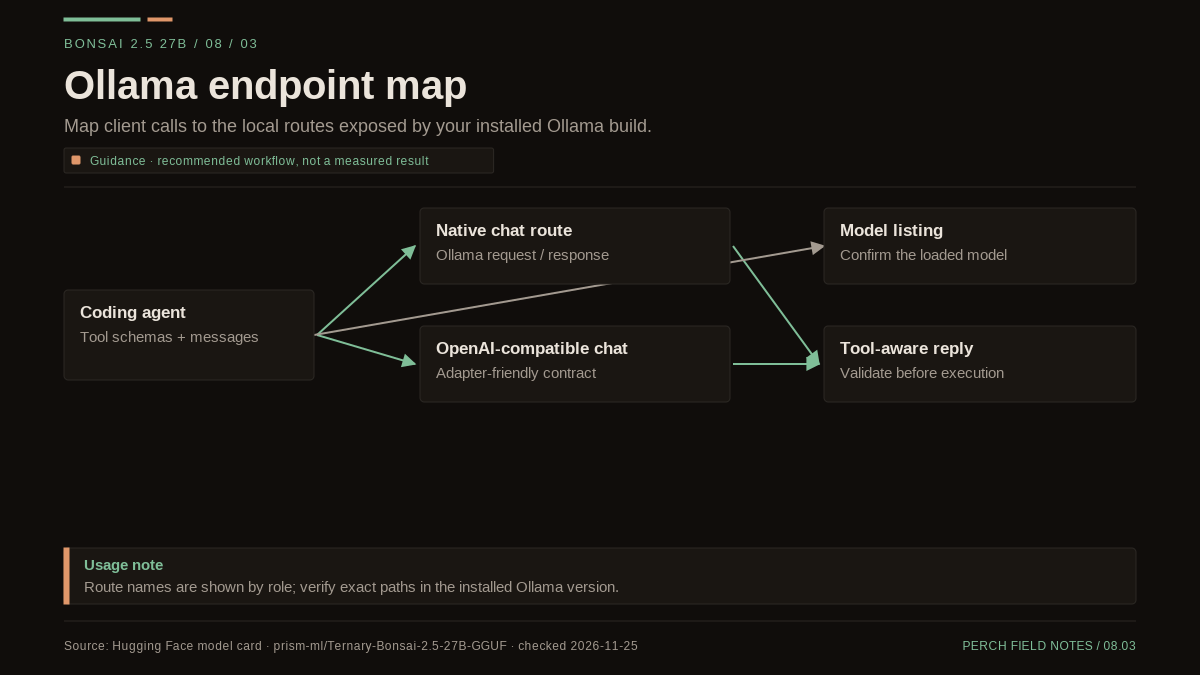
Ollama exposes a native API and an OpenAI-compatible API on the same local service. Native routes use http://localhost:11434 as their base. OpenAI-compatible clients use http://localhost:11434/v1 because the client appends routes such as /chat/completions. Mixing those two base forms is a common source of 404 errors.
| Endpoint route | Purpose | Typical check |
|---|---|---|
GET /api/version |
Returns local server version information | Confirm the Ollama service is reachable |
GET /api/tags |
Lists locally available models | Confirm the exact Q2_0 identifier is present |
POST /api/show |
Returns information about a named model | Inspect the selected local model |
POST /api/chat |
Sends a native multi-turn chat request | Run the marker test with Ollama options |
POST /api/generate |
Sends a native text-generation request | Test a raw prompt without chat messages |
GET /v1/models |
Lists models through the compatibility layer | Verify an OpenAI client can discover the model |
POST /v1/chat/completions |
Sends an OpenAI-style chat request | Connect an agent or application |
For example, list models through the compatibility layer:
curl http://localhost:11434/v1/modelsThen send one OpenAI-style chat request:
curl http://localhost:11434/v1/chat/completions -H "Content-Type: application/json" -d '{
  "model": "hf.co/prism-ml/Ternary-Bonsai-2.5-27B-GGUF:Q2_0",
  "messages": [
    {"role": "system", "content": "Answer concisely and do not invent facts."},
    {"role": "user", "content": "What is the difference between a model weight file and runtime memory?"}
  ],
  "stream": false
}'
The model field must match the identifier Ollama knows. A client does not automatically translate an arbitrary display name into the Hugging Face Q2_0 model. If discovery works but generation returns a model error, compare this field with /api/tags before changing prompts or agent settings.
An OpenAI SDK also needs a base URL and an API key value, even when the server is local. Use a non-secret placeholder such as ollama; it is not a credential issued by One AI API Key.
from openai import OpenAI

client = OpenAI(
  base_url="http://localhost:11434/v1",
  api_key="ollama",
)

response = client.chat.completions.create(
  model="hf.co/prism-ml/Ternary-Bonsai-2.5-27B-GGUF:Q2_0",
  messages=[
      {"role": "user", "content": "Reply with exactly: Bonsai Q2_0 ready"},
  ],
)

print(response.choices[0].message.content)
This code tests the client contract. It does not prove that a particular coding agent supports every Ollama extension or that tool calling works in that agent. PrismML documents native tool calling for Bonsai and OpenAI-compatible local serving, but the supplied sources contain no independent test matrix for named coding agents paired with this Ollama model.
/v1 in the base URL.Keep the endpoint bound to the machine you intend to use. A localhost setup is not an authenticated public service. Do not expose port 11434 to an untrusted network merely to let a remote agent connect. If the agent runs in a container or on another machine, treat network access and authentication as a separate deployment problem rather than assuming the localhost example is safe to publish.
How do you connect a coding agent and run the first test?
Configure the agent’s OpenAI-compatible provider with these values:
Base URL: http://127.0.0.1:11434/v1
API key: ollama
Model: hf.co/prism-ml/Ternary-Bonsai-2.5-27B-GGUF:Q2_0
Tool format: OpenAI-compatible function calling
Context: set explicitly for the test; do not assume 262K
Field names vary by agent. The important part is the mapping, not this illustrative text format. Some clients call the base setting base_url, others call it an API endpoint or provider URL. If the client appends /v1/chat/completions, stop the base URL at /v1. If it expects a complete chat URL, follow that client’s documented format instead. Save the raw outgoing request so you can verify the exact model name and tool schema.
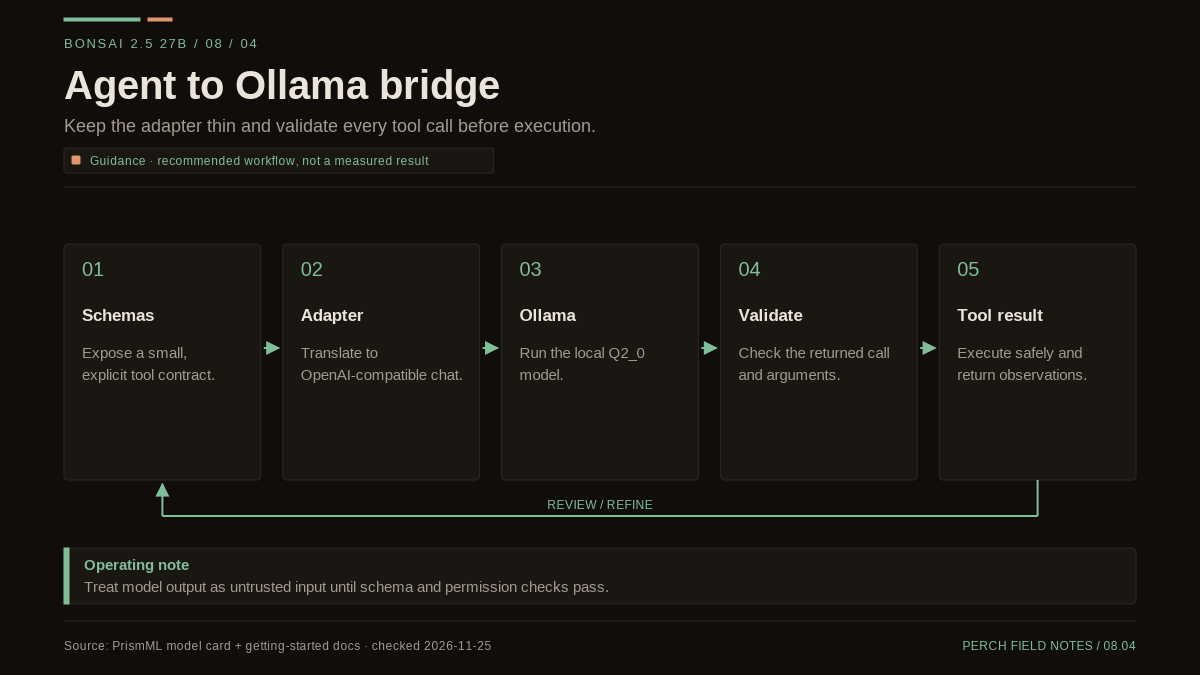
Before using a full repository, run a one-tool bridge test. Create a disposable directory named sandbox with a small example.py file that you already understand. The following Python example gives the model only a read-only read_file tool. It validates that the requested path stays inside sandbox, reads the file, returns the content as a tool result and asks for a final answer.
import json
from pathlib import Path

from openai import OpenAI

client = OpenAI(
  base_url="http://127.0.0.1:11434/v1",
  api_key="ollama",
)
model = "hf.co/prism-ml/Ternary-Bonsai-2.5-27B-GGUF:Q2_0"
root = Path("sandbox").resolve()

tools = [{
  "type": "function",
  "function": {
      "name": "read_file",
      "description": "Read one UTF-8 text file from the disposable sandbox.",
      "parameters": {
          "type": "object",
          "properties": {
              "path": {
                  "type": "string",
                  "description": "File path relative to sandbox, such as example.py.",
              },
          },
          "required": ["path"],
          "additionalProperties": False,
      },
  },
}]

messages = [
  {
      "role": "system",
      "content": "Use read_file at most once. Never invent file contents. Stop after summarizing the file.",
  },
  {
      "role": "user",
      "content": "Read the file example.py in the sandbox and summarize its main function. Do not propose edits.",
  },
]

first = client.chat.completions.create(
  model=model,
  messages=messages,
  tools=tools,
  tool_choice="auto",
)
message = first.choices[0].message
messages.append(message.model_dump(exclude_none=True))

if not message.tool_calls:
  print(message.content)
else:
  read_used = False
  for call in message.tool_calls:
      if call.function.name != "read_file":
          messages.append({
              "role": "tool",
              "tool_call_id": call.id,
              "content": "Rejected: unexpected tool. Only read_file is permitted.",
          })
          continue
      if read_used:
          messages.append({
              "role": "tool",
              "tool_call_id": call.id,
              "content": "Rejected: read_file is allowed at most once.",
          })
          continue
      read_used = True
      args = json.loads(call.function.arguments)
      target = (root / args["path"]).resolve()
      if root not in target.parents:
          raise ValueError("Tool path escaped the sandbox")
      messages.append({
          "role": "tool",
          "tool_call_id": call.id,
          "content": target.read_text(encoding="utf-8"),
      })

  final = client.chat.completions.create(
      model=model,
      messages=messages,
      tools=tools,
      tool_choice="auto",
  )
  print(final.choices[0].message.content)
This is a deliberately narrow integration test. It does not execute shell commands, write patches or contact the network. A pass means the model can request the declared tool with valid arguments, the host can return a matching tool_call_id, and the model can ground its final answer in the supplied file. A failure at any stage is useful evidence: record whether the problem occurred in schema generation, argument parsing, path validation, tool execution or the follow-up response.
Do not interpret the model’s ability to emit a tool call as permission to execute it. The host remains responsible for validating the function name and arguments, restricting filesystem scope, applying timeouts and deciding which actions require approval. Start with read-only tools. Add a test runner only inside a disposable repository, and add write access only after the read-only loop is reliable.
After the bridge test, use a bug you already understand. A test that passes alone but fails in a larger suite is a good shape because you can recognize the root cause and verify the patch independently. Ask the agent to inspect the repository, produce a minimal reproduction and explain the suspected cause before editing. Then allow a limited patch and require the relevant tests plus a final diff. The 180-tool-call Bonsai coding-agent workflow provides the fuller permission and recovery design.
PrismML’s own offline demo reports 180 tool calls while investigating a pytest 9.1 regression, but it supplies no replayable transcript, dataset or independent success rate. Your first local test should therefore measure the whole loop rather than treating that demo count as a target. Log the model identifier, runtime version, context setting, tool schemas, commands, test results and final diff. Otherwise a good or bad outcome will be impossible to reproduce.
Tool quality is also separate from transport quality. Bonsai’s vendor table reports BFCL v4 at 67.2, below Qwen3.8 FP16 at 70.8, even though its five-row tool average is close. The Tau, BFCL and AppWorld tool-calling analysis explains why schema design and error recovery still matter. For your smoke test, check valid JSON, correct tool selection, correct path handling, grounded file summaries and a clean stop. Those observations are more useful than a single subjective impression of fluency.
How do context and memory work in Ollama?
Bonsai’s documented context length is 262,144 tokens. That is a model specification, not a promise that Ollama will allocate or successfully use that window on your hardware. The practical context is the smaller of the model capability, the runtime setting, available memory and the amount of useful repository context your task needs.
Set context deliberately. In an interactive session, use /set parameter num_ctx 32768 for the initial test. In the native /api/chat API, use options.num_ctx. In the example request above, num_ctx is 32,768 and num_predict is 4,096, which gives the smoke test an explicit budget while leaving room for reasoning output. Neither is a benchmark setting.
For the OpenAI-compatible route, check whether your client exposes Ollama’s num_ctx option. If it does not, use the native /api/chat request for controlled context experiments or configure the setting through the runtime method your Ollama release documents. Do not assume that changing the base URL changes context length. The supplied sources do not provide a version-specific Ollama configuration reference, so this guide avoids guessing environment variables or flags.
A coding agent spends context on more than the user’s latest message. The system prompt, tool schemas, repository files, search results, test logs, prior tool calls and failed attempts all compete for the same window. Dumping an entire repository into the prompt is rarely the best first test. Start with the failing test, the module under inspection and the smallest set of related files. Expand only when the model demonstrates that it needs more evidence.
The 262K Bonsai context-window memory guide covers retrieval, history management and summarization in more detail. Its central warning applies directly to Ollama: a documented maximum is not a practical default. Long context can increase memory use and change prompt-processing time, while irrelevant history can make the relevant failure harder to find.
Memory has two separate moments to measure. The first is model load, when weights and initial runtime structures become resident. The second is inference at your chosen context, when the KV cache and request data add pressure. Use ollama ps to see what remains loaded, your operating system’s process or memory tools to observe actual usage, and ollama stop with the full model identifier to unload it between tests. Do not infer runtime memory from the 7.67 GB file size alone.
The model card includes a vendor example of roughly 9.5 GB VRAM before -np 1 on a 10 GB RTX 3080, dropping to about 7.8 GB afterward. That figure describes one reported configuration, not a universal minimum or a verified Q2_0 Ollama measurement. It should not be used to promise that a 12 GB card will hold every context or that an 8 GB card will fit the same setup. The RTX 3060 12GB Bonsai feasibility and context tuning and RTX 4090 Bonsai configuration and speed claims articles keep those hardware claims separate.
The same caution applies to CPU-only machines and Macs. No reliable CPU-only tokens-per-second figure is supplied. A Hacker News commenter’s 22.3 tokens per second on a Mac Mini M5 Pro is anecdotal and lacks a complete configuration. Use the CPU-only Bonsai setup and memory tuning and Mac Mini M5 Pro Bonsai setup and 22.3 tok/s audit for hardware-specific evaluation rather than transferring one machine’s result to another.
What are Ollama’s limitations for Bonsai?
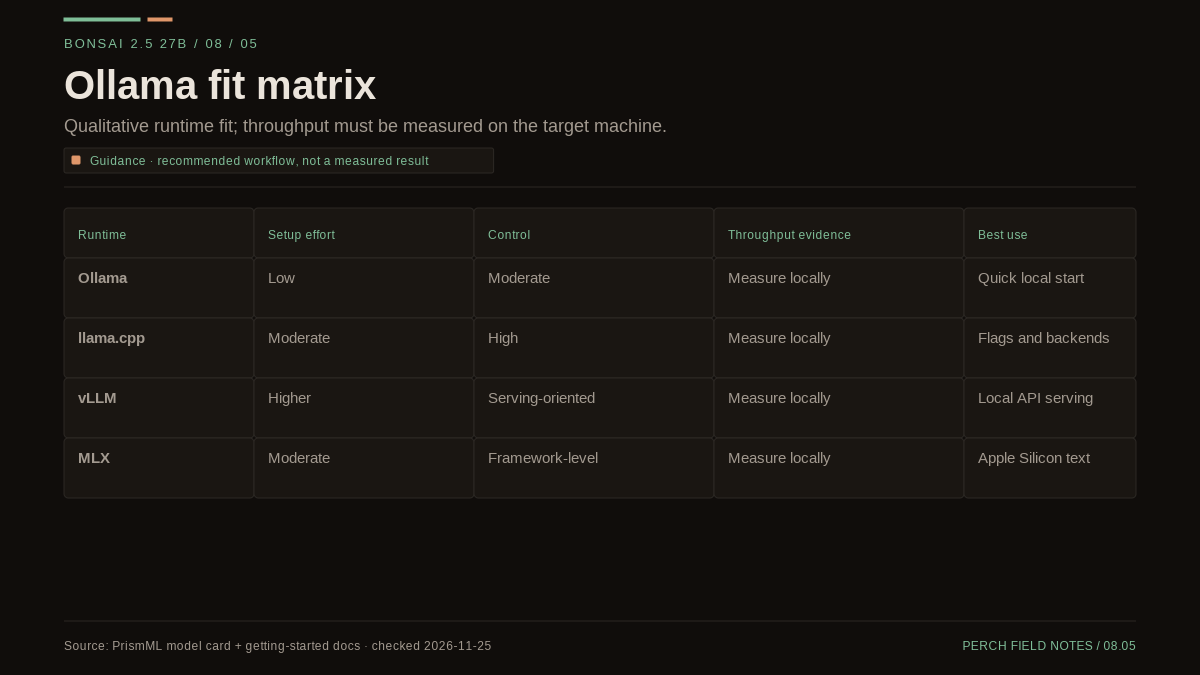
Ollama is the shortest documented route to the base Q2_0 model, but it is not the most flexible Bonsai runtime. It hides some build and serving details that matter when memory is tight or a loader is misbehaving. The right choice comes down to a short setup versus direct control.
| Ollama limitation | Practical effect | Safer response |
|---|---|---|
| PTQ1_0 and PQ2_0 require PrismML’s llama.cpp fork | The smaller 5.99 GB PTQ1_0 file is not the documented Ollama path | Use the PrismML fork for those files |
| Base Q2_0 is 7.67 GB | The launch’s 5.9 GB-class footprint does not describe this pull | Budget for the actual Q2_0 file plus runtime memory |
| Context is configurable, not automatically 262K | A client can use less context than the model supports | Set num_ctx and verify effective behavior |
| The supplied Ollama command names the base Q2_0 file | MTP behavior is not established by that command | Do not assume the 7.91 GB MTP variant is active |
| Vision projectors are separate GGUF files | A text smoke test does not verify image input | Follow a documented vision setup before claiming multimodal support |
| Ollama abstracts parts of llama.cpp configuration | Loader, offload and memory diagnosis can be harder | Record versions and compare with direct llama.cpp when needed |
| No Ollama-specific throughput table is supplied | H100 and RTX 4090 vendor figures are not your session speed | Measure prompt and generation speed locally |
| Bonsai is not a hosted One AI API Key model | A localhost endpoint is not gateway access | Run it locally or compare hosted alternatives separately |
The runtime abstraction is not automatically a defect. It is the reason the setup is short. It becomes a limitation when you need exact backend flags, a particular MTP configuration, vision projector wiring or deeper load diagnostics. For those cases, the PTQ1_0 and Q2_0 local installation walkthrough is the better reference. For an OpenAI-compatible server with a different serving model, see the vLLM OpenAI-compatible Bonsai server setup. On Apple Silicon, the Apple Silicon MLX setup for Bonsai 2.5 27B describes a text-only export, which is a separate path rather than proof of vision through Ollama.
Throughput claims need especially careful labeling. PrismML’s launch page reports 291 generated tokens per second and 3,200 prompt tokens per second on H100, plus 204 generated tokens per second and roughly 3,060 prompt tokens per second on RTX 4090. The model card’s plain-decode PTQ1_0 table lists 186 on H100 and 112 on RTX 4090. ExplainX’s third-party agentic-coding overview attributes the higher launch number to MTP and repeats that the benchmarks were not independently reproduced. None of those figures is an Ollama Q2_0 measurement.
Use the cross-hardware Bonsai tokens-per-second comparison to design a fair local test. Hold the model, runtime version, context, prompt and MTP state constant. Measure prompt processing and generation separately. A fast short chat does not establish fast long-context agent work.
How do you troubleshoot common Ollama failures?
What if ollama is not found or the server does not answer?
Run ollama --version in a fresh terminal. If the command is missing, repair the installation or shell path before troubleshooting Bonsai. If the CLI exists but curl http://localhost:11434/api/version cannot connect, start Ollama Desktop or run ollama serve in a separate terminal when no service is already running. A second service on the same port is not the fix for a stopped first service.
A reachable /api/version with an empty /v1/models response points to a model registration issue rather than a dead server. Run the exact pull command again, inspect ollama list, and confirm that the full identifier appears. Avoid shortening the model name while debugging; consistent identifiers make the failure easier to isolate.
What if the pull fails or the model returns 404?
Check the identifier character by character: hf.co/prism-ml/Ternary-Bonsai-2.5-27B-GGUF:Q2_0. The repository owner is prism-ml, the repository name contains uppercase GGUF, and the tag is Q2_0. A 404 from generation can mean the request uses a different local name even when the pull succeeded. Compare the request’s model field with /api/tags.
A failed pull is a different problem. Confirm network access to Hugging Face, available disk space and whether a proxy or firewall blocks the download. The supplied sources do not provide a special Ollama mirror or alternate registry for these weights. Retrying the same exact command is reasonable after fixing the underlying network or storage issue; changing to an invented tag is not.
What if the model loads but produces garbage?
Treat corrupted output as a compatibility warning. PrismML says Q2_0 requires stock llama.cpp b11556 or newer, and older builds may load the file while producing garbage. Update Ollama, record ollama --version, and repeat the marker test. The supplied evidence does not identify the first Ollama release that satisfies the llama.cpp threshold, so there is no honest version number to prescribe here.
If output remains corrupted, compare the same Q2_0 file with a current stock llama.cpp build to separate a model-file problem from an Ollama backend problem. Do not switch to PTQ1_0 inside stock llama.cpp as a workaround; it requires PrismML’s fork. The PTQ1_0 and Q2_0 local installation walkthrough covers the broader loader and backend checks.
What if the process runs out of memory?
Stop other loaded models with ollama ps and ollama stop, then lower num_ctx for the next request. In chat, /clear removes conversation history, but it does not substitute for a smaller context allocation. Test one request at a time before adding concurrency. If the base Q2_0 weights plus runtime still do not fit, Ollama is not the right runtime for that memory budget; evaluate direct llama.cpp offload behavior or a larger machine rather than assuming PTQ1_0 will work in Ollama.
Do not use the 5.9 GB marketing figure as the memory target for this path. The file being pulled is 7.67 GB, and runtime structures are additional. Record resident memory at load and at your chosen context so the next change has a measurable baseline.
What if the answer stops before the final result?
Increase the output allowance and inspect whether reasoning consumed it. Bonsai defaults to xhigh; medium is available, low is unsupported and behaves like xhigh, and thinking is on by default. A short num_predict value can truncate the reasoning trace before the answer. The model card’s CLI example uses -n 16384; you can test a similarly larger native API num_predict value when memory allows, but it is an example rather than a universal requirement.
Also check context pressure. If repository files and tool outputs fill the window, the runtime may truncate input before generation begins. Reduce the supplied history, retrieve fewer files and keep the failing test plus directly related code. More output room and more input context solve different problems.
What if the agent ignores tools or sends malformed calls?
Verify three layers independently. First, the native /api/chat or OpenAI compatibility request must reach the intended model. Second, the agent must serialize the tool schema in a format the model can follow. Third, the host must validate arguments and return a tool message with the matching tool_call_id. The one-tool Python test in this guide isolates those layers without granting write access.
Log the raw request and response. A missing tools array, a model-name mismatch and an invalid function schema can produce similar user-visible failures. PrismML documents native tool calling, but that does not establish reliable behavior in every agent harness. The supplied Hacker News discussion contains community questions and anecdotes, not an independent tool-calling compatibility test.
What if generation is much slower than expected?
Measure before tuning. Record the exact model, Ollama version, context length, prompt size, hardware and whether the request is streaming. Compare prompt-processing time separately from generated tokens per second. No reliable CPU-only figure is supplied, and vendor H100 or RTX 4090 claims do not transfer to a different backend, quantization or context.
Keep the model loaded only while testing it. ollama ps shows resident models, and ollama stop unloads one, which improves memory headroom without proving a speed problem is resolved. Use repeated, identical short prompts after the model is warm, then repeat at the context size your agent actually needs.
What if image input does not work?
The base Q2_0 command in this guide is a text-first setup. Bonsai is a vision-language model, but the repository publishes separate mmproj files at about 0.93 GB in BF16 and 0.63 GB in Q8_0. A successful text response does not verify projector loading or image support in Ollama. Follow the Bonsai vision mmproj setup and benchmark limits before making a multimodal claim, and do not confuse the text-only MLX export with GGUF vision support.
What is the verdict, and what remains unknown?
Use Ollama if your goal is the shortest documented path to Bonsai 2.5 27B Q2_0, an interactive local chat and an OpenAI-compatible localhost endpoint. The exact pull and run commands are known, the base weight file is 7.67 GB, and the integration contract is straightforward, which makes it a good first runtime for a controlled coding-agent experiment.
Do not choose it for PTQ1_0, PQ2_0, unverified MTP behavior or a setup that depends on direct llama.cpp flags. Do not assume the 262K model context is your working context, and do not quote vendor speed figures as Ollama results. The Bonsai 2.5 27B versus Qwen3.8 27B decision matrix is useful if the decision is really about quality, memory and runtime tradeoffs rather than installation convenience.
The honest loss is agentic coding quality relative to the full-precision comparison. PrismML’s own table puts Bonsai 2.5 27B behind Qwen3.8 FP16 on the coding average, Terminal-Bench 2.1 and SWE-bench Verified. Those scores are vendor-published and not independently reproduced, and none isolates Ollama. A smaller local file is a reason to test the model, not evidence that it will match a larger runtime on your repository.
Several gaps remain as of November 25, 2026. The supplied sources do not identify the minimum Ollama release containing llama.cpp b11556, provide exact Ollama KV-cache sizes, establish a Q2_0 Ollama memory table, supply reliable CPU throughput, or report an independent coding-agent success rate. The LocalLLaMA thread is an inconsistently accessible community pointer, not evidence for any of those values. This guide should be updated when a versioned, reproducible Ollama test supplies them.
Bonsai 2.5 27B is not currently deployed as a hosted One AI API Key model. If you need hosted inference instead of a local process, compare hosted models currently available through One AI API Key and evaluate them separately from this local setup. The practical next step is simple: pull the exact Q2_0 identifier, pass the marker check, run the one-tool sandbox test, and only then expand permissions.
Complete Bonsai 2.5 27B guide
- Bonsai 2.5 27B launch verdict and setup router
- row-by-row Bonsai 2.5 27B benchmark teardown
- 180-tool-call Bonsai coding-agent workflow
- Tau, BFCL and AppWorld tool-calling analysis
- SWE-bench Verified 75.6 repository-repair analysis
- Terminal-Bench 2.1 long-horizon terminal analysis
- PTQ1_0 and Q2_0 local installation walkthrough
- vLLM OpenAI-compatible Bonsai server setup
- Apple Silicon MLX setup for Bonsai 2.5 27B
- Bonsai VRAM and RAM worksheet by quantization
- cross-hardware Bonsai tokens-per-second comparison
- RTX 4090 Bonsai configuration and speed claims
- RTX 3060 12GB Bonsai feasibility and context tuning
- Mac Mini M5 Pro Bonsai setup and 22.3 tok/s audit
- CPU-only Bonsai setup and memory tuning
- 262K Bonsai context-window memory guide
- PTQ1_0 versus PQ2_0 versus Q2_0 quantization guide
- Bonsai vision mmproj setup and benchmark limits
- Bonsai 2.5 27B versus Qwen3.8 27B decision matrix
Sources
- PrismML launch announcement supports the release date, vendor benchmark rows, throughput claims and offline agent demo.
- Hugging Face: Ternary Bonsai 2.5 27B GGUF supports the exact filenames, file sizes, Q2_0 compatibility requirement and documented Ollama command.
- PrismML getting-started documentation supports the model’s local-runtime, tool-calling, image-input and OpenAI-compatible serving claims.
- ExplainX: Bonsai 2.5 27B agentic coding overview provides a third-party interpretation, the vendor-run caveat and the MTP explanation. It is not an independent benchmark reproduction.
- Hacker News discussion provides community questions and the anecdotal Mac Mini speed report, not verified hardware results.
- LocalLLaMA discussion is an inconsistently accessible community pointer and supports no factual claim in this article.