The published agentic coding table from PrismML gives Bonsai 2.5 27B a score of 60.1 on Terminal-Bench 2.1. That is a 7.3-point improvement over Bonsai 2 27B, which scores 52.8, but it remains 10.7 points behind Qwen3.8 FP16 at 70.8. The result supports the model as a promising compact terminal agent, not as the strongest one in that comparison. Every score here is vendor-published rather than independently reproduced.
For a terminal-agent builder, the more important question is what happens between those numbers. Long-horizon command-line work requires an agent to form a plan, execute commands, read their output, update its belief about the environment and verify the final state. A weak shell boundary or an unbounded retry loop can ruin an otherwise capable run. A good harness can make a modest model easier to evaluate and safer to use, but it cannot turn a 60.1 aggregate into proof that your repository will be repaired.
The guide focuses on that workflow. It explains the limited conclusion the Terminal-Bench row supports, shows how to decompose a terminal task, defines shell permission tiers and sets an illustrative timeout policy. It also provides a local harness design and an honest boundary around the evidence. Note that this model is a downloadable local one, not a hosted One AI API Key model. If you need an API rather than a local deployment, you can compare hosted models currently available through One AI API Key.
What does Terminal-Bench 2.1 test?
At the capability level represented by PrismML’s table, Terminal-Bench 2.1 tests whether a model can carry a task through a command-line environment to a verifiable end state. That differs from completing an isolated function or explaining a shell error. A terminal agent has to interact with state: inspect files, run programs, observe results and choose the next action. The benchmark appears under PrismML’s agentic coding heading, alongside repository-repair and software-engineering evaluations.
The supplied sources do not provide the official task list, a per-category breakdown or the exact execution contract, which limits how specifically the score can be interpreted. It would be wrong to claim that a particular share of the 60.1 came from builds, package management, log analysis or system administration. Those are useful categories for your own local evaluation, but they are not a reconstruction of the benchmark from the published evidence.
What the row does establish is narrower and still useful. On a terminal-oriented coding benchmark, the model was evaluated and received a higher reported score than its predecessor. It did not receive the highest score in the three-model comparison. The PrismML launch announcement supplies the number; it does not supply enough execution detail to reproduce the run from the screenshot alone.
Why does long-horizon terminal work need more than a good command?
A single shell command usually has a small decision surface. A long-horizon task introduces dependencies. The agent must know which directory it is in, which files it has already changed, whether a previous command is still running and whether an apparent success actually satisfies the request. Each tool observation becomes part of the evidence for the next decision.
Consider a failure that appears only when a test suite runs as a group. The first observation may show one failing test. The agent then needs to inspect related code, run a narrower reproduction, compare behavior and preserve the original failure evidence. If it immediately edits the first suspicious line, it may hide a symptom without addressing shared state. Terminal-Bench-style work is therefore a test of sequencing and recovery as much as command syntax.
PrismML’s separate offline demo makes that distinction visible. The company reports 180 tool calls while Bonsai 2.5 27B investigated a pytest 9.1 regression that passed alone but failed with other tests. The stated workflow covers repository inspection, a minimal reproduction, tracing, a patch and an unseen maintainer test. This is relevant evidence of intended workflow capability, but it is not the Terminal-Bench result and it is not independently verified. The 180-tool-call Bonsai coding-agent workflow examines that demo without treating it as a controlled success rate.
What should an evaluation record?
A useful local run needs more than a final answer. Record the task statement, starting workspace, allowed tools, model and quantization, runtime version, context configuration, reasoning setting, command outputs and final verification. Also record timeouts, retries, permission denials and human interventions. Without that ledger, two runs can look similar at the end while taking very different paths.
The omission matters because the vendor benchmark methodology leaves out several of those details. The row-by-row Bonsai 2.5 27B benchmark teardown explains the broader evidence gap, including missing hardware, prompts, scaffolds, seeds and independent reproduction. For terminal work, the scaffold is especially important. Tool names, output truncation, working-directory rules and retry limits can change the outcome without changing the model.
Do not quietly repair a failed run. If a command times out, the runner kills a process or the evaluator supplies a hint, mark it. A clean comparison separates model errors from harness errors and human assistance. Such discipline is more valuable than a flattering completion count because it tells you what must improve next.
How does Bonsai 2.5 27B compare on Terminal-Bench?
The published comparison has a clear direction. Bonsai 2.5 27B improves substantially over Bonsai 2 27B while Qwen3.8 FP16 retains the lead. The coding average shows a similar pattern, although the size of the gaps differs by benchmark.
| Published row | Qwen3.8 FP16 | Bonsai 2 27B | Bonsai 2.5 27B | Bonsai 2.5 change vs Bonsai 2 | Bonsai 2.5 gap vs Qwen FP16 |
|---|---|---|---|---|---|
| Terminal-Bench 2.1 | 70.8 | 52.8 | 60.1 | +7.3 | -10.7 |
| Agentic coding average, 3 rows | 60.5 | 37.9 | 54.2 | +16.3 | -6.3 |
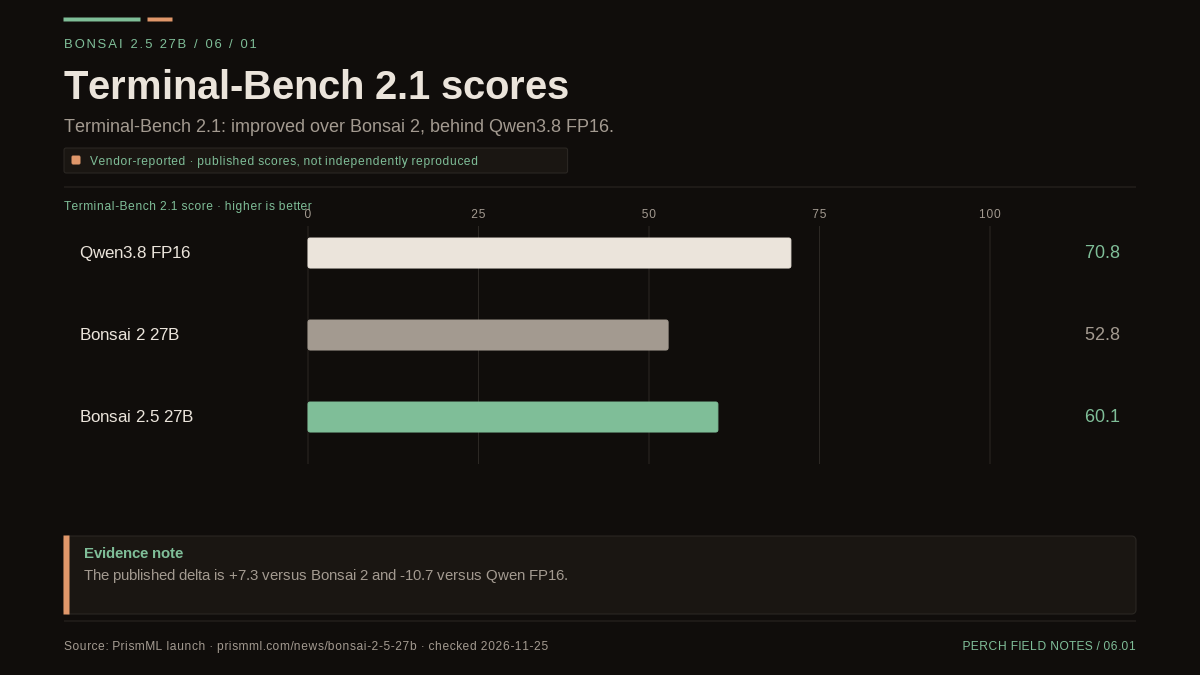
The 7.3-point predecessor gain is meaningful evidence for anyone already using Bonsai 2 27B. It justifies testing the update on a held-out terminal task set. It does not erase the 10.7-point deficit to the FP16 comparison. If maximum reported terminal performance is the deciding factor and the full-precision model fits your hardware, this table favors Qwen.
The coding average also needs careful reading. Bonsai 2.5 27B trails Qwen3.8 FP16 by 6.3 points across Terminal-Bench 2.1, SWE-bench Verified and DeepSWE. Its Terminal-Bench gap is wider than its DeepSWE gap, where the published scores are 27.0 and 30.1. Averages describe a bundle of tasks; they do not tell you which failure will dominate your workload. The SWE-bench Verified 75.6 repository-repair analysis is the companion reference for the patch-oriented side of that bundle.
There is also a format and runtime boundary. Qwen3.8 FP16 is the full-precision reference in PrismML’s table, while Bonsai 2.5 27B is a ternary GGUF model. A benchmark comparison is not a matched memory or latency test. The smaller weight footprint may make Bonsai practical where the FP16 reference is inconvenient, but that benefit must be weighed against the reported quality gap. The Bonsai 2.5 27B versus Qwen3.8 27B decision matrix covers that tradeoff in more detail.
ExplainX’s overview of the vendor-run results explicitly notes that the scores were not independently reproduced. Treat the table as a reason to design a fair local test, not as a substitute for one. The honest summary is: better than Bonsai 2, still behind Qwen FP16 on this row, with insufficient public configuration detail to predict a specific agent harness.
How should you decompose a long-horizon terminal task?
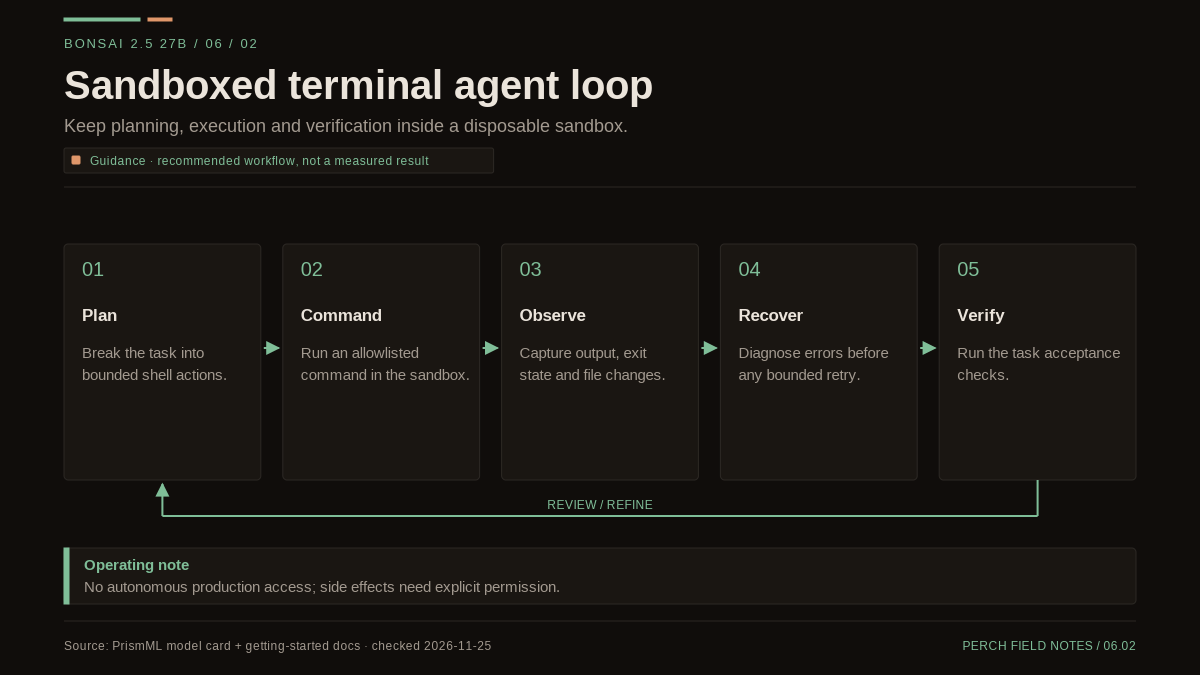
A long task should not be handed to the model as one vague instruction followed by unrestricted shell access. Break it into stages with observable completion criteria. The plan is a control mechanism: it limits how far the agent can drift before it has to produce evidence.
1. Define the end state before the first command
Translate the request into a checkable goal. “Fix the project” is not checkable. “Make the failing addition test pass without editing the test file, then show the relevant diff and run the full suite” gives the agent a boundary and a verifier. Where possible, include invariants: files that must remain unchanged, services that must stay available and tests that must continue to pass.
The evaluator should know the expected result before the agent starts. Otherwise, a plausible-looking diff can be mistaken for a solution. The point matters especially in terminal work because a command can return a zero exit status while still producing the wrong artifact. Completion means satisfying the stated checks, not merely reaching the end of the plan.
2. Capture a baseline
Start with a read-only inspection. Record the working directory, repository status, relevant file paths and the initial failure. For a test-driven repair task, run the narrow failing test before editing anything. The baseline gives later observations something to compare against and prevents the agent from claiming that it fixed a failure it never reproduced.
A baseline also exposes environment problems. A missing dependency, an already dirty workspace or an unrelated failing test may have nothing to do with the requested change. The harness should surface those conditions to the evaluator. Do not let the model silently normalize the environment and then report success against a different starting point.
3. Create a short stage plan
Use stages such as inspect, reproduce, isolate, patch and verify. Each stage should have a small output: a relevant file list, a minimal reproduction, a root-cause hypothesis, a proposed diff or a test result. The model can revise the plan after an observation, but it should say why the revision is necessary.
A stage plan is more reliable than asking for a long chain of commands in advance. One written before seeing the repository can encode bad assumptions. The staged form lets the agent incorporate evidence while keeping the overall goal fixed. If the task becomes blocked, the runner can stop at a stage boundary instead of discovering the drift after many unrelated changes.
4. Keep a task ledger outside the model’s prose
The harness should maintain structured state: current stage, files touched, commands run, unresolved errors and verification results. The model’s natural-language summary is useful, but it is not the source of truth. A compact ledger helps when context grows and makes it easier to resume after a timeout.
For Bonsai, this is especially relevant because the documented context length is 262,144 tokens, but that does not mean an entire agent history should be kept in every request. The 262K Bonsai context-window memory guide explains why repository files, tool schemas, KV cache and runtime overhead compete for practical capacity. Retrieve relevant files and retain concise observations rather than repeatedly replaying every byte of command output.
5. Verify independently of the proposed fix
End with checks that the model did not author. A pre-existing test suite, an expected file hash, a parser or a separate validation script provides stronger evidence than the agent restating its answer. Review the diff for unintended changes, then rerun the relevant tests from a clean process.
PrismML reports that its pytest demo included a previously unseen maintainer test. The instinct is the right one: test whether the patch generalizes beyond the reproduction the agent saw. Your harness does not need a secret test to be useful, but it should separate the visible acceptance criteria from any held-out check used for evaluation.
A practical decomposition has five properties: a fixed goal, an observed baseline, bounded stages, durable state and independent verification. Those properties reduce wasted tool calls without pretending to guarantee success. They also make failures diagnosable, which matters more when comparing models than an opaque final score.
Why does shell safety determine whether an agent is useful?
A terminal agent is only as safe as the execution boundary around it. The model should propose actions; the harness should decide whether those actions are allowed. Do not give a language model a raw root shell, a broad credential-bearing environment or a path to production systems and rely on prompt instructions to prevent mistakes.
The Hugging Face GGUF model card documents local inference and native tool calling, but it does not make an autonomous shell safe. Native tool calling means the model can express tool actions. It does not mean every proposed command deserves execution. Permission enforcement belongs in the runner.
Which shell permission tiers should the harness expose?
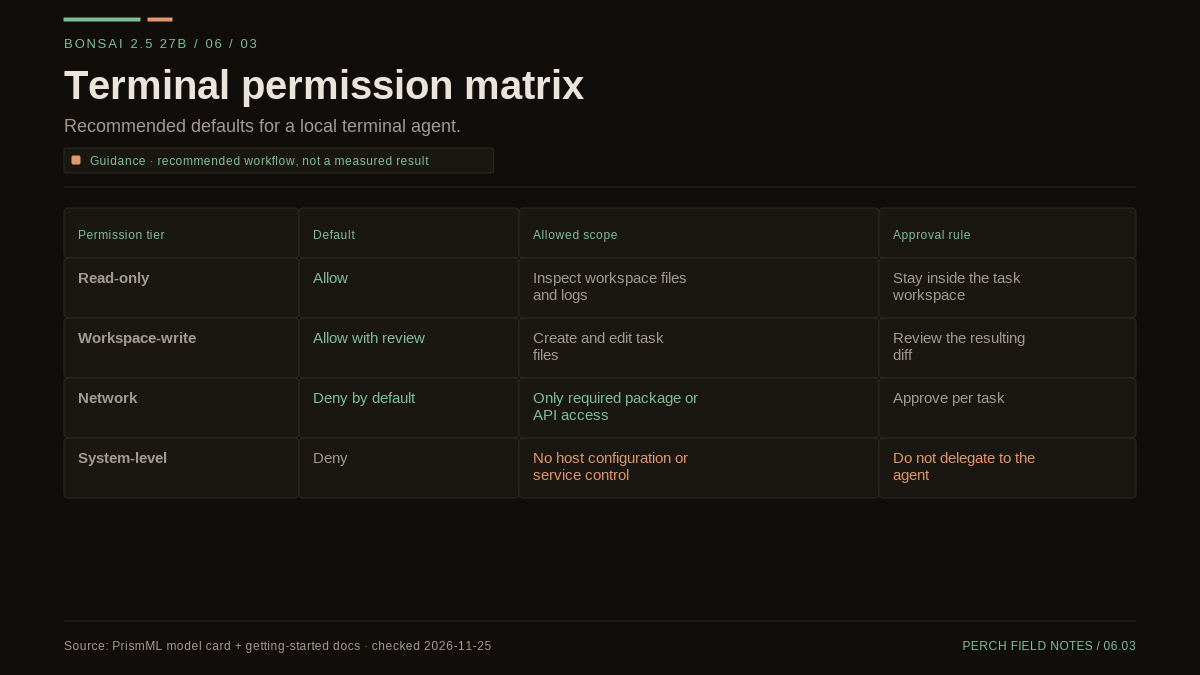
The following tiers are a recommended starting policy, not PrismML benchmark settings. Begin with the lowest tier that can complete the task. Promotion should be an explicit harness decision, ideally approved by a human, rather than a conclusion the model writes in its own reasoning.
| Shell permission tier | Representative operations | Default access | Required guardrail | Stop or escalation condition |
|---|---|---|---|---|
| Read-only inspection | List files, print a targeted file, inspect repository status, read test output | Allow inside the task workspace | Resolve paths canonically; block traversal outside the workspace; cap output | Requested path escapes the workspace or reveals credentials |
| Workspace write | Create or edit task files, write reports, save a patch | Allow only in a designated working directory | Enforce file and size limits; record diffs; reject symlink escapes | Existing unrelated files would be overwritten |
| Tests and local builds | Run the project’s test or build command | Allow after a read-only baseline | Apply command-specific timeouts; isolate environment variables; capture exit status | Repeated failure, runaway output or resource-limit breach |
| Package or network operations | Install dependencies or contact a remote service | Deny unless the task explicitly requires them | Use an isolated environment and an allowlist; review scripts before execution | Unexpected host, unpinned dependency or credential request |
| System-level administration | Change users, services, global configuration or host storage | Deny for the autonomous agent | Keep outside the model-facing tool set; require separate human administration | Any request for elevated host control |
Why are structured tools safer than unrestricted command strings?
Prefer operations such as read_file, list_directory, apply_patch and run_test over a general shell string. Each structured operation can carry its own path rules, output limits and timeout. If a general shell is necessary, parse it with an allowlist and reject constructs that can hide the real target. Treat metacharacters, redirection, process substitution and recursive operations as review triggers rather than conveniences.
Keep secrets out of the sandbox. The agent usually needs source files and fixtures, not API keys, cloud credentials or an inherited production environment. Pass only the variables required for a known task, bind the server to a local interface and do not expose the harness through a public port. Logs should redact sensitive values before they enter the model context.
Filesystem isolation needs as much care as command filtering. A write operation should resolve the requested path inside the workspace, reject symlink escapes and avoid touching pre-existing files outside the task area. Backups and snapshots are useful, but they are not a substitute for permissions. The goal is to prevent an unsafe action, not merely recover from it.
The Tau, BFCL and AppWorld tool-calling analysis is useful context for the model-facing half of this problem. Clear schemas and recoverable errors help the model produce valid tool calls. The permission table governs the other half: whether the harness accepts them. Both layers are required.
What timeout and retry policy prevents an agent from drifting?
A terminal task can fail slowly. A build may hang, a test may wait for input, or a model may keep issuing variations of the same command. Without bounds, the agent consumes time and context without producing new evidence. A timeout policy should distinguish command execution, model generation and the overall task.
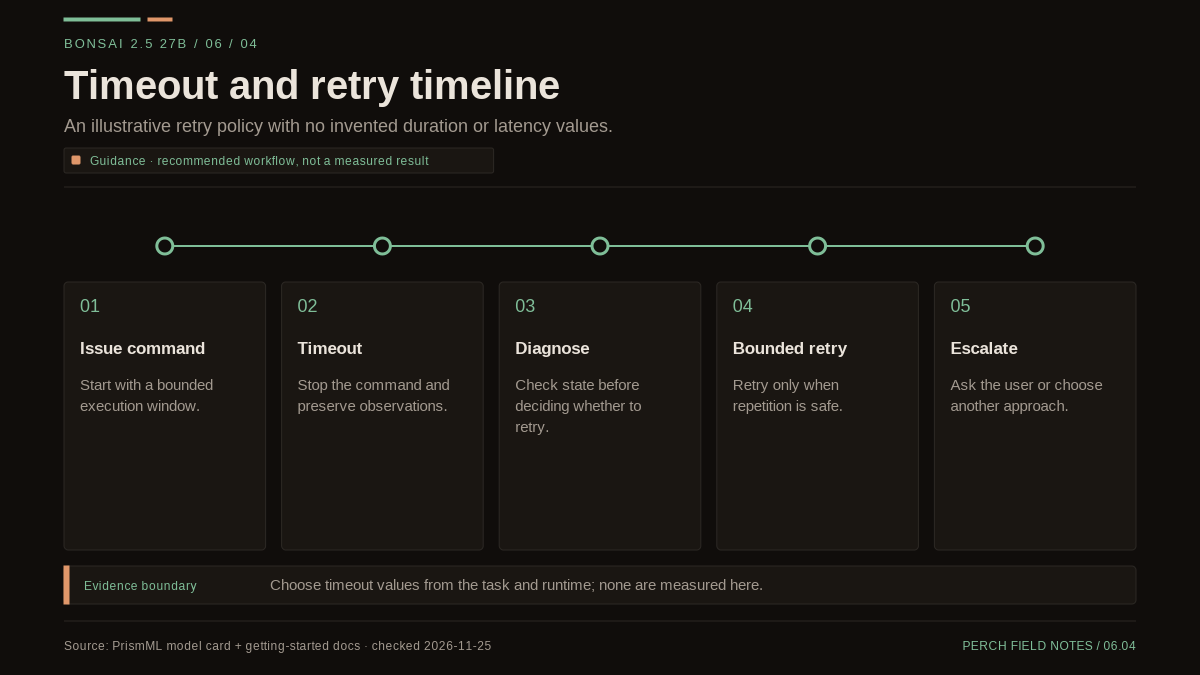
The values below are illustrative starting points for a local harness. They are not measured Bonsai latencies, official Terminal-Bench limits or PrismML recommendations. Adjust them for the project, hardware and model, then record the final policy with each evaluation run.
| Operation or failure | Starting timeout | Automatic retry policy | Required observation before another attempt | Escalation rule |
|---|---|---|---|---|
| Read-only inspection | 10 seconds | None | Confirm path and command syntax | Stop on repeated permission or path errors |
| Focused test command | 120 seconds | At most 1, only after a concrete diagnosis | Compare failure output with the baseline | Stop after two unsuccessful attempts at that stage |
| Build command | 300 seconds | At most 1, after changing a relevant cause | Inspect compiler output and resource state | Escalate if resource limits or dependency state are unclear |
| Integration command | 600 seconds | None by default | Check service readiness and environment assumptions | Require human review before extending the budget |
| Model response | 300 seconds | At most 1 for a transport failure, not for reasoning drift | Check whether a valid response was received | Stop if output caps repeatedly truncate reasoning |
| Network-dependent operation | Task-specific | Denied unless explicitly enabled | Verify allowed destination and dependency state | Require approval rather than widening access automatically |
| Overall task | 60 minutes | No global blind retry | Review completed stages and remaining objective | End the run with a partial ledger and failure reason |
Which failures should never be retried unchanged?
A permission denial is not a slow success. Stop and inspect the policy rather than trying alternate spellings of the same forbidden action. An out-of-memory failure is also not a reason to launch the same configuration again. Reduce context or concurrency only after measuring the cause, and treat that as a new configuration rather than an invisible retry.
A timeout needs investigation. Determine whether the command was waiting for input, doing legitimate work, deadlocked or producing excessive output. Terminate the entire process group in the sandbox, not just the immediate shell wrapper, so child processes do not continue consuming resources. Preserve the partial output and mark the attempt as timed out.
Retries should be tied to a state change. If a test failed because a file was missing, adding the correct fixture may justify another attempt. If the same assertion failed with the same inputs and no relevant change, repeating it provides little information. Require the agent to state the diagnosis and the changed action before the harness grants another try.
Output limits are part of timeout safety. Capture standard output and standard error separately, retain both the beginning and end when truncating a large log, and record how much was omitted. A concise failure summary is often enough for the next model call, while the full log remains available to the evaluator. Do not let a verbose command flood the context and crowd out the actual task.
Finally, keep a task-level budget. Per-command timeouts do not prevent an agent from attempting hundreds of small commands. A wall-clock limit, a maximum unsuccessful-stage count and a human escalation path bound the total effort. These controls make a failed run cheaper and its evidence easier to interpret.
How can you build a local terminal harness for Bonsai?
A minimal harness has four parts: a local model server, a disposable workspace, a constrained tool executor and an evaluation ledger. Keep those pieces separate, since the model server produces tool-call decisions, the executor enforces policy, the workspace contains side effects and the ledger determines whether the run can be called successful.
1. Choose a compatible local runtime
Start with the documented Q2_0 route if you want stock llama.cpp. The model card states that Q2_0 requires stock llama.cpp build b11556 or newer; older builds may load the file but produce garbage output. PTQ1_0 and PQ2_0 require PrismML’s llama.cpp fork instead. Do not mix those compatibility paths.
llama serve -hf prism-ml/Ternary-Bonsai-2.5-27B-GGUF:Q2_0The command above serves the model; it is not a complete agent installation. You still need a client that can expose tool schemas, receive tool calls and execute them under policy. The PTQ1_0 and Q2_0 local installation walkthrough covers the model setup, while the PTQ1_0 versus PQ2_0 versus Q2_0 quantization guide explains the file choices. PrismML’s getting-started documentation also documents native tool calling and local OpenAI-compatible serving.
Use a controlled context setting rather than assuming the advertised maximum will work on your machine. The model defaults to xhigh reasoning; medium is available, while low is unsupported and behaves like xhigh. Thinking is on by default, and a short output cap can truncate reasoning. Give the model enough room to finish, but keep repository retrieval focused so that tool history does not consume the entire budget.
2. Create a disposable fixture with a known failure
Use a small workspace whose starting state you control. The following non-destructive shell example creates an intentionally incorrect addition function and a test that specifies the expected behavior. It writes only inside a new task directory. The agent’s job should be to repair the function without editing the test, then verify the result.
mkdir -p terminal-smoke/workspace
cd terminal-smoke/workspace
git init --quiet
printf 'def add(a, b):
    return a - b
' > calculator.py
printf 'from calculator import add

def test_add():
    assert add(2, 3) == 5
' > test_calculator.py
python -m pytest -q
A suitable task statement is: “Repair calculator.py so test_calculator.py passes. Do not edit the test. Run the test again and show the final diff.” The expected first test run fails. A valid solution changes the implementation, leaves the test intact and produces a passing rerun. The evaluator can compare the workspace with the recorded baseline rather than trusting the model’s summary.
The fixture is deliberately small. It tests whether the agent can observe a failure, inspect a relevant file, make a bounded edit and verify it, but it does not establish Terminal-Bench performance. After the smoke test, progress to a repository task with multiple files, a pre-existing suite and an issue description that does not identify the exact faulty line.
3. Implement the executor as a policy boundary
Expose structured operations with explicit arguments. A test operation should specify the executable, arguments, working directory, timeout, output limit and network policy. Avoid constructing a shell string from model output when a direct argument vector will do. Record the exact operation and result in the ledger.
Return compact observations: exit status, duration, a bounded output excerpt, files changed and whether a timeout or policy denial occurred. The model should receive enough information to choose the next action, not unrestricted access to every process and file on the machine. If a tool fails, return a structured error that distinguishes invalid arguments, denied permissions, command failure and infrastructure failure.
Use a container or virtual machine if available, but do not assume the container label alone provides safety. Review mounts, capabilities, user identity, network configuration and resource limits. A disposable workspace with no production secrets is the minimum starting point. The harness should be able to end a run and discard the environment without relying on the model to clean up after itself.
4. Evaluate more than the final diff
For each task, record whether the final state passed independent checks, how many stages completed, how many retries occurred, whether permissions were denied, whether a human intervened and how much output was truncated. Review unintended file changes as well as the intended patch. A passing test with a modified test file is not a valid repair under the fixture’s rules.
Build an evaluation ladder. First use known bugs where you can recognize the correct answer. Next use unfamiliar issues with a visible test suite. Then use held-out tasks where the acceptance check was not shown to the agent. Finally, review the patch as a maintainer would. The Bonsai 2.5 27B launch verdict and setup router provides the broader cluster context for choosing the model and runtime before you begin that ladder.
Where should the first local tests focus?
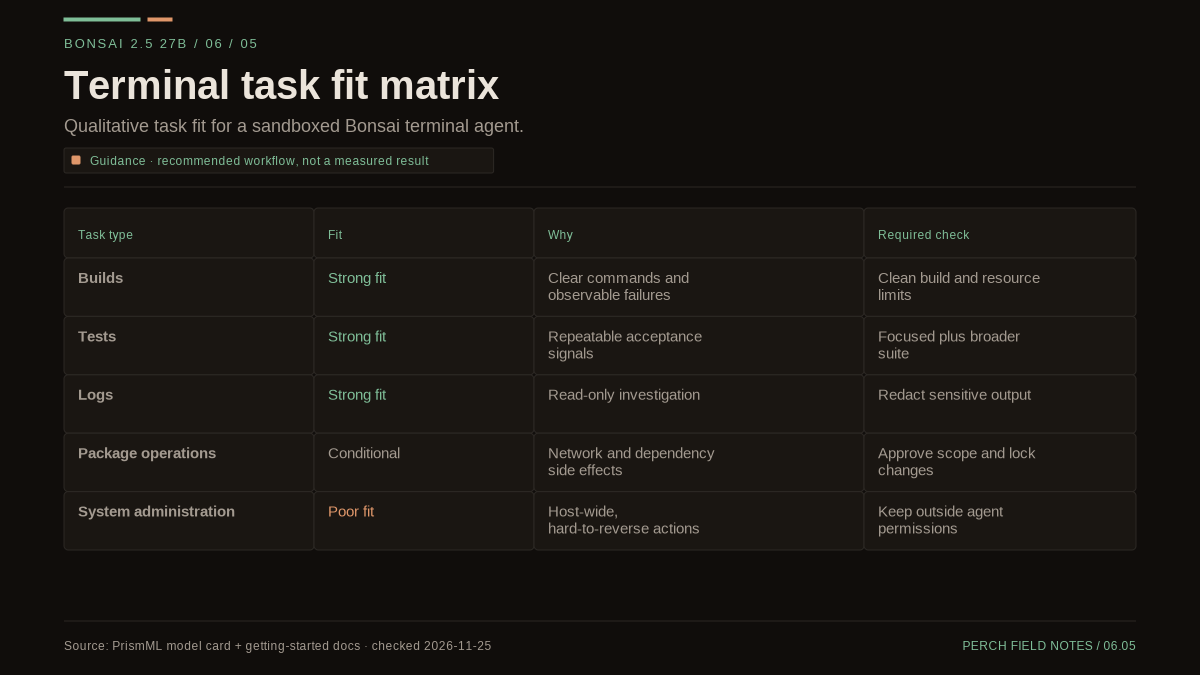
Start with builds, focused tests and targeted log inspection. These tasks have visible outputs and can be constrained to a workspace. Treat package operations as a separate evaluation tier because they add dependency resolution, network access and environment changes. Keep host administration outside the autonomous test set altogether.
Measure end-to-end latency, not just generation speed. A terminal agent spends time processing repository context, generating tool calls, executing commands and feeding observations back into the next request. The cross-hardware Bonsai tokens-per-second comparison explains why published decode figures are not a direct prediction of agent wall-clock time. The Bonsai VRAM and RAM worksheet by quantization helps ensure the selected context and runtime fit before a long run begins.
If the machine is CPU-only, use short tasks and measure before attempting a large evaluation batch. There is no reliable CPU-only tokens-per-second figure in the supplied material. The CPU-only Bonsai setup and memory tuning guide sets the appropriate expectation: feasibility and measurement first, not an invented speed promise.
Where does Bonsai 2.5 27B still fall short?
The clearest loss is on the headline comparison. Qwen3.8 FP16 scores 70.8 on Terminal-Bench 2.1, while Bonsai 2.5 27B scores 60.1. The smaller model improves over Bonsai 2 27B, but the published row does not show parity with the full-precision reference. Any recommendation that ignores that 10.7-point gap is incomplete.
The evidence boundary is the second loss. The public benchmark table omits hardware, prompts, scaffolds, seeds, category weighting, confidence intervals and independent reproduction. It also does not disclose whether a particular score uses one attempt or another evaluation convention. Do not relabel 60.1 as a pass@1 result, and do not convert it into a count of tasks solved. Those would be invented details.
Long-horizon behavior remains harness-dependent. A model can lose the plan after a surprising command result, repeat an unchanged action, edit the wrong file or confuse an intermediate success with final verification. The stage plan, ledger, permission tiers and retry policy in this article are designed to expose those failures. They are not evidence that Bonsai has eliminated them.
Context and memory are separate constraints. The documented 262,144-token context is a vendor specification, not a guarantee that the full window is practical on a given GPU or with a large agent history. The exact KV-cache byte table is not supplied. A 5.9 GB-class weight footprint also excludes runtime memory, context structures, tool overhead and any separate vision files. Terminal tasks that replay verbose logs can become slow or memory-heavy even when the model weights fit.
Speed claims need the same caution. PrismML’s model card lists plain-decode PTQ1_0 generation figures of 186 tokens per second on H100 and 112 on RTX 4090. The launch page gives higher figures, and ExplainX attributes the 291 H100 figure to MTP. The model card also warns that MTP can slow NVIDIA prefill by 9 to 23 percent. These are not matched terminal-agent measurements, and they should not be merged into one promised task speed.
The community material does not close these gaps. The Hacker News discussion of Bonsai 2.5 27B contains an anecdotal Mac speed report and skepticism, but the configuration is incomplete. The LocalLLaMA GGUF release pointer was inconsistently accessible and is not evidence for a benchmark claim. Neither source substitutes for a replayable terminal transcript.
This article should be updated when independent Terminal-Bench 2.1 results publish the model file, runtime version, hardware, scaffold, prompts or permitted task metadata, and when a reproducible local agent transcript is available. Until then, the missing methodology is a first-class limitation, not a footnote. Your own held-out evaluations can guide a deployment decision, but they should be labeled as local results rather than independent confirmation of PrismML’s number.
What is the verdict for terminal-agent work?
Bonsai 2.5 27B is a reasonable local terminal-agent candidate when a compact offline model matters and you can provide a disciplined harness. The 60.1 Terminal-Bench 2.1 score is a genuine improvement over Bonsai 2 27B in PrismML’s table. It is not the best reported result among the three compared models, and the public evidence is too thin to promise autonomous repository or system administration work.
Choose Qwen3.8 FP16 when the published terminal score is the priority and the memory and runtime requirements are acceptable. Choose Bonsai 2.5 27B when its smaller weight footprint and local deployment path fit your constraints, then verify it on representative held-out tasks. In either case, keep shell access structured, start with read-only permissions, bound retries and require independent verification.
The practical verdict is not “trust the benchmark” or “ignore the benchmark.” Use 60.1 as a screening signal. Build a disposable harness, record the complete run, inspect the diff and measure the failures. That process turns a vendor score into a decision you can defend for your own terminal workflow.
Complete Bonsai 2.5 27B guide
- Bonsai 2.5 27B launch verdict and setup router
- row-by-row Bonsai 2.5 27B benchmark teardown
- 180-tool-call Bonsai coding-agent workflow
- Tau, BFCL and AppWorld tool-calling analysis
- SWE-bench Verified 75.6 repository-repair analysis
- PTQ1_0 and Q2_0 local installation walkthrough
- Ollama Q2_0 commands and coding-agent connection
- vLLM OpenAI-compatible Bonsai server setup
- Apple Silicon MLX setup for Bonsai 2.5 27B
- Bonsai VRAM and RAM worksheet by quantization
- cross-hardware Bonsai tokens-per-second comparison
- RTX 4090 Bonsai configuration and speed claims
- RTX 3060 12GB Bonsai feasibility and context tuning
- Mac Mini M5 Pro Bonsai setup and 22.3 tok/s audit
- CPU-only Bonsai setup and memory tuning
- 262K Bonsai context-window memory guide
- PTQ1_0 versus PQ2_0 versus Q2_0 quantization guide
- Bonsai vision mmproj setup and benchmark limits
- Bonsai 2.5 27B versus Qwen3.8 27B decision matrix
Sources
- PrismML: Bonsai 2.5 27B announcement supports the launch date, license, benchmark rows, speed claims and offline demo description.
- Hugging Face: Ternary Bonsai 2.5 27B GGUF supports model architecture, exact GGUF names, runtime compatibility, commands, memory caveats and provider status.
- PrismML: getting started supports the documented local runtimes, native tool and image support, license and OpenAI-compatible serving path.
- ExplainX: Bonsai 2.5 27B agentic coding overview provides a third-party overview, explicitly labels the scores as vendor-run and discusses the MTP interpretation.
- Hacker News discussion is a community discussion containing anecdotal speed commentary and skepticism. It is not benchmark verification.
- LocalLLaMA discussion is an inconsistently accessible community pointer to the GGUF release. It is not used as factual evidence.